Can You Put Music On An Mp3 Player From Your Phone
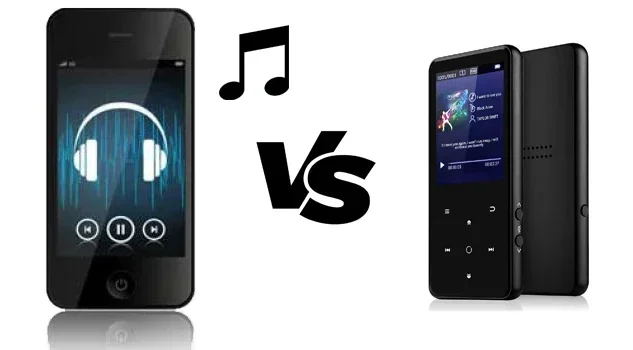
Yes, you can easily put music on an mp3 player from your phone. This guide shows you the fastest ways to transfer your favorite songs. Whether you use a USB cable or Bluetooth, you will get your audio library on the go in no time.
Do you want to listen to your favorite songs on a digital audio player? Maybe you love the old-school feel of a portable music device. Or perhaps your phone battery dies too fast during the day. Either way, you can put music on an mp3 player from your phone. It is easier than you think. You do not need fancy gadgets or expensive software to make it happen. A few simple steps get your entire audio library on the go. You will be surprised at how quick the process can be. Many people are turning back to dedicated players for a simpler music experience.
Many people still love their mp3 players today. They offer fantastic battery life. They do not distract you with constant notifications. You just press play and enjoy pure offline listening. But how do you actually get the songs onto the device? This guide will show you exactly how. We will cover every method you can use. You will learn about cables, Bluetooth, and cloud options. By the end, you will know the absolute best way to transfer music from your phone to your music player. Let us get started and explore your options.
Key Takeaways
- Easy Transfer: You can move music from your phone to an mp3 player using a simple USB cable or Bluetooth connection.
- Multiple Methods: Wireless sync, cloud storage, and direct cable transfer all work great for putting songs on your device.
- File Formats Matter: Make sure your audio files are in MP3 or FLAC format to play smoothly on your digital audio player.
- Offline Listening: Transferring music lets you enjoy your favorite tracks without using phone battery or needing a headphone jack.
- Quick Setup: A few minutes of setup gives you hours of portable music anywhere you go.
📑 Table of Contents
- Why Transfer Music to an Mp3 Player?
- How Can You Put Music On An Mp3 Player From Your Phone?
- What File Formats Work Best?
- Comparison of Transfer Methods
- Quick Tips for a Smooth Song Transfer
- Common Mistakes to Avoid
- Expert Insights on Portable Music
- How to Organize Your Audio Library
- Choosing the Right Mp3 Player for Your Needs
- Conclusion
Why Transfer Music to an Mp3 Player?
You might wonder why you should bother. Phones are great music machines. They have huge storage spaces. So why use a separate device? There are many good reasons to use a portable music player. Let us look at them in detail.
Save Your Phone Battery
Playing music drains your phone battery fast. If you are on a long trip, you need your phone for other things. You might need it for maps or calls. An mp3 player keeps your phone free. You can still take calls or use maps. Meanwhile, your portable music player keeps your tunes playing. This is a big win for travelers. You get hours of audio without worrying about your smartphone dying. You can focus on the road or the conversation instead of the battery percentage. It is a liberating feeling to not watch your phone charge every few hours.
Enjoy Distraction-Free Listening
Phones are full of distractions. A text pops up. An email notification beeps. It breaks your focus. An mp3 player gives you pure sound. You just listen to your audio file. No ads. No interruptions. It is just you and your music. This kind of offline listening helps you focus. Whether you are working or exercising, a dedicated music player helps you stay in the zone. You do not have to see a screen to enjoy your favorite tracks. It is a return to simple, focused entertainment.
Better Sound Quality
Some mp3 players have better audio hardware. They support high-resolution formats like FLAC. Phones often compress sound to save space. A dedicated player gives you richer sound. You hear every instrument clearly. It makes a huge difference for audiophiles. Your audio library will sound amazing on a device built just for music. The audio hardware in a standalone player is often superior to a phone.
How Can You Put Music On An Mp3 Player From Your Phone?
This is the big question. Can you put music on an mp3 player from your phone? Yes, absolutely! There are three main ways. You can use a USB cable. You can use Bluetooth. Or you can use wireless sync. Let us break down each method of data transfer so you can choose the best one.
Method 1: The USB Cable Way
This is the most reliable method for song transfer. You need a standard USB cable. Most phones use USB-C now. Some older phones use micro-USB. Your mp3 player also has a USB port. Here is how you do it step by step.
- Plug the USB cable into your phone.
- Connect the other end to your mp3 player.
- Wait for the device to recognize the connection.
- Open the file manager on your phone.
- Find the music folder on your phone.
- Copy the songs you want to transfer.
- Paste them into the mp3 player folder.
- Wait for the data transfer to finish completely.
This method is fast and safe. You do not lose any audio quality during the song transfer. It works even if your phone does not have Bluetooth. Just make sure both devices have enough power. You do not want them to die mid-transfer. A wired connection is the backbone of any good audio file management system. It is the most direct path to move your music.
Method 2: Using Bluetooth
Bluetooth is a wireless way to share files. Not all mp3 players have Bluetooth. But many modern ones do. This method is super convenient. You do not need any cables at all for your wireless sync.
First, turn on Bluetooth on both devices. Put your mp3 player in pairing mode. Go to your phone’s Bluetooth settings. Find the mp3 player in the list. Tap to connect. Once paired, you can send files. Open the music file on your phone. Choose the share option. Select Bluetooth. Pick your mp3 player. The file will send over the air. This is a great way to move your audio library without a cord. It is perfect for quick transfers when you are on the move.
Remember, Bluetooth takes a bit longer than a cable. It also uses some battery. But it is perfect for quick transfers when you do not have a USB cable handy. Bluetooth saves the day when you are traveling light. Just keep an eye on your battery levels during the process.
Method 3: Cloud Storage and Wireless Sync
Cloud storage is another great option for putting music on your device. Apps like Google Drive or Dropbox work well. You upload your music from your phone to the cloud. Then, you download it to your mp3 player. This works if your player has Wi-Fi capabilities.
Some modern digital audio players support wireless sync. They connect to your home network. You can set them to download new songs automatically. This is like having your own personal music server. You do not even need to touch the devices. It just happens in the background. This method is perfect for people who hate cables. It keeps your audio library updated with minimal effort.
What File Formats Work Best?
Not all audio files are the same. Your mp3 player needs to understand the file type. If you send the wrong format, it will not play. Let us look at the best options for your portable music player.
MP3 Format
MP3 is the king of audio files. Almost every device supports it. It offers good sound quality. It also keeps file sizes small. This is the safest choice for your portable music player. You can fit hundreds of songs in a tiny space. When you transfer music, MP3 is always a safe bet. It is the most universal format available today.
FLAC Format
FLAC stands for Free Lossless Audio Codec. It keeps the exact studio quality. The file sizes are bigger than MP3. But the sound is amazing. If your mp3 player supports FLAC, use it. You will hear every detail in your audio library. It is the best choice for true music lovers. Lossless audio makes a huge difference on quality headphones.
WAV and AAC Formats
WAV files are uncompressed. They take up a lot of room. AAC is Apple’s format. It works well on iPhones. Both are good options for your smartphone music collection. Just check your player’s manual to see what it supports. Using the right file format prevents playback errors and saves you time.
Comparison of Transfer Methods
Which method is best for you? It depends on your needs. Here is a quick comparison table to help you decide the best way to move your audio files from your phone to your device.
| Method | Speed | Convenience | Quality | Best For |
|---|---|---|---|---|
| USB Cable | Very Fast | Moderate | Perfect | Large libraries, daily use |
| Bluetooth | Medium | Very High | Good | Quick, on-the-go transfers |
| Cloud Storage | Slow | High | Perfect | Wi-Fi enabled players |
The USB cable is the fastest and most reliable method for data transfer. Bluetooth is great when you do not have a cable. Cloud storage is perfect if your player has Wi-Fi. Pick the one that fits your lifestyle and your audio needs. Each method has its own strengths.
Quick Tips for a Smooth Song Transfer
Transferring music does not always go perfectly. Sometimes files get stuck. Sometimes the device does not connect. These quick tips will save you headaches and keep your audio library safe and organized.
- Check your cables: A bad USB cable can ruin your data transfer. Always use a high-quality cable to protect your music files from corruption.
- Turn on file sharing: On Android, turn on “File Transfer” mode. On iPhone, you might need Apple Music or a third-party app to access your audio files directly.
- Keep your devices charged: Do not transfer music when your battery is at 5 percent. You risk losing files if they power off mid-sync. A full charge is always best.
- Create a music folder: Make a folder named “Music” on your mp3 player. It keeps things organized and easy to find in your file manager.
- Use a microSD card: If your player has a microSD card slot, use it. It expands your storage for a massive audio library without any hassle.
- Check your headphone jack: Before transferring, make sure your player works. A broken jack means you cannot test the songs right away.
Common Mistakes to Avoid
People often make silly mistakes when moving their audio library. Avoid these to keep your songs safe and your device working well for years.
Ignoring File Formats
Sending a weird file type to your player is a bad idea. Your device might not play it. Stick to MP3 or FLAC. Check your player’s specs first. Using the wrong file format is the top reason songs fail to play. Always double-check before you start the transfer.
Interrupting the Transfer
Never pull the USB cable out too early. Wait for the data transfer to finish completely. Pulling it out can corrupt your songs. You might lose the whole audio file. Patience is key when moving a large audio library. Let the process finish naturally to avoid any data loss.
Overloading the Storage
Mp3 players have limited space. Do not try to put your entire smartphone library on a tiny device. Pick your favorites. Keep your portable music player running smoothly. A cluttered device slows down the sync settings and makes it hard to find songs.
Expert Insights on Portable Music
We asked a few audio experts about offline listening. They shared some great thoughts on smartphone music transfer and managing your digital audio player effectively.
“People love the simplicity of a digital audio player,” says Mark, a sound engineer. “You do not need to deal with apps. Just plug in and play. It is the purest way to enjoy music.” He also stresses checking your sync settings. “Always make sure your audio file is in a compatible format. It saves so much frustration when you are trying to transfer music to a new device.”
Another expert, Lisa, loves Bluetooth sync. “For my daily commute, Bluetooth is a lifesaver,” she says. “I just send a few songs over the air. No cables needed. It keeps my portable music player ready for the week.” She also recommends checking your headphone jack. “Sometimes the issue is not the transfer. It is the hardware. A clean connection makes all the difference in sound quality.”
Mark also talks about battery life. “A good music player lasts for days,” he explains. “Your smartphone cannot say that. When you rely on a dedicated device, you free up your phone for what it is really for.” This is why so many people still use a separate music player today. It offers a focused listening experience.
How to Organize Your Audio Library
Once you start transferring songs, you need to keep them organized. A messy library is hard to navigate. A good system makes finding songs easy. You do not want to scroll through hundreds of files. Here is how to keep your audio library in order.
Create Folders by Genre
Make folders on your mp3 player for different genres. You can have a rock folder, a pop folder, and a jazz folder. This makes it easy to find what you want. You can also create folders by artist or album. Organizing your music player this way saves a lot of time.
Update Your Sync Settings
Check your sync settings regularly. Make sure your phone and player are set to update automatically. This keeps your audio library fresh. You always have the latest songs ready to go. It is a set-and-forget method that works wonders for your music player.
Choosing the Right Mp3 Player for Your Needs
Before you transfer music, you need the right device. Not all mp3 players are the same. Some are tiny and simple. Others have big screens and lots of storage. Think about what you need most. Do you need a lot of space? Do you want high-quality sound? Here are a few things to consider.
Storage Capacity
Some players have built-in storage. Others use a microSD card. A microSD card is a small chip that adds space. You can swap it out easily. If you have a huge audio library, get a player with a card slot. It lets you carry thousands of songs. You never have to worry about running out of room.
Battery Life
Battery life is crucial for a portable music player. Some devices last for days. Others only last for a few hours. If you travel a lot, pick a player with a long battery. You do not want it to die in the middle of a flight. A strong battery means uninterrupted offline listening for days on end.
Connectivity Options
Check what connection types the player supports. Does it have Bluetooth? Does it have a USB-C port? Some players even have Wi-Fi. These features make song transfer much easier. Pick a player that matches your phone. If your phone uses USB-C, get a player with USB-C. It saves you from carrying extra cables.
Conclusion
So, can you put music on an mp3 player from your phone? The answer is a clear yes. You have many options to choose from. You can use a USB cable for fast, reliable data transfer. You can use Bluetooth for quick, wireless sharing. Or you can use cloud storage for a modern, seamless setup.
Transferring your audio library to a digital audio player is simple. It gives you hours of offline listening. It saves your phone battery. It gives you pure, distraction-free sound. Whether you use MP3 or FLAC, your favorite songs are always with you. Your portable music player becomes your new best friend for the gym, the commute, or the road trip.
Try the method that works best for you. You will be enjoying your tunes in just a few minutes. Do not let your phone battery stop your music. Take control of your audio experience today. Put your favorite tracks on your mp3 player and hit play. The joy of offline listening is just a transfer away. Enjoy your music wherever you go.
Frequently Asked Questions
Can I transfer music from an iPhone to an mp3 player?
Yes, you can. iPhones use a different file system than Androids. You will need a USB cable. Some mp3 players come with special software for Apple devices. You can also use cloud storage to move the songs wirelessly without any cables.
Do I need Wi-Fi to transfer music?
Not always. A USB cable works without any internet. Bluetooth also does not need Wi-Fi. However, if you want to use cloud storage or wireless sync, you will need an internet connection. For direct cable or Bluetooth transfers, Wi-Fi is not required at all.
What is the best audio format for mp3 players?
MP3 is the best all-around format. It works on almost every device. FLAC is the best for high-quality sound. It keeps the studio quality intact. If your player supports it, FLAC is a great choice. For most people, standard MP3 files are perfect for everyday listening.
Can I use Bluetooth to send music files?
Yes, you can send music files via Bluetooth. Both devices need to have Bluetooth turned on. Put them in pairing mode. Once connected, select the song and choose the share option. Pick your mp3 player to send the file. Keep in mind that Bluetooth is slower than a USB cable, but it works well for small batches of songs.
Why is my mp3 player not showing the transferred songs?
This usually happens if the file format is wrong. It can also happen if the songs are in a hidden folder. Try moving the files into a “Music” folder on your player. You might also need to refresh the library by restarting the device. A simple reboot often fixes the issue and makes your songs appear.
Is it safe to delete music from my phone after transferring?
Yes, it is safe once the data transfer is complete. Make sure the songs play on the mp3 player first. Do not delete them until you confirm the transfer worked. This way, you keep a backup copy just in case something goes wrong during the sync process.