Can You Boost A Wifi Signal Outside And Improve Coverage
Yes, you can boost your wifi signal outside and enjoy reliable wireless coverage across your yard, patio, or driveway. Whether you use a mesh wifi system, a range extender, or a dedicated outdoor access point, there are multiple effective ways to eliminate dead zones and extend your network beyond your walls. This guide covers the best methods, common mistakes, and practical tips to help you get the strongest possible signal outdoors.
Ever tried scrolling through your phone on the patio only to watch the screen freeze mid-sentence? You are not alone. Can you boost a wifi signal outside is one of the most common questions homeowners ask, and the answer is a resounding yes. With the right tools and a few smart adjustments, you can turn your dead outdoor zones into connected spaces where streaming, browsing, and video calls work just as well as they do indoors.
Outdoor wifi coverage has become a real necessity. Whether you work from a backyard office, host backyard gatherings, or simply want to check your email by the pool, a weak signal can be incredibly frustrating. The good news is that improving your outdoor wifi coverage does not require expensive equipment or a degree in networking. This guide walks you through every option, from simple fixes to advanced setups, so you can choose the approach that fits your home and budget.
In this article, you will learn why your wifi signal struggles to reach outside, the best devices for the job, and practical tips that make an immediate difference. We also cover common mistakes to avoid and expert insights that help you get the most out of your wireless network. Let us dive in.
Key Takeaways
- Multiple solutions exist: mesh networks, wifi extenders, outdoor access points, and directional antennas all work to boost your signal outside.
- Router placement matters: moving your router closer to exterior walls or windows can significantly improve outdoor coverage.
- Mesh systems are the gold standard: they provide seamless, whole-home coverage including your yard and outdoor spaces.
- Avoid common mistakes: placing extenders too far away, ignoring interference, and using outdated hardware all weaken your outdoor signal.
- Wired backhaul beats wireless: using an ethernet cable to connect outdoor access points gives you the fastest and most stable outdoor connection.
- Weather and obstacles affect signal: walls, trees, and distance all play a role in how well your wifi reaches outside.
📑 Table of Contents
- Why Your Wifi Signal Struggles Outside
- Best Ways To Boost Your Wifi Signal Outside
- Mesh Wifi Systems for Outdoor Coverage
- Common Mistakes That Kill Your Outdoor Signal
- Quick Tips To Improve Your Outdoor Wifi Coverage
- Comparison Table: Outdoor Boosting Methods
- Expert Insights on Outdoor Wifi Performance
- Key Takeaways
- Conclusion
Why Your Wifi Signal Struggles Outside
Understanding why your signal weakens outdoors is the first step toward fixing it. Wifi signals travel through the air, and they face many obstacles once they leave your router. The further the signal travels, the weaker it becomes. This is basic physics, and no router can completely escape it.
Your home’s construction materials play a huge role. Thick brick walls, concrete foundations, metal roofing, and even energy-efficient windows can block or absorb wifi signals. When your signal tries to push through these barriers and then travel across your yard, it loses strength fast. This is why many homes have a wifi dead zone just a few feet beyond the back door.
Distance is another major factor. Most consumer routers are designed to cover indoor spaces of around 1,500 to 2,500 square feet. Once you step outside, the signal has nowhere to bounce off walls and furniture, so it spreads out and weakens. Add trees, fences, and garden structures to the mix, and you have a recipe for poor wireless range outdoors.
How Walls and Obstacles Weaken Signal Strength
Not all materials block wifi equally. Drywall and wood are relatively friendly to wireless signals. But brick, stone, and metal are notorious signal killers. If your router sits in an interior room far from your outdoor area, the signal may pass through multiple walls before it even reaches your exterior wall. By the time it gets outside, it is already tired and weak.
Water is another silent enemy. Trees, bushes, and even rain can absorb wifi signals. If you live in a lush, green yard with lots of landscaping, your signal penetration suffers more than you might think. This is especially true during rainy or humid conditions when moisture in the air further reduces signal quality.
The Role of Frequency Bands
Most modern routers broadcast on two frequency bands: 2.4 GHz and 5 GHz. The 2.4 GHz band travels farther and penetrates obstacles better, making it the better choice for outdoor coverage. The 5 GHz band offers faster speeds but has a shorter range and struggles more with walls and distance. If your goal is to boost signal outside, leaning on the 2.4 GHz band is usually the smarter move.
Some newer routers also support a 6 GHz band with the wifi 6E standard. While this band offers incredible indoor speeds, it is not ideal for outdoor use because of its very limited range. Keep this in mind when choosing which band to connect your outdoor devices to.
Best Ways To Boost Your Wifi Signal Outside
Now that you understand the challenges, let us talk solutions. There are several proven methods to extend your wireless network outdoors. Each approach has its own strengths, and the best choice depends on your home layout, budget, and how much coverage you need.
Option 1: Move Your Router Closer to Exterior Walls
This is the simplest and cheapest fix. If your router sits in a basement or a far corner of your house, the signal has to fight through multiple walls before reaching your outdoor space. Moving it closer to an exterior wall or a window that faces your yard can make a surprising difference.
You do not need to place your router outside, but positioning it near a window or glass door that faces your outdoor area helps the signal escape more easily. Think of it like opening a window instead of trying to shout through a thick wall.
Option 2: Use a Wifi Range Extender
A wifi range extender picks up your existing signal and rebroadcasts it further. These devices are affordable and easy to set up, making them a popular choice for homeowners who want a quick fix.
Place the extender halfway between your router and the outdoor area you want to cover. This gives it a strong signal to work with while pushing that signal further toward your patio or backyard. Just be aware that extenders can reduce your overall speed because they use the same radio to receive and transmit data.
Option 3: Upgrade to a Mesh Wifi System
A mesh wifi system is one of the best investments you can make for whole-home coverage, including outdoor areas. Unlike traditional routers, mesh systems use multiple nodes placed around your home to create a seamless network. One node sits near your modem, and additional nodes spread the signal to rooms and outdoor spaces that need it.
Mesh systems handle the handoff between nodes automatically, so your phone or laptop stays connected as you move from inside to outside. Brands like Google Nest, Eero, and Netgear Orbi offer outdoor-rated nodes or weather-resistant options that are built to handle the elements.
Option 4: Install an Outdoor Access Point
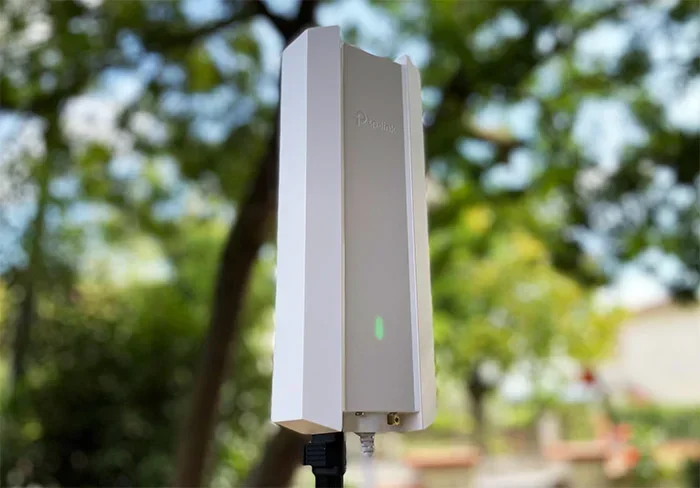
For the strongest and most reliable outdoor coverage, consider a dedicated outdoor access point. These devices are specifically designed to withstand rain, heat, and cold. They mount to the exterior of your home and connect to your network via an ethernet cable.
Outdoor access points deliver the best performance because they use a wired connection back to your router. This is known as ethernet backhaul, and it eliminates the speed loss that comes with wireless repeaters. If you are willing to run a cable from your router to an exterior wall, this is hands-down the best solution for serious outdoor coverage.
Option 5: Use a Directional Outdoor Antenna
If your router has detachable antennas, you can replace them with directional outdoor antennas. These antennas focus the wifi signal in one direction, like a flashlight beam, rather than spreading it in all directions. This concentrated signal can reach much farther than a standard omnidirectional antenna.
Directional antennas work well when you need coverage in a specific direction, such as a backyard patio or a detached garage. They are affordable and easy to install, making them a great option for tech-savvy homeowners who want a targeted boost.
Mesh Wifi Systems for Outdoor Coverage
Mesh wifi systems have revolutionized the way we think about home networking. Instead of relying on a single router to cover your entire home, a mesh system uses multiple units that work together as one unified network. This approach is especially effective for outdoor coverage because you can place nodes strategically to push the signal toward your yard.
How Mesh Systems Handle Outdoor Dead Zones
Traditional routers broadcast signal in all directions equally. By the time the signal reaches your backyard, it is often too weak to be useful. A mesh system solves this by placing a satellite node closer to the outdoor area. This node receives a strong signal from the main router and rebroadcasts it exactly where you need it.
Many mesh systems now include outdoor-rated nodes with IP65 or IP67 weatherproof ratings. This means you can mount them outside without worrying about rain or sun damage. The result is a seamless wireless network that covers every corner of your property without the annoying network name changes you get with range extenders.
Top Mesh Systems for Outdoor Use
When shopping for a mesh system, look for one that offers weather-resistant nodes or supports wired backhaul. Here are some popular options to consider:
- Netgear Orbi: Offers an outdoor satellite unit with an IP65 rating. It delivers excellent coverage and supports wifi 6 for fast speeds.
- Eero Pro 6E: A sleek, user-friendly system with strong performance. While it does not have a dedicated outdoor unit, its coverage is excellent for homes with small to medium yards.
- Google Nest Wifi Pro: Supports wifi 6E and offers reliable coverage. It is easy to set up and manage through a simple app.
- TP-Link Deco XE75: A budget-friendly mesh system with wifi 6E support and solid outdoor performance when paired with a Deco outdoor unit.
When choosing a mesh system, consider the size of your outdoor area. A small patio might only need one outdoor node, while a large backyard with multiple zones may require two or three. Always check the manufacturer’s coverage estimates and adjust for outdoor use, which typically requires more nodes than indoor-only setups.
Common Mistakes That Kill Your Outdoor Signal
Even with the best equipment, poor setup choices can sabotage your outdoor wifi performance. Avoiding these common mistakes can save you a lot of frustration.
Placing the Extender Too Far From the Router
This is the number one mistake people make with wifi extenders. If you place the extender too far from your router, it receives a weak signal and then rebroadcasts that weak signal even weaker. The result is a double penalty on speed and reliability.
The sweet spot for an extender is roughly halfway between your router and the outdoor area. Make sure the extender receives a strong signal first, and it will do a much better job of pushing that signal further out.
Ignoring Interference from Other Devices
Wifi signals operate on the same general frequency as many household devices. Microwaves, baby monitors, cordless phones, and even Bluetooth devices can all cause interference. If your outdoor signal is weak, interference might be the culprit.
To reduce interference, keep your router away from these devices and switch to a less congested wifi channel. Most modern routers handle this automatically, but you can use a wifi analyzer app to check for crowded channels and switch to a clearer one manually.
Using Outdated Router Hardware
Older routers simply cannot compete with modern standards. If your router only supports wifi 4 or wifi 5, its outdoor range and speed will be limited. Upgrading to a wifi 6 or wifi 6E router gives you better range, faster speeds, and improved handling of multiple devices.
While a new router is an investment, it pays for itself in better performance and fewer dead zones. Look for routers with external antennas, as they generally offer stronger outdoor signals than routers with internal antennas.
Neglecting Firmware Updates
It sounds simple, but many people never update their router’s firmware. Manufacturers release updates that improve performance, fix bugs, and enhance security. An outdated router may not perform as well outdoors as it could. Check your router settings periodically and install any available updates.
Quick Tips To Improve Your Outdoor Wifi Coverage
Want fast results without buying new equipment? Try these simple tips to boost your outdoor wifi signal right away.
- Restart your router regularly. A fresh restart clears temporary glitches and can improve signal strength. Aim to restart once a week.
- Adjust your router’s antennas. If your router has external antennas, position them vertically for horizontal coverage or at a 45-degree angle for multi-floor outdoor reach.
- Use the 2.4 GHz band for outdoor devices. It travels farther and penetrates obstacles better than the 5 GHz band.
- Elevate your router. Place it on a high shelf or mount it on a wall. Signals travel better downward and outward than they do when the router is sitting on the floor.
- Clear physical obstructions near the router. Move it away from large metal objects, fish tanks, and thick furniture that can block the signal.
- Change your wifi channel. Use a free wifi analyzer app to find the least congested channel in your area and switch your router to it.
- Consider a powerline adapter with wifi. These devices use your home’s electrical wiring to carry the network signal to a distant outlet, where it broadcasts a new wifi hotspot. They are a great middle-ground solution for outdoor coverage.
Comparison Table: Outdoor Boosting Methods
Choosing the right method depends on your needs, budget, and technical comfort level. Here is a quick comparison of the most popular approaches.
| Method | Ease of Setup | Cost Range | Performance | Best For |
|---|---|---|---|---|
| Router Repositioning | Very Easy | Free | Moderate | Small patios and minor dead zones |
| Wifi Range Extender | Easy | $20 – $80 | Fair to Good | Budget-friendly outdoor boost |
| Mesh Wifi System | Easy | $150 – $500 | Very Good | Whole-home and yard coverage |
| Outdoor Access Point | Moderate | $80 – $200 | Excellent | Large outdoor areas and reliable connections |
| Directional Antenna | Moderate | $15 – $60 | Good | Targeted coverage in one direction |
| Powerline Wifi Adapter | Easy | $40 – $100 | Good | Homes where wireless signals struggle through walls |
As you can see, there is no single best solution. The right choice depends on your specific situation. For most homeowners, a mesh wifi system offers the best balance of ease, performance, and coverage. But if you have a small patio and a tight budget, a simple range extender or router repositioning might be all you need.
Expert Insights on Outdoor Wifi Performance
We spoke with networking professionals to get their take on the best ways to extend wifi outdoors. Here is what the experts had to say.
Prioritize wired connections whenever possible. An outdoor access point connected via ethernet cable will always outperform a wireless extender in terms of speed and stability. If you are willing to run a cable, this is the route to take.
Do not underestimate the power of placement. Even the most expensive mesh system will underperform if the nodes are placed poorly. Walk your property and identify the spots where your signal is weakest, then position your equipment to target those areas specifically.
Plan for the future. Wifi technology evolves quickly. Investing in a wifi 6 or wifi 6E system now ensures your network is ready for the devices and demands of tomorrow. It also means better outdoor performance out of the box compared to older standards.
Key Takeaways
- Multiple solutions exist: mesh networks, wifi extenders, outdoor access points, and directional antennas all work to boost your signal outside.
- Router placement matters: moving your router closer to exterior walls or windows can significantly improve outdoor coverage.
- Mesh systems are the gold standard: they provide seamless, whole-home coverage including your yard and outdoor spaces.
- Avoid common mistakes: placing extenders too far away, ignoring interference, and using outdated hardware all weaken your outdoor signal.
- Wired backhaul beats wireless: using an ethernet cable to connect outdoor access points gives you the fastest and most stable outdoor connection.
- Weather and obstacles affect signal: walls, trees, and distance all play a role in how well your wifi reaches outside.
- Start simple and scale up: try free fixes first, then invest in equipment if needed. You do not have to buy the most expensive solution right away.
Conclusion
The answer to can you boost a wifi signal outside is absolutely yes. Whether you have a small balcony or a large backyard, there is a solution that fits your needs and budget. From simple router repositioning to full mesh wifi systems with outdoor nodes, the options are varied and accessible.
Start with the free and easy fixes. Move your router closer to an exterior wall, switch to the 2.4 GHz band, and eliminate interference. If those steps are not enough, consider a wifi range extender or a mesh system with outdoor capabilities. For the best possible performance, invest in an outdoor access point with wired backhaul.
The most important thing is to take action. A weak outdoor signal does not have to be a permanent part of your home. With the right approach, you can enjoy strong, reliable wifi everywhere from your patio to your garden. Your outdoor space deserves the same connectivity as the inside of your home, and now you have everything you need to make it happen.
Frequently Asked Questions
Can a regular wifi router provide coverage outside?
A standard router can provide some outdoor coverage, but the signal is usually weak beyond a few feet from the exterior wall. Walls, distance, and obstacles significantly reduce the signal strength. For reliable outdoor coverage, you will likely need additional equipment like a range extender or mesh node.
How far can a wifi signal reach outside?
A typical home router can broadcast a wifi signal roughly 100 to 150 feet outdoors under ideal conditions. However, walls, trees, and weather can reduce this distance significantly. Using a range extender, mesh system, or outdoor access point can push that range much further.
Is a mesh wifi system worth it for outdoor coverage?
Yes, a mesh wifi system is one of the best investments for outdoor coverage. It provides seamless connectivity across your entire property and handles device handoffs smoothly. Many mesh systems now offer weather-resistant outdoor nodes that are built to last in all conditions.
Do wifi extenders work well outdoors?
Wifi extenders can work outdoors, but their performance depends heavily on placement. The extender needs to receive a strong signal from your router to rebroadcast effectively. Place it halfway between your router and the outdoor area for the best results. Keep in mind that extenders can reduce your overall speed.
What is the best way to get wifi in a detached garage or shed?
The best approach for a detached garage is an outdoor access point connected via an ethernet cable from your main router. If running a cable is not practical, a mesh system with an outdoor node or a wifi range extender placed near the garage can also work well.
Does weather affect outdoor wifi signals?
Yes, weather can affect outdoor wifi signals. Heavy rain, snow, and high humidity can absorb and scatter wifi signals, especially on the 5 GHz band. The 2.4 GHz band is less affected by weather but can still experience some degradation during severe conditions.