Can I Use Eyeglass Cleaner To Clean A Computer Screen
Using eyeglass cleaner on your computer screen seems convenient, but it’s not always safe. Many eyeglass solutions contain chemicals that can damage your monitor’s special coatings. You need to know what’s in your cleaner and whether it’s compatible with your screen type before you spray anything on your expensive display.
Key Takeaways
- Not all eyeglass cleaners are safe: Some contain ammonia and alcohol that can strip anti-glare coatings from computer screens.
- LCD and LED screens need gentle cleaning: Harsh chemicals can cause permanent damage to your display.
- Microfiber cloths are your best friend: Pair them with the right cleaning solution for streak-free results.
- DIY alternatives work great: Distilled water and white vinegar make a safe, effective screen cleaner at home.
- Check the label before spraying: Always read ingredients and manufacturer warnings on both your screen and cleaner.
- Prevention saves money: Regular dusting reduces the need for heavy cleaning and extends screen life.
📑 Table of Contents
- Can I Use Eyeglass Cleaner To Clean My Computer Screen?
- What’s Actually In Eyeglass Cleaner?
- How Different Screen Types React to Eyeglass Cleaner
- When Is It Safe To Use Eyeglass Cleaner on a Screen?
- Safer Alternatives to Eyeglass Cleaner
- Common Mistakes People Make When Cleaning Screens
- Expert Tips for Streak-Free Screen Cleaning
- How Often Should You Clean Your Computer Screen?
- What Do Manufacturers Say?
- The Bottom Line
- FAQs
Can I Use Eyeglass Cleaner To Clean My Computer Screen?
You’re sitting at your desk. Your computer screen is covered in smudges and fingerprints. You grab your eyeglass cleaner bottle because it’s right there. It seems like the perfect solution. But wait — is eyeglass cleaner safe for computer screens?
The short answer is: it depends. Not all eyeglass cleaners are created equal. Some can clean your screen just fine. Others can cause real damage. The wrong cleaner can strip coatings, leave streaks, or even ruin your display permanently. Understanding what’s in your cleaner and what your screen needs is the key to keeping both in great shape.
In this guide, we’ll break down everything you need to know. We’ll look at the ingredients in eyeglass cleaners, how they interact with different screen types, and what safer alternatives exist. By the end, you’ll know exactly what to do the next time your screen gets dirty.
Why Screen Cleaning Matters More Than You Think
Your computer screen collects dust, oils, and grime every single day. Each time you touch it, you leave behind fingerprints and skin oils. Over time, this buildup can affect your viewing experience. But cleaning your screen the wrong way can be even worse than not cleaning it at all.
Modern screens have special coatings. These include anti-glare layers, oleophobic coatings, and anti-reflective treatments. These coatings make your screen look better and last longer. But they’re also delicate. Harsh chemicals can break them down over time. This means your screen might develop glare, discoloration, or permanent haze.
That’s why choosing the right cleaning method matters so much. A little care goes a long way in protecting your investment.
What’s Actually In Eyeglass Cleaner?
Before you spray anything on your screen, you need to understand what’s inside that little bottle. Eyeglass cleaners contain a mix of ingredients designed to clean glass lenses. But computer screens aren’t made of regular glass. They’re made of specialized materials with sensitive coatings.
Common Ingredients in Eyeglass Cleaners
Most eyeglass cleaning solutions include some combination of these ingredients:
- Isopropyl alcohol — a fast-evaporating solvent that cuts through grease and grime.
- Ammonia — a powerful cleaning agent found in many household cleaners.
- Surfactants — chemicals that reduce surface tension and help the solution spread evenly.
- Fragrances — added for a pleasant scent but unnecessary for cleaning.
- Distilled water — the base liquid that carries the other ingredients.
- Preservatives — added to extend shelf life and prevent bacterial growth.
Which Ingredients Are Dangerous for Screens?
Not all of these ingredients are harmful. In fact, some eyeglass cleaners are perfectly fine for screens. The problem comes down to two specific chemicals:
Ammonia is one of the biggest culprits. It’s a strong alkaline substance that can dissolve the anti-reflective and anti-glare coatings on your monitor. If you’ve ever noticed a hazy or discolored patch after cleaning, ammonia might be the cause.
High concentrations of isopropyl alcohol can also be problematic. While small amounts are generally safe, repeated exposure to strong alcohol solutions can degrade certain screen coatings over time. The key is concentration and frequency.
How Different Screen Types React to Eyeglass Cleaner
Not all computer screens are the same. Your screen type determines how it will respond to eyeglass cleaner. Understanding your specific display helps you make the right choice.
LCD and LED Screens
Most modern monitors use LCD (Liquid Crystal Display) or LED-backlit LCD technology. These screens have a thin layer of liquid crystals sandwiched between protective panels. They often come with anti-glare and anti-reflective coatings.
LCD screens are particularly sensitive to ammonia and harsh solvents. Using a standard eyeglass cleaner on an LCD screen can cause the coating to peel or cloud over time. The result? A screen that looks washed out or develops ugly patches that no amount of wiping can fix.
OLED and QLED Screens
OLED and QLED screens are found in high-end monitors and some premium laptops. These displays offer incredible color and contrast. But they’re even more delicate than LCD screens.
The organic compounds in OLED panels are especially vulnerable to chemical damage. Ammonia-based eyeglass cleaners can cause irreversible harm. Even some alcohol-based cleaners can leave permanent marks. If you have an OLED or QLED display, you need to be extremely careful about what you use.
Glossy vs. Matte Screens
Glossy screens have a smooth, reflective surface that looks vibrant but shows every smudge. Matte screens have a special coating that reduces glare but can feel slightly textured.
Glossy screens are more prone to streaking when you use the wrong cleaner. Matte screens can be damaged by abrasive chemicals that break down their special coating. Both types need gentle, screen-safe cleaning solutions.
When Is It Safe To Use Eyeglass Cleaner on a Screen?
Here’s the good news. Some eyeglass cleaners are perfectly safe for computer screens. The key is reading the label and knowing what to look for.
Signs Your Eyeglass Cleaner Is Screen-Safe
Look for these indicators on the bottle label:
- Ammonia-free — this is the most important label to look for.
- Alcohol-free or low-alcohol — ideally under 5% concentration.
- Labeled safe for electronics — some brands specifically test their products for screen use.
- Streak-free formula — designed to evaporate without leaving residue.
- pH-neutral — gentle enough for delicate surfaces.
Best Eyeglass Cleaners for Computer Screens
Some eyeglass cleaners work well on screens. Here are a few options that are generally considered safe:
- Zeiss Lens Wipes — pre-moistened wipes that are ammonia-free and safe for electronics.
- LensPen — a brush and cleaning tip combo that works without liquids at all.
- Microfiber cloth with distilled water — the simplest and safest method for most screens.
- Screen-specific cleaners like Whoosh! — designed specifically for electronic displays.
When to Avoid Eyeglass Cleaner Entirely
There are situations where you should never use eyeglass cleaner on your screen:
- If the label lists ammonia as an ingredient.
- If the cleaner contains high concentrations of alcohol (over 10%).
- If your screen already has a damaged or peeling coating.
- If you’re cleaning an OLED or QLED display without checking manufacturer guidelines.
- If the cleaner has added fragrances or dyes.
Safer Alternatives to Eyeglass Cleaner
If you’re unsure about using eyeglass cleaner, there are plenty of safe alternatives. Many of these options are already in your home.
DIY Screen Cleaning Solution
Making your own screen cleaner is easy, cheap, and completely safe. Here’s a simple recipe:
- Grab a spray bottle and fill it with distilled water.
- Add a small amount of white vinegar — about one part vinegar to three parts water.
- Shake gently to mix.
- Spray onto a microfiber cloth, never directly on the screen.
- Wipe gently in circular motions until clean.
This solution works great for removing fingerprints and light smudges. It’s also safe for all screen types because it contains no ammonia or harsh chemicals.
The Microfiber Cloth Method
A dry microfiber cloth can handle most daily cleaning needs. These special cloths trap dust and oils without scratching or leaving residue. They’re the safest option for routine screen maintenance.
For best results, use a clean microfiber cloth and gently wipe the screen in one direction. Avoid pressing too hard. A light touch is all you need for most smudges and dust.
Commercial Screen Cleaners
If you prefer a ready-made product, look for cleaners specifically designed for computer screens. Brands like 3M, Endust for Electronics, and iKlear make screen-safe solutions. These products are formulated without ammonia and are tested on various display types.
Common Mistakes People Make When Cleaning Screens
Even with good intentions, people make mistakes that can damage their screens. Avoiding these errors will save you time and money.
Using Paper Towels or Tissue
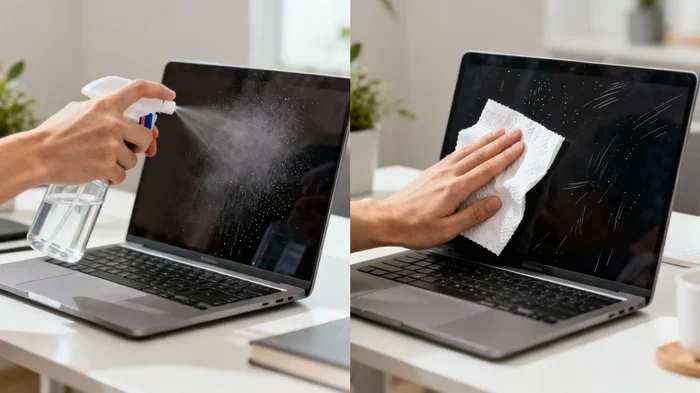
It’s tempting to grab a paper towel when your screen is smudged. But paper towels are too abrasive for screen surfaces. They can create fine scratches that build up over time. Always use a microfiber cloth instead.
Spraying Cleaner Directly on the Screen
Never spray any cleaning solution directly onto your computer screen. Liquid can seep into the edges and damage internal components. Always spray onto your cloth first and then wipe the screen gently.
Using Too Much Pressure
Pressing hard on your screen won’t clean it faster. It can actually damage the LCD layers or push liquid into the seams. Use a light, gentle touch and let the cleaning solution do the work.
Cleaning a Hot Screen
Cleaning your screen right after heavy use is a common mistake. A warm screen causes cleaning solutions to evaporate too quickly, leaving streaks and residue. Let your screen cool down first for the best results.
Expert Tips for Streak-Free Screen Cleaning
Professional cleaners and display manufacturers share these tips:
- Clean your screen regularly — once a week prevents heavy buildup that requires harsh cleaning.
- Turn off the screen before cleaning so you can see all the smudges and streaks clearly.
- Use two cloths — one dampened with cleaner and one dry for buffing.
- Wipe in circular motions starting from the center and moving outward.
- Never use household glass cleaners like Windex — they almost always contain ammonia.
- Store your microfiber cloth properly — keep it in a clean bag to prevent it from picking up dirt.
- Replace your microfiber cloth regularly — worn cloths can scratch screens.
Quick Tips for On-The-Go Cleaning
Traveling or working away from home? Keep these items in your bag:
- A small microfiber cloth — fits in any pocket.
- A travel-sized lens cleaning pen — no liquid needed.
- Pre-moistened screen wipes — look for electronics-safe brands.
- A small spray bottle of distilled water — for light cleaning.
How Often Should You Clean Your Computer Screen?
The frequency of cleaning depends on your environment and usage. Here’s a simple guide:
- Daily use in a dusty environment: Wipe with a dry microfiber cloth every 2-3 days.
- Office or home office: A thorough cleaning once a week is usually sufficient.
- Shared or public workspace: Clean before and after each use if possible.
- Light use in a clean environment: Bi-weekly cleaning with a dry cloth is fine.
Remember, prevention is better than treatment. Keep your screen covered when not in use, avoid touching it with dirty hands, and maintain a clean workspace. These habits reduce the need for intensive cleaning and protect your screen’s coatings.
What Do Manufacturers Say?
Most major monitor and laptop manufacturers warn against using household cleaners on screens. Companies like Dell, HP, Apple, and Samsung all recommend using only soft, lint-free cloths dampened with plain water. Some explicitly advise against ammonia-based and alcohol-based cleaners.
Apple, for example, recommends using a soft, slightly damp, lint-free cloth for their iMac and MacBook displays. They specifically warn against spraying cleaners directly on the screen. Following manufacturer guidelines is always the safest approach for maintaining your warranty and keeping your screen in top condition.
The Bottom Line
Can you use eyeglass cleaner on your computer screen? The answer is yes — but only if the product is ammonia-free, low in alcohol, and labeled safe for electronics. Many standard eyeglass cleaners contain ingredients that can damage your screen’s special coatings over time. When in doubt, stick with distilled water, a microfiber cloth, or a cleaner specifically designed for electronic displays.
Taking a few extra minutes to choose the right cleaning method pays off in the long run. Your screen will stay clearer, last longer, and look better every day. Clean smart, clean safe, and your display will thank you.
Now that you know the risks and the right alternatives, you can tackle smudges and fingerprints with confidence. Keep a microfiber cloth at your desk, make your own cleaning solution when needed, and always check the label before spraying anything on your expensive screen.
FAQs
Can I use Windex on my computer screen?
No, you should never use Windex or similar glass cleaners on computer screens. Windex contains ammonia and other harsh chemicals that can strip the anti-glare and anti-reflective coatings from your display. Stick to screen-specific cleaners or a simple microfiber cloth with distilled water.
Is isopropyl alcohol safe for cleaning computer screens?
Small amounts of isopropyl alcohol are generally safe for most screens, but high concentrations can damage coatings over time. If you use alcohol, dilute it properly and apply it to a cloth rather than directly to the screen. Avoid alcohol on OLED and QLED displays unless the manufacturer explicitly approves it.
What is the best way to clean a computer screen?
The best way is to use a dry microfiber cloth for daily dusting and a damp microfiber cloth with distilled water or a screen-safe cleaner for deeper cleaning. Always turn off the screen first, use gentle circular motions, and never spray liquid directly onto the display.
Can eyeglass cleaner damage my laptop screen?
Yes, if the eyeglass cleaner contains ammonia or high concentrations of alcohol, it can damage your laptop screen’s coatings. This can lead to discoloration, haze, or peeling of the anti-glare layer. Always check the ingredients and opt for ammonia-free, alcohol-free formulas when cleaning a laptop screen.
How do I remove stubborn smudges from my screen?
For stubborn smudges, lightly dampen a microfiber cloth with distilled water or a 50/50 mix of distilled water and white vinegar. Gently wipe in circular motions. Avoid pressing too hard. If the smudge persists, let the solution sit for a few seconds before trying again.
Are pre-moistened lens wipes safe for computer screens?
Many pre-moistened lens wipes are safe for computer screens, especially those from reputable brands like Zeiss. Look for wipes that are ammonia-free and labeled safe for electronics. Avoid wipes with added fragrances or strong solvents, as these can damage screen coatings over time.