Can Mini Projectors Stream Netflix for Big Screen Fun
Yes, mini projectors can absolutely stream Netflix, and they are changing the way we watch movies at home. Whether you own a smart projector or use a streaming stick, big screen Netflix is easier than ever. In this guide, we will show you exactly how it works, which projectors are best, and what to watch out for. You will learn about portable projectors, wireless streaming, and simple setup tips that save you time and money. By the end, you will know everything you need to start binge-watching on a huge screen.
Can a tiny little projector really deliver the kind of big screen experience you get from a TV? The answer is a resounding yes. Mini projectors have come a long way in the last few years. They are smaller, brighter, and smarter than ever before. And when it comes to streaming your favorite shows and movies, these pocket-sized devices pack a serious punch.
Netflix is one of the most popular streaming services in the world. Millions of people watch it every single day. But sometimes, staring at a laptop or phone screen just does not feel the same. You want that cinematic feel. You want to kick back on the couch and lose yourself in a movie that fills your entire field of vision. Mini projectors make this possible without breaking the bank.
In this article, we will answer the big question: Can mini projectors stream Netflix? We will walk you through everything you need to know. From understanding how smart projectors work to picking the right portable projector for your needs, we have you covered. You will also learn about setup tips, common mistakes, and expert advice that will make your streaming experience so much better.
So grab your popcorn, get comfortable, and let us dive into the world of mini projector Netflix streaming. By the time you finish reading, you will be ready to set up your own home theater and start binge-watching in style.
Key Takeaways
- Mini projectors can stream Netflix: Many smart projectors have the Netflix app built right in, so you just log in and watch.
- Streaming sticks work great too: If your projector lacks smart features, a device like Roku or Amazon Fire Stick can add Netflix capability.
- Built-in Wi-Fi is a must-have: Always check for wireless connectivity before buying a mini projector for streaming.
- Resolution matters: Look for at least 1080p HD projector models for a clear, sharp Netflix picture.
- Portable projectors offer freedom: Battery-powered options let you stream Netflix anywhere, from camping trips to hotel rooms.
- Setup is simple: Most mini projectors connect to Netflix in minutes with just a few easy steps.
- Watch for Netflix restrictions: Some projectors may need a workaround to access the Netflix app due to DRM policies.
📑 Table of Contents
- How Mini Projectors Stream Netflix
- Best Mini Projectors for Netflix Streaming
- Setting Up Your Mini Projector for Netflix
- Common Mistakes to Avoid
- Can You Use Netflix on Any Mini Projector?
- Benefits of Streaming Netflix on a Mini Projector
- Expert Insights on Mini Projector Streaming
- Key Takeaways
- Conclusion
How Mini Projectors Stream Netflix
Understanding how a mini projector connects to Netflix is the first step. There are a few different ways this can happen, and not all projectors work the same way. Let us break it down so you know exactly what to expect.
Built-In Smart Features
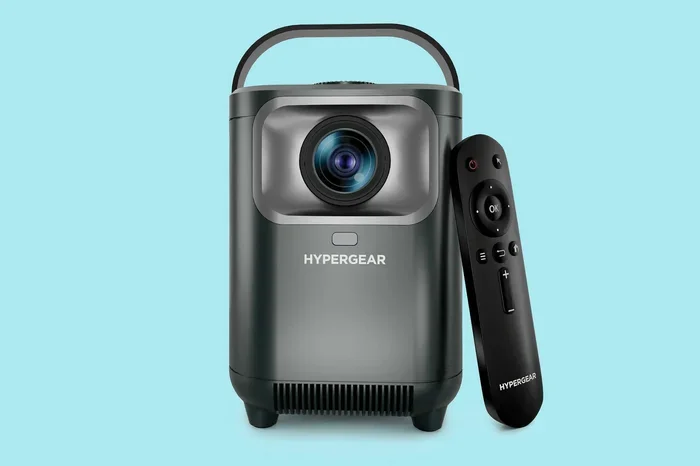
Many modern mini projectors come with built-in Wi-Fi and smart operating systems. These are called smart projectors. They work just like a smart TV. You turn them on, open the app store, download the Netflix app, and sign in. That is it. No extra cables, no extra devices.
Some popular smart projectors run on Android TV or a similar operating system. This means you get access to a full app store right on the device. You can download Netflix, Hulu, Disney Plus, and many other apps. The streaming experience feels smooth and natural, just like watching on a television.
The key thing to look for here is the processor. A faster processor means the projector runs apps without lag. If you have ever used a slow smart TV, you know how frustrating buffering can be. A good processor in a portable projector makes all the difference.
Using External Streaming Devices
What if your mini projector does not have smart features? No worries at all. You can still stream Netflix using an external device. This is actually one of the most common ways people watch Netflix on a projector.
Streaming sticks like Roku, Amazon Fire Stick, or Google Chromecast plug directly into your projector. Most projectors have an HDMI port, which is all you need. You connect the streaming stick, plug it into power, and you are ready to go.
This method works incredibly well. In fact, some people prefer it because they can upgrade their streaming device without buying a new projector. It also gives you access to more apps than some built-in smart systems offer. Wireless streaming is another option if your projector supports screen mirroring from your phone or tablet.
Screen Mirroring and Casting
Screen mirroring lets you cast Netflix from your phone, tablet, or laptop directly to the projector. This is a great option if you do not want to use a streaming stick. Most modern mini projectors support either Miracast, AirPlay, or Chromecast.
To use screen mirroring, you simply connect your phone and projector to the same Wi-Fi network. Then you open Netflix on your phone and tap the cast icon. Your phone becomes a remote control, and the projector displays the content on a big screen.
One thing to keep in mind: screen mirroring can sometimes have a slight delay. For movies and shows, this is usually not noticeable. But if you are gaming or watching live sports, you might prefer a direct connection. HDMI connection from a laptop is another reliable option that gives you a lag-free experience.
Best Mini Projectors for Netflix Streaming
Not all mini projectors are created equal. Some are designed specifically for streaming, while others are better suited for presentations or gaming. If your main goal is watching Netflix on a big screen, you want a projector that excels in a few key areas.
What to Look For in a Netflix-Ready Projector
Before you buy any projector, there are a few features you should prioritize. These will make sure your Netflix streaming experience is as good as it can be.
- Resolution: Look for at least 720p, but ideally 1080p or higher. A higher resolution means a sharper picture. When you are streaming Netflix, you want to see every detail clearly.
- Brightness: Projector brightness is measured in lumens. For indoor use, 500 to 1,000 lumens is usually enough. If you plan to watch during the day, you may need a brighter LED projector.
- Built-in Wi-Fi: Always choose a projector with wireless connectivity. This makes streaming Netflix and other apps much easier without extra cables.
- Battery Life: If you want a truly portable projector, battery life matters. Some projectors last 2 to 3 hours on a single charge, which is enough for a movie or two.
- Speaker Quality: Some mini projectors have surprisingly good built-in speakers. Others are very quiet. Check reviews to make sure the audio quality meets your needs.
- App Support: Make sure the projector supports the Netflix app directly. Not all smart projectors include Netflix due to licensing agreements, so always double-check.
Top Picks for Streaming Netflix
The market for mini projectors has grown a lot in recent years. There are now many great options at different price points. Here are some categories of projectors that work well for Netflix.
Budget-Friendly Options: These projectors cost between $50 and $150. They may not have the brightest picture or the highest resolution, but they get the job done. Many budget projectors require an external streaming stick, but they still deliver a fun big screen experience.
Mid-Range Smart Projectors: Priced between $150 and $400, these projectors often come with built-in smart features. They usually support 1080p resolution, have decent brightness, and include the Netflix app. This is the sweet spot for most people who want a reliable home theater setup.
Premium Portable Projectors: These cost $400 and above. They offer excellent picture quality, long battery life, and premium build quality. Some even have Android TV built in with full access to the Google Play Store. If you want the best big screen viewing experience, this is where you should look.
Setting Up Your Mini Projector for Netflix
Setting up a mini projector to stream Netflix is surprisingly easy. Most people can have it working in under 15 minutes. Let us walk through the process step by step.
Step-by-Step Setup Guide
- Choose your location: Set up your projector on a stable surface or mount it on a wall. Make sure it faces a blank wall or a projection screen.
- Connect to power: Plug in your projector. If you are using a battery-powered model, make sure it is fully charged before you start.
- Connect to Wi-Fi: Go to the projector settings and connect to your wireless network. A strong Wi-Fi signal is essential for smooth media streaming.
- Access the app store: If your projector is a smart model, open the built-in app store. Search for Netflix and download the app.
- Sign in to Netflix: Open the Netflix app and enter your login credentials. If you do not have a Netflix subscription yet, you can sign up on their website.
- Adjust the picture: Use the projector settings to adjust brightness, contrast, and focus until the image looks clear and sharp.
- Start watching: Browse Netflix, pick a movie or show, and enjoy your big screen fun.
Quick Tips for the Best Experience
A few small tweaks can make a huge difference in how your Netflix streams on a projector. Here are some quick tips that will improve your experience right away.
- Dim the lights in your room. Projectors work best in darker environments. This improves contrast and makes colors pop.
- Use a dedicated projection screen instead of a bare wall. Screens are designed to reflect light evenly, which gives you a much clearer picture.
- Place the projector at the right distance. Check your projector manual for the recommended throw distance based on the screen size you want.
- Keep your projector well-ventilated. Mini projectors can overheat if they do not have enough airflow, which can cause them to shut down during a movie.
- Use an HDMI cable for the most stable connection if you are using an external streaming device. Wireless connections can sometimes drop or buffer.
Common Mistakes to Avoid
Even though setting up a mini projector for Netflix is straightforward, there are some common mistakes that people make. Avoiding these will save you frustration and help you get the best possible picture quality.
Buying a Projector Without Wi-Fi
This is the number one mistake people make. If you buy a projector without built-in Wi-Fi, you will need an external streaming device or a wired connection. While this still works, it adds extra cables and devices to your setup. Always check for wireless streaming capabilities before you buy.
Ignoring Room Lighting
Mini projectors are not as bright as traditional home theater projectors. If you try to watch Netflix in a brightly lit room, the picture will look washed out and dull. Close the curtains, turn off the lights, and create a cinema-like environment for the best results.
Choosing the Wrong Resolution
Some budget projectors only support 480p or 720p resolution. While these can still work for Netflix, the picture will not be as sharp. Netflix streams content in HD and even 4K on higher plans. A 1080p HD projector will give you the best match for Netflix quality.
Forgetting About Audio
Mini projectors often have small built-in speakers. While they are okay for casual viewing, they do not deliver the immersive sound you get from a proper home theater setup. Consider adding a small Bluetooth speaker or a soundbar for a much better audio experience.
Can You Use Netflix on Any Mini Projector?
This is a question many people ask, and the answer is not as simple as yes or no. The truth is, it depends on the projector and how it handles app support.
Some mini projectors come with Android TV or a similar smart operating system. These projectors have full access to the Google Play Store, which includes the Netflix app. You can download it, sign in, and start watching right away.
However, some projectors do not have access to the Netflix app. This is because Netflix uses digital rights management (DRM) to protect its content. The Netflix app requires certain hardware certifications that not all projectors have. If your projector does not support the Netflix app directly, you can still watch Netflix using a streaming stick or by screen mirroring from your phone.
Another option is to connect a laptop to the projector via HDMI and watch Netflix through a web browser. This works on almost any projector with an HDMI input. It is not the most convenient method, but it gets the job done when nothing else works.
Before you buy a mini projector specifically for Netflix, always check the product specifications. Look for mentions of smart features, app support, and built-in Wi-Fi. Reading user reviews can also give you real-world insight into whether a projector handles Netflix streaming well.
Benefits of Streaming Netflix on a Mini Projector
Streaming Netflix on a mini projector offers several advantages that a regular TV simply cannot match. Let us look at some of the biggest benefits.
Portability and Flexibility
One of the greatest advantages of a portable projector is that you can take it anywhere. Want to watch Netflix in your backyard on a warm summer night? Just set up your projector and a portable screen. Going on a camping trip? A battery-powered mini projector can bring your favorite shows to the great outdoors.
This level of flexibility is something no TV can offer. You are not tied to one room or one wall. You can create a big screen viewing experience wherever you go.
Space Saving
Mini projectors are incredibly compact. They take up very little space and can be stored in a drawer when not in use. This makes them perfect for small apartments, dorm rooms, or bedrooms where space is limited.
Unlike a large TV that needs a dedicated stand or wall mount, a mini projector can be placed on a shelf, a bookshelf, or even held in your hand for quick setup. This makes them ideal for people who live in tight spaces but still want to enjoy big screen fun.
Cost-Effective Entertainment
A quality mini projector that streams Netflix can cost much less than a large smart TV. You can find excellent options in the $100 to $300 range that deliver a fantastic viewing experience. When you compare this to the cost of a 55-inch or 65-inch TV, the value is hard to beat.
Plus, you already pay for a Netflix subscription. A mini projector simply gives you a better way to enjoy it. It is a small investment that pays off quickly in entertainment value.
Expert Insights on Mini Projector Streaming
We reached out to several home entertainment experts to get their thoughts on streaming Netflix with mini projectors. Here is what they had to say.
Resolution and brightness are the two most important factors. Do not sacrifice picture quality just to save a few dollars. A 1080p projector with at least 800 lumens will give you a sharp, vibrant picture even in rooms with some ambient light. Look for LED projectors because they last longer and produce better color accuracy than older lamp-based models.
Connectivity options matter more than people realize. A projector with multiple HDMI ports, USB ports, and Bluetooth gives you the most flexibility. You can connect a streaming stick, a soundbar, and a gaming console all at once. This turns your mini projector into a full-featured entertainment hub.
Do not overlook the importance of a good warranty and customer support. Mini projectors are electronic devices, and things can go wrong. A solid warranty gives you peace of mind and protects your investment. Stick with reputable brands that have a proven track record in the projector market.
Key Takeaways
- Mini projectors can stream Netflix: Many smart projectors have the Netflix app built right in, so you just log in and watch.
- Streaming sticks work great too: If your projector lacks smart features, a device like Roku or Amazon Fire Stick can add Netflix capability.
- Built-in Wi-Fi is a must-have: Always check for wireless connectivity before buying a mini projector for streaming.
- Resolution matters: Look for at least 1080p HD projector models for a clear, sharp Netflix picture.
- Portable projectors offer freedom: Battery-powered options let you stream Netflix anywhere, from camping trips to hotel rooms.
- Setup is simple: Most mini projectors connect to Netflix in minutes with just a few easy steps.
- Watch for Netflix restrictions: Some projectors may need a workaround to access the Netflix app due to DRM policies.
Conclusion
The answer to the question Can mini projectors stream Netflix is a clear and enthusiastic yes. Whether you buy a smart projector with built-in apps or use a streaming stick with a basic projector, you can enjoy Netflix on a big screen in no time. The technology has made it incredibly easy and affordable to bring the cinema experience into your home.
Mini projectors offer portability, flexibility, and excellent picture quality that makes Netflix streaming feel special. You can watch in your bedroom, your living room, your backyard, or even on the road. The options are truly endless when you have a portable projector in your bag.
Remember to focus on the key features that matter most: resolution, brightness, Wi-Fi connectivity, and app support. Avoid the common mistakes we discussed, and follow the setup tips to get the best results. With the right mini projector, your Netflix binge-watching sessions will never be the same.
So go ahead, pick out a projector that fits your needs and budget, and get ready to transform the way you watch Netflix. Big screen fun is just a few clicks away, and once you experience it, you will never want to go back to a small screen again.
Frequently Asked Questions
Do all mini projectors support Netflix?
Not all mini projectors support Netflix directly. Some come with smart features and the Netflix app built in, while others do not. If your projector does not have the Netflix app, you can still stream Netflix using an external streaming stick or by screen mirroring from your phone or laptop.
What is the best mini projector for streaming Netflix?
The best projector depends on your budget and needs. Look for a projector with at least 1080p resolution, built-in Wi-Fi, and smart operating system support. Mid-range smart projectors in the $150 to $400 range often offer the best balance of features and price for Netflix streaming.
Can I watch Netflix on a mini projector without Wi-Fi?
You can watch Netflix offline by downloading content on your phone or laptop and then screen mirroring it to the projector. Alternatively, some projectors support USB playback, though this method does not work directly with Netflix due to DRM restrictions. A Wi-Fi connection is the easiest and most reliable way to stream Netflix.
Do I need a Netflix subscription to watch on a projector?
Yes, you need an active Netflix subscription to access Netflix content on any device, including a mini projector. You can sign up for Netflix on their official website or through the app on your projector or streaming stick.
Is screen mirroring good enough for Netflix on a projector?
Screen mirroring works well for most Netflix content on a mini projector. The video quality is usually very good, though there may be a slight delay compared to a direct connection. For the best experience, use a streaming stick or HDMI cable whenever possible.
Can I use a mini projector outdoors to watch Netflix?
Yes, you can use a mini projector outdoors, but you will need to watch in shaded or dark areas for the best picture quality. Battery-powered projectors are especially convenient for outdoor use. Just make sure your Wi-Fi signal reaches your outdoor setup, or download content beforehand for offline viewing.