Can Normal Speakers Be Converted To Bluetooth Easily
Yes, you can convert normal speakers to Bluetooth with simple adapters or Bluetooth kits. This guide walks you through every method, from budget-friendly options to premium solutions. You will learn how wireless audio upgrades work, what equipment you need, and how to keep your sound quality intact while going cord-free.
Have you ever looked at your favorite old speakers and wished they could connect to your phone without a cable? You are not alone. Can normal speakers be converted to Bluetooth? The short answer is a resounding yes. Thousands of people upgrade their existing audio setups every day with simple wireless adapters. You do not need to be a tech expert, and you do not need to spend a fortune either.
The world of wireless audio has exploded in recent years. Bluetooth technology has become the standard for streaming music, podcasts, and calls. But that does not mean your old speakers need to gather dust. With the right approach, you can breathe new life into any speaker system. This guide covers everything you need to know about converting normal speakers to Bluetooth easily and affordably.
Whether you have a desktop setup, a living room sound system, or a pair of bookshelf speakers, there is a Bluetooth conversion method that fits. Let us dive into the details and get your speakers wireless.
Key Takeaways
- Bluetooth adapters are the easiest way to make your existing speakers wireless in minutes.
- Bluetooth receiver vs transmitter — know the difference before buying any equipment.
- Sound quality loss is minimal when you choose the right adapter and setup.
- Multiple conversion methods exist, including DIY kits, plug-and-play dongles, and amp-based solutions.
- Compatibility matters — check your speaker’s inputs before purchasing any Bluetooth device.
- Range and battery life vary widely, so pick a device that fits your usage needs.
- Wireless speaker conversion is cost-effective compared to buying brand-new Bluetooth speakers.
📑 Table of Contents
- Why Convert Normal Speakers to Bluetooth?
- Understanding How Bluetooth Speaker Conversion Works
- Methods to Convert Normal Speakers to Bluetooth
- Step-by-Step Guide: Converting Your Speakers
- Factors to Consider Before Buying
- Common Mistakes to Avoid
- Expert Insights on Wireless Speaker Conversion
- Quick Tips for the Best Wireless Experience
- Frequently Asked Questions
- Conclusion
Why Convert Normal Speakers to Bluetooth?
You might wonder why anyone would go through the trouble of wireless speaker conversion. The reasons are simple and practical. First, convenience rules the day. You want to stream music from your phone or laptop without plugging in a single cable. Second, modern devices are dropping the headphone jack. Bluetooth lets you stay compatible with the latest phones and tablets. Third, it saves money. Why buy a brand-new Bluetooth speaker when your current ones work perfectly fine?
Another big reason is home audio system flexibility. Bluetooth lets you move your speakers around the room without tripping over cords. You can take your music from the kitchen to the patio with ease. Wireless connectivity also means fewer cables cluttering your space. Your listening area looks cleaner and feels more organized.
Let us also talk about sound quality. Many people assume wireless means worse audio. That is no longer true. Modern Bluetooth codecs deliver high-quality audio that rivals wired connections. We will cover codecs in more detail later in this guide.
Understanding How Bluetooth Speaker Conversion Works
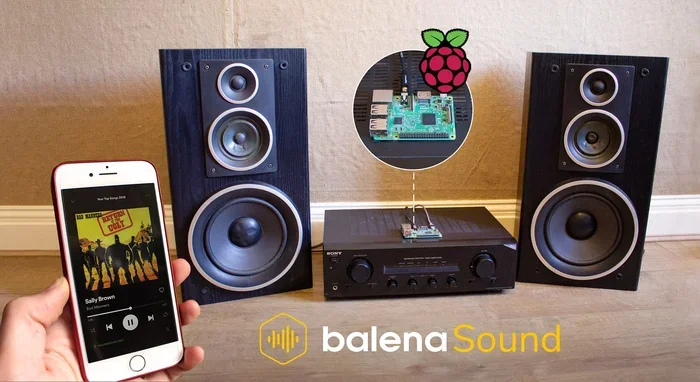
Before you buy anything, it helps to understand the basics. Converting normal speakers to Bluetooth involves adding a wireless receiver to your existing setup. The receiver picks up Bluetooth signals from your phone or computer and turns them into an audio signal your speakers can understand. Think of it as a bridge between your device and your speaker.
The Role of the Bluetooth Receiver
A Bluetooth receiver is the most common device used for this conversion. It plugs directly into your speaker. Some receivers use a 3.5mm aux input, which is the standard headphone-style jack found on most speakers and audio systems. Others connect via RCA cables or even USB, depending on your speaker model.
The receiver contains a Bluetooth chip that handles the wireless connection. It also has a tiny battery that powers the Bluetooth function. Some receivers are rechargeable, while others run on small batteries you replace. The range of Bluetooth typically extends about 30 feet, which covers most rooms easily.
Bluetooth Transmitter vs Receiver
People often confuse these two devices. A Bluetooth transmitter sends audio wirelessly from a device. A Bluetooth receiver picks up that signal and feeds it to your speaker. For converting normal speakers, you need a receiver. However, if your speaker lacks Bluetooth but your source device also lacks Bluetooth, you might need both a transmitter and a receiver pair.
Here is a quick comparison:
- Bluetooth Receiver: Plugs into the speaker end. Receives wireless signals from your phone or laptop.
- Bluetooth Transmitter: Plugs into the source device end. Sends audio from a non-Bluetooth device to Bluetooth headphones or speakers.
Methods to Convert Normal Speakers to Bluetooth
Not all conversions are the same. Different methods work for different setups and budgets. Let us explore the most popular options available today.
Method 1: Plug-and-Play Bluetooth Adapter
This is the simplest and most popular method. A Bluetooth adapter is a small dongle that plugs into your speaker’s audio input. You pair it with your phone, and you are done. These adapters are affordable, usually ranging from $10 to $40. They work great with speakers that have an aux port or RCA input.
Look for adapters that support Bluetooth 5.0 or later. Newer versions offer better range, faster connections, and improved audio codec support. The pairing process is usually straightforward. Just hold the pairing button, search for the device on your phone, and connect.
Quick Tip: If your speaker has a 3.5mm input, buy an adapter with a 3.5mm cable included. If it uses RCA, get an adapter with RCA cables. This saves you from buying extra cables separately.
Method 2: Bluetooth Speaker Conversion Kit
A Bluetooth speaker kit is a more involved option. These kits include a receiver module, a battery pack, and sometimes an amplifier. You install the components inside or alongside your speaker. This method gives you more control over the setup and often delivers better wireless connectivity than a simple adapter.
DIY enthusiasts love this approach. You can customize the battery size, choose your preferred receiver board, and even add volume controls. The trade-off is that it requires some basic soldering or wiring knowledge. If you are comfortable with simple electronics, this is a rewarding project.
Quick Tip: Start with a pre-made kit from a reputable brand. Do not try to build everything from scratch unless you have experience with electronics. Kits save time and reduce the risk of damaging your speakers.
Method 3: Use a Bluetooth Amplifier
If your speakers are passive (they need external power), a Bluetooth amplifier is an excellent choice. This device replaces your current amplifier or sits between your amplifier and speakers. It receives Bluetooth signals and amplifies them to drive your speakers. You get both wireless capability and better sound power.
Bluetooth amplifiers range from compact desktop units to larger home theater models. They are ideal for people who want a permanent upgrade to their home audio system. Many models include additional inputs for other devices, so you are not limited to Bluetooth only.
Method 4: Smart Speaker Replacement
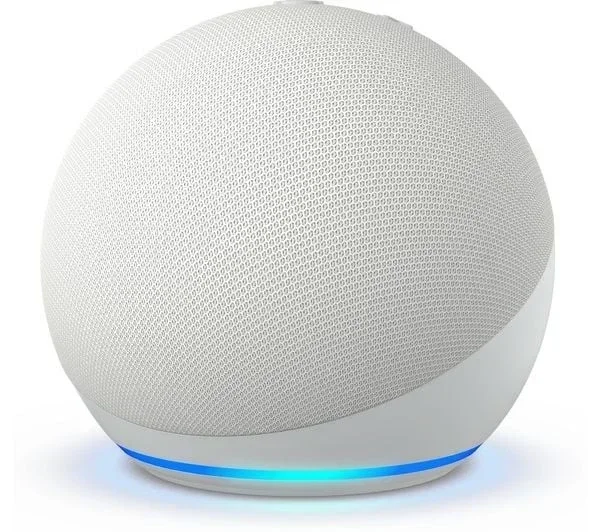
Sometimes the easiest solution is to replace the speaker entirely. Modern smart speakers like those from Amazon Echo or Google Nest offer Bluetooth built in. They also support voice assistants and smart home integration. If your old speaker is truly outdated, a replacement might make more sense than a conversion.
This method costs more than an adapter, but it gives you a fully modern experience. You also gain access to streaming services, voice control, and multi-room audio features.
Step-by-Step Guide: Converting Your Speakers
Now that you know the methods, let us walk through the actual process. Follow these steps for a smooth speaker upgrade experience.
Step 1: Check Your Speaker Inputs
Look at the back or side of your speaker. What kind of inputs does it have? Common options include 3.5mm aux, RCA, USB, or optical. The input type determines which Bluetooth adapter or receiver you need to buy.
If your speaker only has speaker wire terminals (no aux or RCA), you will need a Bluetooth amplifier or a kit that connects directly to the terminals. Do not worry — this is still very doable.
Step 2: Choose the Right Bluetooth Device
Match your input type to the right device. For aux inputs, grab a simple Bluetooth dongle. For RCA inputs, choose a receiver with RCA cables. For speakers with bare wire terminals, a Bluetooth amplifier is your best bet.
Check the Bluetooth codec support on the device. codecs like AAC, aptX, and LDAC deliver better audio quality than basic SBC. If you care about audio fidelity, look for a receiver that supports at least aptX.
Step 3: Connect and Power Up
Plug the Bluetooth receiver into your speaker. If it is a battery-powered receiver, charge it fully first. If it plugs into an amplifier or powered speaker, turn the device on. The LED light should start flashing, indicating it is ready to pair.
On your phone or laptop, go to Bluetooth settings. Turn Bluetooth on and search for available devices. Find your receiver in the list and tap to pair. Some devices auto-pair after the first connection, making future use even faster.
Step 4: Test and Adjust
Play some music and listen carefully. Check the sound quality at different volumes. Make sure there is no static or interference. If you notice audio delay, try moving closer to the receiver. The audio latency is usually minimal with modern Bluetooth 5.0 devices.
If the volume seems low, check if your speaker has a volume knob or if the receiver has its own volume control. Some receivers include a 3.5mm to RCA cable for flexible connections.
Factors to Consider Before Buying
Not all Bluetooth conversion devices are created equal. Before you spend money, consider these important factors.
Compatibility With Your Speaker
This is the most critical factor. Not every Bluetooth speaker kit works with every speaker. Check the input options on your speaker and match them to the receiver or adapter you plan to buy. Buying the wrong device wastes money and time.
Also consider the power requirements. Some receivers need external power, while others draw power from the speaker itself. Make sure your setup can support the device.
Sound Quality and Codecs
Bluetooth audio has come a long way, but not all codecs are equal. The basic SBC codec works fine for casual listening. If you are an audiophile, look for devices that support aptX HD or LDAC. These codecs preserve more of the original audio detail during wireless transmission.
Keep in mind that both the transmitter and receiver must support the same codec for it to work. Check the specifications carefully before purchasing.
Range and Battery Life
The range of Bluetooth typically reaches 30 feet in open spaces. Walls and obstacles reduce this range. If you plan to move around your home while listening, choose a device with a strong signal range and stable connection.
For battery-powered receivers, check the battery life rating. Some last 5 hours, while others go 15 hours or more on a single charge. Pick one that matches your usage patterns. If you stream music for hours at a time, a longer battery life saves you from constant recharging.
Price vs. Quality
Budget adapters under $20 work well for casual use. Mid-range options ($20-$50) offer better codecs and build quality. Premium receivers ($50+) deliver audiophile-grade sound and advanced features. Set a budget before shopping and stick to it. You do not always need the most expensive option.
Common Mistakes to Avoid
Even with the best intentions, people make mistakes when converting normal speakers to Bluetooth. Here are the most common ones and how to avoid them.
- Buying without checking inputs: Always verify your speaker’s connection type before purchasing any Bluetooth device. Mismatched inputs lead to frustration.
- Ignoring codec support: Cheap adapters often only support the basic SBC codec. If sound quality matters to you, invest in a device with aptX or LDAC support.
- Placing the receiver too far away: Bluetooth signals weaken with distance and obstacles. Keep the receiver close to your listening position for the best experience.
- Skipping the firmware update: Some Bluetooth devices have updatable firmware. Check the manufacturer’s website and update before your first use.
- Using a transmitter instead of a receiver: This is the most common mix-up. Remember, you need a receiver to make your speakers wireless, not a transmitter.
Expert Insights on Wireless Speaker Conversion
Audio engineers and tech reviewers agree that wireless speaker conversion is one of the best value upgrades you can make. According to industry experts, the quality gap between wired and Bluetooth audio has narrowed significantly in recent years. Modern codecs handle most of the heavy lifting for audio compression and decompression.
Many professionals recommend the plug-and-play Bluetooth adapter for most users. It is simple, affordable, and effective. For those who want a permanent, polished setup, a Bluetooth amplifier provides the best combination of wireless convenience and audio performance.
One thing experts stress is patience during the pairing process. Bluetooth connections sometimes take a few tries, especially with older devices. Do not give up after the first attempt. Move closer to the receiver, restart both devices, and try again.
Another valuable insight from the pros: keep your firmware updated. Bluetooth technology evolves quickly. Firmware updates often improve connection stability, range, and audio quality. A simple update can transform your experience.
Quick Tips for the Best Wireless Experience
- Keep your devices close during the initial pairing process for a stronger, more stable connection.
- Restart both devices if you experience connectivity issues. A simple reboot often fixes most problems.
- Use a USB power bank if your receiver needs power but you do not have a wall outlet nearby.
- Label your Bluetooth devices in your phone settings so you can easily identify which speaker is connected.
- Update your phone’s Bluetooth drivers regularly for the best compatibility and performance.
- Experiment with placement — even moving the receiver a few inches can improve signal strength.
Frequently Asked Questions
Can any speaker be converted to Bluetooth?
Most speakers can be converted, but it depends on the input options available. Speakers with aux inputs, RCA ports, or speaker wire terminals are all convertible. The method you choose depends on what type of input your speaker supports. Check your speaker’s manual or look at the back panel to find out.
Does converting speakers to Bluetooth reduce sound quality?
The reduction is minimal with modern Bluetooth 5.0 devices and advanced codecs like aptX. Most listeners cannot tell the difference between wired and Bluetooth audio in everyday listening. Only the most demanding audiophiles might notice a slight difference in very high frequencies or dynamic range.
How much does it cost to convert speakers to Bluetooth?
A basic Bluetooth adapter costs between $10 and $30. Bluetooth speaker kits range from $25 to $80. Bluetooth amplifiers can cost anywhere from $50 to $200 depending on features and power output. Overall, conversion is much cheaper than buying a brand-new Bluetooth speaker system.
Is it hard to pair a Bluetooth receiver with my phone?
Not at all. The pairing process is simple and similar to connecting any Bluetooth device. Turn on the receiver, enable Bluetooth on your phone, search for available devices, and tap to connect. Most modern devices remember the connection and auto-pair the next time you use them.
What is the best Bluetooth codec for speaker conversion?
aptX and aptX HD are widely regarded as the best codecs for music streaming. They offer a great balance of audio quality and device compatibility. LDAC is even higher quality but requires compatible hardware on both ends. For most users, aptX support is the sweet spot between quality and convenience.
Can I convert multiple speakers to Bluetooth at once?
Yes, but it requires a slightly different setup. You can use a Bluetooth amplifier that supports multi-speaker connections, or you can connect multiple Bluetooth receivers to separate speakers. Some advanced systems also support wireless speaker grouping through apps, allowing you to sync multiple speakers in different rooms.
Conclusion
Can normal speakers be converted to Bluetooth? Absolutely yes, and it is easier than you might think. Whether you choose a simple plug-and-play adapter, a full conversion kit, or a Bluetooth amplifier, the process is straightforward and rewarding. You get the freedom of wireless audio without replacing your favorite speakers.
The key is to match the right device to your speaker’s inputs, choose a product with good codec support, and follow the setup steps carefully. With a small investment, you can transform your entire home audio system into a wireless experience. Your old speakers get a new lease on life, and you enjoy the convenience of Bluetooth streaming every day.
Start with one speaker if you are unsure. Test the setup, enjoy the wireless freedom, and then expand to other speakers in your home. Once you experience the simplicity of wireless connectivity, you will never go back to cables. Take the leap today and give your speakers the upgrade they deserve.