Can Wifi Router Be Repaired Or Should You Replace It
A wifi router can sometimes be repaired, but it depends on the problem, age, and cost. Many common issues like overheating, firmware problems, and loose connections are fixable at home. However, if your router is old, physically damaged, or has a failed motherboard, replacement is often the smarter choice.
Your wifi router suddenly stops working, and panic sets in. You wonder, can wifi router be repaired? The short answer is yes, in many cases. But the real question is whether it makes sense to repair it or just buy a new one.
This guide walks you through everything you need to know about wifi router repair. We cover common problems, repair costs, do-it-yourself fixes, and signs that mean replacement is the better option. By the end, you will know exactly what to do with your broken router.
Millions of people face router issues every day. Some problems are simple and take minutes to fix. Others point to deeper hardware failures. Understanding the root cause helps you make the right call. Let us dive in.
Key Takeaways
- Minor issues can be fixed: Overheating, firmware glitches, and loose cables are common problems you can repair yourself.
- Age matters a lot: Routers older than 5 years often cost more to fix than to replace.
- Repair costs vary widely: Simple fixes cost little, but motherboard replacements can exceed the price of a new router.
- Warranty can save you money: If your router is still under warranty, you may get a free replacement.
- Know when to call a pro: Complex hardware issues need professional diagnosis.
- Prevention is key: Proper placement and maintenance can extend your router’s life significantly.
📑 Table of Contents
Why Your Wifi Router Might Stop Working
Routers are not magic boxes. They are electronic devices that handle a lot of traffic every day. Over time, parts wear out, software gets outdated, and connections loosen. Understanding why your router fails helps you decide if repairing a wifi router is even possible.
Here are the most common reasons routers stop working properly:
- Overheating: Routers generate heat, especially during heavy use. Poor ventilation causes internal parts to degrade faster.
- Firmware issues: Outdated or corrupted firmware can cause connection drops, slow speeds, and complete failure.
- Power surges: Lightning strikes or electrical surges can fry the power supply or internal circuits.
- Aging hardware: Like any electronic device, routers have a lifespan. After several years, capacitors and other parts fail.
- Loose connections: Cables that are not fully seated can cause intermittent or total loss of connection.
- Software conflicts: Sometimes, a settings change or a bad update causes the router to malfunction.
Each of these causes leads to a different outcome. Some are easy to fix. Others require professional help or full replacement. Let us look at how to identify what is wrong with your device.
Is It a Software Problem or a Hardware Problem?
Before you spend any money, figure out what type of problem you are dealing with. Software issues are usually easy and cheap to fix. Hardware issues can be expensive or impossible to repair at home.
Software problems include:
- Slow internet speeds
- Intermittent wifi drops
- Unable to connect to the network
- Settings that keep resetting
Hardware problems include:
- No power at all
- Burnt smell or visible damage
- Broken antenna or ports
- Loud buzzing or clicking sounds
If your router has power but the internet acts weird, start with software fixes. If it will not turn on at all, you may be looking at a hardware failure.
Common Signs Your Router Needs Repair
Your router gives you clues when something is wrong. Paying attention to these signs can save you time and money. Here are the most common indicators that your router needs repair or attention.
Blinking Lights That Look Wrong
Every router has indicator lights. They tell you the status of power, internet, wifi, and more. If you notice unusual blinking patterns, something is wrong. For example, a blinking internet light that never goes solid usually means your internet connection is not reaching the router properly.
Common light issues include:
- The power light is off even when plugged in
- The internet light blinks red or orange constantly
- Wifi lights are off or flickering
- All lights are blinking at the same time
Check your router manual to understand what each light pattern means. This can point you toward the right fix.
Slow Internet Speeds
Is your internet crawling? Slow speeds do not always mean your router is broken. But if you have tried everything else, the router might be the culprit. Old routers simply cannot handle modern internet speeds. A router from five or more years ago may struggle with today’s bandwidth demands.
Before assuming the worst, run a speed test. Compare the results to what your internet plan promises. If your wired connection is fast but wifi is slow, the router’s wireless radio might be failing.
Frequent Disconnections
If your wifi drops every few minutes, this is more than annoying. It is a sign of a deeper problem. Frequent disconnections can stem from overheating, firmware bugs, or failing internal components. Try restarting the router first. If the problem keeps coming back, you have a real issue to address.
Can You Actually Repair A Wifi Router?
Now we get to the big question: can wifi router be repaired? The answer is yes, but with some important caveats. What you can fix depends on the type of problem, your technical skills, and the router’s age and value.
Let us break down what is repairable and what is not.
Repairs You Can Do Yourself
Many common router problems are easy to fix without any special tools. These DIY repairs are free and take just a few minutes.
1. Power Cycle the Router
This is the simplest fix in the world. Unplug the router, wait 30 seconds, and plug it back in. This clears the memory, resets connections, and often solves temporary glitches. Do this before trying anything else.
2. Update the Firmware
Router manufacturers release updates that fix bugs and improve performance. Log into your router settings and check for firmware updates. This can solve many connection and stability problems.
3. Reset to Factory Settings
If your router is acting completely crazy, a factory reset can bring it back to normal. Use a pin to press the reset button on the back for 10 seconds. You will need to reconfigure your settings after this.
4. Check and Replace Cables
A damaged ethernet cable or loose power cord can mimic router failure. Swap out cables and see if the problem goes away. This costs almost nothing.
5. Improve Ventilation
If your router is overheating, move it to a cooler, open area. Remove any objects blocking the vents. Some people even add small fans near their router to keep it cool.
Repairs That Need Professional Help
Some problems go beyond simple fixes. These require a technician or specialized tools.
- Replacing the power supply: If the power adapter fails, you can buy a replacement. Make sure to match the voltage and amperage exactly.
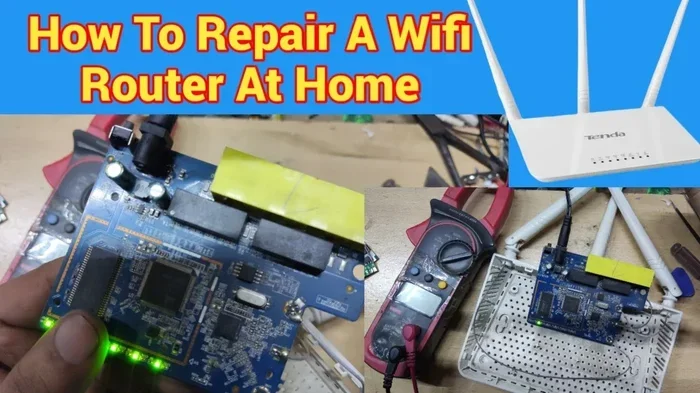
- Soldering damaged components: A failed capacitor or broken circuit board needs someone with soldering skills.
- Replacing the antenna: External antennas can be swapped if they are damaged. Internal antennas are much harder to fix.
- Fixing damaged ports: A broken ethernet port may require professional repair or motherboard replacement.
Professional repairs can cost anywhere from 50 to 200 dollars or more. Whether this makes sense depends on your router’s value and age.
Repairs That Are Not Worth It
Some problems simply are not worth fixing. If the motherboard is completely fried, replacement is the only real option. Similarly, if your router is more than five years old, investing in repairs rarely pays off. Technology moves fast, and a new router will be faster and more efficient.
Router Repair Vs Replacement: Which Makes More Sense?
Deciding between repairing a wifi router and buying a new one comes down to a few key factors. Let us walk through them so you can make the best decision for your situation.
Consider the Age of Your Router
The age of your router is the biggest factor. Most routers last between four and seven years. If your router is within that range and the problem is minor, repair makes sense. If it is older than five years, replacement is usually the better choice.
Here is a simple way to think about it:
- Less than 3 years old: Repair almost always makes sense
- 3 to 5 years old: Repair if the fix is affordable
- Older than 5 years: Replacement is usually better
Compare Repair Cost to Replacement Cost
Do the math before you commit to any repair. If fixing your router costs 100 dollars and a new router with better features costs 120 dollars, go with the new one. You get better performance and a warranty.
Here is a quick comparison:
- Simple repairs: 0 to 30 dollars (cable replacement, firmware update, factory reset)
- Moderate repairs: 30 to 100 dollars (power supply replacement, antenna swap)
- Major repairs: 100 to 250+ dollars (motherboard repair, component-level fixes)
- New router: 50 to 300+ dollars depending on features and speed
As you can see, the line between repair and replacement gets blurry at the 100-dollar mark. Consider what you value most: saving a few dollars or getting better technology.
Think About Your Internet Needs
Your internet needs change over time. If you have added smart home devices, streamed more content, or added family members to your network, your old router might not be able to keep up anyway. A new router with better range and speed could solve your problems and improve your entire home network.
Consider whether a mesh wifi system or a newer dual-band router would serve you better than a repaired old unit. Sometimes the best repair is a modern replacement.
When Should You Call A Professional?
Not everyone feels comfortable opening up a router and poking around inside. That is perfectly fine. There are times when calling a professional is the smartest move.
Call a technician if:
- Your router is under warranty and needs diagnosis
- You smell burning or see visible damage inside the unit
- Simple fixes have not worked after multiple attempts
- You are not comfortable working with electronic devices
- The problem affects your entire home network and you need it fixed quickly
Many internet service providers offer technical support for free. Contact your ISP first before paying for repairs. They can often diagnose remote issues or send a technician to your home. If your router is rented from the ISP, they will usually replace it at no cost.
Can You Trust Third-Party Repair Services?
Yes and no. Look for services with good reviews and clear pricing. Avoid anyone who wants to charge you before diagnosing the problem. A reputable technician will tell you upfront whether repair or replacement makes more sense.
How To Extend Your Router’s Lifespan
Prevention is always better than cure. Taking care of your wifi router can add years to its life and prevent many common problems. Here are practical tips to keep your router healthy.
Keep It Cool
Heat is the enemy of electronics. Place your router in an open, ventilated area. Do not stack items on top of it. Avoid enclosed cabinets unless they have good airflow. A cool router runs more reliably and lasts longer.
Update the Firmware Regularly
Check for firmware updates every few months. These updates fix security vulnerabilities, improve stability, and sometimes boost performance. Many modern routers offer automatic updates, so turn that feature on if available.
Use a Surge Protector
Power surges are one of the leading causes of router failure. Plug your router into a surge protector or uninterruptible power supply. This simple step can save you from expensive replacements.
Restart Your Router Weekly
Give your router a fresh start by restarting it once a week. This clears the memory, refreshes connections, and helps prevent slow performance over time. Many people use smart plugs to automate this process.
Place It in the Right Spot
Router placement affects both performance and longevity. Keep it in a central location, elevated off the floor, and away from walls. Avoid placing it near microwaves, cordless phones, or other electronics that cause interference.
Do Not Overload It
Every router has limits on how many devices it can handle. If you have 30 or more smart devices, your router may be working too hard. Consider upgrading to a more powerful model or adding a mesh system to share the load.
Conclusion
So, can wifi router be repaired? Yes, it often can. Many common issues are fixable with simple steps that cost nothing. Overheating, firmware problems, loose cables, and software glitches respond well to basic troubleshooting.
But not every router is worth saving. Age, repair cost, and your internet needs all play a role in the decision. If your router is old, has serious hardware damage, or repair costs approach the price of a new unit, replacement is the smarter choice.
Start with the basics: restart your router, update the firmware, check your cables, and improve ventilation. These steps solve the majority of problems people face. If those do not work, consider professional help or a new router.
Take care of your equipment, and it will serve you well for years. And when the time comes to replace, invest in a model that fits your current needs and gives you room to grow.
Frequently Asked Questions
How much does it cost to repair a wifi router?
Simple repairs like cable replacement or firmware fixes cost little to nothing. Professional repairs for hardware issues typically range from 50 to 200 dollars. If the repair costs more than half the price of a new router, replacement is usually the better option.
Can a wifi router be repaired if it has no power?
Yes, if the power supply or power adapter is the problem. You can replace the adapter for 15 to 40 dollars. If the internal power circuitry is damaged, professional repair or replacement is needed. Always try a different power outlet and cable first.
Is it worth repairing a wifi router that is 6 years old?
Generally, no. Routers older than five years are nearing the end of their useful life. Newer models offer better speeds, range, and security features. The money spent on repair is better invested in a new router.
Can I fix a wifi router with blinking red lights?
It depends on the cause. Blinking red lights often indicate a connection problem or firmware issue. Try restarting the router, checking your cables, and updating the firmware. If the lights continue after these steps, you may need professional diagnosis.
Will resetting my router fix all connection problems?
A factory reset fixes many software-related problems, including settings conflicts and firmware glitches. However, it will not fix hardware damage like a broken port or failed motherboard. Always try a reset before considering more expensive repairs.
How long should a wifi router last before needing replacement?
Most wifi routers last between four and seven years with proper care. After that, they may struggle with newer internet speeds and security standards. If you notice consistent performance issues, it is usually time to replace the unit.