Can You Get HD Through a Coax Cable and Why It Works
Yes, you can get HD through a coax cable. Modern coaxial cables like RG6 carry high-definition signals with ease, making them a reliable choice for cable TV, internet, and more. Understanding how coax HD works helps you choose the right cable and setup.
Can you get HD through a coax cable? The short answer is yes. But the full story is a lot more interesting than that. Coaxial cables have been around for decades, and they still play a huge role in how we get television, internet, and other signals into our homes. Whether you are setting up a new TV, upgrading your cable plan, or just curious about how your signals travel, understanding HD over coax is genuinely useful.
Many people assume that only fancy new cables like HDMI can deliver high-definition picture quality. That is not true at all. Coax cables have evolved, and today they handle HD signals with impressive reliability. In this guide, we will walk through everything you need to know. We will cover how coax HD works, which cables to use, common problems, and easy fixes. By the end, you will feel confident about your setup and your choices.
## What Is a Coax Cable and Why Does It Still Matter?
A coaxial cable, often called a coax cable, is a type of electrical cable that carries signals from one point to another. It has a simple but clever design. At the center is a copper conductor. Around that is an insulating layer. Then comes a metallic shield, usually made of braided copper or foil. The whole thing is wrapped in a protective outer jacket.
This design does something really important. It protects the signal inside from interference. External noise, electromagnetic interference, and signal loss are all minimized by the shielding. That is why coax cables have been the backbone of cable television and broadband internet for so long.
Coax cables come in different types. The two most common are RG59 and RG6. RG59 is an older, thinner cable. It works fine for short runs and standard-definition signals. RG6 is thicker, has better shielding, and handles higher frequencies. That makes it the preferred choice for HD signals and longer cable runs. If you want HD quality, RG6 is almost always the right pick.
### Why Coax Cables Are Still Popular
Even though newer cable types have entered the market, coax remains popular for several reasons. First, many homes already have coax wiring installed. Retrofitting with new cables can be expensive and disruptive. Second, coax cables are durable and reliable. They handle physical stress better than some alternatives. Third, cable providers still use coax infrastructure for their TV and internet services. So your connection to the outside world likely already depends on coax.
## Can You Actually Get HD Through a Coax Cable?
The answer is a firm yes. You can absolutely get HD through a coax cable. But there are some conditions you need to meet. Not all coax setups are created equal. The cable type, the connectors, the length of the run, and the equipment at each end all play a role.
HD signals over coax use a technology called QAM, which stands for Quadrature Amplitude Modulation. QAM lets digital signals travel through the coax cable without needing a separate tuner or converter in many cases. Most modern TVs come with a built-in QAM tuner. That means you can plug a coax cable directly into your TV and receive HD channels.
### What Resolutions Can Coax Handle?
Coax cables can handle a range of resolutions. Standard HD, often called 720p, is no problem at all. Full HD, or 1080p, is also well within the capabilities of a good coax setup. Some systems can even carry signals that approach 4K quality, though that depends heavily on the specific equipment and cable specifications.
Here is a quick look at what you can expect:
- 480i/480p (SD): Easily handled by both RG59 and RG6.
- 720p (HD): Works great on RG6. RG59 may work for short runs.
- 1080i/1080p (Full HD): Best on RG6 with quality connectors.
- 4K (UHD): Possible with high-quality RG6 and short cable runs.
The key takeaway is that the better your cable and setup, the better your HD experience will be.
## The Technology Behind HD Over Coax
Understanding how HD signals travel through a coax cable helps you make smarter choices. Let us break down the technology in simple terms.
### How Digital Signals Travel Through Coax
In the old days, TV signals were analog. They traveled as continuous electrical waves through the coax cable. Today, most HD signals are digital. They are converted into binary data, ones and zeros, and transmitted as modulated signals. The coax cable carries these modulated signals to your TV or cable box.
The modulation process is what makes digital coax work. QAM modulation packs digital data onto a carrier wave. Your TV’s tuner then decodes that carrier wave back into the original data stream. This all happens in milliseconds, and you see a crisp HD picture on your screen.
### The Role of Bandwidth
Bandwidth is the amount of data a cable can carry at one time. Coax cables have a wide bandwidth capacity, especially the RG6 type. This wide bandwidth is what allows them to carry HD and even ultra-HD signals. A cable with low bandwidth would struggle with high-resolution content, leading to pixelation or a blurry picture.
Think of bandwidth like a highway. A wider highway can handle more cars at once without traffic jams. A wider coax cable can handle more data without signal degradation. That is why upgrading from RG59 to RG6 can make such a noticeable difference in your HD picture quality.
### Signal Modulation and Compression
Cable providers use signal compression to fit multiple HD channels into a single coax line. Compression algorithms shrink the data size without noticeably reducing picture quality. Your TV then decompresses the signal on the fly. This is why you can get dozens of HD channels through a single coax connection.
The efficiency of this process depends on the equipment at both ends. A good cable modem or set-top box will handle compression and decompression smoothly. If your equipment is older, it might not support the latest compression standards, which could limit your HD experience.
## Types of Coax Cables for HD Signals
Not all coax cables are the same. Choosing the right one is critical for getting the best HD quality. Here is a closer look at the most common options.
### RG6 Cable
RG6 is the standard for modern HD and internet installations. It has a thicker copper conductor, better shielding, and can handle frequencies up to 3 GHz. This makes it ideal for HD TV signals, cable internet, and satellite connections.
Most new homes are wired with RG6. If you are running new cables or replacing old ones, RG6 should be your default choice. It costs a bit more than RG59, but the performance difference is worth it.
### RG59 Cable
RG59 is an older, thinner coax cable. It was the standard for many years and still works for basic TV and standard-definition signals. For HD, RG59 can work over short distances, but it is more prone to signal loss and interference. If you have RG59 in your walls and want HD quality, consider upgrading to RG6.
### RG11 Cable
RG11 is a heavy-duty coax cable used for very long runs. It has the thickest conductor and the best shielding of the common types. It is often used in outdoor or underground installations where signal loss over distance is a major concern. For most home setups, RG6 is sufficient, but RG11 is worth considering if you have a run longer than 100 feet.
### Connector Types
The connector matters just as much as the cable itself. The most common coax connectors are F-type and BNC. F-type connectors are what you will see on most TV and cable installations. They screw onto the cable and provide a secure connection. BNC connectors are bayonet-style and are more common in professional or commercial settings.
Always use quality connectors. A cheap or loose connector can ruin your HD signal, no matter how good your cable is. Make sure connectors are tight and properly seated.
## Common Issues and How to Fix Them
Even with the right cable, you can run into problems with HD over coax. Here are the most common issues and how to solve them.
### Signal Loss Over Long Runs
Signal loss, also called attenuation, happens when a coax cable is too long. The signal weakens as it travels. For runs over 50 feet, you may notice a drop in HD quality. The fix is simple. Use RG6 or RG11 cable for longer runs, and avoid unnecessary bends or kinks in the cable.
### Interference and Noise
Interference can come from many sources. Power lines, fluorescent lights, and even nearby electronics can introduce noise into your coax signal. This shows up as ghosting, static, or a fuzzy picture. The best defense is proper shielding. RG6 cables with dual shielding (both braid and foil) handle interference much better than single-shielded cables.
### Bad Connectors
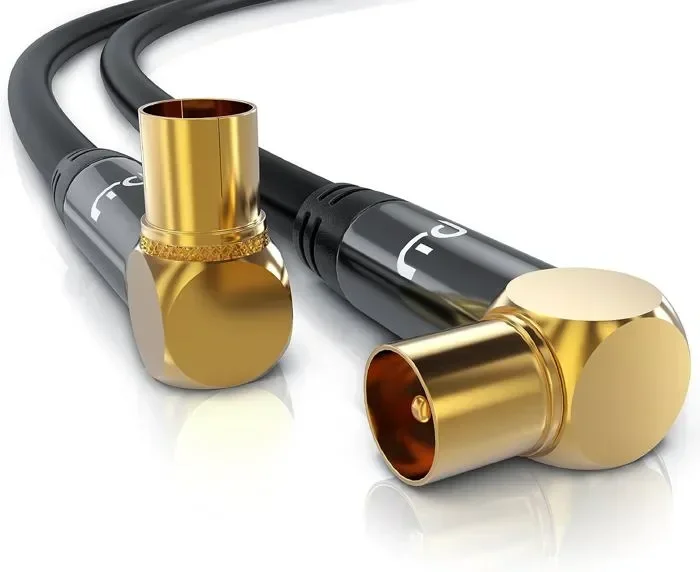
Loose or corroded connectors are a surprisingly common cause of HD problems. Check all your connections. If a connector feels wobbly, tighten it or replace it. Gold-plated connectors resist corrosion better than standard ones and can improve signal quality over time.
### Splitter Loss
If you use a coax splitter to connect multiple TVs, each split costs you some signal strength. A two-way splitter typically loses about 3.5 dB of signal. A four-way splitter loses even more. If you notice HD quality dropping after adding a splitter, consider using a signal amplifier. An amplifier boosts the signal after the splitter, restoring your HD picture.
### Quick Tips for Better HD Over Coax
Here are some fast tips to improve your HD coax setup:
- Use RG6 cable for all new runs. It is the best balance of performance and cost.
- Keep cable runs as short as possible. Shorter runs mean less signal loss.
- Avoid sharp bends. Coax cables should have gentle curves, not tight kinks.
- Use quality F-type connectors. Cheap connectors are the weakest link in most setups.
- Test your signal with a meter. A simple signal strength meter can reveal problems you cannot see.
- Replace old splitters. Modern splitters have lower loss and better performance.
## Coax vs. Other Cable Types for HD
People often wonder how coax compares to other HD cable options. Let us look at the big picture.
HDMI is the most common digital connection today. It carries both audio and video in a single cable and supports very high resolutions. For a direct device-to-TV connection, HDMI is hard to beat. But HDMI has a limitation: it works over short distances. A standard HDMI cable starts to lose signal beyond about 50 feet.
Coax cables, on the other hand, can carry HD signals over much longer distances. A well-installed RG6 coax run of 100 feet or more will still deliver a solid HD signal. That is why cable companies rely on coax for their distribution networks.
Component video cables can also carry HD signals, but they require three separate cables for video and additional cables for audio. Coax handles it all in one cable, making it simpler to install and manage.
For many homeowners, the choice comes down to convenience and existing infrastructure. If your home already has coax wiring, using it for HD is a smart, cost-effective decision. You do not need to rip open walls to run new cables.
### Expert Insight on Coax HD
Industry professionals often say that coax is underrated when it comes to HD delivery. While HDMI gets all the attention, coax cables form the backbone of most cable TV and broadband networks. The technology has kept pace with demand, and modern coax systems deliver excellent HD quality. As long as you use the right cable type and maintain good connections, coax is a dependable choice for HD signals.
## Final Thoughts on Getting HD Through Coax
So, can you get HD through a coax cable? Without a doubt, yes. Coax cables are a proven, reliable, and widely available way to deliver high-definition signals to your TV. The key is using the right cable type, maintaining good connections, and understanding your setup.
If you are currently using an older RG59 cable or have loose connectors, a small upgrade can make a big difference. Switch to RG6, check your connections, and test your signal. You might be surprised at how much better your HD picture looks.
Coax technology is not going away anytime soon. Cable providers continue to invest in coax infrastructure, and the technology keeps evolving to meet new demands. Whether you are a casual TV viewer or a tech enthusiast, knowing how to get the best HD through your coax setup is a valuable skill. Take the time to get your coax setup right, and you will enjoy clear, crisp HD for years to come.
Key Takeaways
- HD over coax is real: Coaxial cables can carry HD signals effectively when you use the right type and setup.
- Cable type matters: RG6 is the go-to choice for HD signals, while older RG59 cables may limit your quality.
- Signal quality depends on setup: Proper connectors, short runs, and good splitters make a big difference.
- Coax is still widely used: Many homes still rely on coaxial cables for TV and internet despite newer options.
- You don’t always need HDMI: Coax cables can deliver HD without needing to upgrade your entire setup.
- Know your system: Understanding your cable infrastructure helps you troubleshoot and optimize your HD experience.
Frequently Asked Questions
Can I get 1080p HD through a coax cable?
Yes, you can get 1080p HD through a coax cable. You need an RG6 cable with quality connectors and a TV or set-top box with a built-in QAM tuner. The signal stays strong over moderate distances with the right setup.
Do I need a special cable box for HD over coax?
Not always. Many modern TVs have a built-in QAM tuner that lets you receive HD channels directly through a coax connection. However, some premium channels or encrypted content may still require a cable box from your provider.
How long can a coax cable be for HD without signal loss?
For RG6 cable, you can typically run up to 100 feet without significant signal loss. Beyond that, you may notice a drop in quality. Using a signal amplifier can extend the range and maintain HD quality over longer distances.
Is RG59 good enough for HD?
RG59 can work for HD over short runs, but it is not ideal. It has thinner shielding and higher signal loss than RG6. For the best HD experience, especially over longer distances, RG6 is the recommended choice.
Can I use a coax splitter without losing HD quality?
You can, but a splitter does reduce signal strength. Each split costs some signal power. If you notice quality issues after adding a splitter, try a lower-loss splitter or add a signal amplifier to boost the signal back up.
What is the difference between coax and HDMI for HD?
HDMI carries uncompressed digital audio and video in one cable and works best over short distances. Coax carries digital TV signals over longer distances and is the standard for cable TV distribution. Both can deliver excellent HD quality in their respective use cases.