Can You Run Hdmi Through Cat6 And Get Great Results
Can you run HDMI through Cat6? Yes, you absolutely can, and it works surprisingly well for most setups. Using an HDMI extender Cat6 setup lets you send high-quality audio and video signals over long distances without signal loss. This guide covers everything you need to know about HDMI over Ethernet, including how it works, what equipment you need, and whether it’s the right choice for your home or office.
Have you ever wanted to mount your TV on the wall but realized your HDMI cable just wasn’t long enough? Or maybe you’re setting up a home theater in a different room from your media console and the distance is giving you pause. You’re not alone. Plenty of people run into this exact problem every day.
The good news is there’s a simple solution that many people overlook. You can run HDMI through Cat6 cable and get great results. It sounds almost too good to be true, right? But it’s real, it works, and it’s more affordable than you might think. In this guide, I’ll walk you through exactly how HDMI over Cat6 works, what gear you need, and how to avoid the common pitfalls that trip people up.
Whether you’re a home theater enthusiast, a remote worker setting up a dual-monitor desk, or someone just trying to clean up cable clutter behind your TV, this article has you covered. Let’s dive in and explore the world of HDMI extension over Ethernet.
Key Takeaways
- HDMI over Cat6 works reliably: You can extend HDMI signals up to 330 feet or more using Cat6 cables and an extender kit.
- You need the right equipment: An HDMI balun or extender kit is essential to convert and transmit the signal over Ethernet cable.
- 4K resolution is possible: With proper Cat6 cabling and a quality extender, you can run HDMI 4K over Cat6 without major quality loss.
- Distance matters: Standard HDMI cables max out at about 50 feet, but Cat6 solutions can stretch that to 100+ meters.
- Signal boosters help: Using an HDMI signal booster or repeater can improve performance over very long runs.
- Cat6 is affordable and widely available: It’s one of the most cost-effective HDMI extension solutions on the market today.
📑 Table of Contents
What Is HDMI Over Cat6?
So what does it actually mean to run HDMI through Cat6 cable? In simple terms, it’s a method of sending HDMI audio and video signals over standard Ethernet cabling instead of a traditional HDMI cable. This is done using a pair of devices called baluns, which convert the HDMI signal into a format that can travel through Ethernet wire.
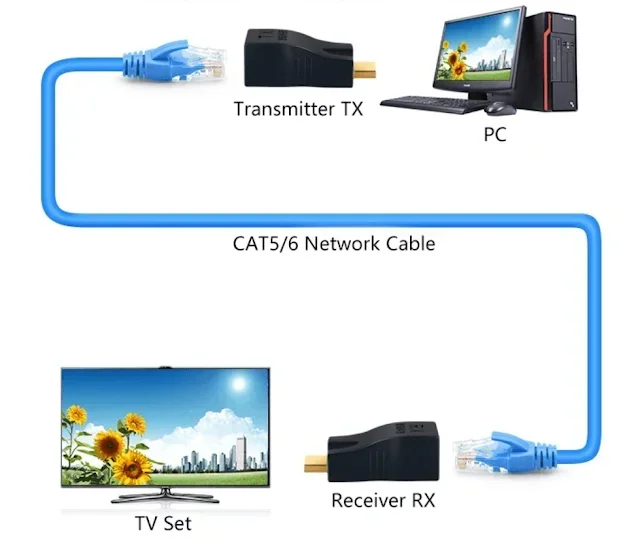
The HDMI extender Cat6 setup typically involves two small boxes. One box connects to your source device, like a Blu-ray player, gaming console, or laptop. The other box connects to your display, like a TV or monitor. A Cat6 Ethernet cable runs between them, carrying the signal. It’s that straightforward.
This approach is part of a broader category known as HDMI signal extension. People use it when standard HDMI cables can’t reach from their source device to their screen. Maybe the couch is too far from the wall mount. Maybe the AV receiver sits in a closet across the room. Whatever the reason, HDMI over network cabling solves the distance problem.
How Does the Technology Work?
The balun does the heavy lifting here. “Balun” stands for balanced-to-unbalanced. It takes the unbalanced HDMI signal and converts it into a format suitable for transmission over twisted-pair Ethernet cable. On the other end, a second balun converts it back into a standard HDMI signal.
Most HDMI extender kits use Cat5e or Cat6 cable. Cat6 is the better choice because it offers improved shielding and bandwidth compared to Cat5e. This means less interference and a cleaner signal, especially over longer distances. Some advanced kits even support HDMI 4K over Cat6 at distances up to 100 meters, which is about 330 feet.
Why Run HDMI Through Cat6? The Benefits
You might be wondering why anyone would bother running HDMI through Cat6 instead of just buying a longer HDMI cable. That’s a fair question. Let me break down the real advantages of this approach.
Longer Distances Without Signal Loss
This is the biggest benefit by far. A standard HDMI cable starts to lose signal quality after about 50 feet. Beyond that, you might see flickering, ghosting, or a complete loss of picture. With a Cat6 extension setup, you can push the signal 100 meters or more without any noticeable degradation.
Think about how useful that is. You could mount a TV in the backyard, set up a projector in a large conference room, or run a display to an upper floor in your home. The HDMI extension cable alternative just can’t compete with that kind of reach.
Cost Savings
Long HDMI cables are expensive. A high-quality 100-foot HDMI cable can cost $100 or more, and it still might not deliver a reliable signal. A Cat6-based HDMI over Ethernet setup costs a fraction of that. You can get a solid HDMI extender kit for $30 to $60, and Cat6 cable is very affordable by the foot.
Flexibility and Future-Proofing
Cat6 cable is everywhere. It’s the standard for most modern networking installations. If you already have Ethernet runs in your walls, you can repurpose them for HDMI extension. This saves you from pulling new cables and makes your setup incredibly flexible.
Plus, as technology advances, many HDMI extender Cat6 kits are getting better at supporting higher resolutions and refresh rates. You’re investing in a solution that will keep up with evolving standards.
What Equipment Do You Need?
Setting up an HDMI over Cat6 system is surprisingly simple. You don’t need a degree in engineering or a toolbox full of expensive gear. Here’s what you’ll need for most setups.
The HDMI Balun Extender Kit
This is the centerpiece of your setup. The HDMI balun kit comes as a pair of devices. One is the sender unit, and the other is the receiver unit. You plug your source device into the sender, and your display into the receiver. Then you connect a Cat6 cable between them.
Look for kits that support the resolution you need. If you want HDMI 4K over Cat6, make sure the kit explicitly states 4K support. Some budget kits only handle 1080p, which is fine for basic setups but won’t cut it for 4K gaming or movie watching.
Cat6 Ethernet Cable
Not all Ethernet cables are created equal. For the best results with HDMI signal extension, use solid Cat6 cable rather than stranded. Solid cable has better signal integrity over long runs. Aim for a cable rated for outdoor use if you’re running it outside, or a plenum-rated cable if it needs to go through air ducts.
Optional: HDMI Signal Booster
For runs over 100 meters, you might want to add an HDMI signal booster or repeater. This device amplifies the signal mid-run, ensuring you get a clean picture at the display end. It’s not always necessary, but it’s a nice insurance policy for long-distance setups.
HDMI Through Cat6 vs. Other Extension Methods
There are several ways to extend HDMI signals. How does running HDMI through Cat6 compare to the alternatives? Let’s take a look.
| Method | Max Distance | 4K Support | Cost | Ease of Setup |
|---|---|---|---|---|
| HDMI Over Cat6 (Balun) | Up to 330 ft | Yes | Low to Medium | Very Easy |
| Standard HDMI Cable | Up to 50 ft | Yes (short runs) | Low | Plug and Play |
| HDMI Over Coax | Up to 300 ft | Limited | Medium | Moderate |
| HDMI Over Fiber | Up to 1,000+ ft | Yes | High | Moderate |
| HDMI Over IP (Network) | Unlimited (LAN) | Yes | Medium to High | Moderate |
As you can see, HDMI over Cat6 strikes an excellent balance between cost, ease of use, and performance. It’s not the absolute longest-range option, but for most home and office applications, it’s more than enough. The setup is plug-and-play, and the price point is hard to beat.
If you need extreme distances or are running cables through walls and ceilings over long spans, fiber optic HDMI extension might be worth the extra cost. But for the vast majority of people, a Cat6 HDMI extender is the sweet spot.
Common Mistakes to Avoid
Running HDMI through Cat6 is simple, but there are a few mistakes that can ruin your experience. Here’s what to watch out for.
Using Cat5e Instead of Cat6
Cat5e will work in a pinch, but Cat6 is the better choice. Cat6 has stricter specifications for crosstalk and system noise, which means a cleaner HDMI signal. If you’re buying new cable, go with Cat6 and skip the headache.
Using Stranded Cable for Long Runs
Stranded Ethernet cable is flexible and great for patch cables, but it’s not ideal for long runs. Solid conductor Cat6 cable provides better signal quality over distances. Use solid cable for any run longer than a few feet.
Ignoring Cable Length Limits
Even with Cat6, there are limits. Most HDMI extender kits are rated for 100 meters. Pushing beyond that without a signal booster can lead to dropouts or no signal at all. Measure your distance carefully before purchasing equipment.
Cheap Extender Kits
You can find HDMI balun kits for under $20 online, and some of them work fine for 1080p. But if you need 4K or HDR support, cheap kits often fall short. Invest in a reputable brand that clearly states its resolution and distance capabilities.
Not Testing Before Installing
Always test your entire setup before you start running cables through walls or ceilings. Connect everything, power it on, and verify that you get a clean picture and sound. Fixing problems after the cables are in the walls is nobody’s idea of a good time.
Quick Tips for the Best Results
Here are some practical tips to help you get the most out of your HDMI over Cat6 setup:
- Use shielded Cat6 cable to minimize interference from nearby power cables.
- Keep the Cat6 cable away from electrical wiring to avoid signal degradation.
- Label both ends of your cable so you know which source connects to which display.
- Use an HDMI signal booster for runs over 100 meters.
- Check your extender kit’s firmware if available. Some manufacturers release updates that improve compatibility and performance.
- Use high-quality HDMI cables between your devices and the balun units. Don’t cheap out on those short connections.
- Mount your balun units in ventilated areas to prevent overheating, especially during long viewing sessions.
Expert Insights
According to AV installation professionals, HDMI over Cat6 has become one of the most popular extension methods in both residential and commercial settings. The technology has matured significantly over the past few years, and modern kits handle 4K HDR with ease.
One thing experts emphasize is the importance of cable quality. Even the best HDMI extender Cat6 kit will underperform if you use low-grade cable. Spending a little extra on a reputable Cat6 cable pays off in reliability and longevity.
Another tip from the pros: if you’re running multiple HDMI sources to multiple displays, consider an HDMI matrix switch combined with your Cat6 extension setup. This lets you route any source to any display with the push of a button, giving you incredible flexibility in multi-room setups.
Is HDMI Over Cat6 Right for You?
The answer is probably yes, if you need to extend an HDMI signal beyond 50 feet. Whether you’re setting up a home theater, a digital signage display, or a conference room presentation system, HDMI over Ethernet offers a reliable, affordable, and easy-to-implement solution.
The equipment is widely available, installation is simple, and the results are impressive. You get clean audio and video over distances that would be impossible with a standard HDMI extension cable. For most people, it’s the best option available.
Just make sure you buy the right equipment for your needs. Check the resolution support, the maximum distance rating, and the quality of the included cables. With the right setup, you’ll enjoy a seamless viewing experience without the hassle of short HDMI cables or expensive alternatives.
The bottom line is this: can you run HDMI through Cat6? Absolutely. And with the right gear and a little planning, you can get great results that rival or even surpass a direct HDMI connection. Give it a try for your next setup, and you’ll wonder how you ever managed without it.
Frequently Asked Questions
Can I run HDMI 4K through Cat6 cable?
Yes, you can run HDMI 4K through Cat6 cable using a compatible HDMI extender kit. Make sure the extender explicitly supports 4K resolution and HDR. Most modern HDMI over Cat6 balun kits handle 4K at distances up to 100 meters without any noticeable quality loss.
How far can I run HDMI through Cat6?
Most HDMI extender Cat6 kits support distances up to 100 meters, or about 330 feet. Some higher-end models can push even further with the help of an HDMI signal booster. Always check the manufacturer’s rated distance before purchasing.
Do I need special Cat6 cable for HDMI extension?
You don’t need anything exotic, but solid Cat6 cable is recommended over stranded cable for long runs. Shielded Cat6 is also a good idea if your cable will run near power lines or other sources of electromagnetic interference. Standard Cat6 cable from any reputable brand will work perfectly.
Is HDMI over Cat6 better than a long HDMI cable?
For runs over 50 feet, yes. Standard HDMI cables start losing signal quality beyond that distance. A HDMI over Ethernet setup using Cat6 gives you a much cleaner signal at longer distances and costs significantly less than a premium long HDMI cable.
Can I use Cat5e cable instead of Cat6 for HDMI extension?
Yes, Cat5e will work in most cases, but Cat6 is the better choice. Cat6 offers improved shielding and bandwidth, which translates to a more reliable HDMI signal extension, especially over longer distances. If you have the option, go with Cat6.
Do HDMI baluns need external power?
Most HDMI balun kits draw power from the HDMI port itself through the source device. However, some kits include a power adapter for more stable performance. Check the product specifications. If it requires external power, make sure you have a nearby outlet or USB port available.
=== CONCLUSION ===
Running HDMI through Cat6 is one of the smartest and most practical solutions for extending your audio and video signals. Whether you’re dealing with a long room, a multi-story home, or a commercial installation, the HDMI over Cat6 approach delivers reliable, high-quality results without breaking the bank.
The equipment is affordable, the setup is simple, and the performance is impressive. With a quality HDMI extender kit, a good length of Cat6 Ethernet cable, and a little planning, you can say goodbye to short HDMI cable headaches forever. Give HDMI over network cabling a try, and you’ll be amazed at how easy and effective it is.