Disadvantages Advantages Of Using Google Maps Website
The Google Maps website offers powerful navigation, real-time traffic updates, and easy route planning, making it a go-to tool for millions. However, it also comes with drawbacks like privacy concerns, data usage, and limited offline features. In this guide, we break down both sides so you can decide if it is right for you.
Have you ever used the Google Maps website to find your way somewhere? Maybe you were planning a road trip or looking for a coffee shop nearby. Either way, Google Maps has become a part of daily life for billions of people around the world.
But like any tool, it has its ups and downs. In this article, we will explore the advantages and disadvantages of using the Google Maps website. We will look at what makes it great and where it falls short. By the end, you will have a clear picture of whether this tool fits your needs.
Let us dive right in. Whether you use Google Maps for work, travel, or just figuring out your commute, this guide has something for you.
Key Takeaways
- Easy Navigation: The Google Maps website provides turn-by-turn directions and real-time traffic updates that make getting around simple.
- Privacy Concerns: Google collects significant location data, which raises privacy issues for many users.
- Battery and Data Usage: Heavy use of the site can drain your battery and consume a lot of mobile data.
- Great for Local Search: Finding nearby businesses, reviews, and places is one of its strongest features.
- Limited Offline Use: Unlike the mobile app, the website version has fewer options for offline map access.
- Free and Widely Available: The core features are completely free and work on any browser.
- Strong Business Tools: Business owners can manage listings and gain insights through Google Maps.
📑 Table of Contents
- What Is the Google Maps Website?
- Advantages of Using the Google Maps Website
- Disadvantages of Using the Google Maps Website
- Google Maps Website vs. Mobile App: Key Differences
- Tips for Getting the Most Out of Google Maps Website
- Common Mistakes People Make with Google Maps Website
- Expert Insights on Google Maps Website
- Who Should Use the Google Maps Website?
- Final Thoughts
What Is the Google Maps Website?
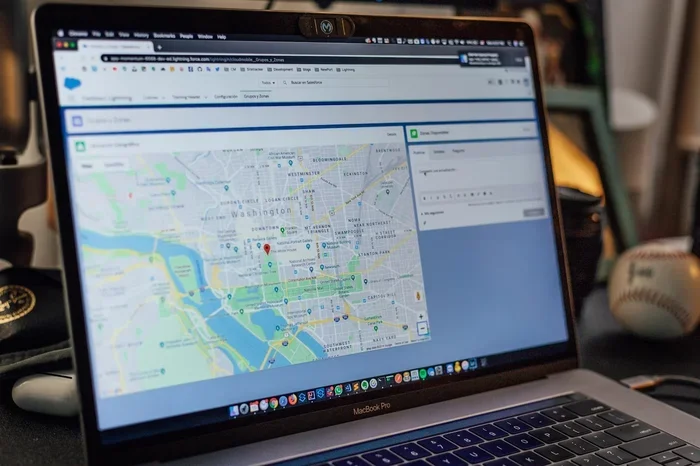
The Google Maps website is a free online mapping service run by Google. It lets users search for locations, get directions, view satellite imagery, and explore local businesses. You can access it from any web browser on a computer or mobile device.
It is different from the Google Maps mobile app, though they share many features. The website version lives in your browser. You do not need to download anything. This makes it quick and easy to use on the go.
Many people rely on it for GPS tracking, route planning, and real-time traffic updates. It has grown into one of the most popular mapping tools on the internet.
Advantages of Using the Google Maps Website
1. Easy Navigation and Directions
One of the biggest advantages of the Google Maps website is how simple it is to get directions. You type in a starting point and a destination. The site gives you the best route in seconds.
It offers turn-by-turn directions for driving, walking, cycling, and public transit. The site also shows real-time traffic conditions. If there is a jam on your route, it will suggest an alternative.
This makes it incredibly useful for daily commutes and long road trips alike. You always know what lies ahead on your journey.
2. Real-Time Traffic Updates
Nobody likes sitting in traffic. The Google Maps website helps you avoid it. It pulls live data from other users on the road and shows you congestion in real time.
You can see color-coded routes. Green means clear roads. Yellow means slow traffic. Red means heavy congestion. This feature alone saves millions of people time every day.
It also estimates your arrival time based on current conditions. So you can plan your departure accordingly.
3. Detailed Satellite and Street View
The Google Maps website offers satellite view and street view. These features give you a bird’s-eye look at any location. You can zoom in and see buildings, parks, roads, and more.
Street view is especially helpful. You can virtually walk down a street before you visit. This is great for checking out a neighborhood or finding a specific entrance to a building.
These visual tools make the site much more than just a map. They add a layer of detail that is hard to beat.
4. Local Business Search and Reviews
Looking for a restaurant, hotel, or gas station? The Google Maps website makes it easy. You can search for nearby businesses and see ratings, reviews, photos, and contact details.
This is a huge advantage for travelers and locals alike. You can compare options and make informed decisions. The place reviews help you avoid bad experiences and find hidden gems.
Business owners also benefit. They can create and manage their listings. This helps them attract more customers through local search.
5. Free and Accessible on Any Device
The Google Maps website is completely free to use. You do not need to pay a subscription or download an app. All you need is a web browser and an internet connection.
It works on Windows, Mac, Linux, and mobile devices. This broad compatibility makes it accessible to almost everyone. Whether you are on a laptop, tablet, or phone, you can use it.
The fact that it is free is a massive advantage. Many competing mapping tools charge for premium features. Google keeps the core experience free for all users.
6. Location Sharing and Collaboration
The Google Maps website lets you share your location sharing with friends and family. This is great for meeting up or keeping loved ones updated on your whereabouts.
You can also collaborate on trips. Multiple people can view the same map, add pins, and plan routes together. This makes group travel and outings much easier to organize.
It is a simple but powerful feature. Not many free mapping tools offer this level of collaboration.
7. Strong Route Planning Tools
Planning a complex route? The Google Maps website handles it well. You can add multiple stops, compare travel times, and choose between different modes of transport.
It also lets you save favorite places and create custom lists. This is helpful for frequent travelers or anyone who visits the same locations regularly.
The route planning tools are intuitive and easy to use. You do not need any technical skills to get the most out of them.
Disadvantages of Using the Google Maps Website
1. Privacy and Data Collection Concerns
One of the biggest disadvantages of the Google Maps website is privacy. Google collects a lot of data when you use its services. This includes your location history, search habits, and travel patterns.
For many users, this raises serious concerns. Your movements are tracked and stored. While Google says this data helps improve services, not everyone is comfortable with it.
If you value your privacy, you may want to limit your use of Google Maps. You can adjust your settings, but the data collection is still extensive. This is a trade-off you should be aware of.
2. High Battery and Data Consumption
Using the Google Maps website on a mobile device can drain your battery quickly. The site constantly fetches data, updates your location, and loads maps in real time.
It also uses a lot of mobile data. If you are on a limited data plan, heavy use can eat through your allowance fast. This is especially true when using GPS tracking or street view features.
This can be a problem for people who rely on their phones throughout the day. You may find yourself running out of battery or data sooner than expected.
3. Limited Offline Functionality
The Google Maps website does not offer robust offline features. Unlike the mobile app, which allows you to download maps for offline use, the website version needs a constant internet connection.
This can be a major drawback when you are traveling in areas with poor connectivity. Rural areas, tunnels, and remote locations can leave you without access when you need it most.
If offline access is important to you, the website version may not be the best choice. You may need to rely on the mobile app or a different tool entirely.
4. Accuracy and Map Errors
While Google Maps is generally accurate, it is not perfect. Map accuracy can vary depending on the location. Some rural areas or newly developed neighborhoods may have outdated or incomplete data.
Road closures, new businesses, and changed addresses may not always be reflected immediately. This can lead to confusing or incorrect directions.
Google relies on user reports and automated systems to keep maps updated. But errors can still slip through. It is always a good idea to double-check directions when using any mapping tool.
5. Requires a Google Account for Full Features
To get the most out of the Google Maps website, you often need a Google account. This means you must sign in to access features like location history, saved places, and personalized recommendations.
Some users are uncomfortable creating a Google account just to use a map. Others may not want to link their browsing activity to their Google profile.
This requirement can be a barrier for privacy-conscious users. It also means your data is tied to your Google ecosystem, which may not appeal to everyone.
6. Advertisements and Business Promotions
The Google Maps website includes ads and promoted business listings. When you search for a local service, paid results may appear at the top of the list.
These promotions can sometimes push the most relevant results further down. You may end up visiting a business that paid for placement rather than the one that best fits your needs.
While ads help keep the service free, they can be frustrating. They add clutter and can sometimes mislead users looking for genuine recommendations.
7. Dependence on Internet Connection
The Google Maps website is heavily dependent on a stable internet connection. Without it, the site cannot load maps, fetch directions, or provide real-time updates.
This is a significant limitation compared to standalone GPS devices or offline map apps. If your signal drops, you may lose access to critical navigation tools.
For users in areas with unreliable internet, this can be a real problem. It is something to consider before relying solely on the website for navigation.
Google Maps Website vs. Mobile App: Key Differences
Many people confuse the Google Maps website with the mobile app. While they share many features, there are important differences. Here is a quick comparison:
- Offline Maps: The mobile app allows you to download maps for offline use. The website version does not support this feature.
- Battery Usage: The app is optimized for mobile devices and uses less battery than the website version.
- GPS Tracking: The app provides more accurate GPS tracking because it uses your device’s hardware directly.
- Notifications: The app can send you alerts about traffic, arrivals, and route changes. The website cannot do this.
- Accessibility: The website works on any browser without installation. The app requires a download from an app store.
Both tools are excellent. Your choice depends on how and where you plan to use them.
Tips for Getting the Most Out of Google Maps Website
Use Keyboard Shortcuts for Faster Navigation
The Google Maps website has several hidden keyboard shortcuts. Pressing “?” on the map opens a shortcut menu. You can zoom in and out, switch between map views, and more without touching your mouse.
Learning these shortcuts can save you a lot of time. They make the website feel faster and more responsive.
Customize Your Map View
You can switch between map, satellite, and terrain views. Each view serves a different purpose. Satellite view is great for exploring new areas. Terrain view helps you understand elevation and landscape.
Take a moment to explore the different view options. They can make your experience more useful and enjoyable.
Save Places and Create Lists
Use the “Save” feature to bookmark your favorite locations. You can create lists for different purposes, such as travel planning, restaurants to try, or places to revisit.
This is a great way to stay organized. You will always have your important locations at your fingertips.
Check for Updates Regularly
Google frequently updates its mapping data. Make sure you are using the latest version of the website. This ensures you get the most accurate directions and information.
Clear your browser cache periodically too. This helps the site load faster and perform better.
Common Mistakes People Make with Google Maps Website
Ignoring Privacy Settings
Many users never check their privacy settings. This means Google may be collecting more data than you realize. Take a few minutes to review your location history and ad settings.
You can limit data collection without giving up the core features. It is a simple step that makes a big difference.
Relying Solely on Google Maps for Navigation
No mapping tool is perfect. Relying solely on Google Maps can leave you vulnerable to errors or outages. Always have a backup plan, especially for long trips.
Carry a physical map or download an offline alternative. This ensures you are never stranded if the service goes down.
Not Checking Business Hours and Reviews
Before visiting a business, always check its hours and recent reviews. Information can change quickly. A place that was open last week may be closed now.
Taking a few extra seconds to verify can save you a wasted trip. It is one of the easiest ways to use Google Maps more effectively.
Expert Insights on Google Maps Website
Digital mapping experts often praise Google Maps for its accuracy and breadth of features. However, they also caution about privacy and data dependence.
“Google Maps is an incredible tool, but users should be aware of what data they are sharing,” says tech analyst Sarah Mitchell. “The site offers unmatched convenience, but it comes with a cost to your digital privacy.”
Experts recommend using the website for quick searches and planning. For daily navigation, the mobile app is often a better choice due to its offline capabilities and GPS optimization.
The key is to use Google Maps intentionally. Understand what data you are sharing and take steps to protect your privacy when needed.
Who Should Use the Google Maps Website?
The Google Maps website is ideal for people who need quick access to maps without installing anything. It is great for:
- Planning trips and routes on a computer
- Looking up local businesses and reviews
- Checking traffic conditions before heading out
- Exploring satellite and street view imagery
- Sharing locations with friends and family
If you primarily use a desktop or laptop, the website version is your best option. It offers most of the core features in a clean, browser-based interface.
However, if you need offline maps or mobile-specific features, you should consider the mobile app instead.
Final Thoughts
The Google Maps website is a powerful and convenient tool. Its advantages include easy navigation, real-time traffic updates, detailed views, and free access. These features make it one of the best mapping tools available today.
At the same time, its disadvantages are real and important. Privacy concerns, data usage, limited offline features, and ad clutter are all valid criticisms. You should weigh these factors before deciding how to use the site.
For most people, the benefits outweigh the drawbacks. The Google Maps website is a reliable, feature-rich tool that serves a wide range of needs. Just be mindful of your privacy and use it wisely.
Now that you know the pros and cons, you can use the Google Maps website with confidence. Try out the tips we shared and see how it fits into your daily routine.
Frequently Asked Questions
Is the Google Maps website really free to use?
Yes, the Google Maps website is completely free. You do not need to pay for any core features. Google makes money through ads and data collection, but the mapping tools themselves cost nothing to use.
Can I use Google Maps website without a Google account?
You can use the basic features without signing in. However, to access saved places, location history, and personalized recommendations, you will need a Google account. Signing in unlocks the full experience.
How accurate is the Google Maps website compared to the app?
The accuracy is very similar for both versions. However, the mobile app uses your device’s GPS hardware directly, which can provide slightly more precise location tracking. The website relies on your browser’s location services, which may be a bit less accurate.
Can I download maps for offline use on the Google Maps website?
No, the website version does not support offline map downloads. This feature is available only in the mobile app. If you need offline access, you should use the app instead of the website.
Does Google Maps website collect my location data?
Yes, Google collects location data when you use the website. This includes your search history, routes, and approximate location. You can manage these settings in your Google account to limit data collection.
What are the best alternatives to the Google Maps website?
Popular alternatives include Apple Maps, MapQuest, Waze, and OpenStreetMap. Each has its own strengths. Apple Maps offers strong privacy features. Waze excels at real-time community traffic updates. OpenStreetMap is a great open-source option.
=== CONCLUSION ===
The Google Maps website is a fantastic tool that offers incredible value to users around the world. Its advantages are clear: easy navigation, real-time traffic updates, detailed views, and free access. These features make it an essential part of modern life.
But we must also acknowledge its disadvantages. Privacy concerns, data usage, and limited offline features are real issues. Being aware of these helps you use the site more responsibly and effectively.
Ultimately, the Google Maps website is a strong choice for anyone who needs quick, reliable mapping tools. Just remember to protect your privacy, use it alongside other resources, and take advantage of the tips we shared.
Now go ahead and explore the world with confidence. The Google Maps website is ready when you are.