Do All Bose Speakers Connect To Each Other Wirelessly
Not all Bose speakers connect wirelessly to each other. Compatibility depends on the Bose model, Bluetooth version, and the Bose app you use. This guide breaks down which Bose speakers pair together, how to set up wireless groups, and common issues you might face.
Bose speakers are some of the best wireless audio devices on the market. They deliver rich sound, solid bass, and reliable wireless performance. But here is the thing. Not all Bose speakers play nice with each other. If you own multiple Bose speakers or are thinking about buying more, you need to know which ones can connect wirelessly.
This topic comes up a lot. People ask, “Can I pair my old Bose speaker with my new one?” or “Will my Bose SoundLink work with my Bose Home Speaker?” The answers are not always simple. Bose has changed its apps and wireless protocols over the years. This means older and newer models sometimes do not get along.
In this article, we will walk through everything you need to know. We will cover Bose speaker compatibility, how wireless pairing works, and which models connect to each other. By the end, you will have a clear picture of what works and what does not. Let us get into it.
Key Takeaways
- Bose speakers use different apps: Some use the Bose Connect app while others use the Bose Music app, and this affects which speakers can pair.
- Not all models are cross-compatible: Older Bose speakers may not connect to newer ones wirelessly.
- Stereo pairing is limited: Only specific Bose speaker combinations support stereo mode.
- Bluetooth version matters: Bluetooth 5.0 offers better range and stability than older versions.
- Firmware updates can help: Keeping your Bose speakers updated improves wireless connectivity.
📑 Table of Contents
- How Bose Speakers Connect Wirelessly
- Which Bose Speakers Can Connect To Each Other
- Setting Up Wireless Pairing Between Bose Speakers
- Common Problems When Connecting Bose Speakers
- Can You Connect Bose Speakers to Other Brands?
- Bose Speaker Wireless Connectivity: What to Know Before Buying
- Expert Insights on Bose Wireless Speaker Pairing
- Final Thoughts
How Bose Speakers Connect Wirelessly
Bose speakers use Bluetooth to connect to each other and to your devices. Bluetooth is the wireless technology that sends audio from one device to another without cables. Most modern Bose speakers use Bluetooth 4.2 or Bluetooth 5.0. The newer Bluetooth 5.0 offers a stronger connection and better range.
But Bluetooth is only part of the story. Bose also uses its own apps to manage speaker connections. The app you use depends on the speaker model and age. This is where things get tricky. Different apps support different features and speaker combinations.
The Bose Connect App
The Bose Connect app was Bose’s first app for managing wireless connections. It works with older Bose speakers like the Bose SoundLink series. Through this app, you can pair two Bose speakers for stereo sound or shared listening. However, the Bose Connect app has limitations. It does not support newer Bose speakers like the Bose Home Speaker 500 or Bose Portable Smart Speaker.
The Bose Music App
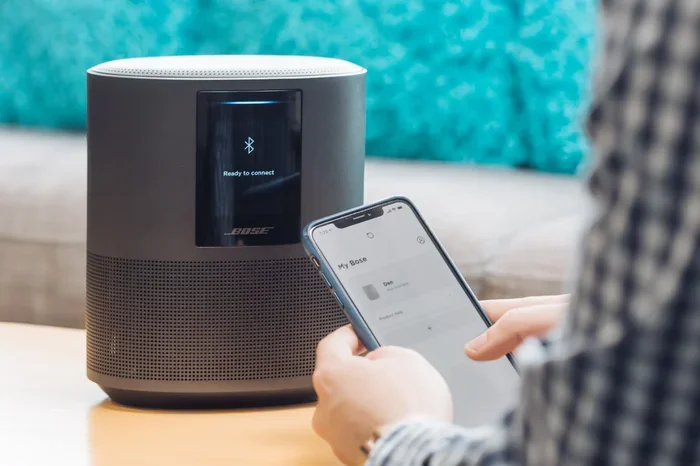
The Bose Music app replaced the Bose Connect app for newer models. It supports Bose speakers like the Bose Home Speaker 300, Bose Home Speaker 500, and Bose Portable Smart Speaker. The Bose Music app lets you create speaker groups and control multiple rooms. But here is the catch. Speakers using the Bose Music app cannot connect to speakers using the Bose Connect app wirelessly.
Which Bose Speakers Can Connect To Each Other
This is the big question. The answer depends on the speaker model and the app it uses. Let us break it down by Bose speaker series.
Bose SoundLink Speakers
The Bose SoundLink lineup includes models like the SoundLink Mini, SoundLink Color, SoundLink Revolve, and SoundLink Flex. These speakers all use the Bose Connect app. Most SoundLink speakers can pair with each other for stereo mode or shared audio. For example, you can pair a Bose SoundLink Revolve with another SoundLink Revolve wirelessly.
However, there are limits. You cannot pair a SoundLink speaker with a Bose Home Speaker through the app. They live in different ecosystems. If you try to connect them, you will run into compatibility issues.
Bose Home Speakers
The Bose Home Speaker series includes the Home Speaker 300 and Home Speaker 500. These speakers use the Bose Music app. They can connect to each other and form groups for multi-room audio. You can also add Bose Portable Smart Speakers to a Bose Music group.
But these speakers cannot link up with Bose SoundLink speakers. The app barrier keeps them separate. If you want to build a multi-room setup, you need to stick with one ecosystem.
Bose Portable Smart Speaker
The Bose Portable Smart Speaker is a newer addition to the lineup. It uses the Bose Music app and supports wireless grouping with other Bose Music-compatible speakers. It does not work with the Bose Connect app or older SoundLink models.
Setting Up Wireless Pairing Between Bose Speakers
If you have compatible Bose speakers, setting up wireless pairing is pretty straightforward. Here is how to do it step by step.
Step 1: Check Compatibility
Before you start, make sure both speakers are from the same app ecosystem. If one uses the Bose Connect app and the other uses the Bose Music app, they will not pair wirelessly. Check the Bose website or your speaker manual to confirm which app your model uses.
Step 2: Update Your Firmware
Firmware updates fix bugs and improve wireless performance. Open the Bose Connect app or Bose Music app and check for updates. Keeping your speakers up to date prevents connection problems. This is a step many people skip, and it causes headaches later.
Step 3: Pair the Speakers
For Bose Connect app users, open the app and select the “Add Speaker” option. Follow the on-screen prompts to pair two speakers. For stereo mode, the app will guide you through setting one speaker as left and the other as right.
For Bose Music app users, open the app and go to the speaker settings. Choose “Create Group” and add your compatible speakers. This lets you play the same audio across multiple rooms or zones.
Quick Tips for Better Wireless Pairing
- Keep speakers within 30 feet of each other during the initial pairing process.
- Turn off other Bluetooth devices nearby to avoid interference.
- Restart both speakers before attempting a new pairing.
- Make sure both speakers are fully charged or plugged in.
- Use the latest version of the Bose app on your phone or tablet.
Common Problems When Connecting Bose Speakers
Even with compatible speakers, you might run into issues. Wireless connections are not always perfect. Here are the most common problems and how to fix them.
Speakers Will Not Pair
This is the number one issue people face. If your Bose speakers will not pair, the first thing to check is the app. Are both speakers using the same app? If one is on Bose Connect and the other is on Bose Music, they will not connect. This is the most common reason for pairing failures.
Another cause is distance. Bluetooth has a limited range. If your speakers are too far apart, the connection will drop or fail. Move them closer together and try again.
Audio Lag or Sync Issues
Sometimes speakers pair but the audio is out of sync. This happens with wireless streaming. Bluetooth adds a small delay to the audio signal. In most cases, this delay is too small to notice. But in some setups, especially with video content, it can be distracting.
To reduce sync issues, keep both speakers in the same room and away from walls. Also, make sure no other wireless devices are causing interference.
Connection Keeps Dropping
Unstable connections are frustrating. If your Bose speakers keep disconnecting, try these fixes. First, restart both speakers. Second, check for firmware updates. Third, move closer to the speakers. Fourth, reduce the number of Bluetooth devices in the area. If none of these work, a factory reset might be needed.
Can You Connect Bose Speakers to Other Brands?
This is another common question. The short answer is no, not wirelessly through the Bose app. Bose speakers use proprietary wireless protocols for speaker-to-speaker connections. You cannot pair a Bose speaker with a JBL speaker or a Sonos speaker through the Bose app.
However, you can connect Bose speakers to other devices via Bluetooth. You can stream music from your phone to a Bose speaker from any brand. The issue is specifically about Bose-to-Bose wireless connections. Those require matching apps and compatible models.
If you want a universal wireless speaker setup, you might want to look into systems like Sonos or Apple AirPlay. These ecosystems support cross-brand wireless grouping. But if you are committed to the Bose sound, you need to stay within the Bose ecosystem.
Bose Speaker Wireless Connectivity: What to Know Before Buying
If you are planning to buy more Bose speakers, keep a few things in mind. First, decide what you want from your setup. Do you want stereo sound in one room? Do you want multi-room audio? Your answer will determine which Bose speakers to buy.
For stereo pairing, buy two of the same model from the same app ecosystem. For multi-room audio, choose speakers that work with the Bose Music app. This gives you the most flexibility and the best wireless experience.
Also consider the Bose Wireless Link adapter. This accessory lets you connect non-Bluetooth Bose systems to your wireless network. It is a great option if you have older Bose equipment and want to modernize your setup.
Expert Insights on Bose Wireless Speaker Pairing
Bose engineers design their speakers to work best within their own ecosystem. The wireless protocols are optimized for Bose-to-Bose connections. This means you get the best audio quality and the most stable connection when pairing Bose speakers together.
One thing to keep in mind is that Bose updates its app and speaker software regularly. These updates can change which speakers are compatible with each other. Always check the Bose website for the latest compatibility information before buying a new speaker.
If you have older Bose speakers, you might wonder if they are still worth using. The good news is that older models still work well for basic Bluetooth streaming. You just might not get the advanced wireless grouping features that newer models offer. And if you are looking to bring old Bose speakers into the wireless age, you can check out how to make older Bose speakers Bluetooth capable for some helpful tips.
Also, if you use Bose earbuds or headphones with your phone, you might wonder about cross-device compatibility. For example, do Bose earbuds work well with iPhones? The answer is yes, most Bose earbuds connect seamlessly to Apple devices through Bluetooth. This is similar to how Bose speakers connect to phones and tablets.
Final Thoughts
So, do all Bose speakers connect to each other wirelessly? The answer is no. Bose speakers connect wirelessly only when they are from the same app ecosystem and are compatible models. The Bose Connect app supports older SoundLink speakers, while the Bose Music app supports newer Home Speakers and Portable Smart Speakers. These two groups do not cross over.
That does not mean you are out of luck. If you pick the right Bose speakers from the start, you can build a great wireless setup. Just make sure all your speakers use the same app and support the same wireless features. Check compatibility before you buy, and you will save yourself a lot of frustration.
Wireless speaker technology is getting better every year. Bose continues to improve its Bluetooth range, audio sync, and app features. The future looks bright for Bose wireless speaker users. Start with compatible models, follow the setup steps, and enjoy your wireless audio experience.
Frequently Asked Questions
Can I connect a Bose SoundLink speaker to a Bose Home Speaker wirelessly?
No, these speakers use different apps. The Bose SoundLink uses the Bose Connect app, while the Bose Home Speaker uses the Bose Music app. They cannot pair wirelessly with each other.
Do I need any extra equipment to connect Bose speakers wirelessly?
No extra equipment is needed if your speakers are compatible. Just make sure both speakers are updated and use the same Bose app. A stable Wi-Fi connection helps with the Bose Music app setup.
Can I connect more than two Bose speakers together wirelessly?
Yes, with the Bose Music app you can create groups of multiple Bose Music-compatible speakers. This works great for multi-room audio setups where you want the same music in different rooms.
Why does my Bose speaker not show up in the app?
This usually happens when the speaker is not in pairing mode or is too far from your phone. Make sure Bluetooth is turned on, the speaker is charged, and you are within 30 feet of the speaker.
Can I use my Bose speaker with other brand devices wirelessly?
You can stream audio from any Bluetooth device to a Bose speaker. But Bose-to-Bose wireless grouping only works between compatible Bose speakers using the same app.
What should I do if my Bose speakers keep disconnecting?
Try restarting both speakers and checking for firmware updates. Move the speakers closer together and reduce Bluetooth interference from other devices. A factory reset can also fix stubborn connection issues.