Do All Mac Laptops Use The Same Charger For Charging
Do all Mac laptops use the same charger? The answer is no. Different Mac models need different chargers, and picking the wrong one can slow down your battery or cause overheating. This guide breaks down exactly which charger your MacBook needs, how to share chargers safely, and what to look for when buying a replacement.
Do all Mac laptops use the same charger? The short answer is no. Apple uses different charging solutions across its Mac lineup, and the charger that works for one MacBook may not fit another. If you have ever grabbed the wrong power adapter and wondered why your Mac is not charging, you are not alone. This guide will walk you through everything you need to know about Mac chargers. You will learn which charger fits your model, how to share chargers safely, and what to avoid when buying a replacement. By the end, you will have a clear picture of Mac charging and never pick the wrong adapter again.
Charging a Mac laptop seems simple, but the details matter. Apple has changed its charging technology several times. The MagSafe connector gave way to USB-C, and now different MacBooks need different wattage adapters. Understanding these differences saves time, money, and protects your battery. Let us dive into the world of Mac chargers and make sense of it all.
Key Takeaways
- MacBooks do not all use the same charger: older models use MagSafe, while newer ones use USB-C.
- USB-C Power Adapters come in different wattages: 20W, 30W, 60W, 96W, and 140W are common.
- You can share chargers between MacBooks if the connector matches: USB-C to USB-C works across models.
- Using the wrong charger can cause slow charging or overheating: always match the connector and wattage.
- The charger that comes with your Mac is usually the best choice: Apple includes the right adapter for each model.
- Future Macs may move to universal USB-C charging: but for now, check your model before buying a replacement.
📑 Table of Contents
Do All Mac Laptops Use The Same Charger? The Short Answer
Do all Mac laptops use the same charger? Not at all. Apple designs each Mac model with a specific charging solution in mind. Older MacBooks used the MagSafe magnetic connector, while newer models rely on USB-C. Even among USB-C MacBooks, the power adapter wattage varies. A MacBook Air might come with a 30W adapter, while a MacBook Pro needs a 96W or 140W adapter. Using the wrong charger can lead to slow charging, overheating, or even battery damage over time.
Why the Confusion Exists
Many people assume all Macs charge the same way because they all come from Apple. The branding is consistent, but the hardware is not. You might see a USB-C cable and think it fits all Macs, and it does in many cases. However, the power brick behind that cable matters just as much. A 20W iPhone charger will charge a MacBook Air very slowly. A 140W Mac Pro charger will charge a MacBook Air quickly but may be overkill. The key is matching the connector type and the wattage to your specific Mac model.
How Apple’s Charging System Has Evolved
Apple has a long history of changing its charging technology. Understanding this history helps you make sense of today’s Mac lineup. The company has moved from proprietary connectors to a more universal standard, but not without growing pains.
The MagSafe Era
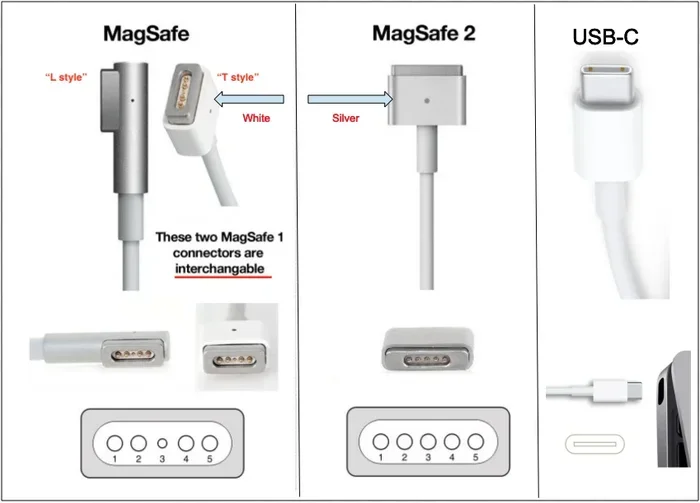
For years, MacBooks used MagSafe chargers. MagSafe stood for Magnetic Safe. The connector attached magnetically to the side of the laptop. This design was brilliant because it prevented accidental drops. If someone tripped over the cable, the magnet would release the charger instead of pulling the laptop off the table. MagSafe chargers came in different wattages, but they all used the same physical connector for a given Mac generation. The MagSafe 2 connector was thinner than the original MagSafe, and it worked on MacBooks from 2012 to 2015. If you have a vintage Mac, you still need a MagSafe charger.
The Switch to USB-C
Apple introduced USB-C on the 12-inch MacBook in 2015. USB-C is a small, reversible connector. It can carry data, video, and power through a single cable. This was a game-changer. You no longer needed a separate power brick for charging. Apple started using USB-C Power Adapters with different wattages to match the power needs of each Mac. The transition took a few years, and Apple still sold MagSafe chargers alongside USB-C models for a while. Today, every current Mac laptop uses USB-C for charging. The MagSafe connector lives on in a new form: MagSafe 3, which uses a magnetic USB-C-like connector for the latest MacBook Pro models.
Which Mac Models Use Which Chargers?
Not all MacBooks need the same charger. The right charger depends on the model, the year, and the chip inside. Here is a breakdown of the most common Mac laptops and their charging requirements. Use this guide to find the perfect match.
MacBook Pro Charger Types
The MacBook Pro comes in several sizes: 13-inch, 14-inch, 16-inch, and the 17-inch model (discontinued but still in use). Each model has specific charger needs.
- MacBook Pro 13-inch (2016 and later): Uses USB-C. Apple includes a 60W USB-C Power Adapter. A 30W adapter works but charges slower. A 87W adapter works fine and charges faster.
- MacBook Pro 14-inch and 16-inch (M1 Pro/Max and later): These powerful machines need a 96W or 140W USB-C Power Adapter. Apple includes a 140W adapter with the 16-inch model. The 96W adapter is also compatible and charges at full speed.
- MacBook Pro 13-inch (2020 and later with M1 chip): Uses a 60W USB-C Power Adapter. A 30W adapter will charge slowly but works.
MacBook Air Charger Types
The MacBook Air is more power-efficient, so it needs less wattage. Most models use a 30W USB-C Power Adapter. The 13-inch MacBook Air with M2 chip also uses a 30W adapter. Older MacBook Air models with USB-A charging (pre-2018) used a 45W or 60W MagSafe charger, but those are rare now.
Mac Mini and Mac Studio Power Needs
Desktop Macs do not use the same chargers as laptops. The Mac Mini comes with a 150W or 300W power supply. The Mac Studio uses a 370W or 475W power supply. These are not interchangeable with Mac laptop chargers. If you need a replacement, you must buy the exact desktop power supply for your model.
| Mac Model | Connector Type | Included Charger Wattage | Compatible Chargers |
|---|---|---|---|
| MacBook Air (M1/M2/M3) | USB-C | 30W | 20W (slow), 30W, 60W, 96W |
| MacBook Pro 13-inch (M1/M2/M3) | USB-C | 60W | 30W (slow), 60W, 87W, 96W |
| MacBook Pro 14-inch | USB-C / MagSafe 3 | 140W | 96W, 140W |
| MacBook Pro 16-inch | USB-C / MagSafe 3 | 140W | 96W, 140W |
| MacBook Pro 13-inch (2016-2019 Intel) | USB-C | 60W or 87W | 60W, 87W |
| MacBook (2015-2017, USB-C only) | USB-C | 29W | 29W, 30W, 60W |
| MacBook (2009-2012, MagSafe) | MagSafe / MagSafe 2 | 45W or 60W | 45W, 60W MagSafe |
Can You Share Chargers Between Different MacBooks?
Sharing chargers is convenient, especially in households or offices with multiple MacBooks. The short answer is yes, you can share chargers, but with some important caveats. The connector must match, and the wattage should be sufficient for the laptop you are charging.
Quick Tips for Sharing Chargers
- Check the connector type first: USB-C to USB-C works across all modern MacBooks. MagSafe chargers only work with MagSafe MacBooks.
- Match the wattage when possible: A 60W charger can charge a MacBook Air, but it will charge a 16-inch MacBook Pro slowly. It will still work, just not at full speed.
- Use a higher wattage charger safely: A 96W charger will charge a MacBook Air just fine. The laptop only draws the power it needs. A 140W charger will also work on a MacBook Air, but it is overkill.
- Use a lower wattage charger with caution: A 20W iPhone charger will charge a MacBook Air, but it will take many hours. You can use it in an emergency, but do not rely on it daily.
- Buy a USB-C Power Adapter with USB-C Power Delivery (PD): This standard allows the charger and laptop to negotiate the right power level automatically. Most Apple USB-C adapters support PD.
Common Mistakes to Avoid
- Using a MagSafe charger on a USB-C MacBook: The connectors do not fit. You need an adapter, and it may not work reliably.
- Using a non-Apple charger without checking compatibility: Many third-party USB-C chargers work great, but cheap knockoffs can damage your battery or fail to charge at all. Look for chargers that are USB-IF certified and support USB-C PD.
- Ignoring cable quality: A cheap USB-C cable can limit charging speed or overheat. Use Apple-certified cables or reputable brands like Anker, Belkin, or Cable Matters.
- Assuming all USB-C chargers are the same: A 30W charger and a 100W charger are not interchangeable in terms of speed. The wattage matters, especially for power-hungry MacBook Pro models.
What Happens If You Use The Wrong Charger?
Using the wrong charger might seem harmless, but it can cause real problems. The severity depends on the mismatch between the charger and your Mac.
Slow Charging Issues
If you plug a 20W charger into a 16-inch MacBook Pro, the laptop will charge, but very slowly. You might notice the battery percentage barely moves while you work. This happens because the charger cannot supply enough power. The Mac will draw power from the charger and also sip from the battery at the same time, leading to a net zero or even a slow drain while you use it.
Battery Health and Safety
Apple designs its charging system to protect battery health. The Mac communicates with the charger through USB-C Power Delivery. If the charger cannot deliver enough wattage, the Mac will limit its power draw to stay safe. However, using a charger that is not USB-C PD compliant can confuse the system. In rare cases, a faulty charger can cause overheating, swelling, or reduced battery lifespan. Always use a charger that supports the correct voltage and amperage for your Mac model.
Expert Insights: What Apple Engineers Say
Apple engineers have stated in support documents that using an Apple USB-C Power Adapter with the correct wattage is the best way to charge any Mac. They also note that third-party chargers that meet USB-C PD standards are safe. However, they caution against using chargers that do not support USB-C PD, as they may not negotiate power correctly. The company recommends checking the charger’s output rating and ensuring it matches or exceeds your Mac’s requirements. When in doubt, stick with the charger that came in the box or buy an Apple replacement.
The Future of Mac Charging: USB-C and Beyond
Apple has fully embraced USB-C as the universal charging standard for its laptops. The transition brought simplicity and versatility. You can now charge your Mac, iPad, and iPhone with the same type of cable and adapter. This is a big step forward for reducing cable clutter.
USB-C Power Delivery (PD) Standard
USB-C PD is the protocol that allows chargers and devices to negotiate power levels. A USB-C PD charger can deliver anywhere from 5W to 240W, depending on the device. Your Mac will automatically pull only the power it needs. This means a single 140W USB-C charger can charge a MacBook Pro 16-inch at full speed and also fast-charge an iPhone 15 Pro. The flexibility is a huge advantage.
Will All Future Macs Use the Same Charger?
Apple has not announced any plans to change its USB-C approach. The EU regulations pushed many companies toward USB-C, and Apple has already made the switch for its laptops. It is likely that all future MacBooks will continue to use USB-C charging. The MagSafe 3 connector is essentially a magnetic USB-C implementation, keeping the magnetic safety feature while embracing the universal standard. For now, USB-C is the one charger to rule them all in the Mac laptop world.
Do all Mac laptops use the same charger? The answer remains no, but the future points toward a more unified charging experience. Until then, knowing your specific Mac model and its charger requirements is the best way to keep your laptop powered and healthy. Always check the label on your power adapter, match the connector, and choose the right wattage. With the right charger, your Mac will charge quickly, run cool, and keep your battery in great shape for years to come.
Frequently Asked Questions
Can I use a 60W charger with a MacBook Air?
Yes, you can. A 60W USB-C Power Adapter will charge a MacBook Air quickly and safely. The Air only draws the power it needs, so using a higher wattage charger will not damage it. It is a great option if you want faster charging or if you share a charger with a MacBook Pro.
What happens if I use a 30W charger on a MacBook Pro 16-inch?
The MacBook Pro 16-inch will still charge, but it will be very slow. The 30W charger cannot supply enough power for the Pro chip to run and charge at the same time. You might see the battery drain slightly while you work under heavy load. It is fine for emergency top-ups, but not ideal for daily use.
Are MagSafe chargers still available for MacBooks?
Yes, but only for older MacBooks that use MagSafe or MagSafe 2 connectors. Apple no longer makes MagSafe chargers for current USB-C MacBooks. The new MagSafe 3 is a magnetic USB-C connector and uses USB-C Power Adapters. If you have a 2015 or older MacBook, you can still find MagSafe chargers from Apple or third-party sellers.
Can I charge my MacBook with a USB-C hub or dock?
Yes, you can charge your MacBook through a USB-C hub or dock as long as the hub supports USB-C Power Delivery and passes through enough wattage. Many hubs only support 10W or 15W, which is too low for MacBooks. Check the hub’s power delivery specs before relying on it for charging.
Is it safe to use a third-party USB-C charger for my Mac?
It is safe if the third-party charger is USB-IF certified and supports USB-C Power Delivery. Reputable brands like Anker, Belkin, and Satechi make excellent Mac-compatible chargers. Avoid cheap, uncertified chargers that do not list their power specs clearly. They can be unreliable and may damage your battery.
How do I know which charger my Mac came with?
Look at the USB-C Power Adapter that came in the box. It will have a wattage rating printed on it, such as 30W, 60W, 96W, or 140W. You can also check your Mac model on Apple’s website and look up the power adapter specifications. The charger that came with your Mac is always the best match.