Do Netflix Games Need Wi Fi Or Can You Play Offline
Do Netflix games need Wi-Fi? The answer depends entirely on the game type. You can play offline if you download them first. However, streaming games always require a Wi-Fi connection.
Do Netflix games need Wi-Fi? The short answer is yes and no. It depends entirely on the type of game you want to play. Offline gaming is possible for some titles, while streaming games always require a strong Wi-Fi connection. If you want to play without internet, you need to know the difference. This guide breaks down exactly how Netflix games work when you are away from a wireless network. You will learn how to download games, manage game storage, and avoid common pitfalls. By the end, you will know exactly how to enjoy your favorite mobile games anywhere.
Many people love the Netflix app for movies and shows. But the gaming experience adds a whole new layer of fun. Whether you are on a long flight or in a dead zone, understanding data usage and internet connection rules is key. You cannot just tap and play every title without thinking about your Wi-Fi connection. Let us explore how you can access the game library and what it takes to play offline successfully.
Key Takeaways
- Point 1: Netflix games need Wi-Fi only if you are streaming them. Downloaded games work perfectly without an internet connection.
- Point 2: You can enjoy offline gaming by downloading your favorite titles through the Netflix app while on a wireless network.
- Point 3: Streaming games will not work without a stable internet connection because they rely on remote servers.
- Point 4: Always check your game storage and data usage before traveling to ensure smooth play without internet.
- Point 5: Smart TV games typically require a Wi-Fi connection and do not support offline downloads.
- Point 6: Allowing background data helps the app verify your Netflix subscription even when you are offline.
📑 Table of Contents
Do Netflix Games Need Wi-Fi to Work?
Before you can figure out if you need Wi-Fi, you must understand how Netflix games actually function. Netflix does not build these games itself. Instead, it partners with developers to bring them to the Netflix app. There are two main ways these games reach your screen. Some games stream directly from the cloud, while others download fully to your device. Each method has different rules about internet connection and offline gaming.
The Two Types of Netflix Games
The first type is streaming games. These are exactly like watching a video. The game runs on a remote server, and Netflix sends the video feed to your phone or TV. This means you need a constant Wi-Fi connection or cellular data. If your internet connection drops, the game pauses. You cannot play without internet using this method. The second type is downloaded games. These install directly onto your phone or tablet. Once installed, they do not need a live feed from Netflix servers to run. This is the key to offline gaming.
How the Netflix App Handles Games
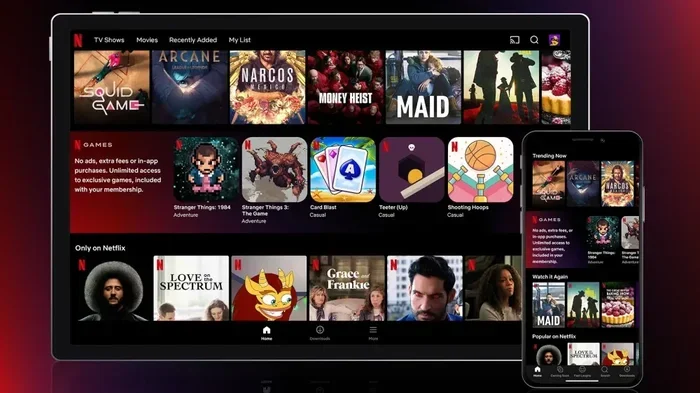
The Netflix app acts as a gateway. It does not just host videos anymore. It now hosts a game library that sits alongside your favorite shows. When you tap on a game, the app checks your device. It decides whether to stream or download. For mobile games, the app uses touch controls to make gameplay smooth. On smart TVs, it uses your remote or a connected controller. The app also manages game updates and background data. If you want to save data usage, you must tell the app to only download over a wireless network connection. This prevents accidental downloads when you are away from home.
Cloud gaming is a marvel of modern technology. It lets you play heavy games on weak devices. Your phone does not do the hard work. A remote server does. The server renders the graphics and sends them to you. You send your inputs back to the server. This entire loop happens in milliseconds. But it requires a perfect Wi-Fi connection. If your wireless network drops for even a second, you fall behind. This is why streaming games cannot work without internet. The server needs constant feedback.
Downloaded games work completely differently. The game engine runs on your phone’s processor. The graphics are already on your device. There is no need to send data back and forth in real time. This is the magic of download games. Once the game downloads are complete, the game is yours. You own it on your device. You can play without internet for as long as you want. You do not need a Wi-Fi connection to load a saved level. This makes downloaded mobile games perfect for long flights or road trips. Just remember that you still need the Netflix app installed to access them.
Can You Play Netflix Games Without Wi-Fi?
The answer to this question is not a simple yes or no. It relies heavily on which game you choose. Offline gaming is a reality, but it has limits. You cannot just open the app and play any game without a Wi-Fi connection. You must prepare ahead of time. Here is a closer look at how play without internet works on Netflix.
The Reality of Playing Downloaded Games Offline
When you download games onto your phone, you create a local copy. This copy lives in your game storage. It does not need to talk to Netflix servers to run. You can turn on airplane mode and still play. This is the ultimate freedom for offline gaming. You are not tied to a wireless network or cellular data. Your gaming experience depends only on your device’s battery and power. This is why many fans love Netflix mobile games. They can enjoy a gaming experience anywhere, anytime. Just remember that you must download the game while you are still connected to a Wi-Fi connection.
What Happens When Streaming Games Lose Connection
Streaming games are a different beast. They live on remote servers. Your device is just a window into that world. If your Wi-Fi connection fails, the window closes. You will see a frozen screen or a disconnect message. You cannot recover by tapping the screen. You must restore the internet connection first. Some games save your progress locally, but they still need the internet connection to sync it. If you lose connection mid-game, you might lose your progress. This is the biggest risk of streaming games. Always make sure you have a stable Wi-Fi connection before you start a streaming title.
How to Download Netflix Games for Offline Play
Want to enjoy offline gaming? You need to download the games first. This process is simple, but it requires some planning. You must ensure you have the right internet connection before you start. Here is how you can build your offline game library.
Step-by-Step Guide to Downloading
First, open the Netflix app on your smartphone or tablet. Make sure you are connected to a wireless network. Using cellular data for large game downloads is a bad idea. It can eat up your monthly data cap very quickly. Next, find the games section. You can usually see it at the bottom of the screen. Browse through the game library and pick a game you want to try. Look for a download icon. It usually looks like a downward arrow. Tap the icon, and the download games process will begin. You will see a progress bar. Wait for it to reach one hundred percent. Once finished, you will see a play button. You can now play without internet whenever you want.
Managing Storage and Game Updates
Game storage is a major factor in offline gaming. Modern games are large files. They can take up several gigabytes of space. If your phone is almost full, the download will fail. You should regularly check your game storage and delete games you no longer play. This keeps your device running fast. Another important step is managing game updates. Developers release updates to fix bugs and add content. To get these updates, you must connect to a Wi-Fi connection. The Netflix app usually does not update games over cellular data. If you want updates, you must be near a wireless network. You can change this setting in your device preferences, but be careful. Allowing updates over cellular data can lead to massive data usage and extra charges from your provider.
Device Compatibility and Offline Gaming
Not every device can handle Netflix games the same way. Your choice of device determines if you can play offline. Some devices support mobile games fully, while others are limited to streaming. Understanding device compatibility saves you from frustration. It ensures you pick the right device for your gaming experience.
Which Devices Support Offline Netflix Games?
Smartphones and tablets are the kings of offline gaming. Both Android and iOS devices support the Netflix app and game downloads. You can play without internet on an iPhone or an Android phone easily. These devices have the power to run downloaded mobile games. However, smart TV games work differently. Most smart TVs cannot download games directly. They rely on streaming games from the cloud. This means you need a constant Wi-Fi connection to play on your television. If you want offline gaming on a big screen, you need a workaround. You might use a streaming stick or a game console that supports the Netflix app. Always check the game library for device-specific limits before you start.
The Role of Background Data and Cellular Networks
Even when you think you are playing without internet, your phone might still be busy. The Netflix app sometimes uses background data. It checks to see if your Netflix subscription is still active. This tiny check happens behind the scenes. If you have blocked background data, the game might not open. You should allow background data for the Netflix app. This ensures smooth offline gaming. Using a small amount of cellular data for this check is usually fine. It uses very little data usage. However, if you are in a strict wireless network environment with no signal, the game might not launch until you reconnect. Always check your background data settings before you travel.
Common Mistakes and Quick Tips
Many fans make mistakes when they try offline gaming. They assume everything works automatically. But small errors can ruin your gaming experience. Learning from these mistakes helps you enjoy your game library without trouble. Here are the most common pitfalls and how to avoid them.
Quick Tips for the Best Offline Gaming Experience
- Check game storage first: Always make sure you have enough room before you download games. Delete old apps if you need space.
- Use a wireless network: Never use cellular data for big downloads. It eats up your data plan fast and slows down your internet connection.
- Update before you travel: Get all game updates while you are still on Wi-Fi. This prevents issues when you want to play without internet later.
- Allow background data: Let the Netflix app check your subscription in the background to avoid login loops when you are offline.
- Keep the app installed: Do not delete the Netflix app to save space. Doing so will also erase your game downloads.
Common Mistakes That Ruin Offline Play
The biggest mistake is assuming all games can be played without internet. Many fans download a game and expect it to work on a plane. But some titles are streaming games only. They never download. Another common error is forgetting to update the game. If you downloaded the game months ago, it might need an update. You cannot get that update without a Wi-Fi connection. Also, people often ignore data usage settings on their phones. If your phone restricts background data, the game might not open. Finally, some users delete the Netflix app to save game storage. This also deletes your downloaded titles. Always keep the app installed if you want to keep your offline games.
Do Netflix Games Need Wi-Fi in the Future?
Netflix is constantly changing its game library. The company knows that offline gaming is highly desired by modern users. Travelers and commuters want to play without internet more than ever. Will Netflix expand these options in the future? The trend looks very promising. More mobile games are being added that support full offline play. This significantly improves the overall gaming experience. As streaming games become more popular, the need for better offline modes will only grow. Netflix must balance server costs with user demands. They want to keep subscribers happy and engaged. Expect to see more download options in the coming years.
Will Netflix Expand Offline Gaming Options?
It is very likely that Netflix will expand game downloads in the future. Other streaming services already offer offline downloads for video. Netflix wants to compete with them. By expanding game downloads, they make their service more attractive to travelers. You might soon see a special filter that shows only games that work offline. This would make finding the right title much easier. Until then, always check the game details before you download games. Look for any mention of offline play in the description. This small step saves you from disappointment later.
How This Impacts the Gaming Experience
Better offline support changes everything about how we game. It means your gaming experience is no longer tied to your living room Wi-Fi connection. You can game on a plane, in a cabin, or on a bus. Touch controls on mobile devices make this even more convenient. The Netflix subscription becomes much more valuable when you can play anywhere. As internet connection issues become less of a barrier, more people will explore the game library. Offline gaming is the future of mobile entertainment. Netflix understands this. That is why they are investing heavily in making their games work without a wireless network. The future of Netflix games is bright and flexible.
Conclusion
So, do Netflix games need Wi-Fi? The answer is clear now. Streaming games always require a Wi-Fi connection. You cannot play without internet if you are streaming live from the cloud. However, downloaded games open the door to true offline gaming. You can enjoy mobile games anywhere, anytime. You just need to prepare ahead of time. Always check your game storage and data usage before you travel. Download your favorite titles while connected to a wireless network. Allow background data so the app can verify your Netflix subscription. By following these steps, you get the best gaming experience possible. You are no longer stuck at home waiting for a Wi-Fi connection. You can take your game library with you everywhere you go. Embrace the freedom of offline gaming and enjoy your Netflix games on your own terms. Whether you are using touch controls on your phone or a controller on your TV, knowing how to play offline makes your Netflix subscription even more valuable.
Frequently Asked Questions
Can I play Netflix games on a plane?
Yes, but only if you downloaded the game before your flight. Streaming games will not work without a Wi-Fi connection. Make sure to download games while you are still on the ground and connected to a wireless network. Once downloaded, you can play without internet for the entire flight.
Do downloaded Netflix games take up a lot of space?
Yes, game downloads can take up several gigabytes of space. Modern mobile games have high-quality graphics that require significant game storage. Before you download, check your phone’s available space. You should keep at least a few gigabytes free to ensure the download games process goes smoothly.
Why can’t I find the download button on some games?
If you do not see a download icon, the game is likely a streaming game. These titles run from Netflix servers and do not support offline gaming. You will need a constant internet connection to play them. Always check the game details before you try to download games for offline play.
Will my game save progress if I play offline?
Most downloaded Netflix games save your progress locally on your device. However, some games might need you to connect to a Wi-Fi connection eventually to sync your progress with the cloud. If you never connect again, your progress stays on your device. To be safe, sync your progress when you have an internet connection.
Can I use cellular data to download Netflix games?
Technically yes, but it is not recommended. Using cellular data for large game downloads can quickly eat up your monthly data cap. It can also lead to slow download speeds if your cellular network is weak. Always use a wireless network to download games to save your data usage and ensure a fast connection.
Do I need a Netflix subscription to play games offline?
Yes, you must have an active Netflix subscription to access the game library. This is true for both streaming games and downloaded games. The Netflix app verifies your subscription status. Even for offline gaming, the app might check your subscription in the background using background data.