Do Thick Walls Affect Your Wifi Speed and Performance
Do Thick Walls Affect Wifi? Yes, thick walls can significantly weaken your wireless signal and reduce internet speed. Materials like concrete, brick, and stone block wifi more than wood or drywall. This guide explains how wall thickness impacts your wifi signal strength, which materials cause the most interference, and practical fixes to restore your wireless connection throughout your home.
Have you ever walked into a room and noticed your wifi suddenly drops? Maybe your streaming show buffers nonstop, or your video call freezes right when things get interesting. If your home has thick walls, that frustrating experience might not be an accident. Do Thick Walls Affect Wifi? The short answer is yes — and the impact can be bigger than you think.
Many homeowners deal with weak signals, slow internet speeds, and annoying dead zones without realizing their walls are the real culprit. Whether you live in an older brick home or a modern concrete building, wall thickness and material play a huge role in how well your wireless connection performs. This article breaks down exactly how thick walls affect your wifi signal strength, which materials cause the most trouble, and — most importantly — what you can do about it.
Key Takeaways
- Thick walls reduce wifi signal: Dense materials like concrete and brick absorb and block wireless signals, creating dead zones in your home.
- Wall material matters more than thickness alone: A thick brick wall blocks more signal than a thick wooden wall.
- 2.4GHz travels farther through walls: Lower frequency bands penetrate obstacles better than 5GHz.
- Mesh networks solve thick-wall problems: A mesh wifi system places nodes in every room for seamless coverage.
- Router placement is critical: Central, elevated positioning improves signal flow through thick walls.
- Wifi extenders and boosters help: Affordable devices can fill in coverage gaps caused by thick walls.
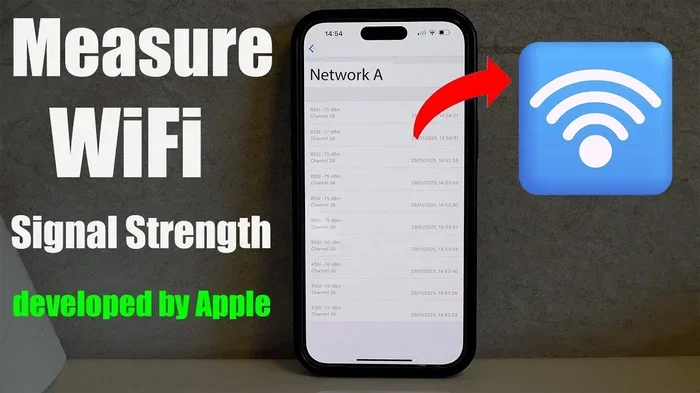
- Testing your signal is the first step: Use apps to identify weak spots before choosing a solution.
📑 Table of Contents
- How Thick Walls Impact Your Wifi Signal
- Which Wall Materials Block Wifi the Most
- How to Test Your Wifi Signal Through Walls
- Best Solutions for Wifi Through Thick Walls
- Router Placement Tips for Thick-Walled Homes
- When to Upgrade Your Network Equipment
- Common Mistakes That Make Thick-Wall Wifi Worse
- Quick Tips to Boost Wifi Through Thick Walls
- Conclusion
How Thick Walls Impact Your Wifi Signal
Understanding how walls affect your wireless connection starts with basic science. Wifi signals are radio waves. They travel through the air and pass through objects in their path. But not all objects let signals through equally.
When a wifi signal hits a wall, three things can happen. The signal gets absorbed. It gets reflected. Or it gets scattered. Thick, dense walls do a great job of absorbing and blocking signals. That means less signal reaches the other side. The result? Slower speeds, dropped connections, and frustrating dead zones.
The Science Behind Signal Penetration
Wifi routers broadcast signals at two main frequencies: 2.4GHz and 5GHz. The 2.4GHz band has a longer wavelength. This lets it travel farther and pass through obstacles more easily. The 5GHz band offers faster speeds but has a shorter wavelength. It struggles more when it hits thick walls.
Think of it like water hitting a wall. A thin curtain lets most water through. A thick concrete wall stops it completely. Your wifi signal works the same way. The thicker and denser the wall, the more signal it blocks.
Signal loss through walls is measured in decibels (dB). Each wall adds to the total loss. One standard drywall might reduce signal by 3dB. A brick wall can add 6dB to 12dB. A concrete wall might reduce it by 10dB to 20dB. Add up several walls between your router and your device, and you can see why your internet speed drops dramatically.
What Is a Wifi Dead Zone?
A wifi dead zone is an area in your home where the signal is too weak to work. You might see full bars on your phone but get no actual connection. Or you might have a connection so slow it is basically useless.
Thick walls are the number one cause of dead zones in most homes. Rooms on the opposite side of the house from your router are the most vulnerable. Basements, attics, and interior bathrooms often suffer the most because of their thick or moisture-heavy walls.
Which Wall Materials Block Wifi the Most
Not all walls are created equal. The material matters just as much as — and sometimes more than — the thickness. Here is a look at common wall materials and how they affect your wireless connection.
Concrete and Cinder Block
Concrete is one of the worst materials for wifi signals. A standard concrete wall can reduce your signal by 10dB to 20dB. That means the signal on the other side is only a fraction of what it was before. Cinder block walls are similarly damaging. If your home has concrete or cinder block walls, you will likely notice weak signals in multiple rooms.
Brick
Brick walls are also tough on wifi. A single brick wall can block a noticeable amount of signal. Older homes with thick brick exteriors and interior brick partitions are especially problematic. The dense clay material absorbs radio waves effectively. This makes it hard to maintain a strong wifi signal strength throughout the house.
Stone and Marble
Natural stone walls are heavy and dense. They block wifi signals almost as well as concrete. Marble walls, common in older or luxury homes, are similarly effective at blocking signals. If your home features stone or marble walls, you may need extra equipment to get good coverage.
Metal and Mirrors
Metal is the enemy of wifi. Metal studs in walls, metal lath, and even metal siding can completely block signals. Mirrors are also problematic because their reflective backing bounces wifi signals away. Even a large mirror on the wall opposite your router can cause serious interference.
Wood and Drywall
Wood and standard drywall are much more wifi-friendly. A standard wooden stud wall with drywall on both sides might only reduce signal by 3dB to 5dB. This is why most modern frame homes have better wifi coverage than brick or concrete homes. However, thick wood panels or plywood can still cause noticeable signal loss.
Glass and Windows
Glass is generally good for wifi signals. However, energy-efficient windows with metallic coatings can reflect signals. Low-E glass (low emissivity) contains a thin metallic layer that blocks heat. It also blocks wifi signals to some degree. Large windows facing your router can actually help extend coverage.
Water and Moisture
Water is a strong wifi signal absorber. This is why bathrooms and indoor pools often have weak signals. Thick plaster walls in older homes can also hold moisture, which worsens signal loss. If your walls are both thick and damp, expect a double hit to your wireless connection.
How to Test Your Wifi Signal Through Walls
Before you fix a problem, you need to know where it is. Testing your wifi signal strength through walls helps you identify dead zones and weak spots. Here are simple ways to do it.
Use a Wifi Signal Meter App
Many free apps measure signal strength in real time. Apps like Wifi Analyzer (Android) or NetSpot (Windows and Mac) show signal strength as you move through your home. Walk room by room and note where the signal drops. You will quickly see which walls are causing the most damage to your network coverage.
Run a Speed Test in Each Room
Signal strength tells you how much signal reaches a spot. A speed test tells you how well it actually works. Run a speed test in every major room. Compare the results. You may find that a room with moderate signal still gets great speeds, while another room with slightly weaker signal gets almost nothing.
Check Your Router Settings
Most modern routers show connected devices and their signal quality in the admin panel. Log in to your router and look at the device list. This gives you a quick overview of which areas of your home have strong and weak connections.
What to Look For
- Signal strength below -70dBm: Poor connection, likely in a dead zone.
- Signal strength between -50dBm and -70dBm: Fair to good connection.
- Signal strength above -50dBm: Excellent connection.
- Speed drops below 50% of your plan speed: Walls may be blocking the signal.
Best Solutions for Wifi Through Thick Walls
The good news is you do not have to live with weak signals. Several solutions can help your wireless connection punch through thick walls. Here are the most effective options.
Upgrade to a Mesh Wifi System
A mesh wifi system is the best solution for homes with thick walls. Unlike a single router, a mesh system uses multiple nodes placed around your home. Each node acts as a mini router. They work together to create one seamless network with full network coverage everywhere.
Mesh systems are especially effective because you place a node in each problematic room. This means signals do not have to travel through multiple thick walls. The node in the far room connects to the main router and rebroadcasts the signal locally. Popular mesh systems include Google Nest Wifi, Eero, and TP-Link Deco.
Use a Wifi Extender or Repeater
A wifi extender boosts your existing signal by receiving it and rebroadcasting it. Place an extender halfway between your router and the dead zone. This can significantly improve coverage through thick walls.
However, extenders have a downside. They usually cut your speed in half because they use the same radio to receive and send data. For light browsing and email, this is fine. For heavy streaming or gaming, a mesh system is better.
Switch to the 2.4GHz Frequency Band
If your router supports dual bands, try switching to the 2.4GHz band for devices far from the router. The 2.4GHz band penetrates walls much better than 5GHz. You will lose some speed, but you will gain reliability and range.
Most modern routers automatically switch devices between bands. Check your router settings to see if you can manually assign devices to the 2.4GHz band for better signal penetration through thick walls.
Install a Powerline Adapter
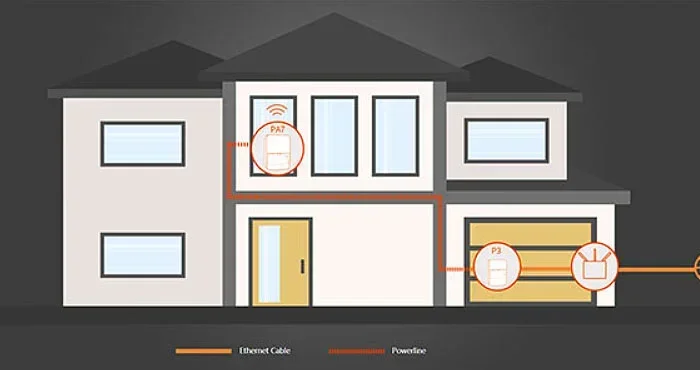
A powerline adapter uses your home’s electrical wiring to carry internet signals. You plug one adapter near your router and another in the room with weak signal. This bypasses walls entirely. Powerline adapters are a great option when thick walls make wireless signals unreliable.
Modern powerline adapters support gigabit speeds. They are easy to set up and require no new wiring. They work best when both adapters are on the same electrical circuit.
Run an Ethernet Cable
For the best possible connection, nothing beats a wired ethernet cable. If you have a device that needs strong, stable internet, run a cable directly from the router to that device. This eliminates wall interference completely.
Ethernet cables come in long lengths and flat designs that are easy to hide under rugs or along baseboards. For rooms far from the router, a long ethernet cable is often the simplest and most reliable fix.
Use a Wifi Booster with an External Antenna
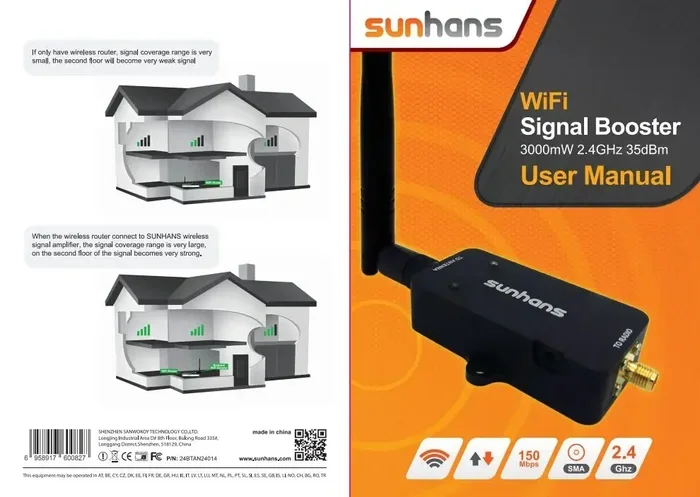
Some wifi boosters come with external antennas that focus the signal directionally. These can push more signal through walls by aiming the beam toward the dead zone. Look for boosters with high-gain antennas for the best results with thick walls.
Router Placement Tips for Thick-Walled Homes
Where you place your router has a huge impact on how well your wireless connection works through thick walls. Small changes in placement can make a big difference.
Put Your Router in a Central Location
The best router position is as close to the center of your home as possible. This gives signals the shortest path to every room. If your router sits in one corner, signals must pass through multiple thick walls to reach the far side of the house.
Keep It Elevated
Wifi signals spread outward and downward. Placing your router on a high shelf or mounting it on a wall improves coverage. Signals travel better through open air than through furniture and clutter. Keep your router out in the open, not hidden inside a cabinet or closet.
Avoid Placement Near Thick Walls
If possible, do not place your router right next to a thick exterior wall. The signal will struggle to get through that wall before it even reaches the rest of the house. Give your router some breathing room on the interior side of the home.
Keep It Away from Interference Sources
Microwaves, cordless phones, baby monitors, and Bluetooth devices can all interfere with your wireless connection. Keep your router at least a few feet away from these devices. Also avoid placing it near large metal objects, which can block or reflect signals.
Adjust the Antennas
If your router has external antennas, position them correctly. For multi-story homes, point one antenna vertically and one horizontally. This helps the signal spread across floors and through walls more effectively. Experiment with different angles to find the best setup for your home network.
When to Upgrade Your Network Equipment
Sometimes no amount of repositioning or add-on devices will solve the problem. If your home has many thick walls and you still experience poor coverage, it may be time to upgrade your equipment.
Is Your Router Outdated?
Older routers use older wifi standards like 802.11n or 802.11g. These standards have weaker signal penetration and slower speeds. Upgrading to a modern router with wifi 6 or wifi 6E technology can improve performance through thick walls. Newer routers handle interference better and deliver stronger signals.
Consider a Professional Network Setup
For large homes with many thick walls, a professional network installation can be worth the investment. A pro can install access points throughout your home, run ethernet cables behind walls, and configure a system that delivers full network coverage everywhere. This is the most expensive option but also the most reliable.
Plan for Future Needs
When choosing new equipment, think about your future needs. More devices, higher speeds, and smart home gadgets all put more demand on your home network. Investing in a quality mesh system or professional setup now saves you headaches later.
Common Mistakes That Make Thick-Wall Wifi Worse
Many people make mistakes that worsen their wifi problems. Avoid these common errors to get the best performance from your wireless connection.
- Hiding the router in a closet: Walls and doors around the router block signals before they even start.
- Placing the router on the floor: Signals struggle to travel downward through floors and furniture.
- Using an old or cheap router: Older routers lack the power and technology to push signals through dense materials.
- Ignoring firmware updates: Router manufacturers release updates that improve signal handling and fix bugs.
- Overloading one band: Putting all devices on the 5GHz band forces them to struggle through thick walls with weaker signals.
Quick Tips to Boost Wifi Through Thick Walls
- Restart your router regularly to keep it running at peak performance.
- Change your wifi channel to reduce interference from neighbors.
- Use a wifi analyzer app to find the least crowded channel.
- Update your router firmware whenever a new version is available.
- Reduce the number of connected devices if your bandwidth is stretched thin.
- Use a range extender for a quick, affordable fix in one problem room.
- Consider a mesh system for whole-home coverage in thick-walled homes.
Conclusion
Do Thick Walls Affect Wifi? Absolutely. Thick walls, especially those made of concrete, brick, or stone, can severely weaken your wireless connection and slow down your internet speed. The good news is you have many options to fix the problem. From smart router placement to mesh networks, powerline adapters, and wifi extenders, there is a solution for every home and budget.
The key is to test your signal first. Identify which walls are causing the most damage. Then choose the right solution for your situation. A mesh wifi system works best for whole-home coverage. A powerline adapter is great for a single problem room. And simple router repositioning can sometimes solve the issue for free.
Do not let thick walls keep you from enjoying fast, reliable internet. Take action today. Test your signal, try a few placement changes, and invest in the right equipment. Your home network will thank you with stronger connections, faster speeds, and fewer frustrating dead zones.
Frequently Asked Questions
Do thick walls affect wifi speed?
Yes, thick walls can significantly reduce wifi speed. Dense materials like concrete and brick absorb and block wifi signals, causing slower connections on the other side. The thicker and denser the wall, the more signal loss you will experience.
Which wall material blocks wifi the most?
Concrete and cinder block walls block wifi signals the most. Brick, stone, and metal walls are also very effective at blocking signals. Wood and drywall allow the most signal to pass through compared to other materials.
Does 2.4GHz wifi penetrate thick walls better than 5GHz?
Yes, 2.4GHz wifi penetrates thick walls much better than 5GHz. The longer wavelength of 2.4GHz signals allows them to travel farther and pass through obstacles more easily. However, 5GHz offers faster speeds in areas with direct line-of-sight to the router.
Can a mesh wifi system solve thick-wall wifi problems?
Yes, a mesh wifi system is one of the best solutions for thick-wall wifi problems. Mesh nodes placed throughout your home create a strong, seamless network. Each node rebroadcasts the signal locally, reducing the number of thick walls the signal must pass through.
How can I test wifi signal strength through walls?
Use a wifi signal meter app like Wifi Analyzer or NetSpot. Walk through your home and check the signal strength in each room. Run speed tests in problem areas to see how much your thick walls are affecting your internet speed and wireless connection quality.
Is a wifi extender worth it for thick-walled homes?
A wifi extender can help in thick-walled homes, especially for a single problem room. However, extenders often reduce speed because they rebroadcast the signal they receive. For best results in homes with many thick walls, a mesh wifi system is a better long-term investment.