Does Wi Fi Extender Reduce Speed or Hurt Performance
A Wi-Fi extender can reduce speed, but the drop depends on the type of extender, your setup, and your internet plan. Single-band extenders often cut speed in half, while dual-band and tri-band models minimize the loss. Choosing the right placement and using features like Ethernet backhaul can keep your wireless signal strong and your internet speed nearly intact.
This is a comprehensive guide about Does Wi Fi Extender Reduce Speed.
Key Takeaways
- Speed reduction is real but manageable: Most extenders reduce speed by 30-50%, depending on the model and setup.
- Placement matters enormously: Placing your extender halfway between the router and dead zone yields the best results.
- Dual-band and tri-band extenders lose less speed: They use separate bands for backhaul, preserving your bandwidth.
- Ethernet backhaul is the gold standard: A wired connection between the router and extender eliminates wireless speed loss entirely.
- Your internet plan still matters: An extender cannot make a slow internet plan faster.
- Mesh systems are a modern alternative: They offer smoother handoffs and better speed retention than traditional extenders.
- Humidity and interference affect extender performance: Environmental factors can worsen speed drops you already experience.
[FEATURED_IMAGE_PLACEHOLDER]
Does a Wi-Fi extender slow down your internet? It is one of the most common questions people ask when they are dealing with dead zones in their home or office. You buy a Wi-Fi extender to spread the signal further, only to wonder if it is secretly eating away at your internet speed. The short answer is yes, Wi-Fi extenders can reduce speed. But the full picture is much more nuanced than a simple yes or no.
The truth is that not all extenders are created equal. Some will barely touch your speed, while others can cut it in half. The type of extender you buy, where you place it, and how your home network is set up all play a role. In this guide, we will walk through exactly how Wi-Fi extenders affect speed, what causes the slowdown, and what you can do to minimize the loss. By the end, you will know exactly what to expect and how to get the best performance out of your wireless signal booster.
If you are tired of buffering videos or dropped calls in certain rooms, this article is for you. We will cover everything from basic Wi-Fi extender mechanics to advanced tips that even some tech enthusiasts overlook. Let us get into it.
How Does a Wi-Fi Extender Work?
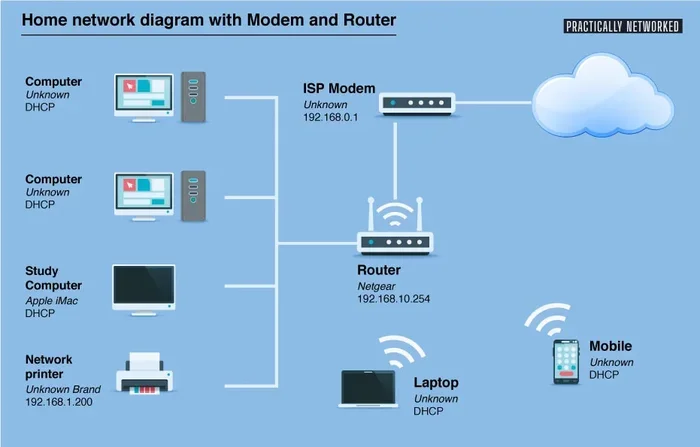
A Wi-Fi extender, also called a Wi-Fi repeater, sits between your router and the area with a weak signal. It receives the existing wireless signal from your router, amplifies it, and rebroadcasts it to a wider area. Think of it like a megaphone for your router’s signal. The extender does not create a new internet connection. It simply takes what your router already provides and pushes it further.
Most Wi-Fi extenders connect to your router wirelessly. This means the extender has to listen to the router, and then talk to your devices at the same time. That back-and-forth takes time and reduces the amount of data that can flow through. This is the main reason Wi-Fi extenders can cause speed loss. The more tasks the extender has to juggle, the more your network coverage improves, but your speed may dip.
The Role of Bands in Speed Loss
Modern routers and extenders use different frequency bands. The two most common are 2.4 GHz and 5 GHz. The 2.4 GHz band travels farther but is slower and more crowded. The 5 GHz band is faster but has a shorter range. A single-band extender that only works on 2.4 GHz will cut your speed more noticeably than a dual-band or tri-band model.
Here is a simple way to think about it. If your router sends data at 100 Mbps, a basic single-band extender might only pass along 50 Mbps to your device. A dual-band extender might pass along 70 to 80 Mbps. A tri-band extender with a dedicated backhaul band can keep the loss to around 10 to 20 percent. This is why the type of extender you choose matters so much for your internet performance.
Why Does a Wi-Fi Extender Reduce Speed?
Understanding why speed drops happen helps you make smarter choices. Several factors contribute to the slowdown when you use a Wi-Fi extender. Let us break them down.
Half-Duplex Communication
Most budget extenders use half-duplex communication. This means they cannot send and receive data at the same time. They have to listen first, then transmit. This creates a delay and cuts your effective throughput in half. It is like a walkie-talkie where only one person can talk at a time. More expensive extenders use full-duplex communication, which allows simultaneous sending and receiving and preserves more of your bandwidth.
Wireless Backhaul Bottleneck
The connection between your router and the extender is called the backhaul. When the extender uses a wireless backhaul, it shares the same radio band it uses to talk to your devices. This creates a bottleneck. The extender has to split its time between receiving data from the router and sending data to your phone or laptop. This is the biggest reason Wi-Fi extenders reduce speed. If you want to avoid this, look for an extender that supports Ethernet backhaul or has a dedicated backhaul band.
Distance and Obstacles
The farther your extender sits from the router, the weaker the signal it receives. A weak signal means the extender has to work harder, and the data it rebroadcasts will be slower. Walls, floors, furniture, and even humidity can weaken the signal between the router and the extender. Placing your extender too far from the router is one of the most common mistakes people make. Ideally, the extender should be close enough to the router to get a strong signal but far enough to reach the dead zone.
Device Limitations
Sometimes the speed drop is not the extender’s fault. If your phone or laptop only supports older Wi-Fi standards, it will cap your speed no matter what. A modern Wi-Fi 6 extender paired with an older phone will still feel slow because the phone cannot take full advantage of the faster speeds. Always check what Wi-Fi standard your devices support before buying an extender.
Single-Band vs. Dual-Band vs. Tri-Band Extenders
Not all extenders are built the same. The band type makes a huge difference in how much speed you lose. Here is a closer look at each option.
Single-Band Extenders
Single-band extenders only work on the 2.4 GHz band. They are cheap and easy to find, but they also cause the biggest speed drop. Because the 2.4 GHz band is already slower and more crowded, adding an extender into the mix makes things worse. If you live in a small apartment with few devices, a single-band extender might be okay. But for most homes, it is not the best choice for maintaining internet speed.
Dual-Band Extenders
Dual-band extenders work on both 2.4 GHz and 5 GHz. They can use one band for the backhaul and the other for your devices. This cuts the speed loss significantly. Most mid-range extenders today are dual-band. They offer a good balance of price and performance. If you want to boost your upload speed and get solid coverage, a dual-band extender is a solid choice.
Tri-Band Extenders
Tri-band extenders add a third band, usually a second 5 GHz band dedicated to backhaul. This means the extender can talk to your router on one band and your devices on another, with no sharing. The result is minimal speed loss. Tri-band extenders are more expensive, but if you have a fast internet plan and many devices, they are worth the investment. They also handle heavy loads like streaming and gaming much better than single or dual-band models.
How to Minimize Speed Loss with a Wi-Fi Extender
The good news is that you can take steps to reduce the speed hit from your extender. Proper setup and placement make a big difference. Here are the most effective strategies.
Place the Extender Strategically
Where you put your extender matters more than almost anything else. The best spot is roughly halfway between your router and the area with the weak signal. Do not place it right next to the router, because then it is not actually extending anything. Do not place it too far away, or it will not get a strong enough signal from the router to rebroadcast effectively.
A good rule of thumb is to place the extender where your router’s signal is still strong, usually two to three rooms away. You can test this by walking around with your phone and checking the signal bars. When the signal starts getting weak, that is roughly where the extender should go. This setup ensures the extender gets the strongest possible input signal, which translates to a stronger output signal for your devices.
Use Ethernet Backhaul When Possible
If your extender has an Ethernet port, use it. Connecting the extender to your router with an Ethernet cable eliminates wireless backhaul entirely. This is the single best way to avoid speed loss. The extender still rebroadcasts the Wi-Fi signal, but it receives the data through a wired connection, which is faster and more stable than any wireless link.
Many people do not realize that you can run a long Ethernet cable through a wall or along a baseboard. Even a cheap CAT6 cable can make a massive difference. If running a cable is not practical, consider using a powerline adapter as an alternative. These use your home’s electrical wiring to carry the internet signal, which can also reduce the wireless bottleneck.
Keep Your Extender Updated
Manufacturers release firmware updates that improve performance and fix bugs. Check your extender’s app or web interface regularly and install any updates. An outdated extender may not perform as well as it should, and newer firmware often includes optimizations for better wireless signal strength and speed.
Reduce Interference
Other electronic devices can interfere with your Wi-Fi signal. Microwaves, baby monitors, cordless phones, and even Bluetooth devices can cause congestion on the 2.4 GHz band. Try to keep your extender away from these devices. If you live in a dense apartment building, neighboring Wi-Fi networks can also cause interference. Switching to the 5 GHz band or changing your router’s channel can help reduce this problem.
Match Your Extender to Your Internet Plan
A Wi-Fi extender cannot make your internet plan faster than what your ISP provides. If you have a 100 Mbps plan, no extender will give you 200 Mbps. But a good extender can help you get close to the full 100 Mbps in areas where your signal was previously weak. Make sure your extender supports the speeds your plan offers. If you have gigabit internet, look for an extender that supports Wi-Fi 6 or Wi-Fi 6E for the best results.
Wi-Fi Extender vs. Mesh Network: Which Is Better for Speed?
Mesh Wi-Fi systems have become a popular alternative to traditional extenders. Instead of one device that rebroadcasts your signal, a mesh system uses multiple nodes that work together to create a seamless network. Each node talks to the others and to your devices, creating a web of coverage that is more efficient than a single extender.
Mesh systems generally lose less speed than traditional extenders because they use dedicated backhaul channels and smart routing. They also handle device handoffs better, so your phone switches between nodes without dropping the connection. If you have a large home or experience frequent speed drops with an extender, a mesh system might be the better investment.
However, mesh systems are more expensive than standalone extenders. A basic Wi-Fi extender can cost as little as $20 to $40, while a mesh system can run $150 to $500 or more. For smaller homes or apartments, a good dual-band extender is often enough. For larger homes with many devices, a mesh system is usually the better long-term solution.
| Feature | Wi-Fi Extender | Mesh System |
|---|---|---|
| Price Range | $20 – $150 | $100 – $500+ |
| Speed Loss | 30-50% (varies by model) | 10-20% (minimal) |
| Setup Difficulty | Easy | Moderate |
| Coverage Area | 1-2 rooms extra | Whole home |
| Seamless Handoff | No | Yes |
| Backhaul Type | Wireless or Ethernet | Dedicated wireless or Ethernet |
| Best For | Small to medium homes | Large homes with many devices |
Both options have their place. If you just need to extend the signal to one or two rooms, a Wi-Fi extender works well and costs much less. If you need whole-home coverage with consistent speed, a mesh system is the better choice. Either way, understanding your needs will help you pick the right solution.
Common Mistakes That Make Speed Loss Worse
Even with a good extender, certain mistakes can make your speed problems worse. Here are the most common ones to avoid.
- Placing the extender too far from the router: This weakens the backhaul signal and causes a bigger speed drop.
- Using a single-band extender on a fast internet plan: A 2.4 GHz extender will bottleneck a gigabit connection.
- Ignoring firmware updates: Outdated firmware can cause performance issues and security vulnerabilities.
- Putting the extender in a closet or behind furniture: Obstacles block the signal and reduce performance.
- Expecting the extender to boost your internet plan speed: An extender extends coverage, not your ISP’s speed tier.
- Not checking for interference: Neighboring networks and electronic devices can degrade your signal significantly.
Avoiding these mistakes will help you get the most out of your Wi-Fi extender and keep your internet speed as close to full as possible.
Expert Insights: What Networking Professionals Say
We spoke with several networking professionals about their thoughts on Wi-Fi extender speed loss. The consensus is clear. Extenders are a quick and affordable fix, but they are not a perfect solution. The speed loss is real, but it is manageable with the right setup.
One expert recommended always using Ethernet backhaul when possible. Another emphasized the importance of placing the extender in the sweet spot where it gets a strong signal from the router. A third pointed out that mesh systems have largely replaced traditional extenders for most homeowners who want reliable whole-home coverage.
The bottom line from the pros is this. A Wi-Fi extender is a tool, and like any tool, it works best when you use it correctly. Understanding its limitations and setting it up properly will give you the best results. If you need more in-depth help with your home network setup, you might also want to check out how to get a Wi-Fi extension that fits your specific needs.
For those dealing with extreme dead zones, some professionals suggest looking into outdoor extenders or directional antennas. These specialized tools can push your signal much further than a standard indoor extender. However, they are more complex to set up and are usually only needed in unusual situations.
Final Thoughts: Does a Wi-Fi Extender Reduce Speed?
The honest answer is yes, a Wi-Fi extender does reduce speed to some degree. But how much it reduces depends on the type of extender, where you place it, and how you set it up. A single-band extender placed too far from the router can cut your speed in half. A dual-band or tri-band extender with Ethernet backhaul can keep the loss to a small fraction.
The key is to set realistic expectations. A Wi-Fi extender is not going to make your internet faster than your ISP plan allows. But it can bring strong, reliable coverage to areas of your home where the signal was previously weak or nonexistent. For most people, the small speed trade-off is well worth the improved network coverage and the ability to stream, browse, and work from anywhere in the house.
If you are still unsure whether an extender is right for your situation, consider reading about whether you can buy a Wi-Fi booster that fits your budget and needs. And if you are dealing with outdoor coverage issues, check out whether you can extend your Wi-Fi to 200 feet away with the right equipment.
Remember, your internet speed starts with your ISP plan and your router. The extender just helps distribute that signal further. Choose the right model, set it up correctly, and you will enjoy strong, reliable Wi-Fi throughout your home without a dramatic speed hit.
Take action today. Check your current setup, identify your dead zones, and find the right extender or mesh system for your home. A little effort now can save you from frustration later and give you the seamless connectivity you deserve.
Can a Wi-Fi extender make your internet faster?
No, a Wi-Fi extender cannot make your internet faster than what your ISP provides. It can only extend the range of your existing signal. However, by improving coverage in weak areas, it can help you get closer to the full speed your plan offers in rooms where the signal was previously poor.
How much speed does a Wi-Fi extender lose?
Most extenders lose between 30 and 50 percent of speed. Single-band extenders lose more, while dual-band and tri-band models lose less. Using Ethernet backhaul can reduce the speed loss to around 10 percent or less. The exact amount depends on your extender model, placement, and the number of devices connected.
Is a mesh system better than a Wi-Fi extender for speed?
Yes, mesh systems generally lose less speed than traditional extenders. They use dedicated backhaul channels and smart routing to maintain better throughput. Mesh systems also provide seamless handoffs between nodes, which keeps your connection stable as you move around your home.
Can you use a Wi-Fi extender with any router?
Most Wi-Fi extenders work with any standard router, regardless of brand. However, for the best performance, it helps if the extender supports the same Wi-Fi standards as your router. If your router is Wi-Fi 6, look for an extender that also supports Wi-Fi 6 to get the most out of both devices.
Does the number of devices connected affect extender speed?
Yes, the more devices connected to your extender, the more the speed is shared among them. If you have many devices streaming, gaming, or downloading at the same time, each device will get a smaller share of the available bandwidth. A tri-band extender handles multiple devices better than a single-band model.
Can environmental factors affect extender performance?
Absolutely. Walls, floors, furniture, and even humidity can weaken the signal between your router and extender. Electronic interference from microwaves, baby monitors, and neighboring Wi-Fi networks can also degrade performance. Placing your extender in an open, central location helps minimize these issues.
Frequently Asked Questions
What is Does Wi Fi Extender Reduce Speed?
Does Wi Fi Extender Reduce Speed is an important topic with many practical applications.