Can I Buy A Modem And Have Internet Without Paying
Yes, you can buy a modem and have internet on your own terms. Purchasing your own modem eliminates monthly rental fees and gives you full control over your connection. This guide walks you through everything from choosing the right modem to setting it up and saving real money every month.
Have you ever wondered if you can buy a modem and have internet without paying a monthly rental fee to your internet service provider? The short answer is yes. You absolutely can buy your own modem and still enjoy a fast, reliable internet connection. But the full picture involves a few important details that many people overlook.
When you sign up for an internet plan, most providers give you a modem to use. The catch? They charge you a monthly rental fee. Over time, this fee can add up to hundreds of dollars. Buying your own modem eliminates that cost and puts you in charge of your equipment. But you need to know which modem to buy, how it works with your ISP, and what else you might need to get online.
This guide covers everything you need to know about buying a modem and setting up your own internet connection. We will walk you through the savings, the setup process, common mistakes to avoid, and expert tips to make the whole experience smooth. Whether you are a tech beginner or someone looking to cut costs, this article has you covered.
Key Takeaways
- Buying your own modem saves money: You can cut $10 to $15 per month in rental fees, which adds up to $120 to $180 per year.
- Not all modems work with every ISP: You must check your internet service provider’s modem compatibility list before purchasing.
- A modem alone is not enough: You still need an active internet plan and often a separate wireless router for Wi-Fi coverage.
- DOCSIS 3.1 modems are the future: They offer faster speeds and better performance for cable internet connections.
- Setup is straightforward: Most modem installations take less than 30 minutes if you follow the right steps.
- Avoid common buying mistakes: Always verify compatibility, check your internet speed tier, and read user reviews before buying.
📑 Table of Contents
- What Does It Mean to Buy a Modem and Get Internet?
- How Buying Your Own Modem Saves You Money
- Can You Get Internet Without a Service Provider?
- How to Choose the Right Modem for Your Home
- Setting Up Your Own Modem and Internet Connection
- Common Mistakes People Make When Buying a Modem
- Expert Tips for Getting the Most Out of Your Modem
- Conclusion
What Does It Mean to Buy a Modem and Get Internet?
A modem is the device that connects your home to the internet. It talks to your internet service provider’s network and brings the signal into your house. Without a modem, you cannot access the internet through a cable, DSL, or fiber connection.
When you buy a modem, you own the hardware outright. You do not pay a monthly fee to rent it from your ISP. Instead, you make a one-time purchase and use the modem as long as it works. This is different from renting, where the ISP owns the equipment and charges you for its use every month.
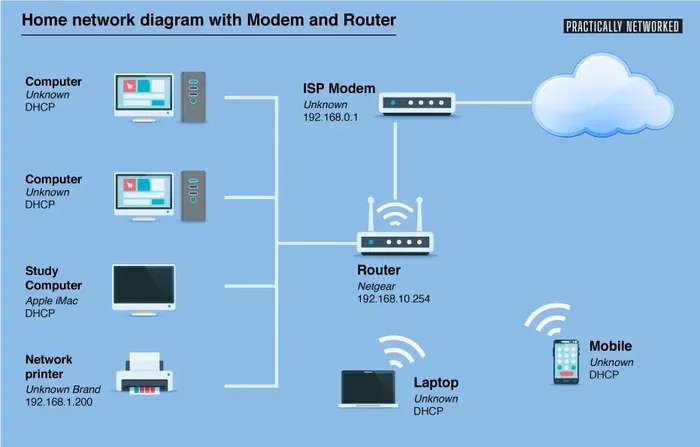
But here is the important part. A modem by itself only brings the internet signal into your home. It does not create Wi-Fi or let you connect multiple devices wirelessly. For that, you need a wireless router. Some people buy a modem router combo, which handles both jobs in one device. Others prefer a standalone modem connected to a separate router for better performance.
How a Modem Connects You to the Internet
Your ISP sends a signal through a cable line, a phone line, or a fiber optic line. The modem receives that signal and translates it into data your devices can use. You connect the modem to your computer or router using an Ethernet cable or a wireless connection.
The type of modem you need depends on your internet connection type. Cable internet uses a DOCSIS modem. DSL internet uses a different kind of modem. Fiber optic internet may use an ONT, which is a type of modem built into the fiber network. Understanding your connection type is the first step in choosing the right equipment.
How Buying Your Own Modem Saves You Money
The biggest reason people buy their own modem is to save money. Internet service providers charge modem rental fees that range from $10 to $15 per month. That is $120 to $180 every year. Over a three-year period, you could pay $360 to $540 just to rent equipment.
A good modem costs between $100 and $200 upfront. That means you can break even in less than two years. After that, you own the equipment and save every single month going forward. The savings only grow over time.
Understanding Modem Rental Fees from ISPs
Most major internet providers include a modem rental fee in your monthly bill. You might not even notice it because it is listed as a separate line item. Common names for this fee include “equipment rental,” “modem fee,” or “gateway fee.”
Some ISPs make it easy to avoid the fee. They let you bring your own compatible modem. Others make the process harder or require you to call and request a waiver. The key is to check your ISP’s modem compatibility list before you buy anything.
The Real Cost of Renting vs. Buying
Let us look at a simple comparison to understand the real savings.
| Option | Monthly Cost | Annual Cost | 3-Year Total |
|---|---|---|---|
| Renting ISP Modem | $10 to $15 | $120 to $180 | $360 to $540 |
| Buying Your Own Modem | $0 (after purchase) | $0 | $100 to $200 (one-time) |
| Total Savings Over 3 Years | – | – | $160 to $340 |
As you can see, buying your own modem can save you a significant amount of money. And if you upgrade your modem every few years, you still come out ahead because you own the equipment and can resell it.
Can You Get Internet Without a Service Provider?
Here is a question many people ask. If you buy a modem, do you automatically have internet? The answer is no. A modem needs to connect to an internet service provider’s network. Without an active internet plan, your modem has nothing to connect to.
Think of it this way. A modem is like a telephone. You can buy a telephone, but without a phone plan and a service provider, it cannot make calls. The same principle applies to your modem. You need both the equipment and the service.
Free and Low-Cost Internet Options
If you want internet without a traditional ISP, there are a few options. Some communities offer free municipal Wi-Fi. Public libraries and cafes provide free internet access. And some ISPs offer low-cost internet programs for qualifying households.
However, these options are not the same as buying a modem and having your own dedicated connection. For reliable, always-on internet at home, you still need to sign up for an internet plan with a provider. The modem just removes the rental fee from the equation.
What You Need Beyond a Modem
To get internet running in your home, you need a few things. First, an active internet plan from an ISP. Second, a compatible modem that matches your connection type. Third, a wireless router if you want Wi-Fi for your phones, tablets, and laptops.
Some people use a modem router combo device. This single unit acts as both the modem and the router. It is convenient and saves space. But it also means if one part breaks, you lose both functions. A separate modem and router setup offers more flexibility and better performance in most cases.
How to Choose the Right Modem for Your Home
Choosing the right modem is one of the most important steps. Not every modem works with every ISP. And not every modem can handle every internet speed tier. Buying the wrong modem means frustration and wasted money.
Start by checking what your ISP supports. Most providers publish a modem compatibility list on their website. This list tells you exactly which modems work with their network. Always buy a modem from this list to avoid compatibility issues.
DOCSIS Modems for Cable Internet
If you have cable internet, you need a DOCSIS modem. DOCSIS stands for Data Over Cable Service Interface Specification. It is the standard that cable modems use to communicate with the ISP network.
DOCSIS 3.0 modems are older but still work well for basic internet plans. They typically support speeds up to 300 to 400 Mbps. DOCSIS 3.1 modems are newer and can handle speeds up to 1 Gbps or more. If you have a fast internet plan, a DOCSIS 3.1 modem is the better choice.
Popular DOCSIS 3.1 modems include the Motorola MB8600, the Netgear CM1000, and the Arris SURFboard SB8200. These modems are widely compatible with major cable ISPs like Xfinity, Spectrum, and Cox.
DSL and Fiber Modems Explained
DSL internet uses a different type of modem. These modems connect to your phone line and bring internet through copper wiring. DSL modems are less common now, but they are still used in areas without cable or fiber coverage.
Fiber optic internet is the fastest option available. Fiber modems, often called ONTs (Optical Network Terminals), convert light signals from the fiber line into data your devices can use. Fiber modems are usually provided by the ISP and are less commonly available for purchase separately.
Setting Up Your Own Modem and Internet Connection
Setting up a modem you bought yourself is easier than most people think. You do not need to be a tech expert. With a few simple steps, you can have your internet running in less than 30 minutes.
Step-by-Step Modem Setup Process
Follow these steps to set up your new modem and get online:
- Check compatibility. Confirm your modem is on your ISP’s approved list.
- Connect the modem. Plug the coaxial cable or phone line into the modem’s input port.
- Power on the modem. Plug in the power adapter and wait for the lights to stabilize.
- Activate the modem. Call your ISP or log into their website to register your new modem.
- Connect your router. Use an Ethernet cable to link the modem to your wireless router.
- Test your connection. Open a browser and visit a website to confirm everything works.
The activation step is crucial. Your ISP needs to recognize your modem’s MAC address on their network. Without activation, the modem will not connect to the internet even if all the lights look normal.
Tips for a Strong and Stable Connection
Once your modem is set up, a few tips can help you get the best performance. Place your modem in a central location in your home. Keep it away from walls, metal objects, and electronics that might cause interference.
If you use a separate router, position it high up and in an open area. Avoid hiding it in a closet or behind furniture. The signal needs a clear path to reach your devices.
Restart your modem once a month to keep it running smoothly. Unplug it, wait 30 seconds, and plug it back in. This simple habit can fix slow speeds and connection drops.
Common Mistakes People Make When Buying a Modem
Buying a modem is straightforward, but mistakes happen. Avoiding these common errors will save you time, money, and frustration.
The first mistake is not checking compatibility. Every ISP uses different network standards and equipment requirements. A modem that works perfectly with one provider might not work with another. Always verify compatibility before you buy.
The second mistake is buying a modem that is too slow for your internet plan. If you pay for 500 Mbps internet but buy a modem that only supports 200 Mbps, you will never get the full speed. Match your modem to your speed tier.
The third mistake is forgetting you still need a router. A modem alone does not create a Wi-Fi network. If you want wireless internet for your phone and laptop, you need a router too. A modem router combo solves this, but a separate setup offers better performance.
The fourth mistake is ignoring firmware updates. Like any tech device, a modem receives software updates over time. Check for firmware updates periodically to keep your modem secure and running at its best.
Expert Tips for Getting the Most Out of Your Modem
Experienced users and network professionals share a few tips that can make a big difference in your internet experience.
First, consider buying a modem with built-in Wi-Fi. These modem router combos reduce cable clutter and simplify setup. They are a great option for people who want fewer devices on their desk or shelf.
Second, invest in a modem with good warranty coverage. A one-year warranty is standard, but some brands offer two or three years. A longer warranty protects your investment if the modem fails unexpectedly.
Third, keep your modem’s user manual and model number handy. When you call your ISP for activation or troubleshooting, having this information ready speeds up the process significantly.
Fourth, monitor your internet speeds regularly. Use a free speed test tool to check if you are getting the speeds you pay for. If your speeds drop consistently, it might be time to upgrade your modem or contact your ISP.
Finally, do not be afraid to ask for help. Many ISPs have online forums and support teams that can guide you through setup. You are not alone in this process, and getting help when you need it is always a smart move.
Conclusion
Buying a modem and having internet on your own terms is entirely possible. You save money, gain control over your equipment, and avoid the hassle of monthly rental fees. The key is choosing the right modem, confirming compatibility with your ISP, and following a simple setup process.
Remember that a modem is just one piece of the puzzle. You still need an active internet plan and a router for wireless access. But with the right equipment and a little knowledge, you can run your home network efficiently and affordably.
Take the time to research your options, read user reviews, and verify compatibility before you buy. The effort you put in upfront pays off every month with lower bills and better performance. Your internet connection is worth the investment, and buying your own modem is a smart step toward taking full control of your home network.
Frequently Asked Questions
Can I buy a modem and use it with any internet provider?
Not every modem works with every provider. You must check your ISP’s modem compatibility list before purchasing. Cable, DSL, and fiber networks all use different standards, so the modem you choose must match your connection type and your provider’s approved equipment list.
How much money can I save by buying my own modem?
Most ISPs charge $10 to $15 per month for modem rental. Over a year, that is $120 to $180. A good modem costs $100 to $200 upfront, so you break even in less than two years. After that, you save $120 or more every year going forward.
Do I still need a router if I buy a modem?
Yes, a modem alone does not create a Wi-Fi network. It brings the internet signal into your home but does not distribute it wirelessly. You need a separate wireless router or a modem router combo device to connect your phones, laptops, and tablets without cables.
What is the difference between a modem and a modem router combo?
A modem only connects your home to the internet. A modem router combo does both jobs in one device. It receives the internet signal and broadcasts Wi-Fi throughout your home. Combos save space and simplify setup, but separate devices usually offer better performance and flexibility.
How long does a modem typically last?
A good modem lasts about 3 to 5 years with normal use. Over time, older modems may struggle with faster internet speeds or new network standards. If you notice slow speeds or connection issues, it might be time to replace your modem with a newer model.
Can I return a modem if it does not work with my ISP?
Return policies vary by retailer. Many online stores offer a 30-day return window. Before you buy, always confirm the modem is on your ISP’s compatibility list. This simple step prevents the hassle of returning equipment that does not work with your network.