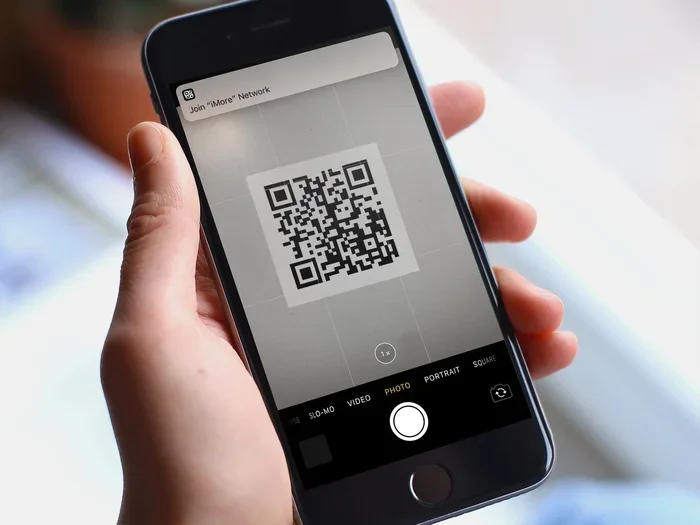
How Do I Create A QR Code Without Paying A Single Dime
You can easily create a QR code without paying by using free online tools and generators. Whether you need a QR code for your business, personal project, or event, multiple no-cost options let you design, customize, and download QR codes in minutes. This guide walks you through every step, from choosing the right generator to avoiding common mistakes.
Have you ever needed a QR code and assumed it would cost you money? Think again. The truth is, you can create a QR code without paying anything at all. Whether you run a small business, plan events, or just want to share a link more easily, free QR code tools make it simple. In this guide, I will show you exactly how to do it.
QR codes have become everywhere. You see them on restaurant menus, product packaging, business cards, and event tickets. They make life easier by letting people scan a code and instantly access a webpage, contact details, or Wi-Fi network. The best part? You do not need a big budget to get started. Plenty of free QR code generators give you everything you need.
In this article, I will walk you through the entire process. I will cover the best free tools, step-by-step instructions, and tips to make your QR codes look great and work perfectly. By the end, you will know how to create a QR code without paying a single dime and feel confident using it in real projects.
Key Takeaways
- Free QR code generators are widely available: You do not need to spend money to create a functional and attractive QR code.
- Static and dynamic QR codes serve different purposes: Understanding the difference helps you pick the right type for your needs.
- Customization is possible without cost: Many free tools let you change colors, add logos, and adjust the design of your QR code.
- Multiple use cases exist for free QR codes: From restaurant menus to business cards, QR codes add value across many industries.
- Common mistakes can ruin your QR code: Learning what to avoid saves time and ensures your code works properly.
📑 Table of Contents
- What Is a QR Code and Why Do You Need One?
- Top Free QR Code Generators You Can Use Right Now
- Step-by-Step Guide to Creating Your First QR Code
- Static vs Dynamic QR Codes: Which Should You Choose?
- Best Practices for Designing and Using Free QR Codes
- Common Mistakes to Avoid When Creating QR Codes for Free
- Creative Ways to Use Free QR Codes in Real Life
- Conclusion
What Is a QR Code and Why Do You Need One?
Understanding the Basics of QR Codes
A QR code stands for Quick Response code. It is a two-dimensional barcode that stores information. When someone scans it with their phone camera, the code directs them to a specific destination. That destination could be a website, a video, a contact card, or even a Wi-Fi login page.
QR codes were invented in Japan back in 1994. They were originally used in the automotive industry. Today, they are used in nearly every field you can imagine. From marketing to healthcare, these little squares have become incredibly useful tools for sharing information quickly.
The reason QR codes have grown so popular is their simplicity. Anyone with a smartphone can scan one in seconds. No special equipment is needed. No app downloads are required for most modern phones. This accessibility makes QR codes a powerful tool for businesses and individuals alike.
Why Creating a QR Code for Free Matters
Many people think they need to pay for a QR code generator to get a quality product. That is simply not true. Free tools offer plenty of features that meet most needs. You can create static and dynamic codes, customize colors, and even add logos without spending a penny.
For small businesses and startups, saving money on tools is essential. Every dollar counts when you are building something new. Using free QR code software lets you allocate your budget to other important areas like marketing, product development, or customer service.
Also, free generators allow you to experiment. You can test different designs, placements, and call-to-action messages before committing to a paid solution. This trial-and-error approach helps you find what works best for your audience without any financial risk.
Top Free QR Code Generators You Can Use Right Now
QR Code Monkey
QR Code Monkey is one of the most popular free generators online. It lets you create codes for URLs, text, emails, phone numbers, and more. The tool offers customization options like changing colors, adding a logo, and adjusting the error correction level. The best part is that there is no paywall for basic features. You can download your code as a PNG or SVG file without creating an account.
Canva QR Code Maker
Canva is known for its design tools, and it also offers a built-in QR code maker. If you already use Canva for social media graphics or flyers, this is a convenient option. You can create a QR code right inside your design project. Canva gives you the ability to match the QR code with your brand colors and style. It is a great choice for people who want everything in one place.
Beaconstac Free QR Generator
Beaconstac offers a free tier that includes QR code creation. It supports various code types including URL, vCard, and WiFi codes. The platform also provides basic analytics on free plans, which is a nice bonus. You can track how many people scan your code even without paying. This feature is helpful for anyone interested in QR code tracking and performance measurement.
GoQR.me
GoQR.me is a straightforward and no-frills generator. It works fast and produces clean, functional codes. You type in your data, choose a few settings, and download your code. There is no signup required, and the tool is completely free. It is perfect for quick, one-off QR code needs when you do not want to deal with accounts or subscriptions.
Other Notable Free Options
- QRCode Monkey – Offers API access and batch generation for free users
- Adobe Express – Includes a QR code maker with design templates
- Microsoft Edge – Has a built-in QR code generator in the browser
- Google Chrome – Can generate QR codes for any webpage natively
- Flowcode – Provides free static codes with basic customization
Step-by-Step Guide to Creating Your First QR Code
Step 1: Decide What You Want Your QR Code to Do
Before you open any tool, think about your goal. What do you want people to do when they scan the code? Here are common use cases:
- Direct people to your website or landing page
- Share your contact information as a digital business card
- Connect to a WiFi network automatically
- Link to a menu or product catalog
- Direct people to a social media profile
- Share event details or ticket information
Knowing your purpose helps you choose the right QR code type and the right generator. For example, a WiFi code needs different data input than a URL code.
Step 2: Choose a Free Generator
Pick one of the tools listed above based on your needs. If you want design flexibility, Canva or QR Code Monkey work well. If you need analytics, Beaconstac offers that in its free tier. For quick, simple codes, GoQR.me is hard to beat.
Step 3: Enter Your Data
Most generators have a simple input field. Paste your URL, type your text, or enter contact details. Make sure everything is accurate. A single typo in your link can send scanners to the wrong place, which wastes the whole purpose of the code.
Step 4: Customize Your Code
Now comes the fun part. Many free tools let you:
- Change the foreground and background colors
- Add a logo or image in the center
- Adjust the shape of the code dots
- Choose different error correction levels
Customization helps your QR code blend with your brand or design. Just remember not to overdo it. If you make the code too complex, scanners may struggle to read it. Keep it simple and test it frequently.
Step 5: Download and Test
Download your code in the highest quality format available. SVG is best for print because it scales without losing quality. PNG works well for digital use. Once downloaded, test the code with multiple phones and scanning apps. Make sure it directs to the right destination and loads quickly.
Quick Tips for Better QR Codes
- Always test your code before printing or sharing it
- Use high contrast between the code and background
- Add a call-to-action near the code so people know what to do
- Keep the code at least 2×2 inches for printed materials
- Place codes where they are easy to scan and reach
Static vs Dynamic QR Codes: Which Should You Choose?
What Is a Static QR Code?
A static QR code encodes fixed information. Once you create it, the destination cannot be changed. If you create a static code that links to your website, that link stays the same forever. Static codes are completely free on almost all generators. They are simple, reliable, and work without any ongoing service.
The downside is that you cannot track scans or update the destination. If you make a mistake, you must create a new code entirely. Static codes work best for one-time uses like event tickets, simple links, or printed materials where the destination will never change.
What Is a Dynamic QR Code?
A dynamic QR code acts as a short link that redirects to your final destination. The beauty of dynamic codes is that you can change the destination URL even after the code has been created and printed. You just log into your account and update the link. This flexibility is incredibly valuable for long-term campaigns.
Dynamic codes also offer QR code tracking and analytics. You can see how many people scanned your code, when they scanned it, and where they were located. This data helps you measure the effectiveness of your marketing efforts.
Comparison Table: Static vs Dynamic QR Codes
| Feature | Static QR Code | Dynamic QR Code |
|---|---|---|
| Cost | Free on all generators | Free tier available, some premium features paid |
| Editability | Cannot be changed after creation | Destination URL can be updated anytime |
| Tracking | No scan data available | Scan counts, location, and time data |
| Complexity | Simple to create | Requires account setup on most platforms |
| Best For | One-time use, simple links | Marketing campaigns, long-term projects |
| File Size | Smaller file size | Slightly larger due to redirect layer |
Which Type Should You Pick?
For most casual and small business needs, a free static QR code works perfectly. If you are running a marketing campaign or need to track performance, look for generators that offer free dynamic codes with basic analytics. Many platforms like Beaconstac and QRCode Monkey provide both options without requiring payment for essential features.
Best Practices for Designing and Using Free QR Codes
Make It Scannable
The most important rule for any QR code is that it must be easy to scan. Avoid placing text or images over the code. Do not reduce the size too much for print materials. Always leave white space around the code so scanners can detect it quickly. A QR code scanner needs clear contrast and adequate size to work properly.
Match Your Brand Identity
Your QR code should feel like part of your brand. Use your brand colors for the code dots and background. Add your logo to the center if the generator allows it. This small touch makes your codes look professional and trustworthy. People are more likely to scan codes that look intentional and well-designed.
Add Context Around the Code
Never place a QR code without explaining what it does. Add a short sentence like “Scan to visit our website” or “Point your camera here for the menu.” People are more comfortable scanning codes when they know what to expect. This simple addition can significantly increase your scan rates.
Test on Multiple Devices
Different phones and cameras handle QR codes differently. Test your code on iPhones, Android devices, and various scanning apps. Make sure it works in different lighting conditions, especially if the code will be used outdoors or in bright environments. Testing takes just a few minutes but saves you from embarrassing failures.
Consider Placement and Size
For printed materials, make sure the QR code is large enough to scan easily. A minimum of 2×2 inches works well for most printed items. Place codes at a comfortable height where people can naturally hold up their phones. Avoid placing codes on curved surfaces or in areas where they might get damaged or obscured.
Common Mistakes to Avoid When Creating QR Codes for Free
Using Low-Quality Images
One of the biggest mistakes is downloading a blurry or pixelated QR code. Always download the highest resolution version available. For print, use SVG format when possible. For digital screens, PNG works great. A low-quality code may look fine on your computer screen but fail to scan when printed.
Over-Customizing the Design
It is tempting to make your QR code look really creative with unusual shapes, colors, and patterns. But there is a limit. If you remove too much contrast or make the code too complex, scanners will fail to read it. Stick to simple modifications and always test after customizing. A beautiful QR code that nobody can scan is useless.
Forgetting to Test
Never assume your code works just because the generator says it does. Always scan your own code with at least two different phones before sharing it. This simple habit catches typos, broken links, and design issues that could cause problems later.
Ignoring Analytics When Available
If you are using a dynamic QR code with tracking, check your analytics regularly. The data tells you how well your code is performing and where improvements are needed. Ignoring this free information means you miss valuable insights about your audience and their behavior.
Using Paid Features Without Realizing It
Some free generators offer a basic code for free but charge for analytics, customization, or bulk downloads. Read the pricing page carefully before you start. Most reputable platforms clearly mark which features are free and which require payment. Stick to well-known tools like QR Code Monkey or Canva to avoid unexpected charges.
Creative Ways to Use Free QR Codes in Real Life
For Restaurants and Cafes
Many restaurants now use QR codes for menus instead of printing physical copies. A free QR code linked to your online menu saves printing costs and lets you update the menu anytime. Customers appreciate the convenience of scanning a code to view the full menu on their phones.
For Business Cards
Add a QR code for business cards that links directly to your website, LinkedIn profile, or digital portfolio. This makes it easy for people to save your contact information without typing anything. A vCard QR code can store your name, phone number, email, and company all in one scan.
For Events and Conferences
Event organizers use QR codes for event registration, ticketing, and information sharing. Attendees scan a code to check in, access the event schedule, or connect to the event WiFi. Free generators make it easy to create these codes without any event budget.
For Retail and Product Packaging
Small businesses can place QR codes on product packaging that link to assembly instructions, warranty information, or customer reviews. This adds value for customers and makes your brand look tech-savvy and customer-focused.
For Personal Use
You can also use free QR codes for personal projects. Share your resume, link to your portfolio, create a contact card for networking events, or even make a QR code that connects people to your home WiFi. The possibilities are endless and completely free.
Conclusion
Creating a QR code without paying is easier than most people think. With the right free tools and a clear plan, you can produce professional-quality codes in just a few minutes. Whether you choose QR Code Monkey, Canva, Beaconstac, or any other free generator, the process is straightforward and accessible to everyone.
Remember to choose between static and dynamic codes based on your needs. Follow the design best practices to make your codes scannable and visually appealing. Test everything before sharing or printing. And avoid the common mistakes that trip up so many beginners.
The world of QR code creation is at your fingertips, and it does not cost you a thing. Start experimenting today. Create your first free QR code, share it with your audience, and watch how it connects people to your content, your business, or your ideas. The only thing you need to pay is a few minutes of your time.
Frequently Asked Questions
Is it really possible to create a QR code for free?
Yes, absolutely. Many reputable platforms like QR Code Monkey, Canva, and Beaconstac offer completely free QR code generation. You can create, customize, and download functional QR codes without entering any payment information. The free versions cover most common use cases perfectly.
What is the difference between a free and paid QR code?
Free QR codes typically offer static codes with basic customization. Paid versions often include advanced analytics, unlimited dynamic codes, bulk generation, and priority support. For most individuals and small businesses, the free options provide more than enough functionality to get the job done.
Can I track scans on a free QR code?
Some free generators like Beaconstac offer basic scan tracking on their free plans. However, most free static QR codes do not include analytics. If tracking is important to you, look for platforms that provide free dynamic codes with built-in scan data and performance reports.
Do I need to create an account to use free QR code generators?
It depends on the tool. Some generators like GoQR.me and QR Code Monkey let you create codes without signing up. Others like Beaconstac and Canva require a free account for access to more features or download options. Creating an account is usually quick and does not require a credit card.
Can I use a free QR code for commercial purposes?
Yes, most free QR code generators allow commercial use of the codes you create. However, always check the terms of service for each platform. The vast majority of reputable tools explicitly permit using their free QR codes for business and commercial projects at no cost.
How long does a free QR code last?
Static QR codes last forever since the information is embedded directly in the code. Dynamic QR codes depend on the generator’s service. Most free platforms keep dynamic codes active as long as you use them regularly. Some may deactivate codes after a period of inactivity, so check the specific platform’s policy before relying on free dynamic codes for important long-term projects.