Can You Charge A Laptop From A Car On Your Next Road Trip
Yes, you can charge a laptop from a car, and it is easier than most people think. Whether you use a power inverter, a DC adapter, or a portable power station, keeping your laptop alive on the road is totally doable. This guide walks you through every method, the right devices to buy, and the mistakes to avoid. You will learn exactly how to keep your laptop charged and ready for anything.
Road trips are amazing. The open road, good music, and the freedom to go anywhere. But here is the thing that can ruin your trip fast. Your laptop dies. You need it for work, navigation, entertainment, or just staying connected. And then you realize you do not know how to charge a laptop from a car.
The good news is that you absolutely can charge a laptop from a car. It is not magic. It is not even complicated. There are several reliable methods, and once you know what works, you will never worry about a dead battery on the road again. This guide breaks everything down in simple terms.
We will cover every charging method you can use. We will talk about the devices you need, the power requirements your laptop has, and the mistakes most people make. By the end, you will feel confident about keeping your laptop powered up no matter how long your drive is.
Key Takeaways
- Multiple methods work: You can use a power inverter, a DC adapter, a USB-C cable, or a portable power station to charge your laptop from a car.
- Know your wattage needs: Most laptops need 45 to 100 watts. Matching your charger to your laptop’s power requirements prevents slow charging or damage.
- Avoid common mistakes: Things like using the wrong adapter, ignoring battery drain, and overloading your car outlet can cause problems.
- Invest in the right gear: A quality car charger or inverter saves you from frustration and keeps your devices safe during long trips.
- Plan ahead for road trips: Managing power usage, bringing backup options, and monitoring your car battery keeps everything running smoothly.
- USB-C charging is a game changer: Many modern laptops support USB-C charging, making it the simplest and fastest option in most cars.
📑 Table of Contents
How Charging a Laptop from a Car Works
Your car has a battery. It also has a power outlet, often called a cigarette lighter outlet. This outlet provides 12 volts of direct current, or DC power. Your laptop, on the other hand, needs alternating current, or AC power, or a specific DC voltage to charge.
So the basic idea is simple. You need a way to convert the car’s 12V power into the right form of energy your laptop can use. There are a few different ways to do this. Each method has its own pros and cons. Let us look at them one by one.
The Basic Science Behind Car Charging
Your car engine generates electricity. The alternator keeps the battery charged while you drive. The 12V outlet taps into this system. When you plug in a device, it draws power from the car’s electrical system.
Most cars have a 12V outlet that can supply about 10 to 15 amps. That gives you roughly 120 to 180 watts of power. Your laptop charger usually needs between 45 and 100 watts. So in most cases, you have plenty of power available. The trick is using the right adapter or converter.
Why Direct DC Charging Is the Simplest Option
Some laptops can charge directly from DC power. This means you skip the conversion step entirely. You use a DC adapter that matches your laptop’s voltage and connector type. This is the most efficient method because you lose the least energy during the process.
Direct DC adapters plug straight into your car’s 12V outlet. They have the right tip for your laptop’s charging port. These adapters are small, lightweight, and very reliable. They are a great choice if your laptop supports them.
Methods to Charge a Laptop from a Car
There are four main methods you can use. Each one works well in different situations. Let us go through them so you can pick the best option for your needs.
Method 1: Using a Power Inverter
A power inverter converts DC power from your car into AC power. This is the same type of power you get from a wall outlet at home. You plug the inverter into your car’s 12V outlet. Then you plug your regular laptop charger into the inverter.
This method works with almost any laptop. You use your existing charger. You do not need to buy a special one. The downside is that inverters can be bulky. They also lose some energy during the conversion process. But for most road trips, they work great.
When choosing an inverter, look for one rated at least 150 watts. This gives you enough headroom for most laptops. Some inverters even have USB ports built in. This adds extra convenience for charging your phone at the same time.
Method 2: Using a DC Adapter
A DC adapter connects directly to your car’s 12V outlet and charges your laptop without converting to AC power. These adapters come with interchangeable tips. You pick the tip that fits your laptop’s charging port.
DC adapters are compact and efficient. They waste less energy than inverters. They are also usually less expensive. The downside is that you need to find the right tip for your laptop model. Not all laptops support DC charging from a car outlet.
Brands like Targus and Lenmar make popular DC adapters for cars. They are widely available online and in electronics stores. Check your laptop’s charging specifications before buying one.
Method 3: USB-C Charging
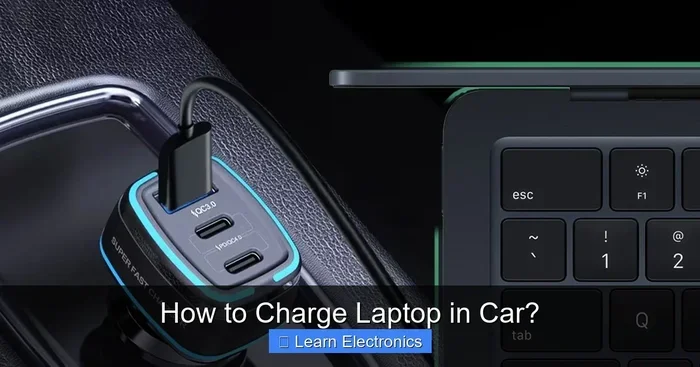
Many modern laptops now support USB-C charging. This is the simplest method of all. You just use a USB-C cable and a car charger with a USB-C port. Plug it in, and your laptop starts charging.
USB-C car chargers are small and portable. They draw power directly from the 12V outlet. Look for a charger that delivers at least 65 watts for most laptops. Some premium chargers deliver 100 watts or more. These can even charge gaming laptops and high-performance machines.
The biggest advantage of USB-C charging is convenience. You use one cable for your laptop, phone, and tablet. You do not need multiple adapters. This makes it a favorite for people who travel light.
Method 4: Using a Portable Power Station
A portable power station is a battery pack you charge before your trip. You then use it to charge your laptop while on the road. These devices are great for camping trips or long drives where you want to stay off the grid.
Portable power stations come in different sizes. Small ones can charge a laptop a few times. Larger ones can power multiple devices for hours. They are not plugged into the car while driving. Instead, you recharge them from your car or a wall outlet before you leave.
Brands like Jackery, Anker, and EcoFlow make excellent portable power stations. They are lightweight and easy to carry. They are a great backup option if your car charging setup fails.
Understanding Your Laptop’s Power Requirements
Not all laptops need the same amount of power. Before you buy any charging device, you need to know what your laptop requires. This simple step saves you money and prevents charging problems.
You can find your laptop’s power requirements on the charger itself. Look for the output voltage and wattage. Most laptop chargers show something like “19V 3.42A 65W.” The wattage number is what matters most for car charging.
Here is a quick breakdown of common laptop power needs:
- Ultrabooks and light laptops: 45 to 65 watts
- Standard laptops: 65 to 90 watts
- Gaming laptops and workstations: 90 to 180 watts
If your car inverter or charger cannot deliver enough wattage, your laptop will charge slowly. In some cases, it may not charge at all while you are using it. Always match your charging device to your laptop’s power needs.
How to Find Your Laptop’s Wattage
Finding your laptop’s wattage is easy. Check the label on your original charger. Look for the output section. It will list the voltage (V) and amperage (A). Multiply these two numbers to get the wattage.
For example, if your charger says 20V and 3.25A, your laptop needs 65 watts. You can also check your laptop manufacturer’s website. They list the power requirements for each model.
Why Matching Wattage Matters
Using a charger with too low wattage is a common mistake. Your laptop may charge very slowly. It might even drain the battery while you use it. On the other hand, a charger with higher wattage than your laptop needs is safe. Your laptop only draws the power it requires.
So if your laptop needs 65 watts, you can safely use a 90-watt or 100-watt charger. The laptop will just take what it needs. This is an important thing to remember when shopping for car chargers.
Best Devices for Charging a Laptop from a Car
The market is full of car charging devices. It can be overwhelming to pick the right one. Here are some of the best options across different categories. Each one is a solid choice for road trips and daily commutes.
Top Power Inverters
The BESTEK 300W power inverter is a popular choice. It has two AC outlets and USB ports. It is compact and reliable. The AIMS 750W inverter is another strong option for larger laptops and multiple devices.
When picking an inverter, go for at least 150 watts for standard laptops. If you have a gaming laptop, look for 200 watts or more. Always check the continuous wattage rating, not just the peak rating.
Top DC Adapters
The Targus USB Type-C Car Charger is a great all-around option. It delivers 65 watts and works with many modern laptops. The Lenmar DC Adapter Kit comes with multiple tips for different laptop brands.
These adapters are affordable and easy to use. They are perfect for people who want a simple, no-fuss charging solution. Just make sure the tip fits your laptop’s charging port.
Top USB-C Car Chargers
The Anker 736 GaNCharger delivers 140 watts from a single port. It is compact and fast. The Ugreen 100W car charger is another excellent option. Both are small enough to fit in your glove box.
USB-C chargers are the future of car charging. They are fast, efficient, and work with a growing number of laptops. If your laptop supports USB-C charging, this is the way to go.
Top Portable Power Stations
The Anker 521 Portable Power Station is a solid budget option. It can charge a laptop several times on a single charge. The Jackery Explorer 300 is another popular choice. It is lightweight and has multiple output ports.
These devices are perfect for camping trips or areas without power. They also work as a backup if your car charging setup has issues.
Common Mistakes When Charging a Laptop from a Car
Even with the right gear, mistakes can happen. Knowing what to avoid saves you time, money, and frustration. Here are the most common errors people make.
Using the Wrong Adapter
Not all adapters fit all laptops. The connector tip must match your laptop’s charging port. Using the wrong tip can damage your laptop or fail to charge it at all. Always double-check compatibility before you buy.
Ignoring Car Battery Drain
Charging your laptop draws power from your car battery. If you leave the engine off and charge for a long time, you can drain the battery. This is especially true with older cars or smaller batteries.
To avoid this, start your engine while charging. The alternator will recharge the battery as you drive. If you must charge with the engine off, limit the time to short periods only.
Overloading the Car Outlet
Your car’s 12V outlet has a maximum power limit. If you plug in too many devices at once, you can trip a fuse or damage the outlet. Keep your total power draw within the outlet’s rated capacity.
A typical car outlet handles 10 to 15 amps. That is about 120 to 180 watts. If you are using an inverter, a phone charger, and a tablet all at once, add up the wattage. Make sure you stay under the limit.
Forgetting to Check the Inverter’s Efficiency
Not all inverters are equally efficient. Cheap inverters waste a lot of energy as heat. They may also produce a noisy electrical signal that affects your laptop. Look for inverters with high efficiency ratings and built-in safety features.
Charging While Using Heavy Apps
If your laptop is running heavy applications, it may use power faster than the charger can supply it. This causes the battery to drain even while plugged in. For best results, close unnecessary apps while charging on the road.
Tips for Long Road Trips
A long road trip is the perfect time to test your car charging setup. But preparation makes all the difference. Here are some practical tips to keep your laptop powered throughout your journey.
Plan Your Charging Stops
Even with a car charger, it helps to plan ahead. Know how long it takes to charge your laptop from empty to full. Factor this into your rest stop schedule. This way, you are never caught with a dead battery.
Bring a Backup Charger
Always have a backup plan. A portable power station or a spare DC adapter can save the day if your primary charger fails. Pack it in your carry-on bag. You will be glad you did.
Keep Your Cables Organized
Tangled cables are annoying and can damage your ports. Use a small cable organizer or a pouch to keep everything neat. Label your cables so you know which one goes where.
Monitor Your Car Battery Health
Your car battery is the foundation of your charging setup. Get it checked before a long trip. A weak battery may not handle the extra load of charging a laptop. A simple battery test at any auto shop takes just a few minutes.
Use a Surge Protector
Car electrical systems can have power fluctuations. A small surge protector for your inverter or charger adds an extra layer of protection. It shields your laptop from voltage spikes that could cause damage.
Turn Off Unnecessary Devices
Every device you plug into your car draws power. Turn off what you do not need. This frees up power for your laptop and keeps your car battery healthy.
Frequently Asked Questions
Can I charge my laptop while the car engine is off?
Yes, you can charge your laptop with the engine off, but only for a short time. Your car battery will slowly drain. If you plan to charge for more than 30 minutes with the engine off, you risk not being able to start the car again. It is always best to charge while driving with the engine running.
Will charging my laptop from a car damage the battery?
No, charging your laptop from a car will not damage your laptop battery as long as you use the right charger. Modern laptops have built-in battery management systems. These systems regulate the charging process and protect the battery from overcharging or power surges.
How long does it take to charge a laptop from a car?
Charging time depends on your laptop’s battery size and the charger’s wattage. A 65-watt charger can typically charge a standard laptop from 0 to 50 percent in about 45 minutes to an hour. A full charge from empty may take two to three hours, depending on the laptop model and power demands.
Can I charge a gaming laptop from a car?
Yes, you can charge a gaming laptop from a car, but you need a more powerful setup. Gaming laptops often require 100 to 180 watts. You will need a high-wattage inverter or a powerful USB-C charger. Check your gaming laptop’s power requirements before buying a car charger.
Is it safe to leave a power inverter plugged in when the car is parked?
It is generally safe for short periods, but it is not recommended for long durations. A power inverter draws standby power even when no device is connected. Over time, this can drain your car battery. Unplug the inverter when you are not using it to protect your car battery.
What is the best way to charge a laptop from a car for a road trip?
The best way depends on your laptop and your needs. For most modern laptops, a USB-C car charger is the simplest and most efficient option. If your laptop does not support USB-C, a power inverter with your existing charger works great. For extended off-grid trips, a portable power station is the most versatile choice.
Conclusion
So the answer to the question is a clear yes. You can charge a laptop from a car, and you have multiple ways to do it. Whether you use a power inverter, a DC adapter, a USB-C charger, or a portable power station, keeping your laptop alive on the road is simple and reliable.
The key is knowing your laptop’s power needs and choosing the right device. Match the wattage. Pick the right connector. Avoid common mistakes like draining your car battery or overloading the outlet. With the right setup, you will never have to worry about a dead laptop again.
Next time you hit the road, you will be fully prepared. Your laptop will stay charged. Your work will stay on track. And your entertainment will keep flowing. A little planning goes a long way. Now you have the knowledge to make it happen. Can you charge a laptop from a car? Absolutely, and you are ready to do it.