Can You Charge A Laptop Without A Power Cord Or Not
Yes, you can charge a laptop without a power cord. You can use a USB-C cable, a power bank, a car charger, or a universal adapter to keep your laptop running. This guide provides safe and easy alternative methods for emergency power and travel.
Key Takeaways
- USB-C is a game changer: Many modern laptops can charge easily using a standard USB-C cable and a compatible power source.
- Power banks offer true portability: High-capacity portable batteries let you charge your laptop on the go without any wall outlet.
- Car chargers work in a pinch: You can use your vehicle’s power outlet to juice up your laptop during road trips.
- Universal adapters are versatile: These devices come with multiple tips to fit various laptop charging ports safely.
- Safety first matters: Always check voltage and amperage to avoid damaging your laptop battery.
- Desktop computers can help: You can send power from a desktop tower to your laptop via a USB-C cable.
📑 Table of Contents
Why Do Laptops Need Power Cords?
Laptops are amazing tools. They let you work anywhere you go. But they need energy to run. The power cord is the standard way to give them that energy. It connects your laptop to the wall outlet. The wall outlet provides alternating current, or AC power. Your laptop needs direct current, or DC power, to charge the battery. The power cord has a small brick that converts AC to DC. This conversion is crucial for safe and steady charging. Without the right power cord, your laptop battery will eventually die. So, keeping your cord safe is very important. Losing it can be a real headache. You might wonder, can you charge a laptop without a power cord? The short answer is yes. There are several ways to keep your laptop alive. Let us explore these options together. We will look at simple methods that work for most people. You do not need to be a tech expert to understand them.
Every laptop has a charging port. This is where you plug in the AC adapter. The adapter takes power from the wall and changes it. It changes it into the right type of power for your device. Over time, cords can wear out. They can fray or break. Sometimes the brick itself stops working. When this happens, you might think your laptop is useless. But it is not. You have other options. You can use alternative power sources. These sources can keep your laptop running. They can also help you in an emergency. Knowing your options gives you peace of mind. It means you are never truly stuck without power. You can travel freely without worrying about your cord. Let us look at how you can charge your laptop without the traditional cord.
Can You Charge A Laptop Without A Power Cord?
Many people ask this question every single day. You might be traveling or moving to a new place. Maybe your cord broke or you lost it. Maybe you left it at the office. Whatever the reason, you have options. You can still power up your device. Modern laptops are more flexible than older models. They support different types of charging methods. You just need to know what works for your specific model. Let us look at the most common ways to charge your laptop without the traditional cord. These methods are easy to use. They can save you a lot of trouble. You will not have to buy a new laptop just yet.
The key is to understand your laptop’s charging port. Newer laptops often use USB-C. Older laptops might use a barrel jack. Some very thin laptops have no removable cord at all. They use magnetic connectors or USB-C only. Once you know your port type, you can find the right alternative. You can use a power bank, a car charger, or a USB-C cable. Each method has its own benefits. Let us break them down so you can choose the best one for your needs. You will be surprised at how simple it is.
The USB-C Revolution
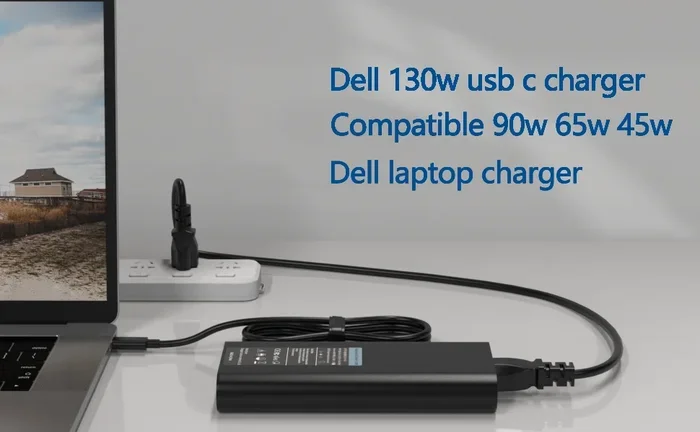
USB-C has changed the game completely. It is a small, reversible connector. You do not have to flip it to plug it in. Many new laptops use USB-C for charging. This means you can use a USB-C cable and a different power source. You can plug it into a wall adapter, a monitor, or even a battery pack. USB-C power delivery, or PD, is a standard. It sends enough power to charge your laptop quickly. You do not need the bulky original brick. Just make sure the USB-C charger supports the right wattage. Most laptops need at least 45 watts. Some need 65 or 100 watts. Check your laptop manual for the exact power needs. Using a low-wattage charger might not charge your laptop. It might even drain the battery while you use it. Always match the power requirements for the best results. This is the easiest way to avoid charging problems. USB-C cables are also very durable. They last longer than older cables. You do not have to worry about them breaking easily. This makes them a great long-term choice for your charging needs.
Power Banks to the Rescue
Power banks are like big portable batteries. They are great for phones. But did you know they work for laptops too? You can buy a high-capacity power bank designed for laptops. These power banks have USB-C outputs. They can charge your laptop on the go. You can use them on a plane, in a park, or during a blackout. The capacity of a power bank is measured in milliampere-hours, or mAh. For a laptop, you need a very large capacity. Look for power banks around 20,000 mAh or higher. Some special power banks can charge a laptop several times over. They are perfect for travel or emergencies. Just remember that power banks take time to recharge themselves. You should charge the power bank ahead of time. This way, it is ready when you need it most. A good power bank is a lifesaver for travelers.
When choosing a power bank, look at the wattage output. A 45-watt power bank is a good starting point. It can charge most standard laptops. If you have a gaming laptop, you might need 100 watts. The higher the wattage, the faster it charges. Power banks are also great for camping trips. You can charge your laptop in the middle of nature. Just make sure you have a way to recharge the power bank. You can plug it into a car charger or a solar panel. This creates a full portable power system. It keeps you connected no matter where you are. Emergency power is just a power bank away.
Charging From a Desktop Computer
This is a lesser-known trick that many people love. If you are at home and have a desktop PC, you can use it. Most desktop towers have USB ports on the front or back. You can connect your laptop to your desktop using a USB-C cable. Your desktop will send power to your laptop. It is not the fastest way to charge. But it works in a pinch. You can also use the monitor connected to your desktop. Many modern monitors have USB-C ports that deliver power. This is a great way to charge two devices with one cable. It saves you from needing a wall outlet. This method is perfect for home offices. You can keep your laptop running while you work at your desk.
Another great thing about this method is it is free. You are not using extra electricity. You are just sharing power from your desktop. It is also very safe. Desktop computers have stable power supplies. They are unlikely to cause power surges. So you can leave your laptop connected for a while. It will slowly charge the battery. This is perfect for overnight charging. Just make sure your desktop is turned on or in sleep mode. Some desktops turn off their USB ports when shut down. Check your desktop settings to be sure. This simple trick can extend your laptop battery life.
Alternative Ways to Charge Your Laptop
Besides USB-C and power banks, there are other methods. These methods can save the day when you are stuck. You might not have your original cord with you. Or maybe you just want a backup option. Let us look at some alternative ways to charge your laptop. These tips will help you stay connected. You will always have a way to power up. Whether you are at home or on the road, these ideas work. They give you flexibility and freedom. You will never have to wait for a wall outlet again.
Using a Car Charger
Do you spend a lot of time in your car? You can use your vehicle to charge your laptop. A car charger plugs into your cigarette lighter or power port. It converts the car battery power into the right type of power for your laptop. You can use a standard car charger with a USB-C cable. Or you can use an adapter that fits your laptop’s charging port. This is very handy for road trips. You can charge your laptop while you drive. It is also great for people who work from their cars. Just make sure your car is running. A dead car battery will not help you. Also, driving while charging is fine. But parking and idling for long periods can waste gas. Use this method wisely when you are on the road. It keeps your laptop ready for your next meeting.
Car chargers come in different sizes and shapes. Some are small and compact. Others can charge multiple devices at once. You can find a car charger with two USB-C ports. This lets you charge your laptop and your phone at the same time. Always check the wattage of the car charger. A 45-watt car charger is usually enough for most laptops. If you buy a cheap car charger, it might not work well. It could also damage your laptop battery. Stick to trusted brands. They offer reliable and safe charging. A car charger is a must-have for any road trip.
Universal Power Adapters
A universal adapter is a great backup tool. It comes with many different tips. These tips fit various laptop brands and models. You can buy a universal adapter at most electronics stores. It is not as elegant as the original cord. But it gets the job done. You just pick the right tip for your laptop. Make sure the tip fits snugly into your charging port. Universal adapters can be very handy. They are perfect for households with multiple laptops. If you have a Dell, a HP, and a Lenovo, one universal adapter might work for all of them. Always check the voltage and amperage settings on the adapter. You want to match your laptop requirements exactly. A universal adapter is a smart buy for any home.
One of the best things about a universal adapter is the price. They are usually much cheaper than buying a brand-specific cord. They also save you space. Instead of keeping five different bricks, you keep one adapter and five tips. You can store them in a small bag. They are perfect for travel. You do not have to worry about losing your only cord. If you travel often, a universal adapter is a lifesaver. Just remember to check the tip size. A wrong tip can damage your charging port. Always be gentle when plugging it in.
How to Choose the Right Alternative Charger
Not all chargers are the same. Picking the wrong one can damage your laptop. You need to pay attention to a few key details. Let us break down what to look for when buying an alternative charger. This will help you make a safe choice. You will avoid buying the wrong product. Your laptop battery will thank you for being careful. Taking a few extra minutes to learn can save you a lot of money.
Understanding Voltage and Amperage
Voltage and amperage are the two most important numbers. Voltage is the pressure of the electric current. Amperage is the amount of current flowing. Your laptop needs a specific voltage to work safely. You can usually find this number on the bottom of your laptop. Or you can check the original power brick. The voltage must match exactly. The amperage can be equal to or higher than your laptop needs. If the amperage is too low, the charger will overheat. It might fail to charge your laptop at all. Always aim for the right voltage and equal or higher amperage. This keeps your laptop battery healthy and safe. Do not ignore these numbers. They are the secret to long battery life.
Think of voltage like water pressure. Too much pressure can burst a pipe. Too little pressure and the water will not flow. The same goes for your laptop. Too much voltage can fry the internal parts. Too little voltage and the laptop will not charge. Always double-check the voltage before you plug anything in. It is a simple step that saves you from big trouble. Amperage is like the flow of water. More amperage means faster charging. But your laptop will only draw as much as it needs. So a higher amperage charger is safe. It just means it has the potential to charge faster.
Wattage Matters
Wattage is the total power output. It is the result of voltage multiplied by amperage. A higher wattage means faster charging. If you buy a USB-C charger, look for the wattage rating. A 45-watt charger is good for basic laptops. A 65-watt charger is standard for most work laptops. A 100-watt charger is great for gaming laptops or big screens. If you use a charger with too low wattage, your laptop might charge very slowly. Or it might lose battery while you use it. Always check the wattage before you buy a replacement charger. Matching the wattage ensures your laptop runs smoothly. It also keeps your battery healthy over time.
Wattage is especially important if you use your laptop while charging. If you play games or edit videos, you need more power. A 45-watt charger might not keep up. Your battery will slowly drain even while plugged in. A 100-watt charger can handle heavy use. It will keep your laptop running at full speed. It will also charge the battery at the same time. This is the best way to maintain your battery health. You never have to stop working to let your laptop charge.
Connector Size and Type
The physical connector is also very important. Laptops have different charging ports. Some use round tips. Some use rectangular tips. And many modern laptops use USB-C. If you use the wrong tip, it will not fit. Or it might fit loosely and cause sparking. A loose connection can damage your charging port. Always make sure the tip fits securely. If you are using a universal adapter, double-check the tip number. It should match your laptop model exactly. A snug fit ensures safe and efficient charging every time. Do not force a tip that does not fit. This can break the port inside your laptop.
The charging port is a delicate part of your laptop. If it gets damaged, it can be expensive to fix. You might need to take your laptop to a repair shop. To avoid this, always handle your connectors with care. Do not yank the cable out. Pull it out gently. Also, keep the port clean. Dust can build up inside over time. Use a soft brush to clean it out. A clean port makes a strong connection. It also helps your laptop charge faster. Taking care of your port is easy and very smart.
Safety Tips for Cord-Free Charging
Charging without the original cord is totally fine. But you must be careful. Safety should always come first. Cheap chargers can be dangerous. They can damage your laptop battery. In rare cases, they can even cause fires. Follow these simple safety tips to charge safely. You will protect your investment and your home.
First, buy from reputable brands. Do not buy the cheapest charger you find online. Well-known brands have safety certifications. They protect against power surges. Second, never leave your laptop charging unattended. This is especially true with third-party chargers. If something goes wrong, you want to catch it early. Third, check for overheating. If your charger or laptop feels very hot, unplug it immediately. A little warmth is normal. But burning heat is a danger sign. Fourth, use the right cables. A cheap USB-C cable might not support power delivery. It might melt or fail under high load. Always use high-quality cables that match your charger. These simple steps keep you and your laptop safe. They give you peace of mind every day.
Another safety tip is to avoid wet conditions. Do not charge your laptop near water. Water and electricity do not mix. Keep your charger and cables dry at all times. Also, do not cover your charger while it is working. Chargers need air to cool down. If you wrap it in a blanket, it can overheat. Place it on a flat, hard surface. This lets the heat escape. A cool charger is a safe charger. Following these tips will keep your laptop running for years. Fifth, keep your charger away from pets. Dogs and cats might chew on the cables. This can cause serious damage. It is also a fire hazard. Store your cords safely when you are not using them.
Final Thoughts on Laptop Charging
So, can you charge a laptop without a power cord? Yes, you absolutely can. You have many great options today. You can use USB-C cables, power banks, car chargers, or universal adapters. You can even borrow power from a desktop computer. The key is to know your laptop’s power needs. Always match the voltage, amperage, and connector type. This keeps your laptop safe and running smoothly. Losing your power cord is not the end of the world. You just need to find the right alternative. Keep these tips in mind for your next trip or emergency. You will be glad you know how to charge your laptop without the original cord. Stay powered up and keep working! Your laptop will thank you for taking good care of it.
Now you know all the secrets. You can handle any charging situation. Whether you are at home, in the car, or on a plane, you are prepared. You do not need the original cord to get the job done. Just pick the right method for your needs. Charge safely and enjoy your freedom. You are now an expert on charging your laptop without a power cord. Go out and explore the world with a fully charged laptop.
Frequently Asked Questions
Can I charge my laptop with a phone charger?
It depends on the phone charger and your laptop. If both use USB-C and the phone charger has enough wattage, it might work. However, phone chargers usually have lower power output, so it will charge very slowly.
Is it safe to charge a laptop with a power bank?
Yes, it is safe if you use the right power bank. Look for power banks that support power delivery and match your laptop’s voltage. Always use high-quality power banks from reputable brands to avoid any risks.
How long does it take to charge a laptop with a car charger?
It varies based on the car charger’s wattage and your laptop battery size. A standard car charger might take several hours to fully charge a laptop. It is slower than using a wall outlet but works well for emergencies.
What happens if I use the wrong voltage charger?
Using the wrong voltage can seriously damage your laptop. If the voltage is too high, it can fry the internal components. If the voltage is too low, the laptop might not charge at all or could overheat.
Can I charge my laptop through a USB-C monitor?
Yes, many modern monitors have USB-C ports that support power delivery. You can connect your laptop to the monitor with a USB-C cable and it will charge while you work. Just make sure the monitor supports enough wattage for your laptop.
Do all laptops support USB-C charging?
No, not all laptops support USB-C charging. Older laptops and some budget models still use traditional round charging ports. You should check your laptop specifications to see if it supports USB-C power delivery before trying this method.