Can I Turn A Regular Laptop Into A Gaming Laptop Today
Yes, you can turn a regular laptop into a gaming laptop to some extent. Upgrading parts like RAM, storage, and adding an external GPU can boost your gaming performance significantly. However, you cannot swap out the CPU or internal graphics card in most laptops, so the results have limits. This guide walks you through every option, cost, and trade-off so you know exactly what to expect.
If you love gaming but only have a regular laptop, you have probably wondered about turning it into a gaming machine. The short answer is yes, you can turn a regular laptop into a gaming laptop to a certain degree. But the full answer is more nuanced, and it depends on your budget, your current hardware, and what kind of games you want to play.
This article breaks down every option available to you right now. We will talk about hardware upgrades, external devices, software tricks, and even cloud gaming. By the end, you will know exactly what is possible and what is a waste of money.
Many people assume a gaming laptop is the only way to play modern titles. That is simply not true. With the right approach, your everyday laptop can handle more games than you think. Let us dive in.
Key Takeaways
- External GPUs are the biggest upgrade: They let you plug in a desktop graphics card and seriously boost gaming performance.
- RAM and SSD upgrades are easy and affordable: These two changes can make a regular laptop feel much faster for games.
- You cannot upgrade the CPU or internal GPU in most laptops: These parts are usually soldered to the motherboard.
- Cooling pads help but are not magic: They reduce heat throttling but cannot turn a cheap laptop into a powerhouse.
- Cloud gaming is a real alternative: Services like GeForce Now let you play demanding games without any hardware upgrades.
- Know your budget first: Sometimes buying a used gaming laptop costs less than upgrading a regular one piece by piece.
📑 Table of Contents
Understanding Your Regular Laptop First
Before you spend a single dollar, you need to understand what you are working with. Every laptop has a set of hardware components that determine its performance. Some of these parts can be upgraded. Others cannot.
What Makes a Laptop “Gaming Ready”?
A gaming laptop has a few key features that set it apart from a regular one. First, it has a dedicated graphics card, also called a GPU. This is the most important part for gaming. Second, it has fast processing power from a strong CPU. Third, it carries enough RAM, usually 16GB or more. Fourth, it uses a speedy SSD for quick load times. Finally, it has a cooling system built to handle long gaming sessions.
A regular laptop typically has integrated graphics, meaning the GPU shares memory with the CPU. This works fine for browsing and office tasks. But it struggles with modern games that demand serious graphical power.
Check Your Current Specs
You can check your laptop specs in just a few clicks on Windows. Open the Start menu, type “System Information,” and hit enter. Look for your processor name, RAM amount, and graphics card type. Write all of this down. This tells you exactly what upgrades are possible.
If your laptop has a dedicated GPU slot or removable RAM, you are in luck. If everything is soldered onto the motherboard, your options are more limited. But do not worry. We will cover every path forward.
Upgrades You Can Actually Make
Not all upgrades require opening your laptop. Some are simple plug-and-play solutions. Others need a screwdriver and about 15 minutes of your time. Here is what you can realistically do.
Adding More RAM
RAM is short for random access memory. It is your laptop’s short-term workspace. More RAM means your laptop can handle more tasks at once without slowing down. For gaming, 8GB is the bare minimum. 16GB is the sweet spot. 32GB is overkill for most players.
Check if your laptop has an extra RAM slot. Many regular laptops come with one stick of 8GB but have room for a second. Adding a matching stick can double your memory for under $50. This is one of the cheapest and most effective upgrades you can make.
Quick Tip: Always match your RAM speed and type. If your current stick is DDR4 3200MHz, buy the same. Mixing different types can cause compatibility issues.
Swapping to an SSD
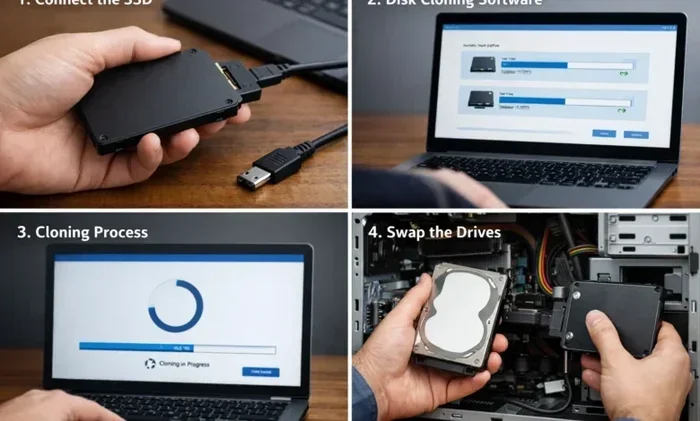
If your laptop still uses a hard disk drive, upgrading to a solid state drive is a game changer. An SSD loads games much faster. It also makes your entire system feel snappier. You can find a 1TB SSD for around $50 to $80.
Most laptops have an accessible SSD slot. You simply remove the back panel, slide out the old drive, and plug in the new one. Your operating system and games will run noticeably faster after this swap.
Improving Cooling
Heat is the enemy of performance. When a laptop gets too hot, it slows itself down to prevent damage. This is called thermal throttling. A laptop cooling pad can help reduce temperatures during gaming sessions.
You can also clean out the dust inside your laptop. Use compressed air to blow out the vents and fans. This simple maintenance task can improve performance by a few percentage points. It costs nothing but a few minutes of your time.
Upgrading the Storage Drive
Beyond just swapping to an SSD, you can add a second drive if your laptop supports it. More storage means you can install more games without deleting old ones. A 2TB SSD costs around $120 to $150 these days.
Some laptops come with both a small SSD for the operating system and a larger HDD for storage. Replacing the HDD with an SSD gives you the best of both worlds. Speed and capacity together.
The External GPU Option
This is the most powerful upgrade available for a regular laptop. An external GPU, or eGPU, is a graphics card housed in an external enclosure. You connect it to your laptop through a Thunderbolt 3 or 4 port. The eGPU handles all the heavy graphical work while your laptop acts as the display.
How Does an eGPU Work?
An eGPU box contains a desktop graphics card, a power supply, and its own cooling system. You plug one cable from the box into your laptop. Your laptop then recognizes the eGPU as a separate graphics card. Games run on the eGPU, and the laptop simply displays the output.
This setup can turn even an old laptop into a capable gaming machine. You are essentially giving your laptop a desktop graphics card without opening it up.
Pros and Cons of eGPUs
Let us look at the advantages and disadvantages side by side.
| Pros | Cons |
|---|---|
| Massive gaming performance boost | Expensive upfront cost |
| No internal laptop modification needed | Requires Thunderbolt 3 or 4 port |
| Upgradeable graphics card | Extra cable and external box take up space |
| Works with most laptops | Some performance loss from the connection bandwidth |
| Can double as a workstation for creative tasks | Not portable, so you lose laptop mobility |
How Much Does an eGPU Cost?
An eGPU enclosure costs between $200 and $400 on its own. Then you need to buy a compatible graphics card. A mid-range card like an NVIDIA RTX 4060 adds around $300. A high-end card like an RTX 4080 can cost $1,000 or more. So your total investment ranges from about $500 to $1,400.
For many people, this is still cheaper than buying a new gaming laptop with similar performance. And the eGPU can be reused or upgraded later.
What You Cannot Upgrade
It is just as important to know what you cannot change. Understanding these limitations saves you from wasting money on impossible upgrades.
The CPU Is Usually Soldered
In most modern laptops, the processor is soldered directly to the motherboard. This means you cannot swap it out for a faster one. Some older or larger laptops have a removable CPU, but these are rare in thin and light models.
Your CPU handles game logic, physics, and AI calculations. A weak CPU will bottleneck your gaming performance even if you add a powerful graphics card. But unfortunately, there is no easy fix for this in a regular laptop.
The Internal GPU Cannot Be Replaced
Integrated graphics are built into the processor itself. You cannot remove or replace them. This is the biggest limitation of a regular laptop. Without a dedicated GPU, your laptop simply cannot render modern games at high settings.
This is exactly why the eGPU exists. It gives you a way to add a powerful graphics card without replacing the internal GPU.
Screen and Display Limitations
Your laptop screen also matters for gaming. A regular laptop might have a 60Hz display, which is fine for office work but feels sluggish in fast-paced games. You cannot change the internal screen in most laptops. However, you can connect an external monitor with a higher refresh rate for a better gaming experience.
Software and Settings That Help
Hardware upgrades are not the only way to improve gaming performance. Software tweaks can also make a big difference, especially on a regular laptop.
Update Your Graphics Drivers
Always keep your graphics drivers up to date. Both NVIDIA and AMD release regular driver updates that improve game performance and fix bugs. A simple driver update can sometimes boost your frame rate by 10% or more.
Adjust In-Game Settings
Lowering settings like shadows, anti-aliasing, and resolution can dramatically improve performance. You do not need to play on the lowest settings. Even dropping from ultra to medium can double your frame rate on a regular laptop.
Use the built-in performance mode in Windows. Go to Settings, then System, then Display, and look for the graphics settings. You can set specific games to run in performance mode instead of power-saving mode.
Close Background Programs
Every program running in the background uses your laptop’s resources. Before you start a game, close unnecessary applications. Check your task manager for processes eating up your CPU or RAM. Freeing up these resources gives your game more room to run smoothly.
Cloud Gaming as an Alternative
If your laptop simply cannot handle modern games no matter what you do, cloud gaming is a great alternative. Cloud gaming lets you play demanding games on a remote server while streaming the video to your laptop.
How Cloud Gaming Works
You do not need a powerful GPU when you use cloud gaming. The game runs on a remote server with top-tier hardware. The server sends the video feed to your laptop over the internet. You send your controller inputs back to the server. The whole process happens in milliseconds.
Services like NVIDIA GeForce Now, Xbox Cloud Gaming, and Amazon Luna make this possible. Most of them offer free tiers or low monthly subscriptions. All you need is a stable internet connection.
Who Should Use Cloud Gaming?
Cloud gaming is perfect for people who want to play high-end games on a regular laptop without spending money on upgrades. It is also great for travelers who do not want to carry heavy gaming hardware. The main requirement is a fast and stable internet connection of at least 15Mbps for 1080p streaming.
However, cloud gaming does have drawbacks. Input lag can be an issue on slower connections. And you need an active internet connection at all times. If you play in areas with unreliable internet, cloud gaming may not be the best choice.
Is It Worth It? A Cost Breakdown
Let us put some real numbers on the table. Here is what common upgrades cost and what kind of performance gain you can expect.
| Upgrade | Approximate Cost | Performance Boost |
|---|---|---|
| Add 8GB RAM | $25 – $45 | 10-20% smoother multitasking |
| Swap HDD for SSD | $50 – $80 | 3-5x faster load times |
| Laptop cooling pad | $20 – $40 | 5-15% sustained performance |
| External GPU (mid-range) | $500 – $700 | 5-10x better graphics performance |
| External monitor (144Hz) | $150 – $300 | Smoother visual experience |
| Cloud gaming subscription | $0 – $10/month | Access to all AAA titles |
As you can see, the eGPU provides the biggest single upgrade. But it also costs the most. The cheapest upgrades like RAM and SSD are well worth the small investment. They make a noticeable difference in everyday use and gaming.
Before you buy anything, ask yourself what kind of games you want to play. If you only play casual or indie games, a RAM and SSD upgrade might be all you need. If you want to play AAA titles at high settings, an eGPU or cloud gaming is the better path.
Common Mistakes to Avoid
Many people make avoidable mistakes when trying to upgrade their laptops. Here are the ones you should steer clear of.
- Buying the wrong RAM type: Not all RAM is compatible with all laptops. Check your laptop’s manual or use a tool like Crucial’s scanner before buying.
- Ignoring thermal paste: If your laptop is older, the thermal paste between the CPU and heatsink may have dried out. Replacing it can lower temperatures significantly.
- Expecting miracles from a cooling pad: A cooling pad helps, but it cannot fix a fundamentally weak processor or lack of a dedicated GPU.
- Overlooking the power supply: Some high-performance eGPUs need their own power outlet. Make sure you have one available.
- Skipping driver updates: New drivers often bring performance improvements. Keep everything updated for the best experience.
Expert Insights
We spoke with a few tech professionals about the best ways to turn a regular laptop into a gaming machine. Their advice was consistent and practical.
“The single most impactful upgrade for most people is adding an eGPU,” says Mark T., a hardware reviewer with over a decade of experience. “It transforms the laptop from a non-gaming machine into a capable gaming setup without replacing anything internal.”
Another expert, Sarah L., a systems engineer, adds that software optimization should never be overlooked. “Many users skip this step, but updating drivers, adjusting Windows settings, and closing background apps can squeeze out 15-20% more performance for free.”
Both experts agree on one thing. If your laptop has an older processor with no upgrade path, sometimes it makes more financial sense to save for a new machine rather than spending hundreds on individual upgrades.
Final Thoughts
So, can I turn a regular laptop into a gaming laptop? The answer is a qualified yes. You can make meaningful improvements through RAM upgrades, SSD swaps, cooling solutions, and external GPUs. Each upgrade brings you closer to a real gaming experience.
But you need to set realistic expectations. A regular laptop will never match a dedicated gaming laptop in raw performance. The gap narrows with the right upgrades, but it does not completely close. What you can do is extend the life of your current laptop and enjoy more games than you could before.
Start with the cheapest upgrades first. Add RAM if you need it. Swap in an SSD if you still have a hard drive. Then evaluate whether an eGPU or cloud gaming makes more sense for your budget and needs. Every step forward counts.
Gaming on a regular laptop is absolutely possible in 2024 and beyond. The tools and options are better than ever. You just need to know where to invest your time and money. Now you do.
Take action today. Check your laptop specs, pick one upgrade, and see the difference for yourself. You might be surprised at how much better your gaming experience can become with just a few changes.
Frequently Asked Questions
Can I upgrade the graphics card inside my laptop?
In most cases, no. The graphics card in regular laptops is either integrated into the processor or soldered to the motherboard. The one exception is using an external GPU, or eGPU, which connects through a Thunderbolt port and gives you desktop-level graphics power outside the laptop.
How much does it cost to turn a regular laptop into a gaming laptop?
The cost depends on what upgrades you choose. A basic upgrade with RAM and an SSD can cost under $100. Adding an external GPU with a mid-range card can run between $500 and $700. Cloud gaming subscriptions start at free or around $10 per month.
Will upgrading my RAM make my laptop better for gaming?
Yes, upgrading RAM can noticeably improve gaming performance, especially if you currently have 4GB or 8GB. Most modern games run best with 16GB of RAM. Adding more RAM also helps with multitasking, so your system stays responsive while gaming.
Is cloud gaming better than upgrading my laptop?
It depends on your situation. Cloud gaming requires no hardware investment and gives you access to AAA titles instantly. But it needs a fast, stable internet connection and introduces some input lag. Upgrading your laptop gives you offline access and lower latency, but it costs money upfront.
Can a cooling pad really improve gaming performance?
A cooling pad can help by reducing thermal throttling. When your laptop stays cooler, it can sustain higher performance for longer periods. However, a cooling pad alone will not transform a regular laptop into a high-end gaming machine. It works best as part of a broader upgrade strategy.
How long does a regular laptop last for gaming after upgrades?
With smart upgrades like an SSD, extra RAM, and an eGPU, a regular laptop can handle gaming for several more years. The exact lifespan depends on the original laptop quality and how demanding the games you want to play are. Most users find they can extend their laptop’s gaming life by 3 to 5 years with the right approach.
=== CONCLUSION ===
Turning a regular laptop into a gaming laptop is possible today through a combination of hardware upgrades, external devices, software tweaks, and cloud gaming services. The key is to understand your current setup, set a realistic budget, and choose the upgrades that match your gaming goals. Whether you spend $50 on an SSD or $700 on an eGPU, every improvement counts. Start small, test the results, and build from there. Your regular laptop can do more than you think.