What Is The Definition Of A Pen Drive And How It Works
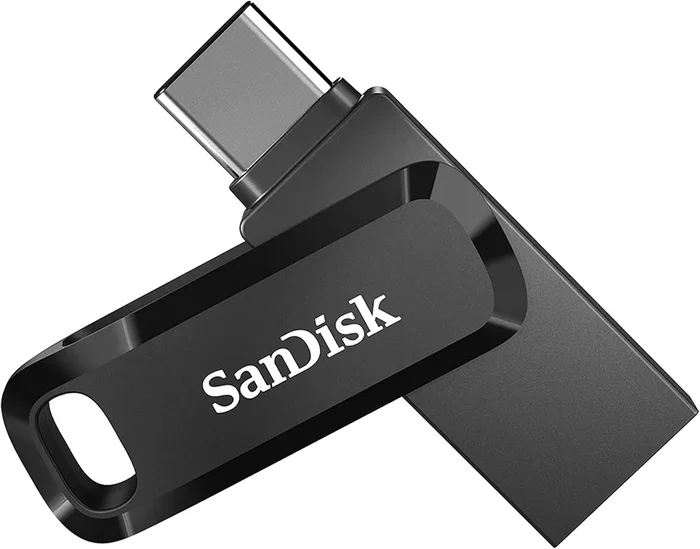
A pen drive is a small, portable storage device that uses flash memory to store and transfer data through a USB connection. It is plug-and-play, meaning you can use it instantly without installing extra software.
Key Takeaways
- Pen Drive Definition: A compact, removable storage device that uses flash memory and connects via a USB interface to read and write data.
- How It Works: The USB connector plugs into a computer’s port, and the NAND flash memory chip stores your files using electrical charges.
- Types Available: You can choose from standard, encrypted, metal-body, and high-speed USB 3.0 pen drives based on your needs.
- Key Benefits: Portable storage, easy file transfer, data backup, and plug-and-play convenience make pen drives essential tools.
- Buying Tips: Consider storage capacity, read and write speed, build quality, and compatibility before purchasing.
- Care Matters: Proper handling, safe ejection, and keeping your pen drive away from extreme heat will extend its lifespan.
📑 Table of Contents
What Is The Definition Of A Pen Drive?
A pen drive is a tiny, lightweight portable storage device that you can carry in your pocket or attach to your keychain. It stores digital files like documents, photos, videos, and music using flash memory technology. The term pen drive comes from its slim, pen-like shape that fits comfortably in your hand.
Most people also call it a USB flash drive, thumb drive, jump drive, or memory stick. No matter what name you use, the pen drive definition stays the same. It is a small device with a USB connector on one end and a flash memory chip inside. You plug it into any computer or laptop with a USB port, and it shows up as a new drive letter on your screen.
The beauty of a pen drive lies in its simplicity. There are no moving parts inside. No spinning disks. No noisy fans. Just a solid-state memory chip that holds your data using tiny electrical charges. This makes pen drives incredibly fast, durable, and reliable for everyday data transfer tasks.
Modern pen drives come in many shapes, sizes, and designs. Some look like traditional sticks, while others are shaped like animals, tools, or even jewelry. Despite the variety, every pen drive serves the same core purpose. It gives you compact storage that you can carry anywhere and access on almost any device.
If you have ever needed to move a file from one computer to another, you already understand the value of a pen drive. It eliminates the need for cloud storage or internet connections. You simply copy your files, plug the drive into another device, and paste them. That is the power of portable storage at its finest.
Brief History Of The Pen Drive
The first USB flash drive appeared in the early 2000s. Before that, people relied on floppy disks and CDs to move files around. Those older methods were slow and held very little data. The pen drive changed everything. It offered removable storage that was faster, smaller, and far more convenient.
By the mid-2000s, pen drives had become standard accessories for students, professionals, and tech enthusiasts. Today, they are available in capacities ranging from a few gigabytes to over one terabyte. The solid state storage inside them keeps getting better, making each new generation faster and more reliable.
How Does A Pen Drive Work?
Understanding how a pen drive works is simpler than you might think. Inside every pen drive, there is a USB connector, a controller chip, and a flash memory chip. These three parts work together to store and retrieve your data quickly and efficiently.
The USB Connector
The USB connector is the metal tip you plug into your computer. It creates a physical and electrical connection between the pen drive and the host device. When you insert the USB connector, the computer recognizes the device and assigns it a drive letter. This is what makes plug and play possible. You do not need to install drivers or restart your computer.
The Controller Chip
The controller chip acts as the brain of the pen drive. It manages data flow between the USB connector and the flash memory chip. When you copy a file to the pen drive, the controller organizes the data and stores it in the right memory blocks. When you open a file, the controller retrieves it and sends it back through the USB connection.
The Flash Memory Chip
The flash memory chip is where your actual files live. This chip uses NAND flash technology to store data electrically. Unlike a hard drive, there are no spinning parts. The NAND flash stores information in tiny memory cells called transistors. Each transistor holds a small electrical charge that represents a piece of data. When the charge is present, it reads as a “1.” When it is absent, it reads as a “0.”
This binary system is how every file on your pen drive gets stored. Your photos, documents, and videos all break down into streams of ones and zeros. The flash memory holds these charges even when the pen drive is unplugged. That is why your files do not disappear when you remove the device.
Read And Write Speeds
The speed of a pen drive depends on its USB version and the quality of its controller chip. Older USB 2.0 pen drives offer slower speeds, typically around 30 megabytes per second. Newer USB 3.0 pen drives and USB 3.1 drives can reach speeds of 100 megabytes per second or more.
If you frequently transfer large files like videos or backups, a faster pen drive saves you significant time. Look for read and write speed ratings before buying. A drive with high read speed lets you open files quickly, while high write speed means faster saving and copying.
Types Of Pen Drives Available Today
The market is full of different pen drives, each designed for specific needs. Understanding the options helps you pick the right one for your situation.
Standard Pen Drives
A standard pen drive is the most common type. It has a simple plastic or metal body with a USB connector on one end. These offer reliable portable storage at affordable prices. They come in capacities from 4 GB to 256 GB, making them suitable for everyday file transfer and data backup.
Encrypted Pen Drives
An encrypted pen drive adds a layer of security to your files. It requires a password or PIN before anyone can access the stored data. Some models use hardware encryption, which means the security is built into the controller chip. Others use software encryption that runs when you plug the drive in. These are ideal for professionals who handle sensitive information.
Metal-Body Pen Drives
A metal-body pen drive offers extra durability. The metal shell protects the internal flash memory from drops, bends, and scratches. These drives often have a sleek, premium look. They are perfect for people who carry their pen drive in a pocket or bag every day.
High-Speed Pen Drives
If speed is your priority, a high-speed pen drive with USB 3.0 or USB 3.1 technology is the way to go. These drives transfer files much faster than older models. They are great for videographers, photographers, and anyone who works with large media files.
Novelty Pen Drives
Some pen drives come in fun shapes and designs. You can find them shaped like animals, cars, food items, or popular characters. While they may not offer the best performance, they make great gifts and promotional items. Companies often use custom-shaped pen drives for marketing campaigns.
Benefits Of Using A Pen Drive
The pen drive has remained popular for over two decades because it offers so many practical advantages. Here are the key benefits that make it a must-have tool.
Portability And Convenience
The biggest advantage of a pen drive is its size. You can slip it into your wallet, attach it to your keys, or keep it in your laptop bag. It takes up almost no space. Yet it holds hundreds of files, photos, or even entire presentations. This compact storage makes it incredibly convenient for people who are always on the move.
Plug And Play Functionality
You do not need technical skills to use a pen drive. Just plug it in, and your computer recognizes it instantly. This plug and play feature means no software installation, no setup wizard, and no waiting. It works on Windows, Mac, and Linux computers. Some smart TVs and car audio systems also support pen drives directly.
Fast Data Transfer
Modern pen drives offer impressive data transfer speeds. A USB 3.0 pen drive can move a 1 GB file in just a few seconds. This is much faster than burning a CD or emailing large attachments. For quick file sharing between devices, a pen drive is hard to beat.
Reliable Data Backup
A pen drive serves as an excellent tool for data backup. You can copy important documents, family photos, and work files onto the drive and keep them safe. If your computer crashes or gets infected with malware, your backed-up files on the pen drive remain untouched. It is a simple form of external storage that everyone can use.
Affordability
Pen drives are incredibly affordable. You can buy a reliable 64 GB pen drive for a very reasonable price. Even higher capacity models are priced competitively. Compared to external hard drives or cloud storage subscriptions, a pen drive offers excellent value for money.
No Internet Required
Unlike cloud storage, a pen drive does not need an internet connection. You can transfer files in places with no Wi-Fi or limited connectivity. This makes it invaluable for travelers, field workers, and anyone who works in areas with poor internet access.
Common Uses For Pen Drives
Pen drives are versatile tools used in many different situations. Here are the most common ways people put them to work.
School And Education
Students use pen drives to carry assignments, presentations, and research materials. A student can work on a project at school, save it on the pen drive, and continue at home. Teachers also use pen drives to distribute course materials and collect student submissions.
Office And Business
Professionals rely on pen drives for sharing reports, presentations, and confidential documents. In meetings, a pen drive makes it easy to hand over files without needing email or internet access. Many businesses also use encrypted pen drives to protect sensitive company data.
Photography And Videography
Photographers and videographers often use pen drives to transfer large media files from cameras to editing computers. A high-speed pen drive with plenty of storage capacity makes this process quick and seamless.
System Recovery And Diagnostics
Tech professionals create bootable pen drives for system recovery. A bootable pen drive can restore an operating system, run diagnostics, or install software on a computer that will not start normally. This is one of the most powerful uses of a pen drive in IT support.
Music And Entertainment
Many car stereos and home entertainment systems have USB ports that accept pen drives. You can load your favorite music or movies onto a pen drive and enjoy them on the go. It is a simple way to carry your entertainment library wherever you travel.
How To Choose The Right Pen Drive
With so many options available, picking the right pen drive can feel overwhelming. Here are the key factors to consider before making a purchase.
Storage Capacity
Think about how much data you need to store. For basic documents and a few photos, a 16 GB or 32 GB pen drive works well. If you store videos or large project files, look for 64 GB, 128 GB, or even 256 GB options. Always choose a little more capacity than you currently need to allow room for growth.
Speed And USB Version
Check the USB version of the pen drive. USB 3.0 and USB 3.1 drives offer much faster speeds than USB 2.0 models. If you frequently transfer large files, the extra speed is worth the small price difference. Look for read and write speed specifications in the product details.
Build Quality And Durability
A metal-body pen drive or one with a sturdy rubber housing will last longer. Avoid drives with fragile plastic shells if you plan to carry them around daily. Some pen drives come with keychain loops or retractable connectors, which add convenience and protection.
Security Features
If you handle sensitive data, look for encrypted pen drives with password protection or hardware encryption. These features add a critical layer of security. Even if you lose the drive, your files remain protected from unauthorized access.
Brand And Warranty
Stick with reputable brands that offer warranties. Well-known manufacturers provide better data reliability and customer support. A warranty of at least one year gives you peace of mind against defects or early failure.
Common Mistakes To Avoid With Pen Drives
Even though pen drives are simple to use, certain mistakes can damage them or cause data loss. Here are the most common errors and how to avoid them.
Removing The Drive Without Ejecting
Always use the “Safely Remove Hardware” option before pulling out your pen drive. Removing it while data is still being written can corrupt files or damage the flash memory. This simple habit protects both your pen drive and your data.
Exposing The Drive To Extreme Heat
Flash memory is sensitive to high temperatures. Leaving your pen drive in a hot car or near a heater can damage the internal chip. Keep your drive in a cool, dry place when not in use.
Using The Wrong USB Port
If your pen drive supports USB 3.0, plug it into a USB 3.0 port for full speed. Plugging a fast drive into an older port will limit its performance. Check your computer or laptop for the correct port type.
Ignoring Data Backups
A pen drive is convenient, but it is not a permanent backup solution. Drives can be lost, stolen, or fail. Always keep a second copy of your most important files on a different external storage device or in the cloud.
Buying Counterfeit Drives
Some cheap pen drives on online marketplaces claim to have more storage capacity than they actually do. These counterfeit drives often fail quickly or corrupt data. Buy from trusted retailers and verify the brand and model before purchasing.
How To Care For Your Pen Drive
Taking proper care of your pen drive extends its lifespan and keeps your data safe. Follow these simple maintenance tips.
- Store it in a protective case: A small carrying case prevents dust, moisture, and physical damage to the USB connector.
- Keep it away from magnets: While flash memory is not affected by magnets like old hard drives, it is still best to keep the drive away from strong magnetic fields.
- Update firmware when available: Some pen drives have updatable firmware that improves performance and fixes bugs. Check the manufacturer’s website for updates.
- Scan for viruses regularly: If you use your pen drive on multiple computers, run a virus scan regularly to prevent malware infections.
- Avoid bending or dropping: The internal NAND flash chip can be damaged by physical stress. Handle your drive gently and avoid bending it at sharp angles.
The Future Of Pen Drive Technology
The pen drive continues to evolve with advances in flash memory and USB technology. The latest USB 3.2 and USB4 standards promise even faster data transfer speeds. Manufacturers are also exploring smaller form factors and higher capacities. Some cutting-edge models now offer 1 TB of storage capacity in a device smaller than your thumb.
As solid state storage technology improves, pen drives will become even faster, more durable, and more affordable. They may also integrate with wireless charging and Bluetooth connectivity in the future. But no matter how technology changes, the core appeal of a pen drive will remain the same. It is a simple, reliable, and portable way to carry your digital life with you.
The pen drive has proven that sometimes the simplest solutions are the best. In a world dominated by cloud services and wireless technology, the humble USB flash drive still holds a special place. It offers control, privacy, and independence that online solutions cannot always match. Whether you are a student, a professional, or simply someone who values portable storage, a quality pen drive remains an essential tool in your digital toolkit.
Now that you understand the pen drive definition, how it works, and how to choose the right one, you are ready to make an informed decision. Pick a drive that suits your storage capacity needs, your speed requirements, and your budget. Take good care of it, and your pen drive will serve you reliably for years to come.
Frequently Asked Questions
What Is The Definition Of A Pen Drive?
A pen drive is a small, portable storage device that uses flash memory to store data and connects to computers through a USB port. It is also commonly called a USB flash drive or thumb drive. You can plug it in, copy files, and carry your data anywhere with ease.
How Much Storage Does A Typical Pen Drive Have?
Pen drives come in a wide range of storage capacities, from 4 GB to 1 TB or more. For everyday use like documents and photos, 16 GB to 64 GB is usually enough. If you work with large video files or need to back up entire folders, consider a 128 GB or 256 GB model.
Can I Use A Pen Drive On Both Windows And Mac Computers?
Yes, most pen drives work on both Windows and Mac computers. They use the USB plug and play standard, which means they are recognized automatically on both operating systems. Some drives may need to be reformatted for full compatibility, but this is a quick and easy process.
Is It Safe To Leave Files On A Pen Drive Long-Term?
Flash memory can retain data for many years if stored properly. However, it is not designed for permanent long-term storage. The electrical charges in the memory cells can slowly leak over time. For critical files, always keep a backup on a different external storage device or in the cloud.
What Is The Difference Between A Pen Drive And An External Hard Drive?
A pen drive uses solid state flash memory with no moving parts, making it small, fast, and durable. An external hard drive uses spinning magnetic disks and is larger, heavier, and more fragile. Pen drives are better for quick file transfer and portability, while external hard drives offer much higher storage capacity for bulk backups.
How Do I Know If My Pen Drive Is USB 3.0?
Check the product packaging or specifications for the USB version. A USB 3.0 pen drive usually has a blue-colored USB connector inside the port. You can also check your computer’s USB port color or look for the “SS” (SuperSpeed) logo next to it, which indicates a USB 3.0 connection.
=== CONCLUSION ===
A pen drive is one of the most practical and essential portable storage tools available today. Its simple pen drive definition barely scratches the surface of what this remarkable device can do. From data transfer and file sharing to data backup and system recovery, the pen drive continues to prove its value in our digital lives.
Understanding how a pen drive works gives you the confidence to use it more effectively. You now know about the flash memory inside, the role of the controller chip, and the importance of USB versions for speed. You also know how to choose the right pen drive based on storage capacity, build quality, and security features.
Remember to avoid common mistakes like removing the drive without ejecting or exposing it to extreme heat. Proper care goes a long way in keeping your pen drive healthy and your files safe. Whether you are a student carrying assignments, a professional sharing presentations, or a creative storing media files, the right pen drive makes your life easier.
So go ahead, explore the options, and find the perfect pen drive for your needs. With the knowledge you have gained from this guide, you are fully equipped to make a smart choice. Embrace the convenience of portable storage and enjoy the freedom of having your important files always within reach.