Can I Open My Garage Door With My iPhone Right Now
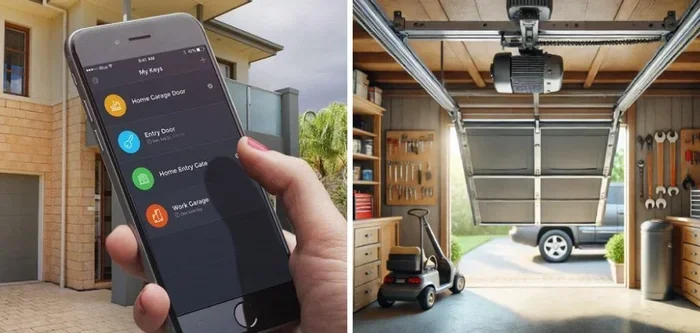
Can I open my garage door with my iPhone right now? Absolutely yes. With a smart garage door opener and your iPhone, you can open, close, and monitor your door from anywhere. This guide covers the best iPhone-compatible openers, setup steps, and security tips to keep your home safe.
Can I open my garage door with my iPhone right now? Yes, you absolutely can. Modern smart garage door openers let you turn your iPhone into a powerful remote control. You can open, close, and monitor your door from anywhere with just a few taps. Whether you are at the office, on vacation, or simply standing in the driveway with your hands full, your iPhone has you covered.
This guide walks you through everything you need to know. You will learn how smart garage door openers work, which models pair best with iPhone, and how to set up iPhone garage door control step by step. I will also cover security features, troubleshooting tips, and expert tricks to make your life easier. By the end, you will feel confident using your iPhone to manage your garage door like a pro.
The whole process is simpler than most people think. You do not need advanced tech skills. A few minutes of setup is all it takes to connect your iPhone garage door controller to your opener. Let us dive in and explore the world of home automation for your garage.
Key Takeaways
- You can open your garage door with your iPhone: Using a smart garage door opener or a compatible app, you can control your door right from your phone.
- iPhone Garage Door Apps Are Easy to Set Up: Most openers connect via Wi-Fi or Bluetooth, and you can add them to Apple HomeKit for Siri control.
- Security Is Built In: Modern openers use rolling codes, encryption, and geofencing to keep your garage safe.
- Multiple Brands Work with iPhone: Chamberlain MyQ, Genie Aladdin, and other brands offer iOS apps.
- Voice Control Is Possible: You can use Siri to open your garage door hands-free.
- Remote Access Works Anywhere: As long as you have internet, you can check and operate your garage door from any location.
📑 Table of Contents
Can I Open My Garage Door With My iPhone? Here’s How It Works
Understanding the basics helps you get the most out of your setup. A smart garage door opener replaces your old manual opener with a connected device. This device talks to your iPhone over your home Wi-Fi network or Bluetooth. You then use a dedicated app to send commands. The opener receives those commands and moves the door accordingly.
What Is a Smart Garage Door Opener?
A smart garage door opener is a wireless garage door opener that includes a Wi-Fi module or Bluetooth chip. It connects to your home network and communicates with a companion app on your iPhone. You can think of it as adding a smart brain to your existing door mechanism. Most openers work with your existing door hardware, so you usually do not need to replace the whole system.
These devices support remote access, which means you can control your garage door from miles away. As long as your phone has internet, the app sends a signal through the cloud to your opener. The opener then executes your command. This is the core of iPhone garage door control.
How iPhone Control Works
Once the opener is connected, you download its app from the App Store. The app acts as your iPhone garage remote. You can press an on-screen button to open or close the door. Many apps also show the current status of your door. You will see whether it is open, closed, or in motion.
Some openers integrate with Apple HomeKit. This lets you use Siri voice commands to control the door. You can say, “Hey Siri, open the garage door,” and it happens. HomeKit also allows you to create automations. For example, you can set the door to close automatically when you leave home. This is called geofencing, and it is a key feature of modern home automation.
Common Mistake: Ignoring the Garage Door Sensor
Every garage door has safety sensors. These sensors prevent the door from closing on objects or people. When you set up your iPhone garage door controller, do not forget to check the sensors. A misaligned sensor can cause the door to reverse unexpectedly or fail to close. Keep the sensor lenses clean and properly aligned for safe operation.
Expert Insight: The Role of Rolling Codes
Security is a top concern when you connect your garage door to the internet. Modern smart openers use rolling code technology. This means the security code changes every time you use the app or the remote. Even if someone intercepts the signal, they cannot reuse it. This rolling code security is a standard feature in quality openers. It keeps your garage safe from unauthorized access.
Best Smart Garage Door Openers for iPhone
Not all openers work equally well with iPhone. Some offer deep iOS integration, while others provide basic app control. Below are the top brands and models that shine as an iPhone garage door controller. I will compare their features, app quality, and HomeKit support.
Chamberlain MyQ Smart Garage Door Opener
Chamberlain MyQ is one of the most popular smart garage door openers. It works with iPhone through the MyQ app. You get a simple interface that shows door status and lets you open or close the door with one tap. The app also sends notifications when the door opens or closes. Chamberlain MyQ does not support HomeKit natively, but you can bridge it with Siri using third-party services like IFTTT.
The MyQ system uses a battery backup, so your door keeps working during power outages. It also includes a Wi-Fi module that connects directly to your router. Installation is straightforward if you are comfortable with basic tools. The opener uses a wireless garage door opener signal to communicate with your door motor.
Genie Aladdin Connect
Genie Aladdin Connect is another excellent choice for iPhone users. The Genie app is well-designed and offers reliable remote access. Aladdin Connect supports HomeKit, which means you can use Siri directly without extra workarounds. This makes it a favorite among Apple enthusiasts. You can create Siri Shortcuts to open the door with a single voice command.
The Aladdin Connect unit installs on your existing Genie opener. It adds Wi-Fi connectivity and smart features. The app also includes a camera option on some models, letting you see who is at your garage door. This adds a layer of home automation security and peace of mind.
Other iPhone-Compatible Openers
Several other brands offer iPhone garage door control. LiftMaster, which shares the Chamberlain platform, uses the same MyQ app. Craftsman openers also support MyQ in many models. For a more budget-friendly option, some universal smart controllers like the Ryobi One+ Garage Door Opener work with iPhone and offer solid app control. Always check the product listing for iOS compatibility before you buy.
Comparison Table
| Feature | Chamberlain MyQ | Genie Aladdin Connect | Other iPhone-Compatible Openers |
|---|---|---|---|
| iPhone App | MyQ App | Genie App | Brand-specific apps |
| HomeKit Support | No (needs IFTTT) | Yes | Varies |
| Siri Voice Control | Indirect | Direct | Direct or indirect |
| Battery Backup | Yes | Yes | Often yes |
| Remote Access | Yes | Yes | Yes |
| Geofencing | Yes (via app) | Yes (via HomeKit) | Varies |
| Rolling Code Security | Yes | Yes | Yes |
Setting Up iPhone Garage Door Control – Step by Step
Setting up your iPhone garage door controller is a straightforward process. You will need your iPhone, your smart opener, and a stable Wi-Fi connection. Follow these steps to get everything running smoothly.
Download the Right App
Go to the App Store on your iPhone and search for your opener’s official app. For Chamberlain MyQ, download the MyQ app. For Genie, download the Aladdin app. Make sure the app is from the official developer. Avoid third-party apps that promise similar features but may compromise your security.
Once installed, create an account with your email address. Most apps require you to verify your account before you can pair the opener. This step adds an extra layer of home automation security.
Connect the Opener to Your Wi-Fi Network
Next, you need to connect the smart module to your Wi-Fi network. This usually involves pressing a button on the module or following on-screen instructions in the app. The module will search for your network and ask for your Wi-Fi password.
Make sure your Wi-Fi signal reaches the garage. If the signal is weak, consider adding a Wi-Fi extender. A strong connection ensures your iPhone garage remote works reliably. After the module connects, the app will confirm that the opener is online.
Add to Apple HomeKit for Siri Control
If your opener supports HomeKit, you can add it directly in the Home app on your iPhone. Open the Home app, tap the “+” button, and select “Add Accessory.” Scan the HomeKit code on the opener’s module or in the app. The opener will now appear in your Home app.
Once added, you can control the door with Siri. You can say, “Hey Siri, open the garage door,” or “Hey Siri, close the garage door.” You can also check the door status by asking, “Hey Siri, is the garage door closed?” This Siri voice control makes daily routines effortless.
Create an iPhone Garage Door Shortcut
The Shortcuts app on iPhone lets you create custom automation. You can build a shortcut that opens your garage door with a single tap or a voice command. Open the Shortcuts app, tap “New Shortcut,” and add the “Control Garage Door” action. You can name it something like “Open Garage” and add it to your Home Screen.
You can also set up an iPhone shortcut that runs automatically when you arrive home. Combine this with geofencing to have the door open as you pull in. This is a powerful feature of iPhone smart home setups.
Common Mistake: Skipping the Firmware Update
After setup, check for firmware updates in your opener’s app. Manufacturers release updates that improve performance and fix bugs. An outdated firmware can cause connection issues or security vulnerabilities. Keeping your wireless garage door opener up to date ensures smooth iPhone garage door control.
Security Features and Privacy Considerations
Connecting your garage door to the internet raises valid security questions. You want to make sure no one can open your door without permission. Fortunately, modern openers include robust rolling code security and encryption. Understanding these features helps you feel confident using your iPhone garage door controller every day.
Rolling Code Technology and Encryption
Rolling code technology is the backbone of opener security. Every time you send a command from your iPhone, the system generates a new, unique code. The opener and the app stay synchronized, so only the current code works. Even if a hacker captures the signal, the code will be useless the next time you use it. This prevents unauthorized remote access to your garage.
Encryption adds another layer of protection. The data traveling between your iPhone and the opener is scrambled. Only the intended device can unscramble it. Look for openers that use AES-128 or higher encryption standards. This is standard in quality smart garage door openers.
Geofencing and Auto-Close Features
Geofencing uses your iPhone’s location to trigger actions. You can set a radius around your home. When your phone crosses that boundary, the system can automatically close the garage door. This prevents you from forgetting to close the door after you leave.
Some apps also let you set a timer. If the door stays open for more than a set time, the app sends you a notification. You can then close it remotely. These geofencing features are part of a well-designed home automation setup and greatly enhance convenience and safety.
Protecting Your iPhone Garage Door Account
Keep your garage door account secure with a strong password and two-factor authentication. Use a unique password that you do not reuse on other sites. Enable two-factor authentication in the app settings. This ensures that even if someone learns your password, they still cannot access your opener without your phone’s verification code.
Troubleshooting Common Issues
Even the best smart garage door openers can have occasional hiccups. Most issues are easy to fix with a few simple steps. Here are the most common problems and how to resolve them.
iPhone Can’t Connect to the Opener
If your iPhone cannot connect, start by checking your Wi-Fi network. Make sure your phone is connected to the same network as the opener module. Restart your router if needed. Sometimes a simple reboot of the opener module fixes the issue. You can usually do this by unplugging the module for 10 seconds and plugging it back in.
Also check that the app is up to date. Outdated apps can lose compatibility with the latest iOS version. Visit the App Store and install any available updates. This keeps your iPhone garage door control working smoothly.
Garage Door App Not Responding
If the app freezes or fails to respond, force-close it and reopen. On iPhone, swipe up from the bottom of the screen to access the app switcher, then swipe the app away. Relaunch it and try again. If the problem persists, check your internet connection. A weak Wi-Fi signal in the garage can cause delays or timeouts.
Another common cause is a server outage at the opener’s cloud service. You can check the manufacturer’s website or social media for service alerts. In most cases, the issue resolves quickly on its own.
Battery and Power Problems
Smart opener modules have a small internal battery. If the battery dies, the module loses its Wi-Fi connection and cannot receive commands from your iPhone. Replace the battery according to the manufacturer’s instructions. Most modules use a standard CR123A or 9V battery. Keeping a spare battery on hand prevents unexpected downtime.
For the garage door itself, ensure the opener has a battery backup if your area experiences frequent power outages. A battery backup keeps the door operational even when the power is out. This is especially important if you rely on iPhone garage door control for daily access.
Common Mistake: Forgetting to Check the Internet Connection
Remote access depends entirely on the internet. If your home internet goes down, you will not be able to control your door from outside the local network. Check your internet connection first when troubleshooting remote access issues. Also make sure your opener module is online. The app usually shows the connection status clearly.
Expert Tips for Seamless iPhone Garage Control
Once your setup is working, you can enhance the experience with a few expert tricks. These tips turn basic control into a truly seamless iPhone smart home routine.
Use Siri Voice Commands
Voice control is one of the biggest advantages of using an iPhone with your garage door. With HomeKit support, you can say, “Hey Siri, open the garage door,” without touching your phone. This is incredibly handy when you are carrying groceries or a leash for your dog.
You can also create custom Siri Shortcuts. For example, a shortcut called “Coming Home” could open the garage door, turn on the porch light, and play your favorite playlist. The possibilities are vast with home automation integration.
Set Up Geofencing Automation
Geofencing automates your garage door based on your location. You can set the door to close automatically when all family members leave the house. You can also set it to open when the first person arrives home. This removes the mental burden of remembering to check the door.
Combine geofencing with notifications. The app can alert you if the door is left open for more than five minutes. This simple feature prevents forgotten open doors and adds a layer of home security.
Keep Your iOS App Updated
Developers regularly release app updates that add features and fix bugs. Enable automatic updates for your garage door app in the App Store settings. This ensures you always have the latest iOS app version with the best performance and security patches.
Add a Backup NFC Tag
For an extra layer of convenience, you can use an NFC tag. Place an NFC sticker near your garage entrance. When your iPhone touches the tag, it can trigger a shortcut that opens the door. This works even if your phone screen is locked. It is a fun, futuristic way to use iPhone garage door control.
Conclusion
So, can I open my garage door with my iPhone right now? Yes, absolutely. With the right smart garage door opener and a few minutes of setup, your iPhone becomes the ultimate garage door controller. You can open, close, and monitor your door from anywhere. You can use Siri voice commands, set up geofencing automations, and enjoy top-notch security features like rolling codes and encryption.
The process is simpler than most people expect. Whether you choose Chamberlain MyQ, Genie Aladdin Connect, or another iPhone-compatible opener, you will gain convenient remote access and peace of mind. Keep your app updated, secure your account with a strong password, and enjoy the benefits of modern home automation.
Now you know exactly how to take control of your garage door with your iPhone. Start by choosing the right opener, follow the setup steps, and explore the security and automation features. Your future self will thank you every time you pull into the driveway with your hands full and the door opens automatically. Embrace the convenience of iPhone garage door control today.
Frequently Asked Questions
Can I open my garage door with my iPhone if I do not have a smart opener?
You will need a smart garage door opener or a smart controller module that connects to your existing opener. These devices add Wi-Fi or Bluetooth connectivity, allowing your iPhone to send commands. Without a smart opener, your iPhone cannot directly control the door.
Is it safe to control my garage door with my iPhone over the internet?
Yes, modern openers use rolling code security and encryption to protect your commands. These features prevent unauthorized access. You should also enable two-factor authentication on your opener app and use a strong, unique password for your account.
Can I use Siri to open my garage door with my iPhone?
Yes, if your opener supports Apple HomeKit. You can add the opener to the Home app and use Siri voice commands like “Hey Siri, open the garage door.” Some openers that do not natively support HomeKit can still work with Siri through third-party services like IFTTT.
What happens if my internet goes down? Can I still use my iPhone to open the garage door?
Remote access requires an internet connection. If your home internet goes down, you will not be able to control the door from outside your local network. However, if you are within Wi-Fi range of your home network, the app may still work locally. Some openers also offer Bluetooth control as a backup.
Do I need an iPhone to use these smart garage door openers?
While these openers are designed for iPhone and iPad, many also offer Android apps. You can control the door from any smartphone with the manufacturer’s app. The HomeKit and Siri features, however, are exclusive to Apple devices.
How much does it cost to add iPhone control to my garage door?
A smart garage door opener or smart controller module typically costs between $100 and $300, depending on the brand and features. Chamberlain MyQ and Genie Aladdin Connect are popular options in this price range. Installation is usually straightforward and can be done as a DIY project in about 30 minutes.