Can I Use Any Cordless Phone For Voip Phone Service
Not every cordless phone works with VoIP, and picking the wrong one can cause frustration. This guide explains exactly which cordless phones are compatible with VoIP phone service, what features matter most, and how to set them up without headaches. You will learn about DECT phones, SIP compatibility, analog telephone adapters, and much more.
Have you ever wondered if you can use any cordless phone for VoIP phone service? Maybe you already have a cordless phone at home and want to switch to a VoIP system. Or perhaps you are shopping for a new phone and want to keep things simple. Either way, the answer is not as straightforward as you might think.
The truth is, not every cordless phone works with VoIP. Some phones are built specifically for internet calling, while others need extra equipment to connect. Using the wrong phone can lead to dropped calls, poor sound quality, and a lot of wasted time. That is exactly why this guide exists.
In this article, we will walk you through everything you need to know about using a cordless phone for VoIP. We will cover which phones work, which do not, and how to make the right choice for your home or office. By the end, you will feel confident about picking the perfect phone for your VoIP setup.
Key Takeaways
- Not all cordless phones work with VoIP: You need a phone that supports SIP protocol or use an ATA adapter to make it compatible.
- DECT 6.0 phones are the most popular choice: They offer great range, clear sound, and reliable performance with VoIP systems.
- Check for SIP compatibility before buying: A SIP-compatible cordless phone saves you time and money on extra equipment.
- An Analog Telephone Adapter (ATA) can convert any phone: This lets you use older cordless phones with modern VoIP service.
- Battery life and signal range matter a lot: VoIP cordless phones need strong batteries and good coverage for smooth calls.
- Setup is usually simple: Most cordless VoIP phones connect to your router or ATA in just a few minutes.
- Avoid common mistakes like ignoring network settings: Proper QoS and router configuration keep your calls clear and drop-free.
📑 Table of Contents
- What Is VoIP and Why Use a Cordless Phone With It?
- Types of Cordless Phones That Work With VoIP
- How to Choose the Right Cordless Phone for VoIP
- Setting Up Your Cordless Phone for VoIP Service
- Common Problems and How to Fix Them
- Common Mistakes to Avoid
- Expert Tips for the Best VoIP Cordless Phone Experience
- Conclusion
What Is VoIP and Why Use a Cordless Phone With It?
VoIP stands for Voice over Internet Protocol. It is a technology that lets you make phone calls using your internet connection instead of traditional phone lines. Services like Vonage, RingCentral, and Ooma use VoIP to deliver calls over broadband. This means no copper wires, no landline fees, and often much lower monthly bills.
A cordless phone for VoIP gives you the freedom to move around your home or office while staying connected. You can walk from room to room, step outside into the garden, or move about your office without losing your call. That wireless convenience is a huge reason why people love cordless VoIP phones.
How VoIP Phone Service Works
When you make a call with VoIP phone service, your voice is converted into digital data packets. These packets travel over your broadband connection to the recipient. On the other end, the data is converted back into sound. The whole process happens in milliseconds, which is why modern VoIP calls sound so clear.
Your internet phone service relies on a few key pieces of equipment. You need a broadband router, a VoIP-compatible phone or adapter, and a stable internet connection. The phone itself can be a desk phone, a softphone app on your computer, or a wireless VoIP handset like the ones we are discussing here.
Why Choose a Cordless Setup?
There are several reasons why a cordless VoIP phone makes sense for most people:
- Mobility: You are not tied to one spot. Move freely while talking.
- Convenience: No tangled cords or limited reach. Carry the handset anywhere in range.
- Multiple handsets: Most cordless phone systems come with two or more handsets, so everyone in the house can have one.
- Modern features: Many DECT phones now include caller ID, call waiting, voicemail, and even Bluetooth connectivity.
- Cost savings: VoIP service is often cheaper than traditional landline service, and adding a cordless handset costs almost nothing extra.
Types of Cordless Phones That Work With VoIP
Not all cordless phones are created equal when it comes to VoIP compatibility. Understanding the different types helps you avoid buying something that will not work with your setup.
SIP-Compatible Cordless Phones
SIP stands for Session Initiation Protocol. It is the standard signaling method used by most VoIP providers. A SIP compatible phone is designed to work directly with VoIP systems without needing extra equipment. These phones connect straight to your router or network switch using an Ethernet cable.
Popular brands that make SIP cordless phones include Yealink, Snom, Grandstream, and Polycom. These phones are common in offices but are also available for home use. They tend to cost more than regular cordless phones, but they deliver the best performance with VoIP phone systems.
DECT Phones with VoIP Support
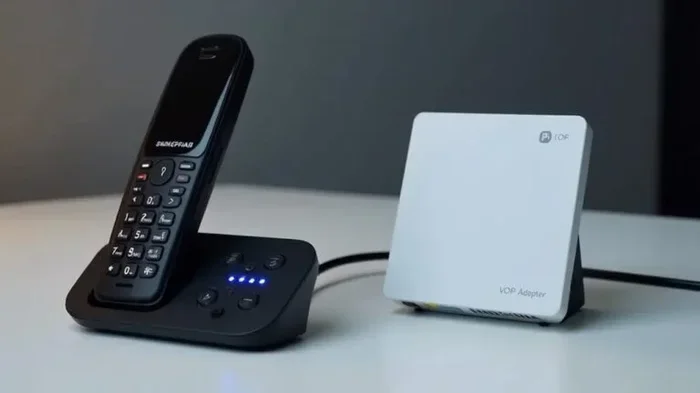
DECT stands for Digital Enhanced Cordless Telecommunications. Most consumer cordless phones use DECT technology, and many modern DECT phones now support VoIP. These phones have a base station that connects to your router or ATA, and the handsets communicate wirelessly with the base.
The VTech SIP series and AT&T DECT 6.0 VoIP phones are great examples. They offer excellent range, clear digital sound, and easy setup. If you want a reliable cordless telephone for home VoIP, a DECT phone is usually the way to go.
Phones That Need an ATA Adapter
If you already own a cordless phone that does not support SIP or VoIP natively, do not worry. You can still use it with VoIP phone service by adding an Analog Telephone Adapter, commonly known as an ATA. The ATA converts the digital VoIP signal into an analog signal that any standard cordless phone base can understand.
Popular ATA devices include the Grandstream HT801 and the Obihai OBi202. These small boxes plug into your router and connect to your phone base with a standard phone cable. This setup lets you use any cordless phone for VoIP, even older models that were not designed for internet calling.
Comparison Table: Cordless Phone Types for VoIP
| Phone Type | VoIP Ready? | Extra Equipment Needed? | Best For | Price Range |
|---|---|---|---|---|
| SIP Cordless Phone | Yes, native | No | Businesses, power users | $80 – $250 |
| DECT VoIP Phone | Yes, with base | Sometimes | Home users, small offices | $40 – $150 |
| Standard Cordless Phone + ATA | Yes, with adapter | Yes (ATA required) | Budget setups, existing phones | $20 – $60 (ATA) |
| WiFi Cordless Phone | Yes, native | No | Users who want no cables | $60 – $180 |
How to Choose the Right Cordless Phone for VoIP
Choosing the right cordless phone for VoIP depends on several factors. Here is what you should consider before making a purchase.
Check VoIP Protocol Compatibility
The first thing to check is whether the phone supports the right protocol. Most VoIP phone service providers use SIP. Look for a phone that explicitly says it is SIP compatible. If the phone does not mention SIP, it may not work with your VoIP provider, or you will need an ATA to bridge the gap.
Consider Your Internet Connection
Your broadband connection plays a big role in call quality. A fast, stable internet connection ensures clear voice quality and fewer dropped calls. If your internet is slow or unreliable, even the best cordless VoIP phone will struggle. Aim for at least 100 Kbps of upload and download speed per concurrent call.
Look at Range and Coverage
Cordless phones vary widely in their wireless range. Indoor range can be anywhere from 50 feet to 1,000 feet depending on the model and the environment. If you have a large home or office, look for a DECT 6.0 phone with excellent range. Walls, floors, and electronic devices can all reduce the effective range, so it is wise to go a little higher than you think you need.
Battery Life Matters
A cordless phone is only as good as its battery. Look for handsets with long talk time and standby time. Most quality wireless VoIP handsets offer 8 to 12 hours of talk time and several days of standby. If you forget to charge your phone often, go for a model with a longer battery life.
Number of Handsets
Think about how many handsets you need. Most cordless phone systems come with a two-handset pack, but you can often add more. For a small family, two handsets are usually enough. For a larger home or small office, three or four handsets might be better. Check whether the base station supports additional handsets before you buy.
Setting Up Your Cordless Phone for VoIP Service
Setting up a cordless VoIP phone is simpler than most people think. Here is a step-by-step guide to get you started.
Step 1: Connect Your ATA (If Needed)
If you are using an ATA, plug it into your broadband router using an Ethernet cable. Then connect your cordless phone base to the ATA using a standard phone cable. The ATA will convert the VoIP signal for your phone. Make sure the ATA is powered on and properly configured with your VoIP provider settings.
Step 2: Connect Directly to the Router (For SIP Phones)
If you have a SIP-compatible cordless phone, you can skip the ATA. Simply plug the phone base into your router using an Ethernet cable. The phone should automatically detect the network and register with your VoIP provider. Follow the on-screen prompts to enter your account details if needed.
Step 3: Register the Handset with the Base
Once the base is connected, you need to register each handset. Most phones have a simple registration process. Place the handset in the base station and follow the instructions in the user manual. Usually, you just press a register button on both the base and the handset.
Step 4: Test Your Connection
After setup, make a test call to confirm everything works. Check for clear audio, no delay, and a stable connection. If you hear static or experience drops, move closer to the base or check your network settings.
Expert Insight
Many users skip the test call step and run into problems later. Always make a test call right after setup. It saves time and frustration down the road. Also, keep your phone firmware updated to ensure the best performance and security.
Common Problems and How to Fix Them
Even with the right setup, you may run into some issues with your cordless phone VoIP connection. Here are the most common problems and their solutions.
Poor Call Quality or Static
Static or choppy audio is often caused by a weak internet connection or interference. Try these fixes:
- Move your router closer to the phone base.
- Reduce interference from other wireless devices like microwaves or baby monitors.
- Check your internet speed and upgrade your plan if needed.
- Enable Quality of Service (QoS) settings on your router to prioritize VoIP traffic.
Dropped Calls
If your calls drop frequently, the issue is usually related to signal range or network instability. Make sure your handset is within range of the base station. Also, check that your router is handling the load properly. Some routers struggle when multiple devices are using bandwidth at the same time.
Phone Will Not Register with VoIP Provider
This is a common issue with SIP phones and ATAs. Double-check your account credentials, including the username, password, and server address provided by your VoIP provider. Make sure your router allows SIP traffic through its firewall. You may need to enable SIP ALG or configure port forwarding.
Short Battery Life
If your handset battery drains quickly, try reducing the ring volume and backlight brightness. Also, make sure you are using the charger that came with the phone. Third-party chargers can sometimes cause battery issues over time.
Quick Tips
- Restart your router and phone base regularly to keep things running smoothly.
- Use a UPS (Uninterruptible Power Supply) for your router and ATA to keep calls going during power outages.
- Place your router centrally in your home for the best wireless coverage.
Common Mistakes to Avoid
Avoiding mistakes can save you a lot of headache. Here are the most common errors people make when setting up a cordless phone for VoIP.
- Buying a phone without checking VoIP compatibility: Not all cordless phones work with VoIP. Always confirm SIP support or plan to use an ATA.
- Ignoring network requirements: VoIP needs a stable, fast internet connection. Do not try to run it on a weak or congested network.
- Skipping the ATA for older phones: If your phone does not support SIP natively, an ATA is your best friend. Do not try to force a connection without one.
- Placing the base too far from the router: Distance and walls reduce signal strength. Keep the base within reasonable range of your router.
- Neglecting security settings: VoIP calls can be intercepted. Use strong passwords and enable encryption on your phone and ATA if supported.
Expert Tips for the Best VoIP Cordless Phone Experience
Want to get the most out of your VoIP cordless phone? Here are some expert-backed tips that make a real difference.
Prioritize Quality of Service (QoS)
QoS settings on your router tell your network to prioritize voice traffic over other data. This means your calls stay clear even when someone else is streaming video or downloading files. Most modern routers have QoS settings in their admin panel. Look for VoIP or voice priority options and enable them.
Choose a Dual-Band Router
A dual-band router operates on both 2.4 GHz and 5 GHz frequencies. The 5 GHz band is less crowded and offers faster speeds, which helps VoIP calls stay crisp. If your cordless phone base and router both support 5 GHz, use that band for the best performance.
Keep Your VoIP Provider Updated
Your internet telephony provider may release updates that improve compatibility and call quality. Check for updates regularly and apply them to your ATA or router. This is especially important if you experience issues after a provider change.
Consider a Cloud Phone System for Multiple Users
If you are running a small business, a cloud phone system can manage multiple VoIP lines and handsets from a single dashboard. This makes it easy to add or remove users, set up extensions, and manage call routing. Many cloud providers also offer PBX features like auto-attendants and call recording.
Key Takeaways
- SIP-compatible phones offer the best native VoIP experience and are worth the investment for regular users.
- An ATA is a cost-effective way to use existing cordless phones with VoIP service.
- Network quality directly affects call quality, so invest in a good router and stable broadband.
- QoS settings can transform your VoIP experience by prioritizing voice traffic.
- Regular maintenance like firmware updates and restarts keeps everything running smoothly.
Conclusion
So, can you use any cordless phone for VoIP? The short answer is: it depends. While you can technically make almost any cordless phone work with VoIP phone service using an ATA, the best experience comes from a phone that natively supports SIP or is designed for VoIP use. A SIP compatible phone or a modern DECT VoIP phone will give you clearer calls, easier setup, and fewer headaches.
Your choice should depend on your budget, your internet connection, and how you plan to use the phone. If you just need a simple home setup, a DECT phone with VoIP support will do the job perfectly. If you need advanced features or run a business, a SIP cordless phone is the way to go.
The most important thing is to do your research before you buy. Check compatibility, read reviews, and make sure your internet can handle VoIP traffic. With the right cordless phone for VoIP and a solid setup, you will enjoy clear, reliable calls without the high costs of traditional phone service.
Take the time to choose wisely, set up properly, and you will wonder why you ever stuck with an old landline. The world of internet phone service is flexible, affordable, and surprisingly easy to use. Start exploring your options today and find the perfect VoIP cordless phone for your needs.
Frequently Asked Questions
Can I use my old cordless phone with VoIP service?
Yes, you can use an older cordless phone with VoIP, but you will need an Analog Telephone Adapter (ATA). The ATA converts the VoIP signal into a format your old phone can understand. Just connect the ATA to your router, plug your phone base into the ATA, and you are good to go.
What is the difference between a SIP phone and a regular cordless phone?
A SIP phone is designed specifically for VoIP and can connect directly to your internet network. A regular cordless phone connects to a physical phone jack and works with traditional landlines. SIP phones use digital signaling, while regular cordless phones use analog signals, which is why you need an ATA to bridge the gap.
Do I need a special router for VoIP cordless phones?
You do not need a special router, but a good router makes a big difference. Look for a router that supports QoS (Quality of Service) settings, which prioritize voice traffic. A dual-band router is also helpful because it reduces interference and keeps your VoIP calls clear and stable.
Will my cordless VoIP phone work during a power outage?
Most cordless VoIP phones will not work during a power outage unless you have a backup power source. Your router, ATA, and phone base all need electricity. Using a UPS (Uninterruptible Power Supply) can keep your system running for a few hours when the power goes out.
How many cordless handsets can I use with a VoIP system?
This depends on your phone system and VoIP provider. Most cordless phone systems support between two and six handsets out of the box, and many can handle even more with additional purchases. Check your phone’s specifications and your VoIP provider’s guidelines to know the exact limit.
Is VoIP call quality as good as a traditional landline?
Yes, VoIP call quality can be just as good as a traditional landline, and in many cases it is even better. The key factor is your internet connection. A fast, stable broadband connection with sufficient bandwidth will deliver crystal-clear voice quality. Slow or congested connections, on the other hand, may cause delays or dropped calls.