Can You Delay Your Facebook Posts Heres The Real Answer
Yes, you can delay your Facebook posts using built-in scheduling tools or third-party apps. This lets you plan your content calendar ahead of time and publish when your audience is most active. Whether you run a Facebook business page or a personal profile, scheduling saves time and boosts engagement rates.
Ever wonder if you can delay your Facebook posts and still get great results? You are not alone. Thousands of page admins and social media managers ask this question every single day. The short answer is yes, you absolutely can. But the real question is how to do it right.
Facebook has changed a lot over the years. What used to be a simple timeline is now a complex platform driven by algorithms. These algorithms decide who sees your posts, when they see them, and how often. Understanding this changes everything about how you approach your social media strategy.
In this guide, we will walk through everything you need to know about delaying Facebook posts. We will cover native tools, third-party apps, best practices, and common mistakes. By the end, you will have a clear roadmap to schedule your content like a pro.
Key Takeaways
- Native Scheduling: Facebook offers built-in tools to queue posts directly from your page or profile.
- Third-Party Tools: Apps like Buffer, Hootsuite, and Later give you advanced scheduling features and analytics.
- Smart Timing Matters: Posting when your audience is active increases reach and engagement significantly.
- Algorithm Friendliness: The Facebook algorithm rewards consistent, well-timed content with better organic reach.
- Batch Creation: Delaying posts allows you to create content in bulk, saving hours each week.
- Common Pitfalls: Over-scheduling and ignoring analytics can hurt your social media performance.
- Facebook Business Suite: This free tool integrates scheduling across Facebook and Instagram seamlessly.
📑 Table of Contents
- What Does It Mean to Delay a Facebook Post?
- Can You Delay Facebook Posts Natively?
- Best Tools for Delaying Facebook Posts
- Why Post Timing Matters for Facebook
- How to Build a Smart Facebook Content Calendar
- Common Mistakes When Delaying Facebook Posts
- How Delaying Posts Boosts Your Social Media Strategy
- Expert Insights on Facebook Post Scheduling
- Key Takeaways
- Conclusion
What Does It Mean to Delay a Facebook Post?
Delaying a Facebook post means writing or preparing content ahead of time and setting it to publish later. Instead of hitting “Publish” right away, you queue the post for a future date and time. This process is also called scheduling a post.
Think of it like setting an alarm clock. You prepare everything the night before, set the alarm, and let the system do the work at the right moment. This approach works for both Facebook business pages and personal profiles, though the features differ slightly.
Why Delay Posts Instead of Publishing Live?
There are several strong reasons to delay your posts rather than publishing them in real time:
- Time savings: You can create content in batches and schedule it all at once.
- Better timing: You can target peak hours when your audience is most active.
- Consistency: Regular posting keeps your page fresh and signals quality to the Facebook algorithm.
- Reduced stress: You do not have to remember to post every day manually.
- Strategic planning: You can align posts with campaigns, events, or product launches.
When you delay posts, you gain control over your post timing. This is one of the most powerful tools in any social media management toolkit.
Can You Delay Facebook Posts Natively?
Yes, Facebook provides built-in tools that let you schedule posts without any extra software. These native features are free and easy to use. Let us look at how they work for both pages and profiles.
Scheduling on a Facebook Business Page
If you manage a Facebook business page, scheduling is straightforward. Here is how you do it:
- Go to your Facebook Page.
- Click on “Create Post” or “Write Something.”
- Type your content, add images or links.
- Click the small arrow next to the “Publish” button.
- Select “Schedule Post.”
- Pick your date and time.
- Click “Schedule.”
That is it. Your post will automatically go live at the time you set. You can view all your scheduled posts in the “Scheduled Posts” section of your page. You can also edit or delete them before they publish.
Scheduling on a Personal Profile
Facebook does not offer a native scheduling option for personal profiles. This is a notable limitation. If you post from your personal account, you need to publish it in real time or use a third-party tool. Many people work around this by using a Facebook business page instead, even for personal branding.
For those who want to manage both a page and a profile, Facebook Business Suite is a great solution. It lets you schedule posts for both platforms from one dashboard. We will dive deeper into this tool later in the article.
Best Tools for Delaying Facebook Posts
While Facebook’s native tools work well, third-party apps offer more power and flexibility. These automation tools give you advanced features like analytics, auto-posting, and team collaboration. Here are the top options to consider.
Buffer
Buffer is one of the most popular social media scheduling tools on the market. It is simple, clean, and beginner-friendly. You can connect your Facebook page and schedule posts days or weeks in advance. Buffer also provides basic analytics to help you track performance.
The free plan allows you to connect up to three social accounts and schedule a limited number of posts. For more features, paid plans start at a very affordable price. Buffer is ideal for small businesses and solo creators.
Hootsuite
Hootsuite is a powerhouse for social media management. It supports Facebook and dozens of other platforms. You can schedule posts, monitor mentions, and analyze results all in one place. Hootsuite is best for teams and larger businesses that need robust features.
The learning curve is a bit steeper than Buffer, but the payoff is significant. Hootsuite lets you manage multiple pages, assign tasks, and approve posts before they go live.
Later
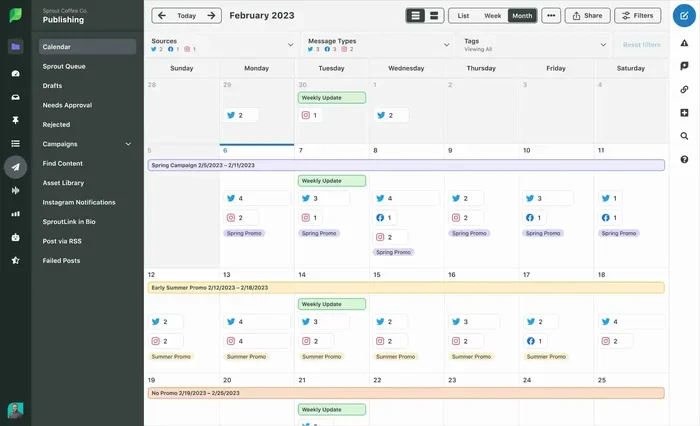
Later started as an Instagram tool but now supports Facebook as well. It is known for its visual content calendar, which makes it easy to see your entire content calendar at a glance. You can drag and drop posts to rearrange your schedule.
Later also suggests the best time to post on Facebook based on your audience data. This feature alone can make a big difference in your engagement rate.
Facebook Business Suite
Facebook Business Suite is a free, official tool from Meta. It combines Facebook and Instagram scheduling into one unified workspace. You can plan posts, respond to messages, and view insights without leaving the dashboard.
This tool is perfect if you want an all-in-one solution without paying for extra software. It handles everything from basic scheduling to detailed Facebook Insights reporting.
Comparison Table
| Tool | Free Plan? | Facebook Scheduling? | Analytics? | Best For |
|---|---|---|---|---|
| Facebook Native | Yes | Yes | Limited | Quick scheduling |
| Buffer | Yes (limited) | Yes | Yes | Small businesses |
| Hootsuite | Yes (limited) | Yes | Yes | Large teams |
| Later | Yes (limited) | Yes | Yes | Visual planners |
| Business Suite | Yes | Yes | Yes | All-in-one management |
Why Post Timing Matters for Facebook
Timing is everything on Facebook. When you publish a post can be just as important as what you post. The Facebook algorithm favors content that gets early engagement. If your post goes live when your audience is asleep, it may struggle to gain traction.
Understanding Your Audience Activity
Facebook Insights provides data on when your followers are most active. You can see which days and hours generate the most engagement. Use this data to guide your scheduling decisions. For example, if your audience is most active on Tuesday mornings, that is when you should schedule your key posts.
Keep in mind that audience activity varies by niche. A B2B page might see peak activity on weekday mornings, while a lifestyle page might perform best on weekends. Test different times and track the results.
The Best Times to Post on Facebook
While every audience is different, some general patterns hold true across many industries. Here are some commonly recommended best times to post on Facebook:
- Wednesday at 11 AM: Mid-week mornings tend to see high engagement.
- Thursday at 1 PM: Lunchtime posts often get good traction.
- Friday at 10 AM: People start planning weekends and engage more.
- Saturday at 9 AM: Weekend browsing can boost reach for certain niches.
These are starting points, not rules. Always check your own Facebook Insights data to find what works best for your specific audience.
How to Build a Smart Facebook Content Calendar
A content calendar is the backbone of any successful social media strategy. It is a plan that maps out what you will post, when you will post, and where it will go. Without one, you are guessing. With one, you are strategizing.
Steps to Create Your Calendar
- Define your goals: What do you want from your Facebook presence? More reach? More clicks? More sales?
- Choose your posting frequency: How often will you post? Daily? Every other day? Three times a week?
- Plan your content types: Mix text posts, images, videos, links, and stories for variety.
- Pick your posting times: Use audience data and general best practices to set times.
- Batch your content: Create multiple posts in one sitting and schedule them all at once.
- Review and adjust: Check your analytics weekly and tweak your schedule as needed.
When you batch create and delay posts in advance, you save enormous amounts of time. Instead of scrambling every day to come up with something to post, you work in focused blocks. This is called batch content creation, and it is a game-changer for social media marketing.
Quick Tips for Content Calendar Success
- Keep a mix of evergreen content and timely posts.
- Leave room for spontaneous or reactive content.
- Use color coding to differentiate content types.
- Set reminders to review scheduled posts weekly.
- Align your calendar with holidays, events, and promotions.
Common Mistakes When Delaying Facebook Posts
Delaying posts is powerful, but it is easy to make mistakes. Here are some pitfalls to avoid.
Over-Scheduling Without Review
One of the biggest mistakes is scheduling an entire month of posts and never looking back. Social media is a two-way conversation. If something big happens in the news or your industry, you may need to adjust your schedule. Stay flexible and review your calendar regularly.
Ignoring Analytics
Scheduling posts is only half the battle. You also need to track how they perform. If a post scheduled for Tuesday gets terrible engagement, try moving similar content to a different day. Use Facebook Insights and your tool’s analytics to learn from every post.
Posting the Same Content Everywhere
Each platform has its own culture and audience expectations. A post that works perfectly on Facebook may not resonate on Instagram or LinkedIn. Customize your content for each platform, even when you use the same core message.
Forgetting About the Facebook Algorithm
The Facebook algorithm rewards posts that generate genuine interaction. If you schedule too many posts too close together, you might flood your followers’ feeds and trigger negative signals. Space out your posts thoughtfully and prioritize quality over quantity.
Neglecting to Edit Scheduled Posts
Once a post is scheduled, it is easy to forget about it. But things change. Links break, events get cancelled, and news shifts. Always review your scheduled posts before they go live, or at least check them regularly.
How Delaying Posts Boosts Your Social Media Strategy
Delaying posts is not just a convenience. It is a strategic move that can transform your social media marketing efforts. Here is how it helps.
Increases Your Organic Reach
When you post at optimal times, your content gets more initial engagement. The Facebook algorithm interprets this as a signal that your post is valuable. It then pushes your post to more people’s feeds. This creates a positive cycle that boosts your organic reach over time.
Improves Consistency
Consistency is one of the most important factors in social media success. When you schedule posts in advance, you maintain a steady presence on your page. Your followers know they can expect regular content from you, which builds trust and loyalty.
Reduces Burnout
Managing social media can be exhausting if you do it every day without a plan. Scheduling and delaying posts gives you breathing room. You can focus on creating great content during dedicated work sessions instead of constantly reacting to the feed.
Enables Better Team Collaboration
If you work with a team, scheduling tools make delegation much easier. One person can create content, another can review it, and a third can approve the schedule. Tools like Hootsuite and Buffer support this kind of workflow, making team collaboration smooth and efficient.
Expert Insights on Facebook Post Scheduling
We spoke with several social media experts about their scheduling strategies. Here are some key insights they shared.
Consistency beats perfection. One expert emphasized that showing up regularly matters more than creating flawless content every time. Use the delay feature to maintain a consistent posting rhythm, even when life gets busy.
Test and learn. Another expert recommends running A/B tests with different posting times. Schedule the same type of post at different times of day and compare the results. This data-driven approach takes the guesswork out of your post timing strategy.
Stay human. Despite the convenience of scheduling, do not let automation replace genuine interaction. Set aside time each day to respond to comments and messages. The Facebook algorithm notices and rewards active engagement with your audience.
Key Takeaways
- Native Scheduling: Facebook offers built-in tools to queue posts directly from your page or profile.
- Third-Party Tools: Apps like Buffer, Hootsuite, and Later give you advanced scheduling features and analytics.
- Smart Timing Matters: Posting when your audience is active increases reach and engagement significantly.
- Algorithm Friendliness: The Facebook algorithm rewards consistent, well-timed content with better organic reach.
- Batch Creation: Delaying posts allows you to create content in bulk, saving hours each week.
- Common Pitfalls: Over-scheduling and ignoring analytics can hurt your social media performance.
- Facebook Business Suite: This free tool integrates scheduling across Facebook and Instagram seamlessly.
Conclusion
So, can you delay your Facebook posts? Absolutely. Facebook gives you the tools to schedule posts directly from your business page, and powerful third-party apps take it even further. Whether you use the native scheduler, Facebook Business Suite, or a tool like Buffer or Hootsuite, the key is to do it strategically.
Focus on timing, consistency, and quality. Use your Facebook Insights data to understand when your audience is most active. Build a content calendar that keeps your page fresh and engaging. Avoid common mistakes like over-scheduling and ignoring analytics.
Delaying your posts is more than a time-saving trick. It is a core part of a strong social media strategy. When you take control of your post timing, you take control of your growth. Start scheduling today and watch your engagement improve over time.
The real answer is simple. You can delay your Facebook posts, and you should. Your audience will thank you for showing up at the right time with valuable content. Happy scheduling.
Frequently Asked Questions
Can I schedule posts on a personal Facebook profile?
Facebook does not offer native scheduling for personal profiles. You can only schedule posts directly on Facebook business pages. However, you can use third-party tools like Buffer or Hootsuite to schedule posts from a personal profile through those apps.
How far in advance can I schedule Facebook posts?
With Facebook’s native tools, you can schedule posts up to several months in advance. Third-party tools like Buffer and Hootsuite often allow even longer scheduling windows, sometimes up to a year ahead. However, it is best to review and adjust your schedule regularly.
Does delaying posts hurt my Facebook engagement?
No, delaying posts does not hurt engagement when done correctly. In fact, scheduling posts for optimal times can significantly boost your engagement rate. The key is to post when your audience is active and to maintain a consistent schedule that the algorithm favors.
Is Facebook Business Suite free to use?
Yes, Facebook Business Suite is completely free. It lets you schedule posts, respond to messages, and view analytics for both Facebook and Instagram. It is one of the best free tools for managing your social media presence without paying for extra software.
What is the best time to schedule Facebook posts?
The best time varies by audience, but general recommendations include mid-morning on weekdays, especially around 9 to 11 AM. Use Facebook Insights to find your specific audience’s activity patterns. Testing different times and tracking results will help you pinpoint your optimal post timing.
Can I edit a post after I schedule it?
Yes, you can edit a scheduled post before it goes live. In Facebook’s native tools, go to your Scheduled Posts section and click on the post you want to change. You can edit the text, images, or timing. Most third-party tools also allow editing scheduled posts easily.