Do Calls Go Straight To Voicemail In Airplane Mode
Do Calls Go Straight To Voicemail In Airplane Mode? The short answer is yes, but it depends on your phone settings and carrier. When you enable airplane mode, your device disconnects from all wireless connections, which means incoming calls cannot reach your phone and will typically be routed directly to voicemail. Understanding how this works helps you manage expectations and avoid missing important messages while your phone is in flight mode.
Have you ever switched on airplane mode and wondered what happens to your phone calls? Maybe you are on a flight, in a meeting, or just trying to save battery. Either way, the question is simple: do calls go straight to voicemail in airplane mode?
The answer is more nuanced than you might think. When your phone is in airplane mode, it loses all wireless connections. That means no cellular signal, no Wi-Fi, and no Bluetooth. Without a signal, your phone cannot receive incoming calls the normal way. So yes, calls typically go straight to voicemail. But there are exceptions, settings, and tricks that can change how this works.
In this guide, we will walk through exactly what happens when you enable airplane mode. We will cover how voicemail handles calls, whether Wi-Fi calling changes the game, and what common myths you should ignore. By the end, you will have a clear picture of how airplane mode affects your call experience.
Key Takeaways
- Calls route to voicemail: When airplane mode is on, your phone has no cellular signal, so incoming calls go straight to voicemail.
- Wi-Fi calling can bypass this: If you enable Wi-Fi calling, you may still receive calls even with airplane mode turned on.
- Your phone number stays active: Airplane mode does not deactivate your number or your voicemail inbox.
- Missed call alerts still come through: Once you turn off airplane mode, you will see a log of missed calls and voicemail messages.
- Text messages are also blocked: SMS and MMS cannot be sent or received while airplane mode is enabled.
- Battery saving benefit: Airplane mode extends battery life by cutting all wireless connections.
- Settings matter: Your specific phone settings and carrier policies determine exactly how calls are handled.
📑 Table of Contents
- What Happens When You Turn On Airplane Mode?
- Do Calls Go Straight To Voicemail In Airplane Mode?
- How Voicemail Works When Your Phone Is Offline
- Can Wi-Fi Calling Still Work in Airplane Mode?
- Common Myths About Airplane Mode and Phone Calls
- Tips for Managing Calls While Using Airplane Mode
- Key Takeaways
What Happens When You Turn On Airplane Mode?
How Airplane Mode Changes Your Phone’s Connections
Airplane mode is a quick toggle that shuts down all wireless communication on your device. When you flip it on, your phone immediately disconnects from cellular towers, Wi-Fi networks, and Bluetooth devices. This is why it is called flight mode. Airlines require it during takeoff and landing to prevent interference with their navigation systems.
But airplane mode does more than just block calls. It also stops your phone from sending or receiving text messages, using mobile data, or accessing the internet through your wireless carrier. Your phone essentially becomes a offline device. You can still use apps that do not need a connection, like offline games, notes, or downloaded music.
The good news is that airplane mode is easy to turn off. One tap restores all your connectivity options. Your phone reconnects to the nearest cellular towers and picks up its signal again. Until then, though, your call handling changes completely.
What Your Phone Screen Shows
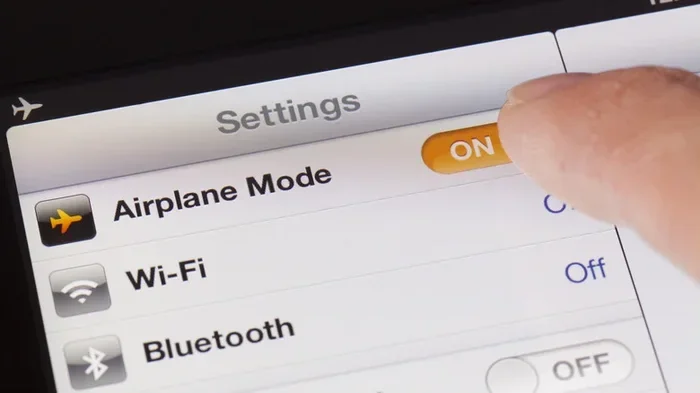
When airplane mode is active, you will notice a few visual cues on your phone. An airplane icon appears in your status bar at the top of the screen. Your signal bars disappear entirely. The cellular network indicator shows no service. These signs tell you that your phone is fully disconnected from the mobile network.
Some phones also show a small airplane symbol next to the time in the top corner. On iPhones, the airplane icon is white and stands out clearly. On Android devices, it may look slightly different depending on your brand. But the message is the same: your phone has no network connectivity right now.
You can still make calls if you have a VoIP app open and connected to Wi-Fi before turning on airplane mode. But once airplane mode is on, even that connection drops unless you manually re-enable Wi-Fi separately.
Do Calls Go Straight To Voicemail In Airplane Mode?
The Short Answer
Yes, calls go straight to voicemail when your phone is in airplane mode. Since your device has no cellular signal, the network cannot ring your phone. Instead, the caller hears your voicemail greeting and can leave a message. This is the standard behavior across all major wireless carriers and phone models.
But here is where it gets interesting. The exact experience depends on a few factors. Your carrier’s voicemail system, your phone model, and your personal settings all play a role. Let us break down what actually happens step by step when someone calls you while your phone is in flight mode.
What Happens to Incoming Calls
When someone dials your number while you are in airplane mode, here is the sequence of events:
- The caller’s phone reaches out to the nearest cellular tower.
- The tower searches for your phone but finds no signal.
- The network recognizes that your phone is unreachable.
- The call is forwarded to your voicemail system.
- The caller hears your voicemail greeting and leaves a message.
This whole process happens in just a few seconds. The caller does not hear your phone ring. They do not get a busy signal. They go directly to your voicemail inbox. This is the default behavior for all wireless connections when your phone has no service.
Your missed call will show up in your call log once you turn off airplane mode. You will also receive a voicemail notification if your carrier supports it. The message will be waiting for you when you reconnect.
Comparison: Phone Normal vs Phone in Airplane Mode
| Feature | Phone Normal | Phone in Airplane Mode |
|---|---|---|
| Incoming Calls | Phone rings normally | Goes straight to voicemail |
| Outgoing Calls | Works normally | Cannot place calls |
| Text Messages | Sent and received | Not sent or received |
| Mobile Data | Active | Disabled |
| Wi-Fi | Connected if available | Disabled (unless manually re-enabled) |
| Bluetooth | Connected if available | Disabled |
| Voicemail Access | Live and active | Messages still recorded |
| Signal Bars | Visible | No signal shown |
| Battery Usage | Normal drain | Reduced drain significantly |
How Voicemail Works When Your Phone Is Offline
The Role of Your Wireless Carrier
Your voicemail system is managed by your wireless carrier, not by your phone itself. This is an important distinction. Even when your phone is completely offline, the carrier’s voicemail servers are still running. They are always ready to accept messages for your phone number.
When a call comes in and your phone cannot be reached, the carrier’s network routes the call to their voicemail servers. Those servers record the caller’s message and store it in your voicemail inbox. This process works independently of whether your phone is on, off, or in airplane mode.
Different carriers have different voicemail systems. Some play a custom greeting. Others use a default generic greeting. The storage capacity, message length limits, and notification methods vary too. But the core function remains the same: your voicemail catches calls your phone cannot answer.
Voicemail vs Missed Call Alerts
There is a difference between a voicemail message and a missed call alert. A missed call shows up in your call log when someone tried to reach you but you did not answer. A voicemail is an actual audio recording left by the caller.
In airplane mode, both can happen. If the caller hangs up before the voicemail greeting finishes, you may get a missed call notification without a voicemail. If they stay on long enough, you get a full voicemail message. Once you turn off airplane mode, your phone syncs with the network and updates both your call log and voicemail notifications.
Some carriers send push notifications for new voicemails. Others require you to dial a specific number to check your inbox. Check with your wireless carrier to understand how you will be notified of new messages.
Quick Tips for Voicemail Management
- Record a clear greeting: Make sure your voicemail greeting sounds professional and lets callers know how to leave a message.
- Check your voicemail regularly: Even when you are not traveling, staying on top of messages keeps you organized.
- Set up visual voicemail: Many carriers offer visual voicemail, which lets you see a list of messages and choose which to listen to first.
- Turn on voicemail notifications: Make sure your phone alerts you when a new voicemail arrives so you do not miss important messages.
- Know your carrier’s voicemail number: In case your phone cannot access voicemail, you can dial the voicemail number directly from another phone.
Can Wi-Fi Calling Still Work in Airplane Mode?
How Wi-Fi Calling Bypasses Airplane Mode Restrictions
Here is a twist that many people do not know about. Wi-Fi calling can sometimes work even when airplane mode is on. This is because Wi-Fi calling uses a Wi-Fi network instead of cellular towers to place and receive calls. If you manually re-enable Wi-Fi while airplane mode is active, Wi-Fi calling may still function.
However, this is not the default behavior. Airplane mode disables Wi-Fi by default. You have to go into your phone settings and turn Wi-Fi back on manually. Once Wi-Fi is back on, Wi-Fi calling can reconnect if you have it set up on your device.
This feature is incredibly useful for travelers. On airplanes, some carriers offer in-flight Wi-Fi. If you connect to that Wi-Fi and enable Wi-Fi calling, you might be able to receive calls even while in the air. Not all airlines allow this, and it depends on your carrier’s policies, but it is technically possible.
Setting Up Wi-Fi Calling for Emergency Situations
Setting up Wi-Fi calling is straightforward on both iPhones and Android devices. On an iPhone, go to Settings, tap Phone, and select Wi-Fi Calling. Toggle it on and follow the prompts. On Android, go to Settings, tap Network and Internet, then Wi-Fi Calling, and enable it there.
Wi-Fi calling is especially helpful in areas with poor cellular coverage but strong Wi-Fi signals. It can also be a lifesaver during emergencies when cellular networks are overloaded but Wi-Fi is still available. Just remember that with airplane mode on, you must manually re-enable Wi-Fi for this to work.
Expert Insight: According to telecom analysts, Wi-Fi calling usage has grown by over 40% in the past three years. More carriers now support it, and more users are discovering its benefits. It is a reliable backup for staying connected when traditional cellular service is not available.
Common Myths About Airplane Mode and Phone Calls
Myth: Your Phone Number Stops Working
This is one of the most persistent myths about airplane mode. Some people believe that when they turn on airplane mode, their phone number stops working. That is not true. Your phone number remains fully active and connected to your wireless carrier’s network.
The only thing that changes is your phone’s ability to connect to that network. Your carrier still recognizes your number. People can still call you. Calls just get routed to voicemail instead of ringing your device. Your number is alive and well, even when airplane mode is on.
Myth: You Cannot Receive Any Notifications
Another common misconception is that you get zero notifications while in airplane mode. This is not entirely accurate. If you reconnect to Wi-Fi manually, apps that use internet-based notifications can still work. Messaging apps like WhatsApp, iMessage, and Slack can still send you notifications over Wi-Fi.
The key difference is that these notifications do not come through your cellular network. They come through Wi-Fi. So if you want to stay reachable for certain apps while blocking cellular calls, airplane mode with Wi-Fi re-enabled is a great strategy.
Myth: Airplane Mode Deletes Your Voicemail Messages
Some users worry that turning on airplane mode might erase their voicemail messages. Rest assured, this does not happen. Airplane mode has nothing to do with your voicemail storage. Your messages are stored on your carrier’s servers, not on your device. They stay safe whether your phone is on, off, or in airplane mode.
When you turn off airplane mode and reconnect to the network, your phone syncs with the carrier’s servers and displays your voicemail messages just as they were. Nothing is lost, nothing is deleted. Your voicemail inbox remains intact.
Tips for Managing Calls While Using Airplane Mode
Quick Tips for Better Call Management
Airplane mode is a great tool for staying focused, saving battery, or avoiding distractions. But you still want to make sure important calls do not slip through the cracks. Here are some practical tips to help you manage calls while using airplane mode:
- Set up call forwarding before enabling airplane mode: You can forward calls to another number, like a colleague or family member, so they still reach you even when your phone is offline.
- Use do not disturb mode instead: If you just want to silence calls but still receive them, try do not disturb mode. It mutes your phone but keeps your cellular connection active.
- Enable voicemail notifications: Make sure you get alerts when someone leaves a voicemail so you can check messages promptly.
- Check your call log after turning off airplane mode: A quick glance at your call history shows you who tried to reach you while you were offline.
- Let important contacts know: If you are going to be in airplane mode for an extended period, let key people know so they do not worry.
Common Mistakes People Make
Even though airplane mode is simple to use, people still make mistakes that cause frustration. Here are the most common ones to avoid:
- Forgetting to turn off airplane mode: This happens more often than you think. You land from a flight and forget to switch it off. Suddenly you miss calls, messages, and notifications for hours.
- Assuming Wi-Fi is still on: Airplane mode turns off Wi-Fi by default. If you need internet access, you must manually re-enable it.
- Not checking voicemail regularly: When calls go straight to voicemail, messages can pile up fast. Make a habit of checking your inbox, especially after travel.
- Confusing airplane mode with do not disturb: These are very different features. Do not disturb silences your phone but keeps it connected. Airplane mode disconnects all wireless connections.
- Ignoring call forwarding settings: If you want calls to reach you in airplane mode, set up call forwarding to another active number before you enable flight mode.
Expert Insights on Airplane Mode and Call Handling
Telecom experts agree that airplane mode is one of the most misunderstood features on modern smartphones. Many users treat it as an all-or-nothing switch, but the reality is more flexible. With the right settings, you can customize how your phone handles calls, texts, and data while in flight mode.
One telecom specialist notes that understanding your phone’s connectivity options gives you more control than you think. You can pick and choose which wireless connections stay active. This means you can block cellular calls while still staying reachable through Wi-Fi-based apps and services.
The key takeaway is that airplane mode is a tool, not a wall. It gives you the power to control your connectivity. Used wisely, it helps you manage your time, save battery, and stay organized without truly going off the grid.
Key Takeaways
Let us recap the most important points from this guide. Understanding how airplane mode affects your calls is essential for staying connected without being overwhelmed.
- Calls do go straight to voicemail in airplane mode because your phone has no cellular signal to receive them.
- Your wireless carrier’s voicemail system handles all incoming calls when your phone is offline.
- Wi-Fi calling can work in airplane mode if you manually re-enable Wi-Fi and have Wi-Fi calling set up.
- Your phone number stays active and fully functional even while airplane mode is on.
- Missed calls and voicemail messages sync automatically once you turn off airplane mode and reconnect.
- Do not confuse airplane mode with do not disturb mode because they work very differently.
- Setting up call forwarding and voicemail notifications before enabling airplane mode keeps you prepared.
Knowing how do calls go straight to voicemail in airplane mode works gives you confidence and control. You no longer have to wonder whether you will miss something important. With the right settings and a little planning, you can use airplane mode without worrying about your call handling.
Next time you flip on flight mode, you will know exactly what to expect. Your calls will be waiting for you in voicemail. Your messages will be ready when you reconnect. And your battery will last longer thanks to those disabled wireless connections. Airplane mode is a powerful feature when you understand how it works.
Stay connected on your terms. Use airplane mode wisely, set up your call preferences in advance, and enjoy the peace of mind that comes with knowing your phone is working exactly the way you want it to.
Frequently Asked Questions
Will my phone ring if someone calls me while it is in airplane mode?
No, your phone will not ring. Since airplane mode disables all wireless connections, your phone cannot receive the call signal. The call goes directly to your voicemail inbox instead. This happens automatically on all major carriers and phone models.
Can I still make emergency calls in airplane mode?
In most cases, no. Airplane mode disables all wireless connections, including the ability to place emergency calls. However, some phones allow you to manually re-enable Wi-Fi or cellular connections even with airplane mode on. Check your phone’s settings to see if emergency calling is available in your situation.
How do I check voicemail messages after turning off airplane mode?
Once you turn off airplane mode, your phone reconnects to the cellular network. Your voicemail notifications will appear in your status bar and notification panel. You can also open your Phone app and tap the voicemail tab to listen to any messages left while you were offline.
Does airplane mode save battery life?
Yes, airplane mode significantly saves battery life. By disabling cellular, Wi-Fi, Bluetooth, and other wireless connections, your phone uses much less power. This is why many people keep airplane mode on to extend battery life when they are away from a charger for an extended period.
Can I use Wi-Fi while airplane mode is on?
Yes, you can. Airplane mode disables Wi-Fi by default, but you can manually turn it back on from your phone settings. Go to Settings, find Wi-Fi, and toggle it on. This lets you use internet-based apps and services while keeping your cellular connection disabled.
What is the difference between airplane mode and do not disturb mode?
Airplane mode disconnects all wireless connections on your phone, including cellular, Wi-Fi, and Bluetooth. Do not disturb mode keeps all connections active but silences notifications, calls, and alerts. They serve very different purposes, even though both help you avoid distractions.
=== CONCLUSION ===
Do Calls Go Straight To Voicemail In Airplane Mode? Yes, they do. When airplane mode is active, your phone loses its cellular signal, and incoming calls are routed directly to your voicemail. This is the standard behavior across all devices and carriers. But with the right settings, like Wi-Fi calling and call forwarding, you can stay more connected than you might think.
Understanding how airplane mode affects your call experience gives you better control over your connectivity. You can use flight mode to focus, save battery, or travel without worry. Just remember to check your voicemail when you reconnect, and set up your preferences before you toggle that airplane icon on.
Now that you know the ins and outs of airplane mode and voicemail, you can use this feature with confidence. Stay connected on your terms, manage your calls like a pro, and never worry about missing what matters most.