Does a QR Code Generator Cost Money or Is It Really Free
Most QR code generators offer free plans that cover basic needs, but premium features like dynamic QR codes, analytics, and branding tools often come with a price tag. The cost of a QR code generator depends on what you need — from simple static codes to full QR code marketing campaigns. This guide explains what you actually pay for and how to pick the right QR code solution without overspending.
Have you ever wondered does a QR code generator cost money? The short answer is: it depends. Some tools let you make a free QR code in seconds, while others charge monthly fees for advanced features. If you have ever searched for a QR code maker online, you have probably seen dozens of options. Some look completely free, and others come with price tags that might surprise you.
This article breaks down everything you need to know about QR code generator cost. We will cover what you get for free, what costs money, and how to choose the right QR code software for your needs. Whether you are a small business owner, a marketer, or someone who just needs a quick code for a personal project, this guide has you covered.
Key Takeaways
- Free QR code tools exist: Many online QR code generators let you create basic codes at no cost.
- Premium features cost money: Dynamic QR codes, analytics, and custom branding usually require a paid plan.
- Hidden costs can add up: Watch for pay-per-scan fees, expiration dates, and limited download options on free tiers.
- Business needs dictate cost: A personal project needs a free QR code maker, while a business campaign may justify a paid QR code platform.
- Compare before you commit: Use free trials and compare QR code pricing across providers to find the best value.
- Static codes are always free: If you only need a simple code, you can create and use it without spending a dime.
- Your choice affects performance: A free QR code may lack tracking, which matters for marketing campaigns and ROI measurement.
📑 Table of Contents
What Is a QR Code Generator?
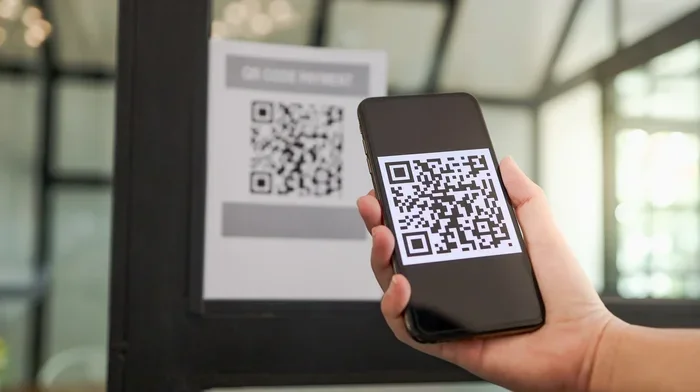
A QR code generator is an online tool or software that creates Quick Response codes. These are the square-shaped barcodes you see on posters, menus, business cards, and product packaging. When someone scans a QR code with their phone camera, it takes them to a website, a video, a contact card, or other digital content.
The process is simple. You enter the data you want to encode — a URL, text, Wi-Fi password, or email address — and the QR code creator generates a scannable image. Most generators work right in your web browser. You do not need to download any software or have technical skills.
How Do QR Code Generators Work?
Behind the scenes, a QR code maker uses algorithms to convert your data into a pattern of black and white squares. The pattern follows international standards so any phone camera or QR code scanner app can read it. Here is a quick look at the basic steps:
- You input your data into the tool.
- The generator encodes it into a unique matrix pattern.
- The tool renders the pattern as a downloadable image file.
- You print, share, or display the code wherever you need it.
That is all there is to it. The technology has been around since 1994, and modern QR code generators make the process faster and easier than ever.
Does a QR Code Generator Cost Money?
The honest answer is both yes and no. Most online QR code generators offer a free tier. You can create a basic static QR code without paying a single penny. However, if you want more advanced capabilities, you will likely need to pay for a subscription or a one-time upgrade.
Free vs. Paid QR Code Generators
Understanding the difference between free and paid options is key to managing your QR code generator cost. Here is a quick comparison:
| Feature | Free Plan | Paid Plan |
|---|---|---|
| Static QR codes | Unlimited | Unlimited |
| Dynamic QR codes | Limited or none | Full access |
| Scan analytics | Not available | Detailed reports |
| Custom branding | Basic or none | Logos, colors, frames |
| Download formats | PNG only | SVG, PDF, EPS |
| Code expiration | May expire | No expiration |
| Customer support | Community or none | Priority support |
As you can see, a free QR code covers the basics. But if you run a QR code campaign for your business, the paid features become very valuable. Analytics alone can tell you how many people scan your code, where they are located, and what device they use. This data helps you measure return on investment and improve your marketing strategy.
What Do You Actually Pay For?
When you pay for a QR code platform, you are paying for more than just the code itself. Here is what typically comes with a paid plan:
- Dynamic QR codes: These are editable codes. You can change the destination URL without creating a new code. This is perfect for campaigns where you want to update the landing page later.
- Scan tracking: You get real-time data on how many times your code was scanned and by whom.
- Brand customization: You can add your logo, change colors, and add a frame to make the code match your brand.
- Higher resolution exports: Paid plans let you download codes in vector formats like SVG, which are essential for professional printing.
- No scan limits: Some free tools cap the number of scans. Paid plans remove these limits.
All of these features support QR code marketing and help businesses get more value from their campaigns. The QR code pricing varies widely. Some tools charge as little as $5 per month, while others charge $50 or more for enterprise-level features.
Hidden Costs of Free QR Code Generators
Just because a QR code maker is free does not mean there are no strings attached. Many free tools come with limitations that can cost you time, money, or even your data. Here are some hidden costs to watch out for.
Pay-Per-Scan Models
Some generators offer free QR codes but charge you every time someone scans the code. This sounds great at first, but if your campaign goes viral or you distribute codes widely, those costs can add up fast. Always check whether a tool uses a pay-per-QR code model before you commit.
Expiration Dates
Many free QR code solutions set an expiration date on your codes. After a certain period — sometimes just 30 days — the code stops working. This can be a huge problem if you have already printed thousands of flyers or posters with that code. Paid plans typically remove expiration limits, giving you peace of mind.
Limited Export Options
Free generators often only let you download your code as a low-resolution PNG file. If you need to print the code on a large banner or a product label, a low-res image will look blurry and unprofessional. Paid plans give you access to vector formats like SVG and EPS, which scale to any size without losing quality.
Data Privacy Concerns
This is an often-overlooked cost. Some free QR code tools collect and sell your data. If you are creating codes for a business, you do not want your customer data ending up in the wrong hands. Always read the privacy policy of any QR code generator you use. Look for tools that clearly state they do not sell your information.
How to Choose the Right QR Code Generator
With so many options on the market, choosing the right QR code software can feel overwhelming. Use these tips to narrow down your choices and find a tool that fits your needs and budget.
Step 1: Define Your Needs
Before you try any QR code creator, ask yourself what you need the code for. Are you sharing a link to your website? Promoting a special offer? Collecting customer feedback? Your use case determines whether you need a free plan or a paid one.
For simple personal projects, a free QR code generator is more than enough. For business campaigns, look for tools that offer dynamic QR codes, analytics, and custom branding.
Step 2: Compare Pricing Plans
Take the time to compare QR code pricing across different providers. Look beyond the monthly fee. Check for:
- Are there setup fees?
- What happens if you cancel mid-cycle?
- Is there a free trial so you can test the tool first?
- Are there long-term discounts for annual billing?
A good QR code platform will be transparent about its pricing. If the pricing page is confusing or hides important details, that is a red flag.
Step 3: Test the Free Tier
Most reputable tools let you create a few free QR codes without entering your credit card. Use this to test the quality, ease of use, and output. Try scanning the generated code with different phones to make sure it works reliably every time.
Step 4: Check for Scalability
If your project might grow, choose a QR code solution that can scale with you. A tool that works for a one-time event may not support the volume and features you need for an ongoing marketing campaign. Look for flexible plans that let you upgrade as your needs change.
Best Practices for Using QR Codes
No matter which QR code generator you choose, following best practices ensures your codes work well and look professional.
Keep Your Codes Simple
Do not overload a single QR code with too much data. The more information you encode, the denser the pattern becomes, and the harder it is for phones to scan. Keep the data minimal and direct users to a landing page where they can find more details.
Test Before You Print
Always test your QR code design with multiple devices before sending it to print. Scan it with an iPhone, an Android phone, and a tablet. Make sure it works in different lighting conditions and from different distances.
Add a Call to Action
Many people do not know what to do with a QR code if there is no context. Add a short instruction near the code, like “Scan to visit our website” or “Point your camera here”. This small step can dramatically increase scan rates.
Use High-Resolution Files for Print
If you are printing your code on physical materials, always download the highest resolution version available. For professional printing, use vector formats like SVG. A blurry or pixelated code will frustrate users and reduce scans.
Monitor Your Analytics
If you are running a QR code campaign, check your scan data regularly. Look at when and where people are scanning your codes. Use this information to refine your strategy and improve results over time.
Common Mistakes People Make With QR Codes
Even with the best QR code software, mistakes happen. Here are the most common ones to avoid:
- Using a free code for a long-term campaign: If the code expires, your entire campaign falls apart. Always check the expiration policy.
- Placing codes where there is no Wi-Fi: People cannot scan your code if they have no internet connection. Make sure your code is placed where users can connect.
- Making codes too small: A QR code needs to be large enough for a phone camera to read. For print materials, a minimum size of 2×2 inches is recommended.
- Ignoring contrast: Dark codes on light backgrounds work best. Avoid low-contrast combinations like yellow on white.
- Not tracking performance: If you do not know how many people scan your code, you cannot measure success. Use a generator that provides analytics.
Is It Worth Paying for a QR Code Generator?
For most personal use cases, a free QR code generator is perfectly fine. You can create codes for sharing links, contact information, or event details without spending anything. The quality of free codes is often just as good as paid ones for basic needs.
However, if you are a business using QR codes for marketing, paying for a reliable QR code platform is usually worth it. The analytics, editability, and branding features give you a significant advantage. You can track campaign performance, update content without reprinting, and create codes that match your brand identity.
The key is to match the tool to your needs. Do not pay for features you will never use. And do not use a free tool if it lacks the capabilities your project requires.
Final Thoughts
So, does a QR code generator cost money? The answer is that it can be completely free or quite affordable, depending on what you need. A simple static QR code costs nothing. A full-featured QR code solution with analytics and branding might cost you $5 to $50 per month.
The best approach is to start with a free QR code maker, test it out, and then upgrade if you need more features. Always read the fine print, compare providers, and choose a tool that fits your goals and budget. With the right QR code generator, you can create powerful codes that drive engagement and help your business grow — without breaking the bank.
Take some time today to explore your options. You might be surprised at how easy and affordable it is to get started with QR codes for your next project or campaign.
Frequently Asked Questions
Is there a completely free QR code generator?
Yes, many QR code generators offer free plans that let you create basic static codes at no cost. These free tools are perfect for personal projects, sharing links, or simple information. Just be aware that free plans usually come with limitations like fewer download formats or scan caps.
What is the difference between a static and a dynamic QR code?
A static QR code encodes fixed data that cannot be changed after creation. A dynamic QR code lets you update the destination URL without generating a new code. Dynamic codes usually require a paid plan because they need server-side tracking and management.
Can I use a free QR code for my business?
You can, but it depends on your needs. A free QR code works well for simple tasks like sharing a website link. For business campaigns that require analytics, branding, or long-term reliability, a paid QR code solution is a better investment.
Are pay-per-scan QR code generators worth it?
Pay-per-scan models can work for short-term campaigns with limited distribution. However, if your campaign gains traction, the costs can add up quickly. For ongoing business use, a flat-rate monthly subscription is usually more cost-effective and predictable.
How much does a QR code generator cost per month?
QR code pricing varies widely. Basic paid plans start around $5 per month, while advanced enterprise plans can cost $50 or more. Most providers offer tiered pricing, so you only pay for the features you actually need.
Do QR codes expire on free plans?
Many free generators set an expiration date on codes, often between 14 and 30 days. After expiration, the code stops working. Paid plans typically remove expiration limits, making them a better choice for anything beyond a short-term project.