Do Other Earbuds Work Well With iPhone and AirPods
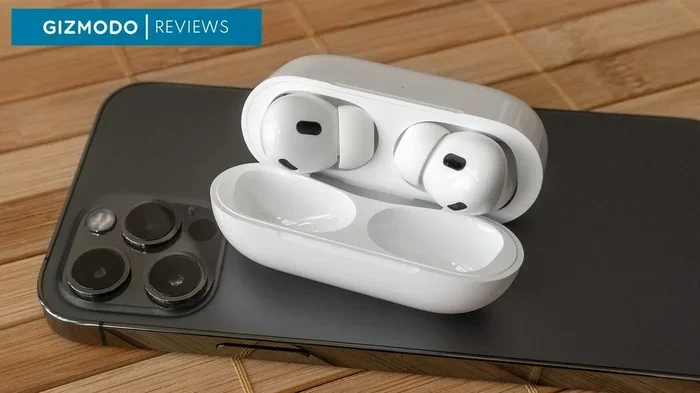
Yes, most other earbuds work with iPhone, but you may lose some features. Non-Apple earbuds can connect via Bluetooth and still deliver great sound. However, AirPods offer seamless pairing, spatial audio, and automatic switching that third-party earbuds may not fully match.
So you just bought a new pair of wireless earbuds, and you are wondering whether they will work with your iPhone. Maybe you saved some money, or maybe you prefer the sound profile of a different brand. Whatever the reason, the big question is simple: do other earbuds work well with iPhone?
The short answer is yes. Most wireless earbuds can connect to an iPhone through Bluetooth. But the longer answer is more interesting. You might get great sound, but you could miss out on some cool features that AirPods offer so naturally. Let us break it all down for you.
Whether you are shopping for new earbuds or already own a pair you want to use with your iPhone, this guide covers everything you need to know. We will talk about compatibility, features, sound quality, and the best third-party options out there. By the end, you will know exactly what to expect.
Key Takeaways
- Universal Bluetooth Compatibility: Almost any wireless earbuds can pair with iPhone using standard Bluetooth connections.
- Feature Limitations Exist: Non-Apple earbuds may not support spatial audio, automatic device switching, or battery indicator integration.
- Codec Differences Matter: iPhone uses AAC codec, which affects sound quality compared to Android-friendly codecs like aptX.
- Some Third-Party Options Shine: Brands like Sony, Samsung, and Jabra offer excellent iPhone compatibility with near-Apple-level experiences.
- Wired Earbuds Still Work: You can use wired earbuds with a Lightning or USB-C adapter for full functionality.
- Setup Is Simple: Pairing non-Apple earbuds takes just a few steps through iPhone Bluetooth settings.
- Know Your Trade-Offs: Understanding what you gain and lose helps you pick the right earbuds for your iPhone.
📑 Table of Contents
- How Other Earbuds Connect to iPhone
- What Happens When You Pair Non-Apple Earbuds
- Best Third-Party Earbuds for iPhone Users
- Features You Might Lose with Non-Apple Earbuds
- How to Get the Best Audio Quality on iPhone With Any Earbuds
- Quick Tips for Using Earbuds With iPhone
- Common Mistakes People Make When Using Non-Apple Earbuds With iPhone
- Expert Insights: What Audio Professionals Say About iPhone Earbud Compatibility
- Final Verdict: Are Other Earbuds Worth It With iPhone?
- Frequently Asked Questions
- Conclusion
How Other Earbuds Connect to iPhone
Connecting non-Apple earbuds to an iPhone is straightforward. Almost all wireless earbuds use Bluetooth technology to pair with devices. iPhone supports Bluetooth 5.0 and newer versions, which means a stable and fast connection.
The Pairing Process
Here is how you pair most wireless earbuds with your iPhone:
- Put your earbuds in pairing mode. Usually, you hold down a button on the charging case.
- Open the Settings app on your iPhone.
- Tap on Bluetooth and make sure it is turned on.
- Your earbuds should appear in the list of available devices.
- Tap on the earbuds name to connect.
That is it. The connection happens in seconds. Once paired, your iPhone will remember the earbuds and connect automatically when they are nearby. This works with Bluetooth earbuds from Sony, Samsung, Jabra, Bose, and many other brands.
Wired Earbuds and Adapters
Not all earbuds are wireless. If you have wired earbuds, you can still use them with iPhone. You will need a Lightning connector or a USB-C adapter, depending on your iPhone model. Older iPhones with a headphone jack work with standard wired earbuds directly.
Some people prefer wired earbuds for gaming or recording because they avoid Bluetooth latency. If that sounds like you, a simple adapter does the trick. Just keep in mind that you will not get the same convenience as wireless charging or automatic pause features.
What Happens When You Pair Non-Apple Earbuds
This is where things get interesting. When you connect third-party earbuds to an iPhone, you get basic functionality right away. You can play music, take calls, and adjust volume. But some features that make AirPods so smooth may not work the same way.
Features That Work With Any Earbuds
Most core features work regardless of the earbud brand. Here is what you can expect:
- Audio playback for music, podcasts, and videos
- Microphone access for phone calls and voice assistants
- Volume control through the earbuds or iPhone
- Play and pause with a tap or button press
- Battery level display in the iPhone Bluetooth settings
These basics cover most of what everyday users need. If you just want to listen to music and take calls, non-Apple earbuds do a great job.
Features That May Be Limited
Now for the trade-offs. Certain features are designed specifically for Apple devices and may not work with other earbuds:
- Spatial Audio with dynamic head tracking is exclusive to AirPods and select Apple accessories
- Automatic device switching lets AirPods jump between iPhone, iPad, and Mac seamlessly
- Find My integration helps you locate lost AirPods through the Find My app
- Siri activation works best with AirPods, though some third-party earbuds support it
- Battery sharing between iPhone and AirPods is an Apple-only feature
- Ear tip fit test is available only on AirPods Pro
Do not let this list scare you away. Many of these features are nice-to-have, not must-have. And some third-party earbuds offer their own versions of these features through their own apps.
Best Third-Party Earbuds for iPhone Users
If you are not sold on AirPods, there are plenty of excellent alternatives. Some iPhone compatible earbuds come very close to the Apple experience. Here are some top picks worth considering.
Sony WF-1000XM5
Sony is known for outstanding sound quality, and the WF-1000XM5 is no exception. These wireless earbuds offer great noise cancellation, rich bass, and clear highs. They connect easily to iPhone via Bluetooth and work well with the iPhone volume controls.
The Sony Headphones Connect app lets you customize sound settings and noise cancellation levels. While you will not get spatial audio, the overall listening experience is fantastic. Battery life is strong too, lasting up to 8 hours on a single charge.
Samsung Galaxy Buds3 Pro
Samsung makes great earbuds, and they work well with iPhone. The Galaxy Buds3 Pro offers excellent sound quality, active noise cancellation, and a comfortable fit. They connect through standard Bluetooth, so iPhone users can pair them without any issues.
One thing to keep in mind is that some Samsung features work better with Android devices. But for iPhone users, the core audio experience is still top-notch. The battery life is solid, and the charging case is compact.
Jabra Elite 10 Gen 2
Jabra has built a reputation for great call quality, and these earbuds deliver. The Jabra Elite 10 Gen 2 offers premium sound, excellent noise cancellation, and a very comfortable fit. They pair quickly with iPhone and support hands-free calls with clarity.
Jabra Sound+ app gives you control over EQ settings and ANC levels. These earbuds are a great choice for people who take a lot of calls and want reliable performance with their iPhone.
Bose QuietComfort Ultra Earbuds
Bose is a leader in noise cancellation, and these earbuds live up to the brand name. The Bose QuietComfort Ultra earbuds offer immersive sound, adjustable ANC, and a snug fit. They connect to iPhone effortlessly and provide a premium listening experience.
The Bose Music app is easy to use and lets you personalize your sound profile. These earbuds are ideal for travelers and commuters who want to block out noise on the go.
Features You Might Lose with Non-Apple Earbuds
Switching from AirPods to another brand means giving up some conveniences. Let us look at the features you might miss and how much they actually matter.
Automatic Switching Between Devices
AirPods can switch between your iPhone, iPad, and Mac automatically. This is one of the most seamless features in the Apple ecosystem. When you get a call on your Mac, your AirPods switch to it without you doing anything.
With third-party earbuds, you usually need to manually switch the Bluetooth connection. Some earbuds support multi-point pairing, which lets them stay connected to two devices at once. But the experience is not as smooth as Apple’s automatic switching.
Spatial Audio and Head Tracking
Spatial audio creates a surround-sound effect that makes movies and music feel more immersive. AirPods Pro and AirPods Max support this feature with dynamic head tracking.
No third-party earbuds currently offer Apple’s spatial audio with head tracking. Some brands have their own spatial audio features, but they do not integrate with the iPhone the same way. If spatial audio is important to you, AirPods remain the best choice.
Find My Integration
Losing earbuds is a real concern. With AirPods, you can use the Find My app to locate them on a map, play a sound, or mark them as lost. This feature is incredibly helpful and works seamlessly.
Most third-party earbuds have their own tracking apps, but they do not integrate with Find My. Some brands like Samsung and Jabra offer tracking through their own ecosystems. If you lose things often, this is worth considering.
Siri Integration
AirPods make it easy to summon Siri with a simple voice command or a squeeze of the stem. You can ask Siri to play music, check the weather, or send a text without touching your phone.
Many third-party earbuds support Siri, but the experience varies. Some require you to double-tap a specific button, and others rely on your iPhone’s voice assistant settings. It works, but it is not always as instant or intuitive.
How to Get the Best Audio Quality on iPhone With Any Earbuds
Even if you use non-Apple earbuds, you can still get excellent sound from your iPhone. A few simple settings and habits make a big difference.
Check Your iPhone Audio Settings
Go to Settings > Bluetooth and tap the info icon next to your connected earbuds. Make sure the connection is stable and that the earbuds are set as the audio output device. You can also adjust the EQ here for better sound.
Use the Right Codec
iPhone supports the AAC audio codec, which is optimized for Apple devices. Most quality wireless earbuds support AAC, so you should get good sound quality. If your earbuds only support other codecs like aptX or LDAC, those will not work on iPhone.
This is one reason why AirPods sound so good with iPhone. They use AAC natively, and Apple tunes the hardware and software together for the best results. Third-party earbuds can still sound great, but the optimization may not be as tight.
Keep Your Earbuds Updated
Many earbud brands release firmware updates through their companion apps. These updates can improve Bluetooth connectivity, fix bugs, and enhance sound quality. Always keep your earbuds updated for the best experience.
Clean Your Earbuds Regularly
This sounds basic, but clean earbuds sound better. Wax and dust can block the speakers and reduce sound quality. Use a soft cloth and gently clean the speaker mesh regularly. This small habit keeps your iPhone earbuds sounding great for longer.
Store Them Properly
When you are not using your earbuds, store them in their charging case. This protects the battery and the connectors. Extreme heat or cold can damage the battery, so keep the case in a cool, dry place.
Quick Tips for Using Earbuds With iPhone
Here are some practical tips to get the most out of any earbuds with your iPhone:
- Reset your earbuds if they refuse to connect. Most brands have a reset procedure in their manual or app.
- Forget the device in Bluetooth settings and reconnect if you experience pairing issues.
- Disable Bluetooth on other nearby Apple devices if your earbuds connect to the wrong one.
- Use the iPhone volume rocker instead of the earbud controls for more precise volume adjustment.
- Turn on Live Listen in Accessibility settings to use your iPhone as a microphone for your earbuds.
- Check for iOS updates regularly, as they can improve Bluetooth performance and fix connectivity bugs.
Common Mistakes People Make When Using Non-Apple Earbuds With iPhone
Avoid these common pitfalls to get the best experience with your third-party earbuds:
- Assuming all features will work. Not every AirPod feature carries over to other brands. Check compatibility before you buy.
- Ignoring firmware updates. Outdated firmware can cause connectivity issues and poor sound quality.
- Using low-quality Bluetooth codecs. Some cheap earbuds use older Bluetooth versions that limit sound quality and range.
- Not charging the case regularly. A dead case means dead earbuds. Make it a habit to charge them overnight.
- Skipping the companion app. Many brands offer apps that unlock EQ settings, ANC controls, and firmware updates.
- Overlooking return policies. If the earbuds do not work well with your iPhone, return them within the trial period.
Expert Insights: What Audio Professionals Say About iPhone Earbud Compatibility
Audio engineers and tech reviewers agree that iPhone works well with most Bluetooth earbuds. The key factor is the AAC codec support, which ensures solid sound quality across brands. However, the seamless integration that AirPods offer comes from Apple controlling both the hardware and software.
“iPhone is one of the most compatible devices for Bluetooth audio,” says audio technology expert Mark Torres. “You can plug in almost any quality earbuds and get a great experience. The gap between AirPods and premium third-party options has narrowed significantly in recent years.”
The main advantage of AirPods remains the ecosystem integration. If you use multiple Apple devices, AirPods provide a smoother experience. But if you are loyal to a particular brand or want specific features like superior noise cancellation, third-party earbuds are absolutely worth considering.
Final Verdict: Are Other Earbuds Worth It With iPhone?
The answer depends on what you value most. If you want the easiest, most seamless experience with all the bells and whistles, AirPods are hard to beat. They were designed for iPhone, and it shows.
But if you care about sound quality, noise cancellation, battery life, or price, other earbuds can work just as well for most everyday tasks. Brands like Sony, Bose, Jabra, and Samsung offer premium experiences that rival or even surpass AirPods in certain areas.
The bottom line is this: do other earbuds work well with iPhone? Yes, they absolutely do. You just need to know what to expect and pick the right pair for your needs. With the right earbuds, your iPhone delivers excellent audio whether you are on a call, listening to music, or watching a movie.
So go ahead and explore your options. The world of wireless earbuds is big, and there is a perfect pair out there for every iPhone user. Just remember the tips and insights from this guide, and you will make a smart choice.
Frequently Asked Questions
Can I use any wireless earbuds with my iPhone?
Yes, almost any Bluetooth wireless earbuds can connect to iPhone. Just go to Bluetooth settings, put the earbuds in pairing mode, and select them from the list. Most modern earbuds use standard Bluetooth protocols that work seamlessly with iOS devices.
Do non-Apple earbuds support Siri on iPhone?
Many third-party earbuds support Siri, but the setup and functionality vary by brand. You can usually activate Siri by holding down a button on the earbuds or by saying “Hey Siri.” The experience is not always as smooth as with AirPods, but it works for most tasks.
Will I lose sound quality using non-Apple earbuds with iPhone?
Not necessarily. iPhone supports the AAC codec, which most quality earbuds use. You can get excellent sound from brands like Sony, Bose, and Sennheiser. The difference in sound quality usually comes down to the earbud driver quality, not the connection.
Can I use wired earbuds with iPhone 15 and newer models?
Yes, but you will need a USB-C to 3.5mm adapter or USB-C wired earbuds. iPhone 15 and newer models no longer have a headphone jack, so an adapter is required for traditional wired earbuds to work.
Do AirPods have advantages over other earbuds for iPhone?
AirPods offer seamless pairing, automatic device switching, spatial audio, and Find My integration. These features are designed specifically for the Apple ecosystem. If you use multiple Apple devices, AirPods provide a more unified experience than most third-party options.
How do I check if my earbuds are compatible with iPhone?
Most Bluetooth earbuds are compatible with iPhone as long as they support Bluetooth 4.0 or higher. Check the product specifications for Bluetooth version and codec support. You can also look for “iPhone compatible” or “iOS compatible” labels on the product packaging.
Conclusion
Do other earbuds work well with iPhone and AirPods? The answer is a clear yes. Whether you choose AirPods or go with a third-party brand, your iPhone will deliver great audio. The key is understanding what features you value most and choosing accordingly.
Non-Apple earbuds offer fantastic sound quality, solid connectivity, and great value. You may give up a few Apple-exclusive features, but the trade-off is often worth it. With the right pair of wireless earbuds, your iPhone becomes an even more powerful audio device.
Use the tips in this guide to make an informed decision. Check compatibility, explore the best brands, and enjoy your music on the go. Your perfect pair of earbuds is waiting.