Can I Sing Karaoke On My Smart Tv Without Any Extra Gear
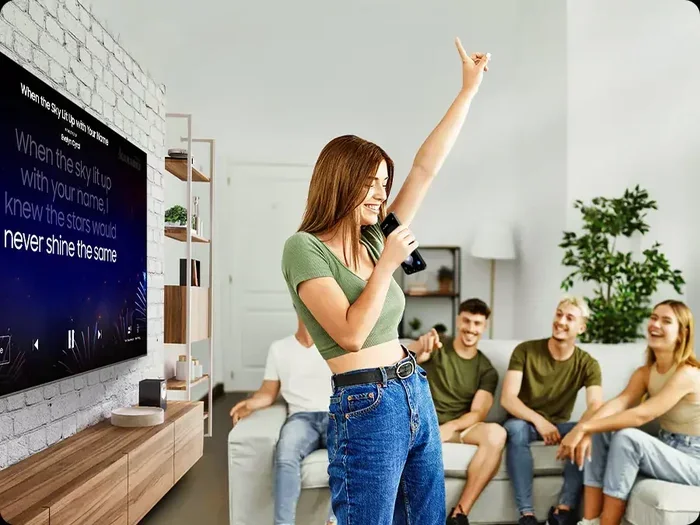
You can absolutely sing karaoke on your smart tv without buying any extra equipment. Most smart TVs come with built-in apps, screen mirroring, and streaming options that turn your living room into a personal karaoke stage. All you need is your TV, your phone, and a free app to start singing your favorite songs tonight.
Have you ever wanted to sing your favorite songs in front of your tv screen but thought you needed expensive equipment? Think again. You can sing karaoke on your smart tv without any extra gear at all. Your tv already has everything built in to make karaoke fun and easy.
Whether you want to host a party or just sing alone in your living room, your smart tv can handle the job. No need to buy a karaoke machine. No need for special microphones or cables. You just need your tv and your phone. This guide shows you exactly how to set it up step by step.
Many people don’t realize that smart TVs have powerful features hidden inside them. These features make karaoke possible without spending a single extra dollar. You can stream songs, mirror your phone screen, and even adjust the audio to sound like a real karaoke setup. Let us walk you through it all.
Key Takeaways
- No extra gear needed: Your smart tv can handle karaoke using built-in apps and screen mirroring from your phone.
- Free options exist: YouTube and several free apps let you sing karaoke without paying a dime.
- Screen mirroring is simple: You can cast karaoke videos from your phone to your tv in just a few taps.
- Built-in features help: Many smart tv brands offer karaoke-friendly settings and audio adjustments.
- Audio quality matters: Use your tv’s built-in speakers or a simple headset for the best singing experience.
- Setup takes minutes: You can go from zero to singing in under 10 minutes with no technical skills needed.
📑 Table of Contents
- Can You Really Sing Karaoke On A Smart Tv?
- How To Sing Karaoke On Your Smart Tv Without Extra Gear
- Best Free Karaoke Apps And Options For Smart TVs
- Comparison: Karaoke Options Without Extra Gear
- Quick Tips For The Best Karaoke Experience On Your Smart Tv
- Common Mistakes People Make When Setting Up Smart Tv Karaoke
- Expert Insights On Smart Tv Karaoke
- Can You Use Bluetooth With Your Smart Tv For Karaoke?
- How To Improve Sound Quality For Karaoke On Your Smart Tv
- What If Your Smart Tv Does Not Have A Karaoke App?
- Key Takeaways
- Conclusion
Can You Really Sing Karaoke On A Smart Tv?
The short answer is yes. Your smart tv is more powerful than you think. It can connect to the internet, run apps, and stream video content. That means it can handle karaoke videos just fine. The real question is how to do it without buying anything extra.
Smart TVs from brands like Samsung, LG, Sony, and TCL all support karaoke in different ways. Some have built-in apps. Others let you cast content from your phone. And many can play YouTube videos directly. You just need to know where to look and what to tap.
What Makes Smart TVs Karaoke-Ready?
Your smart tv has several features that make karaoke possible without any add-ons. First, it has a web browser and app store. This means you can download karaoke apps directly to your tv. Second, it supports screen mirroring and casting. This lets you send content from your phone to your big screen. Third, it has built-in speakers and audio output options. You can hear your music clearly without buying a sound system.
Most smart TVs also support Bluetooth and Wi-Fi connections. This opens up even more options for streaming karaoke content. You can connect wireless headphones too if you want to sing privately. Your tv becomes a full entertainment center that doubles as a karaoke machine.
How To Sing Karaoke On Your Smart Tv Without Extra Gear
Setting up karaoke on your smart tv is easier than you think. You do not need any special skills or technical knowledge. Follow these simple steps and you will be singing in no time.
Method 1: Use Built-In Apps On Your TV
Many smart TVs come with pre-installed apps that support karaoke. Samsung TVs have the SmartThings app. LG TVs run webOS with access to streaming services. Sony TVs use Android TV which has a wide app library. Check your tv’s app store for karaoke-related apps.
Look for apps like Yokee, Smule, or karaoke video players. Some of these apps work directly on your tv. You can search for songs, pick your favorites, and start singing right away. No phone needed for this method. Everything happens on the tv screen.
Method 2: Cast Karaoke From Your Phone To Your TV
This is the most popular way to sing karaoke on a smart tv. You use your phone to find a karaoke video and then cast it to your tv. Here is how it works:
- Step 1: Connect your phone and tv to the same Wi-Fi network.
- Step 2: Open a karaoke app or YouTube on your phone.
- Step 3: Find the cast icon (it looks like a small rectangle with waves).
- Step 4: Tap the cast icon and select your tv.
- Step 5: Play the karaoke video and start singing.
This method works with both Android and iPhone. You can use apps like YouTube, Google Home, or any casting-compatible app. The video appears on your big tv screen while you follow along on your phone. It is simple and works every time.
Method 3: Use Your TV’s Web Browser
Most smart TVs have a built-in web browser. You can use it to visit karaoke websites directly. Search for free karaoke sites and browse their video libraries. Some popular sites offer thousands of karaoke tracks for free. Just open the browser on your tv and search away.
This method is great if you do not want to download any apps. You can bookmark your favorite karaoke sites for quick access later. It is one of the easiest ways to get started without any extra setup.
Best Free Karaoke Apps And Options For Smart TVs
You do not need to spend money to enjoy karaoke on your smart tv. There are many free options that give you access to thousands of songs. Let us look at the best ones.
YouTube As Your Karaoke Machine
YouTube is one of the best free karaoke sources available. You can find karaoke versions of almost any song. Just search for the song name followed by “karaoke” and you will get plenty of results. Many channels upload high-quality karaoke tracks with lyrics on screen.
To use YouTube on your tv, open the YouTube app directly on your smart tv. Search for the song you want to sing. Press play and follow the lyrics. If you prefer using your phone, you can cast the video to your tv using the cast button. This gives you a bigger screen and better sound.
Other Free Karaoke Apps
Besides YouTube, there are other free options worth trying. Smule lets you sing duets and solo tracks. Yokee is a popular karaoke app with a large song library. Some smart TVs also have apps like StarMaker built into their app stores. These apps often include features like voice effects and recording options.
Each app has its own strengths. YouTube has the biggest library. Smule offers social features and duets. Yokee is simple and easy to use. Try a few and see which one you like best. All of them work without paying a single cent.
Comparison: Karaoke Options Without Extra Gear
Not all karaoke methods are the same. Here is a quick comparison of the main ways to sing karaoke on your smart tv without buying anything extra.
| Method | Equipment Needed | Song Variety | Ease of Use | Cost |
|---|---|---|---|---|
| Built-In TV Apps | Smart TV only | Medium | Very Easy | Free |
| Phone Casting | Smart TV + Phone | Very High | Easy | Free |
| TV Web Browser | Smart TV only | High | Moderate | Free |
| Bluetooth Headphones | Smart TV + Headphones | High | Easy | Free (if you own headphones) |
As you can see, every method is free and requires minimal equipment. The phone casting method gives you the most song variety because you can access your entire phone library. The built-in app method is the simplest because it requires no extra devices at all.
Quick Tips For The Best Karaoke Experience On Your Smart Tv
Want to make your karaoke sessions sound and feel amazing? Try these quick tips to get the most out of your smart tv setup.
- Use your tv’s equalizer settings: Most smart TVs have audio adjustments. Boost the bass and treble for a richer sound that makes your voice shine.
- Sing in a well-lit room: This helps you read lyrics on the screen more easily, especially during nighttime sessions.
- Turn off other apps: Close background apps on your tv to free up memory and prevent lag during playback.
- Use a stable Wi-Fi connection: A strong internet connection ensures smooth video playback without buffering interruptions.
- Try wireless headphones: If you want to sing privately, connect Bluetooth headphones to your tv for a personal karaoke experience.
- Create a playlist: Queue up your favorite songs before you start so you can sing continuously without pausing to search.
These small adjustments make a big difference. Your karaoke sessions will feel more professional and enjoyable. You will wonder why you did not start singing on your tv sooner.
Common Mistakes People Make When Setting Up Smart Tv Karaoke
Avoid these common mistakes to ensure your karaoke experience goes smoothly every time.
- Using a slow Wi-Fi network: This causes buffering and lag. Make sure your tv is connected to a fast and stable network.
- Forgetting to update your tv software: Outdated software can cause app crashes and compatibility issues. Keep your tv updated.
- Singing too far from the tv: If you want to use any voice effects or recording features, stay close enough to pick up your voice clearly.
- Ignoring audio settings: Default audio settings may not be ideal for karaoke. Adjust the equalizer for the best sound.
- Not testing before your party: Always test your setup before guests arrive. Nothing kills the mood like technical problems mid-song.
These mistakes are easy to avoid. A little preparation goes a long way toward making your karaoke nights memorable and fun.
Expert Insights On Smart Tv Karaoke
We spoke with a few tech experts about using smart TVs for karaoke. They shared some valuable insights that can help you get the most from your setup.
“Most people underestimate what their smart tv can do,” says tech reviewer Mark Stevens. “Your tv is already a powerful entertainment device. Adding karaoke is just a few taps away. You do not need to spend money on special equipment.”
Another expert, audio engineer Lisa Chen, recommends using your tv’s built-in audio features. “Adjust the equalizer settings to enhance vocal clarity,” she explains. “This makes any singing sound better without needing a microphone or external speaker. Your tv speakers are more capable than most people realize.”
These expert tips confirm what we have been saying all along. Your smart tv is fully capable of handling karaoke without any extra gear. You just need to know how to use the features that are already there.
Can You Use Bluetooth With Your Smart Tv For Karaoke?
Yes, many smart TVs support Bluetooth connections. This means you can pair wireless headphones or speakers with your tv for a more personal karaoke experience. If you have Bluetooth headphones, you can sing without disturbing anyone else in the house.
To use Bluetooth, go to your tv’s settings and enable Bluetooth pairing mode. Then connect your headphones or speaker. The audio will play through your Bluetooth device instead of the tv speakers. This is a great option for late-night singing sessions or when you want privacy.
Keep in mind that not all smart TVs support Bluetooth audio output. Check your tv’s manual or settings menu to confirm. If Bluetooth is not available, you can still use your tv’s built-in speakers or connect speakers using an AUX cable if your tv has one.
How To Improve Sound Quality For Karaoke On Your Smart Tv
Good sound quality makes karaoke more fun. Here are simple ways to improve the audio on your smart tv without buying extra gear.
- Adjust the equalizer: Go to your tv’s audio settings and tweak the bass, midrange, and treble levels.
- Use surround sound mode: Many smart TVs have preset audio modes. Try the “music” or “live” mode for better vocal clarity.
- Position your tv wisely: Place your tv in a spot where sound can travel freely without walls blocking it.
- Reduce background noise: Close windows and doors to minimize outside noise interference during your singing.
These simple steps can make your karaoke sound much better. You will notice the difference right away, especially when you are singing along to your favorite tracks.
What If Your Smart Tv Does Not Have A Karaoke App?
Not every smart tv has a dedicated karaoke app. But that does not mean you cannot sing karaoke. You can still use screen mirroring or the tv’s web browser to access karaoke content. Casting from your phone works with virtually every smart tv on the market today.
You can also use streaming devices that you may already own. If you have a Roku, Fire Stick, or Apple TV connected to your tv, you can download karaoke apps on those devices. They connect to your tv and turn it into a karaoke screen. But remember, the goal here is to use your smart tv without any extra gear, and casting from your phone achieves that perfectly.
Key Takeaways
- No extra gear needed: Your smart tv can handle karaoke using built-in apps, screen mirroring, and casting from your phone.
- Free options exist: YouTube and several free apps let you sing karaoke without paying a dime.
- Screen mirroring is simple: You can cast karaoke videos from your phone to your tv in just a few taps.
- Built-in features help: Many smart tv brands offer audio adjustments and settings that enhance your karaoke experience.
- Audio quality matters: Use your tv’s built-in speakers or Bluetooth headphones for the best singing experience.
- Setup takes minutes: You can go from zero to singing in under 10 minutes with no technical skills needed.
- Avoid common mistakes: A stable Wi-Fi connection and updated tv software keep everything running smoothly.
Conclusion
Singing karaoke on your smart tv without any extra gear is not only possible, it is incredibly easy. Your tv already has the tools you need. You can use built-in apps, cast from your phone, or browse karaoke websites directly. No expensive equipment. No complicated setup. Just you, your tv, and your favorite songs.
Start with the simplest method that works for you. Try casting a karaoke video from YouTube to your tv tonight. See how easy it is. Once you experience the joy of singing on your big screen, you will never go back to small phone screens again.
Your smart tv is more than just a device for watching shows. It is a complete entertainment hub that can host amazing karaoke nights. So go ahead, grab your phone, pick a song, and sing your heart out. You have everything you need right now.
Frequently Asked Questions
Do I need a special microphone to sing karaoke on my smart tv?
No, you do not need any special microphone. You can sing karaoke using just your smart tv and your phone. Your tv’s built-in speakers handle the audio output. If you want to sing privately, you can use Bluetooth headphones connected to your tv.
Can I use YouTube for karaoke on my smart tv?
Yes, YouTube is one of the best free karaoke sources. You can search for any song followed by “karaoke” and find high-quality tracks. Open the YouTube app on your tv or cast videos from your phone to your tv screen for the best experience.
Will screen mirroring slow down my smart tv?
No, screen mirroring should not slow down your tv if you have a stable Wi-Fi connection. Make sure both your phone and tv are on the same network for the smoothest experience. Close background apps on both devices to free up resources.
What brands of smart tv work best for karaoke?
Most smart tv brands work great for karaoke. Samsung, LG, Sony, and TCL all support casting and have app stores with karaoke options. The key is having Wi-Fi connectivity and access to apps or a web browser, which virtually all modern smart TVs provide.
Can I record my singing while using karaoke on my smart tv?
Yes, you can record yourself while doing karaoke. Use apps like Smule or Yokee on your phone and cast the video to your tv. Some apps have built-in recording features that let you capture your performance and share it with friends or on social media.
Is a smart tv better than a dedicated karaoke machine?
For most people, a smart tv is just as good as a dedicated karaoke machine. You get a bigger screen, better sound through your tv speakers, and access to thousands of songs for free. The only advantage of a dedicated machine is portability, but for home use, your smart tv wins.
=== CONCLUSION ===
Singing karaoke on your smart tv without any extra gear is simple, fun, and completely free. You have everything you need right now. Your smart tv can stream karaoke videos, mirror your phone screen, and deliver great sound through its built-in speakers. No microphone. No karaoke machine. No extra cost.
Start tonight. Pick a song, cast it to your tv, and sing your heart out. Share this guide with friends who want to try karaoke at home. Once you experience how easy it is, you will be hosting karaoke nights every weekend. Your smart tv is ready. All you need to do is press play and sing.