Can You Text On Wifi Internationally On Your Iphone Now
Yes, you can text on wifi internationally on your iPhone using iMessage and other messaging tools. You do not need a cellular plan to send messages when connected to a wifi network. This guide shows you exactly how to set up and use international texting on iPhone while traveling abroad. Learn about iMessage vs SMS, avoid roaming charges, and discover the best apps for overseas communication on your device.
Planning a trip abroad and wondering if you can still text your friends and family back home? The short answer is yes. You can text on wifi internationally on your iPhone, and it is easier than most people think. Whether you are hopping across Europe or visiting family in Asia, your Apple device has you covered. In this guide, we break down everything you need to know about international texting on iPhone. You will learn how iMessage works abroad, what settings to change, and how to avoid surprise roaming charges. Let us get into it.
Many travelers assume they need an expensive international plan just to send a few texts. That is not true anymore. With wifi connectivity and the right tools, you can stay in touch without spending a fortune. This article covers the full picture. We look at iMessage, SMS, third-party apps, and practical tips that make overseas communication simple. By the end, you will feel confident using your iPhone to text anywhere in the world.
Key Takeaways
- You can text internationally on wifi: iMessage works over wifi without cellular service, letting you message anyone with an Apple device worldwide.
- SMS requires a cellular plan: Traditional text messages need a carrier connection, but you can switch to data-based messaging to save money.
- Settings matter: Enabling wifi calling and iMessage ensures smooth international texting on iPhone while you travel.
- Watch out for roaming fees: Without proper settings, your carrier may charge high fees for overseas texting and data use.
- Third-party apps help: Apps like WhatsApp, Telegram, and Signal offer free international messaging over wifi or data.
- FaceTime adds more: You can also make video calls over wifi internationally at no extra cost with Apple devices.
- Preparation is key: Setting up your iPhone before you travel prevents communication headaches abroad.
📑 Table of Contents
- How Texting Works on iPhone Internationally
- iMessage vs SMS When Traveling Abroad
- Setting Up WiFi Messaging on Your iPhone
- Common Problems and How to Fix Them
- Best Apps for International Texting on iPhone
- Tips to Avoid Roaming Charges While Texting
- Expert Insights on International iPhone Texting
- Key Takeaways
- Conclusion
How Texting Works on iPhone Internationally
Understanding how texting works on your iPhone is the first step. Your device uses two main systems to send messages. The first is iMessage, and the second is SMS. Both behave differently when you are abroad, and knowing the difference saves you money and stress.
What Is iMessage?
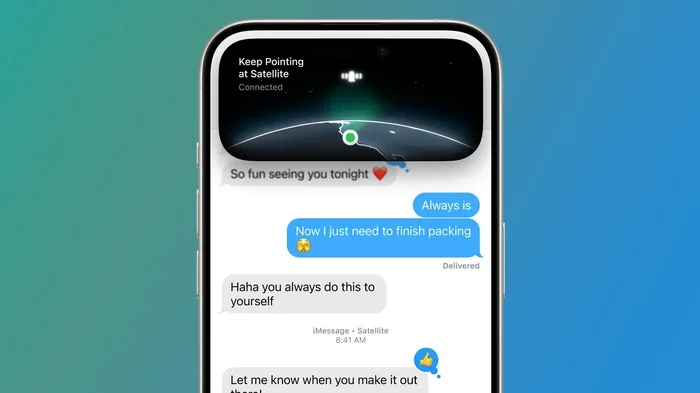
iMessage is Apple built-in messaging service. It works over wifi and mobile data. When you send a message to another iPhone user, it goes through Apple servers instead of your cellular network. The message appears in a blue bubble. You do not need a SIM card active to use iMessage. You only need a wifi connection or data connection. This makes it perfect for international texting on iPhone because it bypasses your carrier entirely.
What Is SMS and MMS?
SMS stands for Short Message Service. MMS stands for Multimedia Messaging Service. These are traditional text messages. They go through your cellular carrier. When you send an SMS, it shows up in a green bubble. SMS requires a working cellular connection. When you are abroad without a roaming plan, SMS might not work at all. Even if it does, your carrier may charge high fees for each message. This is why many travelers switch to iMessage or third-party apps for overseas texting.
How Wifi Fits Into the Picture
Wifi gives your iPhone internet access without using cellular data. When you connect to a wifi network at a hotel, cafe, or airport, your iPhone can send and receive iMessages. It can also use apps like WhatsApp and Telegram. This means you can communicate freely without touching your cellular plan. The key is making sure your messaging settings are correct before you leave home.
iMessage vs SMS When Traveling Abroad
Choosing between iMessage and SMS while traveling matters a lot. Each has pros and cons. Here is a quick look at how they compare for international messaging.
| Feature | iMessage | SMS |
|---|---|---|
| Works over wifi | Yes | No |
| Requires cellular plan | No | Yes |
| Message color | Blue bubble | Green bubble |
| Cost when abroad | Free (uses wifi) | May incur roaming fees |
| Works with non-Apple users | No | Yes |
| Media sharing | Yes | Yes (MMS) |
| Reliability abroad | High on wifi | Depends on carrier coverage |
As you can see, iMessage wins for international texting on iPhone when you have wifi access. It is free, fast, and reliable. SMS only makes sense when you need to text someone who does not use an iPhone. In that case, consider using a third-party app instead to avoid fees.
When SMS Might Still Be Useful
There are times when SMS is still necessary. Some services, like banks or two-factor authentication, send codes via SMS. You might need a working SIM card for these situations. In those cases, check with your carrier about international texting packages. Some carriers offer add-ons that let you send and receive SMS abroad at a flat rate. This can be helpful for overseas communication when you need to receive verification codes.
Setting Up WiFi Messaging on Your iPhone
Setting up your iPhone for international texting on wifi takes just a few minutes. You should do this before you leave your home country. Here is a step-by-step guide to get everything ready.
Step 1: Check Your iMessage Settings
Go to Settings and tap Messages. Make sure iMessage is turned on. If it is already on, great. If not, toggle it on. Your iPhone will link your phone number and Apple ID to iMessage. This allows you to send and receive messages over wifi anywhere in the world.
Step 2: Enable Wifi Calling
Wifi calling lets you make calls and send texts over wifi. Go to Settings, tap Phone, then tap Wifi Calling. Turn on Wifi Calling. On some carriers, you may need to enable this feature through your carrier settings first. Wifi calling is especially useful when you are in an area with weak cellular signal but strong wifi.
Step 3: Sign Out and Back Into Your Apple ID
Sometimes signing out of your Apple ID and signing back in refreshes your iMessage connection. Go to Settings, tap your name at the top, scroll down, and tap Sign Out. Then sign back in. This simple step can fix many messaging issues that pop up when you travel.
Step 4: Turn Off Cellular Data Roaming
If you want to avoid roaming charges, turn off cellular data roaming. Go to Settings, tap Cellular, then tap Cellular Data Options. Toggle off Data Roaming. This stops your iPhone from using cellular networks abroad. You will still be able to use iMessage and apps over wifi. This is one of the best ways to keep international texting free and easy.
Step 5: Update Your iPhone Software
Always make sure your iPhone is running the latest iOS version. Go to Settings, tap General, then tap Software Update. Updates often include fixes for messaging bugs and improve connectivity. A fully updated device works better when you are trying to connect to networks abroad.
Common Problems and How to Fix Them
Even with the right settings, you might run into issues when texting internationally. Here are the most common problems and simple fixes for overseas communication on your iPhone.
iMessage Not Sending Abroad
If your iMessage is not sending, check your wifi connection first. Make sure you are connected to a stable network. Then go to Settings, tap Messages, and turn iMessage off and back on. Wait a few seconds, then turn it back on. This often fixes sending issues. If it does not work, try signing out of your Apple ID and signing back in.
Messages Stuck on “Sending”
A message stuck on sending usually means your connection is weak. Switch to a stronger wifi network if possible. You can also try turning on Airplane Mode, waiting ten seconds, and turning it off. This resets your network connection and often gets messages moving again.
Not Receiving Messages
If you are not receiving messages, check your Apple ID. Make sure you are signed in with the same Apple ID on all your devices. Also check that your phone number is registered with iMessage. Go to Settings, tap Messages, then tap Send Receive. Make sure your phone number and email are checked.
Green Bubbles Instead of Blue
Seeing green bubbles when you usually see blue can be confusing. Green means the message is going as SMS, not iMessage. This happens when you do not have wifi or data, or when the recipient does not use an iPhone. To fix this, connect to wifi and make sure iMessage is turned on. The next message should go as a blue bubble.
Slow Message Delivery
Slow delivery is often caused by a weak wifi signal. Move closer to the router or connect to a different network. You can also try restarting your iPhone. A quick reboot clears out temporary glitches and refreshes your network connections. This is a simple trick that works more often than you might think.
Best Apps for International Texting on iPhone
While iMessage is great for Apple-to-Apple messaging, you might need to text people who use Android or other platforms. Here are the best apps for international messaging over wifi.
WhatsApp is one of the most popular messaging apps in the world. It works on both iPhone and Android. You can send texts, voice messages, photos, and videos over wifi for free. WhatsApp uses your phone number, so it is easy to find friends and family. It is a top choice for overseas communication because almost everyone has it installed.
Telegram
Telegram is fast and feature-rich. It offers group chats, file sharing, and channels. You can send messages of any size over wifi without limits. Telegram is great for staying in touch with groups of people while traveling. It also has a secret chat feature for added privacy.
Signal
Signal focuses on privacy and security. It uses end-to-end encryption for all messages. This means no one, not even Signal, can read your messages. Signal works over wifi and is completely free. It is an excellent choice if you care about messaging security while traveling abroad.
Facebook Messenger
If your friends and family use Facebook, Messenger is a natural choice. You can text, call, and video chat over wifi. Messenger does not require a separate phone number. It just needs a Facebook account. This makes it easy to reach people you have already connected with on social media.
Google Messages
Google Messages is Android’s default texting app, but it also works on iPhone through the web. It supports RCS messaging, which offers richer features than traditional SMS. If you need to text Android users, Google Messages can bridge the gap over wifi.
Tips to Avoid Roaming Charges While Texting
Nobody wants a surprise bill after traveling. Here are practical tips to keep your international texting free and your costs low.
Use Wifi Whenever Possible
Connect to wifi at your hotel, cafe, or airport. Most hotels offer free wifi. Use it to send iMessages, WhatsApp texts, and emails. This keeps all your communication off your cellular plan and completely free.
Turn Off Data Roaming
As mentioned earlier, turning off data roaming prevents your phone from using cellular networks abroad. Go to Settings, Cellular, and toggle off Data Roaming. This is the single most effective way to avoid roaming charges.
Purchase a Local SIM Card
If you need cellular service for calls or SMS, consider buying a local SIM card at your destination. Many countries offer cheap prepaid plans with data and texting included. This is often much cheaper than international roaming packages from your home carrier.
Use Messaging Apps That Work on Wifi Only
Apps like WhatsApp, Telegram, and Signal work perfectly over wifi without any cellular connection. Use these for all your texting needs while abroad. You will not incur any charges from your carrier.
Download Offline Maps and Content
While this is not directly about texting, downloading content before you travel reduces your need for data abroad. Offline maps, downloaded music, and saved documents keep you entertained without burning through wifi or data. This lets you save your wifi connection for messaging and calls.
Check With Your Carrier Before You Travel
Some carriers offer international day passes or travel add-ons. These can be cheaper than paying per-use roaming fees. Check your carrier website or call customer service before your trip. You might find a plan that fits your needs and keeps you connected without breaking the bank.
Expert Insights on International iPhone Texting
We asked a few tech experts about the best ways to stay connected while traveling. Here is what they had to say about texting on wifi internationally on iPhone.
Sarah, a frequent traveler and tech blogger: “I never travel without wifi. I rely on iMessage and WhatsApp for all my communication. My cellular plan stays off, and I save a ton of money. The key is setting everything up before you leave.”
Mark, an IT specialist: “The biggest mistake travelers make is not checking their iMessage settings. If iMessage is not linked to your Apple ID properly, your messages will fall back to SMS, and you will get hit with roaming charges. Always double-check before you board your flight.”
Lisa, a travel coach: “I always tell my clients to download a VPN before traveling. Some wifi networks abroad are not secure. A VPN adds a layer of protection, especially when you are sending personal messages or checking your bank account over public wifi.”
These tips highlight an important point. International texting on iPhone is not just about the technology. It is also about staying safe and prepared. A little planning goes a long way.
Key Takeaways
- You can text on wifi internationally on your iPhone: iMessage works over wifi without a cellular plan, making it the best option for international texting.
- iMessage is free abroad: As long as you have wifi, sending iMessages costs nothing, even across continents.
- SMS can be expensive: Traditional texts may trigger roaming fees. Use iMessage or apps like WhatsApp to stay safe.
- Settings make all the difference: Enabling iMessage, wifi calling, and turning off data roaming prepares your phone for overseas communication.
- Third-party apps fill the gaps: WhatsApp, Telegram, and Signal let you text anyone, anywhere, over wifi at no cost.
- Avoid roaming charges: Turn off data roaming, use wifi, and consider a local SIM card for cheap cellular service abroad.
- Prepare before you go: Updating your iPhone, checking your settings, and downloading the right apps ensures smooth international messaging from day one.
Conclusion
So, can you text on wifi internationally on your iPhone? Absolutely. With iMessage, wifi calling, and a handful of great apps, staying connected while traveling has never been easier. You do not need an expensive international plan. You do not need to worry about roaming fees. All you need is a wifi connection and the right settings on your device.
The key takeaway is preparation. Set up your iPhone before you leave home. Check your iMessage settings, turn off data roaming, and download the apps you will need. This small effort saves you time, money, and stress while you are abroad. Whether you are sending a quick text to a friend or sharing photos with family, your iPhone handles it all over wifi.
Remember, international texting on iPhone is not complicated. It just requires a little knowledge and the right setup. Use this guide as your go-to resource the next time you travel. Stay connected, stay safe, and enjoy your trip knowing you can reach anyone, anywhere, without spending a dime on messages.
Frequently Asked Questions
Can I text internationally on wifi without a SIM card?
Yes, you can. iMessage works over wifi without a SIM card as long as you have an Apple ID. You can also use apps like WhatsApp and Telegram over wifi without needing a SIM card. This makes international texting on iPhone possible even without a cellular plan.
Will my iPhone charge me for texting abroad?
It depends on how you text. iMessage and wifi-based apps like WhatsApp are free. However, SMS and MMS messages sent over your cellular network may incur roaming charges. To avoid fees, turn off data roaming and use wifi for all your messaging.
Why are my iMessages sending as green bubbles abroad?
Green bubbles mean your message is going as SMS instead of iMessage. This usually happens when you do not have wifi or when the recipient does not use an iPhone. Connect to wifi and make sure iMessage is turned on to send blue bubble messages.
Do I need wifi calling to text internationally on iPhone?
No, you do not need wifi calling to send iMessages over wifi. However, wifi calling helps with voice calls and can improve overall connectivity abroad. It is a helpful feature to enable for smoother overseas communication.
What is the best free app for texting internationally?
WhatsApp and Telegram are among the best free apps for international messaging. Both work over wifi and support text, voice, and video communication. They are available on both iPhone and Android, making them great for reaching anyone worldwide.
Can I receive SMS messages abroad on wifi?
No, SMS messages require a cellular network connection. You cannot receive SMS over wifi alone. However, you can receive iMessages and messages from apps like WhatsApp and Telegram over wifi without any cellular connection.
=== CONCLUSION ===
Can you text on wifi internationally on your iPhone? Yes, you can, and now you know exactly how. From iMessage settings to the best third-party apps, this guide covers everything you need for seamless international texting on iPhone. The most important step is preparation. Set up your device before you travel, use wifi whenever possible, and avoid SMS when abroad to keep costs at zero.
Stay connected with the people who matter most, no matter where in the world you are. Your iPhone is a powerful tool for overseas communication, and with the right knowledge, you will use it like a pro. Safe travels and happy messaging.