Five Major Activities Of An Operating System Process Management
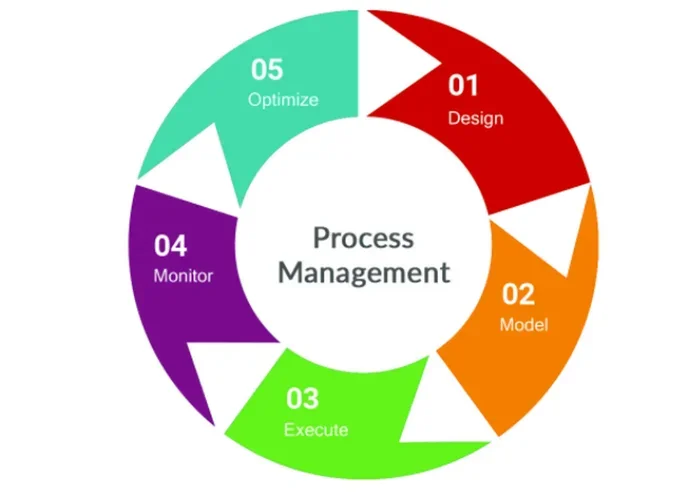
Process management is the backbone of every operating system, ensuring tasks run efficiently and without conflict. The five major activities of an operating system process management include process creation, scheduling, synchronization, communication, and termination. Understanding these functions helps users and developers appreciate how their systems juggle multiple tasks seamlessly every single day.
Your computer runs dozens — sometimes hundreds — of processes at any given moment. Every time you open a browser, play a video, or even move your mouse, the operating system is hard at work behind the scenes. But have you ever wondered exactly how it manages all of that? That is where process management comes in.
The five major activities of an operating system process management form the core of how your system stays organized, responsive, and efficient. From the moment a program starts to the moment it closes, the operating system orchestrates every step. In this article, we will break down each of these five activities in simple, easy-to-understand terms. Whether you are a student, a developer, or just a curious computer user, you will walk away with a clear picture of what makes your system tick.
Let us start at the very beginning — what process management actually means and why it matters so much for everyday computing.
Key Takeaways
- Process Creation: The OS spawns new processes to handle every task you launch, from browsers to background services.
- Process Scheduling: CPU scheduling algorithms decide which process gets attention next, keeping your system responsive.
- Process Synchronization: The OS prevents conflicts when multiple processes access shared resources simultaneously.
- Process Communication: Processes exchange data through inter-process communication mechanisms managed by the kernel.
- Process Termination: The OS cleanly ends processes when they finish or encounter errors, freeing up system resources.
- Context Switching: The OS rapidly switches between processes, creating the illusion of multitasking on a single CPU.
- Process Control Block: Every process has a PCB that stores its state, priority, and resource information for efficient management.
📑 Table of Contents
- What Is Process Management in an Operating System?
- The Five Major Activities of an Operating System in Process Management
- How These Five Activities Work Together
- Common Challenges in Process Management
- Practical Tips to Optimize Process Management
- Expert Insights on Process Management
- The Future of Process Management
- Conclusion
What Is Process Management in an Operating System?
Process management refers to how an operating system handles the lifecycle of every program running on your computer. A process is simply a program in execution. When you double-click an app, the operating system does not just load it and forget about it. It creates a process, assigns it resources, schedules its turn on the CPU, and eventually shuts it down when it is done.
Think of it like a restaurant kitchen. Each dish being prepared is a process. The head chef — which is your operating system — decides who gets to use the stove, when, and for how long. Without this coordination, chaos would ensue. The same applies to your computer.
The operating system functions related to process management are handled primarily by the kernel. The kernel is the core component that sits between your hardware and your applications. It makes sure every process gets what it needs without stepping on anyone else’s toes. Let us now look at the five major activities in detail.
The Five Major Activities of an Operating System in Process Management
Activity 1: Process Creation
The very first activity in process management is creating new processes. When you open a program, the operating system needs to build a process for it from scratch. This involves allocating memory, setting up a process control block (PCB), and assigning a unique process ID.
The process control block is like a digital ID card for each process. It stores vital information such as:
- The current state of the process (running, waiting, ready).
- The process priority level.
- CPU registers and counters.
- Memory allocation details.
- Open file handles and I/O status.
Without the PCB, the operating system would have no way to keep track of what each process is doing. Process creation happens every single time you launch an application, open a new tab, or even when background services start automatically at boot time.
For example, when you start your computer, the operating system immediately creates several essential processes. These might include system daemons, network managers, and audio services. Each one gets its own PCB and its own slice of resources. This process lifecycle begins the moment a process is born and continues until it is terminated.
Here is a quick tip: if your system feels slow, it might be because too many processes were created and are competing for resources. Checking your task manager can help you identify resource-hungry processes that you do not actually need running.
Activity 2: Process Scheduling
Once processes are created, the operating system must decide which one gets to use the CPU and when. This is process scheduling, and it is arguably the most critical of the five activities. Without scheduling, your computer would freeze every time it tried to run more than one thing at a time.
CPU scheduling algorithms determine the order in which processes receive CPU time. There are several common scheduling algorithms that operating systems use:
- First-Come, First-Served (FCFS): Processes are handled in the order they arrive. Simple but can lead to long wait times.
- Shortest Job First (SJF): The process with the smallest execution time goes first. Efficient but hard to predict.
- Round Robin: Each process gets a fixed time slice, then moves to the back of the queue. Fair and widely used.
- Priority Scheduling: Processes with higher priority get CPU time first. Useful for real-time applications.
Modern operating systems use a combination of these strategies. Windows, for instance, uses a priority-based preemptive scheduling model. Linux uses a completely fair scheduler that aims to balance responsiveness with throughput.
The goal of process scheduling is to maximize CPU utilization while keeping the system responsive. When you switch between apps on your phone and everything feels smooth, that is scheduling at work. The operating system is rapidly performing context switching — saving the state of one process and loading the state of another — in mere milliseconds.
Context switching is not free. It takes time and CPU cycles. Too many processes and too frequent switching can actually slow your system down. This is why efficient scheduling algorithms matter so much in multiprocessing and multitasking environments.
Activity 3: Process Synchronization
Now imagine two processes trying to access the same file at the exact same time. Or two threads updating the same variable simultaneously. This is where process synchronization becomes essential.
Synchronization ensures that processes do not interfere with each other when they share resources. Without it, you could end up with corrupted data, inconsistent results, or system crashes. The operating system uses several mechanisms to handle this:
- Mutexes (Mutual Exclusion): A lock that allows only one process to access a resource at a time.
- Semaphores: Counters that control how many processes can access a resource simultaneously.
- Monitors: High-level synchronization constructs that encapsulate shared data and the procedures that operate on it.
- Spinlocks: Busy-wait locks used in multiprocessor systems where a process repeatedly checks if a lock is available.
One of the biggest challenges in process synchronization is avoiding deadlock. A deadlock occurs when two or more processes are waiting for each other to release resources, and none of them can proceed. Imagine two people trying to pass through a narrow door from opposite sides — both stop, and neither moves. That is a deadlock in action.
Operating systems use various deadlock prevention and deadlock avoidance strategies to handle this. These include resource ordering, wait-die schemes, and the banker’s algorithm. Good process management always keeps deadlock scenarios in mind.
Here is a practical example. When you download a file and try to open it at the same time, the operating system uses synchronization to make sure the download process finishes writing before the media player tries to read it. Without synchronization, you would get errors or corrupted playback.
Activity 4: Process Communication
Processes often need to talk to each other. This is called inter-process communication, or IPC. The operating system provides mechanisms that allow processes to exchange data and coordinate their actions.
Common IPC methods include:
- Shared Memory: Two or more processes access a common memory region. Fast but requires careful synchronization.
- Message Passing: Processes send and receive messages through the operating system. Safer but slightly slower.
- Pipes: A unidirectional communication channel between processes. Commonly used in command-line environments.
- Sockets: Allow communication between processes, even across different machines over a network.
- Signals: Lightweight notifications sent to a process to notify it of an event.
Process communication is vital for many real-world scenarios. For instance, when you copy a file in your file manager, the file manager process communicates with the disk I/O process and the user interface process. All three need to work together seamlessly.
In multiprocessing environments, IPC becomes even more important. Servers, for example, spawn multiple child processes to handle incoming requests. Each child process needs to communicate with the parent process and sometimes with sibling processes to share results and status updates.
The operating system kernel manages all of these communication channels. It ensures that data is transferred safely and that processes do not accidentally read each other’s private information. Kernel operations related to IPC are optimized for speed and security.
Activity 5: Process Termination
Every process has a beginning and an end. The fifth major activity is process termination — the clean shutdown of a process when it is done or when something goes wrong.
Processes can terminate in several ways:
- Normal Exit: The process finishes its task and calls an exit system call. This is the healthy way to end.
- Error Exit: The process encounters an error it cannot handle and terminates abnormally.
- Fatal Error: The process crashes due to an illegal operation, such as accessing invalid memory.
- Killed by Another Process: The operating system or another process forcefully terminates it.
When a process terminates, the operating system performs cleanup tasks. It releases all allocated memory, closes open files, frees up I/O resources, and removes the process’s PCB from the system tables. This cleanup is crucial for preventing resource leaks that can degrade system performance over time.
In batch processing systems, process termination is straightforward — the process finishes its job and exits. In real-time processing systems, termination might need to happen within strict time constraints. The operating system must handle these scenarios gracefully.
A quick tip for users: if a program stops responding, you can use the task manager or force quit to terminate it manually. This tells the operating system to clean up the stuck process and reclaim its resources. However, frequent forced terminations can sometimes lead to data loss, so it is best to let programs close normally when possible.
How These Five Activities Work Together
The five major activities do not work in isolation. They are deeply interconnected and happen simultaneously in a well-functioning operating system. Let us look at how they interact with each other in a typical scenario.
Imagine you open a video editing application. Here is what happens step by step:
- Process Creation: The operating system creates a new process for the video editor and allocates the necessary memory and resources.
- Process Scheduling: The scheduler assigns CPU time to the video editor process so you can start using it immediately.
- Process Communication: The video editor communicates with the graphics driver process and the file system process to load your project.
- Process Synchronization: When rendering a video, the OS ensures that multiple rendering threads do not write to the same output file simultaneously.
- Process Termination: When you save and close the application, the operating system cleanly terminates the process and frees all resources.
This entire cycle happens in seconds, often in milliseconds. The operating system functions work together so smoothly that you barely notice them. That is the beauty of good process management.
For developers, understanding these five activities is essential. It helps you write better code that cooperates well with the operating system. For everyday users, it helps you understand why your system behaves the way it does — and how to troubleshoot issues when things go wrong.
Common Challenges in Process Management
Even the best operating systems face challenges when managing processes. Here are some of the most common issues:
Resource Starvation
When a process does not get enough CPU time or memory to function properly, it is said to be starving. Poor scheduling algorithms can cause low-priority processes to wait indefinitely. The operating system must balance fairness with efficiency to prevent starvation.
Race Conditions
A race condition occurs when the outcome of a process depends on the unpredictable timing of other processes. This is a synchronization problem that can lead to bugs and data corruption. Operating systems use locks and other synchronization tools to prevent race conditions.
Memory Overcommitment
When too many processes are created and each demands more memory than is physically available, the system can slow down dramatically. The operating system uses techniques like paging and swapping to cope, but there are limits. Monitoring your system’s memory usage can help you avoid this problem.
Zombie Processes
A zombie process is a process that has finished executing but still has an entry in the process table. This happens when the parent process has not yet read the child’s exit status. Over time, zombie processes can accumulate and waste system resources. The operating system must periodically clean these up.
Practical Tips to Optimize Process Management
Whether you are a regular user or a system administrator, there are steps you can take to improve how your operating system manages processes:
- Monitor running processes regularly: Use built-in tools like Task Manager (Windows), Activity Monitor (macOS), or top/htop (Linux) to see what is running.
- Close unused applications: Every open process consumes resources. Shut down programs you are not using.
- Limit startup programs: Many applications add themselves to the startup list. Disable unnecessary ones to reduce the load at boot time.
- Keep your OS updated: Operating system updates often include improvements to scheduling algorithms and kernel operations.
- Use lightweight alternatives: If your system struggles, consider using lighter applications that create fewer background processes.
- Adjust process priorities: On most operating systems, you can manually set process priorities to ensure critical tasks get more CPU time.
Expert Insights on Process Management
Experienced system administrators and operating system developers emphasize a few key principles when it comes to process management:
First, simplicity wins. The best scheduling and synchronization strategies are often the simplest ones that meet your needs. Over-engineering process management can introduce complexity and bugs.
Second, monitor and measure. You cannot optimize what you do not measure. Tools like performance monitors, profiling utilities, and system logs provide invaluable data about how your processes behave.
Third, design for failure. Processes will crash. Network connections will drop. Disk space will fill up. Good process management anticipates these failures and handles them gracefully, rather than letting them cascade into system-wide problems.
Fourth, understand your workload. A server handling thousands of web requests has very different process management needs than a desktop computer running a few applications. Tailoring your approach to your specific use case yields the best results.
These insights come from years of real-world experience managing everything from embedded systems to massive cloud computing clusters. The fundamental principles remain the same regardless of scale.
The Future of Process Management
As computing evolves, so does process management. Several trends are shaping the future:
- Containerization: Technologies like Docker use lightweight process isolation to run applications in environments that behave like separate systems.
- Cloud-Native Scheduling: Modern cloud platforms manage millions of processes across thousands of servers, using advanced scheduling algorithms that go far beyond traditional OS-level approaches.
- AI-Driven Optimization: Some researchers are exploring how machine learning can optimize CPU scheduling and resource allocation in real time.
- Real-Time Operating Systems: As IoT devices proliferate, the demand for predictable, low-latency process management in real-time systems continues to grow.
These developments build on the same foundational five activities we have covered. The core principles of creating, scheduling, synchronizing, communicating, and terminating processes remain the same — even as the tools and techniques become more sophisticated.
Conclusion
The five major activities of an operating system process management — process creation, scheduling, synchronization, communication, and termination — are the building blocks of how your computer handles every task you throw at it. From the simplest text editor to the most complex video rendering pipeline, these activities work together behind the scenes to keep everything running smoothly.
Understanding these activities gives you a deeper appreciation for the complexity and elegance of modern operating systems. It also empowers you to troubleshoot issues, optimize performance, and write better software. Whether you are a student learning about operating system functions for the first time or a seasoned developer optimizing a production system, these five activities form the foundation you need to master.
Next time you switch between apps or open a new program, take a moment to appreciate the incredible coordination happening inside your machine. The operating system is juggling processes, managing resources, and keeping everything in order — all in the blink of an eye. That is the magic of process management, and it is happening right now, every single time you use your computer.
Frequently Asked Questions
What is process management in an operating system?
Process management is the way an operating system handles the lifecycle of every running program. It covers creating processes, scheduling them for CPU time, synchronizing their access to shared resources, enabling them to communicate, and cleaning them up when they finish.
What are the five major activities of process management?
The five major activities are process creation, process scheduling, process synchronization, process communication, and process termination. Each activity plays a vital role in ensuring that programs run efficiently and without conflicts on your system.
What is a process control block?
A process control block, or PCB, is a data structure used by the operating system to store all the information about a process. This includes its current state, priority, memory allocation, CPU registers, and open files. The PCB is essential for context switching between processes.
How does CPU scheduling work?
CPU scheduling determines which process gets to use the processor and for how long. The operating system uses scheduling algorithms like Round Robin, Priority Scheduling, or Shortest Job First to decide the order. The goal is to maximize CPU usage and keep the system responsive for all users.
What is a deadlock in process management?
A deadlock happens when two or more processes are waiting for each other to release resources, and none can proceed. It is like two people blocking a narrow doorway from opposite sides. Operating systems use deadlock prevention and avoidance strategies to detect and resolve these situations.
Why is process synchronization important?
Process synchronization prevents conflicts when multiple processes access shared resources like files, memory, or devices at the same time. Without synchronization, you risk data corruption, inconsistent results, and system crashes. It is a cornerstone of reliable process management.
=== CONCLUSION ===
The five major activities of an operating system process management are essential knowledge for anyone who uses or works with computers. From process creation to termination, each activity ensures your system runs like a well-oiled machine. By understanding these functions, you gain insight into the invisible orchestration that happens every time you use your device. Apply the practical tips shared in this article, and you will be better equipped to manage your system and appreciate the complexity underneath the surface.