Can I Watch My Trail Camera Live Stream From Anywhere
Yes, you can watch your trail camera live stream from almost anywhere. Modern trail camera live stream technology lets you view wildlife in real time using cellular networks, WiFi, or Bluetooth. Whether you are at home, at work, or on vacation, a wireless trail camera with the right setup keeps you connected to your hunting spots or backyard wildlife. This guide covers everything from choosing the right cellular trail camera to troubleshooting common streaming issues.
There is something magical about checking your trail camera and seeing what moved through the woods overnight. For years, that meant walking to the camera, pulling the SD card, and scrolling through still images or short clips. But technology has changed fast. Today, many hunters, wildlife enthusiasts, and property owners want to know one thing: can I watch my trail camera live?
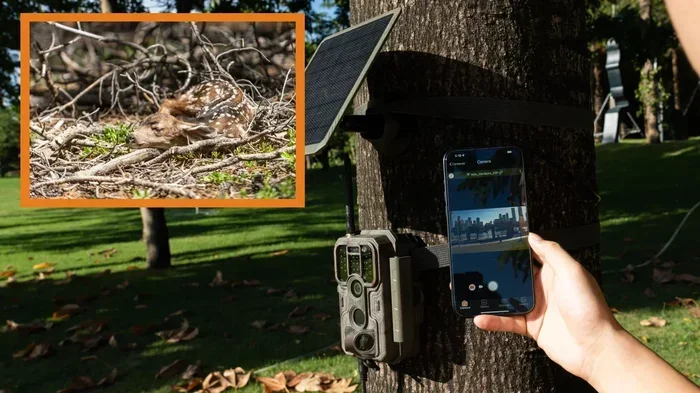
The short answer is yes. You can absolutely watch your trail camera live stream from nearly anywhere in the world. Whether you are sitting on your couch, stuck in an office, or thousands of miles from your hunting lease, modern wireless trail camera systems put real-time wildlife footage right on your phone or computer. This is not science fiction anymore. It is real, accessible, and easier to set up than most people think.
In this guide, we will walk through everything you need to know about live viewing with your scouting camera. We will cover how the technology works, which trail camera brands support it, how to set things up, and what to watch out for. By the end, you will know exactly what you need to start watching your trail camera footage in real time.
Key Takeaways
- Live viewing is possible: Many modern trail cameras now support live streaming through cellular or WiFi connections.
- Cellular cameras offer the most freedom: They let you stream from remote locations without needing nearby WiFi.
- Apps make it easy: Dedicated trail camera apps turn your phone into a live monitor.
- Setup matters: Proper placement, signal strength, and power management determine your streaming success.
- Real-time alerts add value: Most systems send instant notifications when motion detection triggers.
- Costs vary: Expect monthly data plan fees for cellular models, plus potential cloud storage costs.
📑 Table of Contents
- What Is a Trail Camera Live Stream?
- How Does Live Trail Camera Streaming Work?
- Types of Trail Cameras That Support Live Viewing
- Step-by-Step Guide to Setting Up Live Stream Viewing
- Best Apps and Platforms for Trail Camera Live Feeds
- Common Challenges and How to Solve Them
- Expert Tips for Getting the Most Out of Live Trail Camera Viewing
- Key Takeaways
- Conclusion
What Is a Trail Camera Live Stream?
A trail camera live stream means you can view live or near-live video from your camera at any time. Instead of waiting to retrieve an SD card, you get instant access to what your camera sees. This is possible through wireless connections like cellular networks, WiFi, or even Bluetooth in some cases.
The concept is similar to how a home security camera works. You install the camera, connect it to a network, and then view the feed through an app on your phone. The big difference is that trail cameras are built to survive outdoors. They handle rain, snow, extreme heat, and cold. They run on batteries or solar panels. And they are designed to be invisible to both animals and potential thieves.
How Is Live Streaming Different From Normal Trail Camera Use?
Traditional trail camera use works on a schedule. You set the camera, it takes photos or videos when motion detection triggers it, and you collect the data later. Live streaming changes the game entirely. Instead of storing clips locally, the camera sends data to the cloud or directly to your device in real time.
This means you can see animals walking by as they happen. You get real-time alerts on your phone. You can adjust your hunting strategy on the fly. For wildlife researchers, this kind of remote wildlife monitoring opens up entirely new possibilities for observation without disturbing the animals.
How Does Live Trail Camera Streaming Work?
Understanding the basics of how game camera streaming works helps you make better buying decisions. The process relies on a few key components working together.
The Role of Cellular Networks
Most live-capable trail cameras use cellular networks, just like your phone does. The camera has a built-in SIM card or eSIM that connects to a mobile network. When motion detection triggers the camera, it captures the image or video and sends it over the cellular network to a cloud server. That server then pushes the feed to your phone or computer through a companion app.
This is why cellular trail camera plans matter so much. You need a data plan that supports the amount of streaming or image sharing you want to do. Some plans are pay-as-you-go, while others are monthly subscriptions. The data usage depends on how often the camera triggers and the quality of the images or video it sends.
WiFi-Enabled Trail Cameras
Some trail camera WiFi models connect to a local WiFi network instead of cellular. These work well if you are monitoring a property that already has WiFi coverage. The advantage is no monthly data fee. The downside is limited range. If your camera is far from your WiFi router, the connection may be weak or unreliable.
WiFi trail cameras are great for backyard wildlife watching or monitoring a cabin close to home. They are not ideal for remote hunting properties where no WiFi exists. For those situations, a cellular trail camera is the clear winner.
Bluetooth and Proximity Streaming
A few trail camera brands offer Bluetooth-based live viewing. This works only when you are physically close to the camera, usually within 50 to 100 feet. It is not true remote viewing. But it can be handy for quick checks while you are still on-site. Think of it as a bonus feature rather than a primary streaming solution.
Types of Trail Cameras That Support Live Viewing
Not all trail cameras can stream live. You need a model specifically designed for wireless data transmission. Here are the main categories to consider.
Cellular Trail Cameras
Cellular trail cameras are the most popular choice for live streaming. They use a SIM card and a cellular data plan to send images and videos to your phone or email. Some models support live video feeds, while others send still images with near-instant delivery.
Popular trail camera brands in this category include Browning, Bushnell, Spypoint, and Stealth Cam. Each brand offers different features, image quality, and data plan options. When shopping, look for models that explicitly mention live streaming or real-time viewing capabilities.
WiFi Trail Cameras
WiFi trail cameras connect to a local wireless network. They tend to be more affordable than cellular models because there is no monthly service fee. However, they require a WiFi source nearby, which limits where you can place them.
These cameras work best for people who want to monitor a specific area close to home. If you have WiFi at your cabin, a WiFi trail camera can give you live access without recurring monthly costs.
Hybrid Models
A few newer trail camera models offer both cellular and WiFi connectivity. This gives you flexibility. You can use WiFi when you are near the camera and switch to cellular when you are away. Hybrid models are becoming more common as manufacturers respond to demand for versatile wildlife camera live feed options.
Step-by-Step Guide to Setting Up Live Stream Viewing
Setting up live viewing on your trail camera is not as hard as it sounds. Most modern cameras walk you through the process with clear instructions. Here is a general overview of what to expect.
Step 1: Choose the Right Camera and Plan
Start by selecting a trail camera that supports live streaming. Then pick a cellular trail camera plan that fits your needs. Consider how many images you want to receive per day, whether you need video streaming, and what your budget looks like. Most plans range from about 100 images per month to unlimited data packages.
Step 2: Install the App and Create an Account
Download the companion app for your camera brand. Most brands have their own app, like the Spypoint Link app or the Browning Dark app. Create an account, pair your camera using the instructions in the manual, and activate your data plan if required.
Step 3: Place the Camera and Check Signal Strength
Trail camera setup is critical for live streaming. Place the camera in a spot with good cellular signal. If the signal is weak, the camera may struggle to send data. Use your phone to check the signal strength at the exact location where you plan to mount the camera.
Point the camera north or south to avoid sun glare. Make sure the lens is clear and the motion detection sensors are not blocked by branches or leaves.
Step 4: Test the Live Feed
Before walking away, test the connection. Trigger the camera manually and check your phone to see if the image or video arrives quickly. Adjust settings if needed. Some cameras let you choose between sending still images or short video clips. Start with still images to conserve battery and data, then switch to video if your plan allows it.
Step 5: Monitor and Adjust
Once you are live, keep an eye on your battery life trail camera performance. Live streaming uses more power than standard photo mode. Consider adding a solar panel to keep the camera running longer. Check your data usage regularly to avoid unexpected overage charges.
Best Apps and Platforms for Trail Camera Live Feeds
The right app makes all the difference when it comes to live viewing. Most trail camera brands offer their own dedicated apps, but some third-party platforms also support multiple camera types.
Manufacturer Apps
Browning, Bushnell, Spypoint, and Stealth Cam all have their own apps. These apps are designed to work seamlessly with their cameras. They offer live feeds, motion alerts, and image management in one place. The downside is that you are locked into one brand’s ecosystem.
Third-Party Platforms
Some platforms support multiple trail camera brands and offer additional features like cloud storage, sharing with hunting partners, and advanced analytics. These can be a great option if you use cameras from different manufacturers.
What to Look for in a Trail Camera App
When choosing an app, look for these features:
- Real-time push notifications when motion is detected.
- Live video streaming capability, not just still images.
- Cloud storage so you never lose trail camera footage.
- Easy sharing options to send clips to friends or hunting partners.
- Battery and signal monitoring so you know when the camera needs attention.
- User-friendly interface that is easy to navigate on a phone.
Common Challenges and How to Solve Them
Live streaming from a trail camera is not perfect. You will run into some challenges, especially when you are first getting started. Here are the most common issues and how to fix them.
Weak or No Cellular Signal
This is the number one problem with cellular trail cameras. If your camera is in a dead zone, it cannot send data. The fix is to choose your placement carefully. Use your phone as a signal checker before mounting the camera. If the signal is weak, consider moving the camera or using a signal booster.
Short Battery Life
Live streaming drains batteries faster than standard photo mode. A camera that normally lasts six months on batteries might only last a few weeks if it is streaming constantly. The solution is to use lithium batteries, which perform better in cold weather. Even better, add a solar panel to keep the camera powered year-round.
Data Overages
If you do not monitor your cellular trail camera plans, you can quickly run up overage charges. Set daily or monthly limits in the app. Choose lower image quality for faster uploads and less data usage. Some cameras let you set a schedule so the camera only transmits during certain hours.
Slow Upload Speeds
Even with a good signal, large video files can take time to upload. This is especially true in rural areas where cellular speeds are slower. To fix this, send shorter video clips or stick to still images for faster delivery. You can always check full-resolution footage when you return to the site.
Camera Theft or Vandalism
A trail camera that is broadcasting a live signal is also more visible to potential thieves. Use a security box to hide the camera. Choose models with camouflage finishes. And never advertise publicly that you have a live-streaming camera on your property.
Expert Tips for Getting the Most Out of Live Trail Camera Viewing
After working with trail cameras for years, a few tips can save you a lot of frustration. Here is what the pros recommend.
Start with Still Images Before Going Live Video
Live video uses a lot of data and battery. Start by sending still images to get comfortable with the system. Once you understand how the camera performs in your specific location, you can add video streaming if your plan supports it.
Use a Solar Panel for Continuous Power
A battery life trail camera is only as good as its power source. A small solar panel keeps the camera running without you needing to visit and swap batteries. This is especially important for cameras that stream live, which consume power much faster than standard models.
Set Up Multiple Cameras for Full Coverage
One camera gives you one angle. If you really want to monitor a property or hunting area, set up multiple wireless trail camera units. Some apps let you view all your cameras in one dashboard. This gives you a much bigger picture of what is happening on your land.
Check Your App Settings Regularly
App updates can change settings or reset preferences. Make it a habit to check your trail camera app every few weeks. Confirm that notifications are on, your data plan is active, and the camera is connecting properly. A small check can prevent big surprises when you need the camera most.
Combine Live Viewing with Traditional Methods
Live streaming is a powerful tool, but it does not replace the value of physically visiting your camera. Go check on your cameras regularly. Look for signs of tampering, clean the lens, and verify that the camera is angled correctly. The best wildlife observation setup combines technology with hands-on care.
Key Takeaways
- Live viewing is possible: Many modern trail cameras now support live streaming through cellular or WiFi connections.
- Cellular cameras offer the most freedom: They let you stream from remote locations without needing nearby WiFi.
- Apps make it easy: Dedicated trail camera apps turn your phone into a live monitor.
- Setup matters: Proper placement, signal strength, and power management determine your streaming success.
- Real-time alerts add value: Most systems send instant notifications when motion detection triggers.
- Costs vary: Expect monthly data plan fees for cellular models, plus potential cloud storage costs.
Conclusion
Watching your trail camera live stream from anywhere is no longer a dream. It is a practical, affordable reality that changes how you hunt, scout, and observe wildlife. With the right cellular trail camera, a solid data plan, and a good app, you can keep an eye on your property from across the world.
The key is to start simple. Pick a reliable trail camera brand, set up your trail camera setup in a spot with good signal, and use the app to test your live feed. Once you see a deer walking by your camera in real time from your living room, you will wonder how you ever hunted without it.
Remember that live streaming works best when you combine it with good old-fashioned fieldwork. Check your cameras, maintain your batteries, and stay patient. The technology is a tool, not a replacement for the experience of being outdoors. Use it wisely, and it will make your wildlife observation and hunting adventures far more rewarding.
So yes, you can watch your trail camera live. The question now is which trail camera will you choose to make it happen?
Frequently Asked Questions
Can any trail camera stream live video?
No, not all trail cameras support live streaming. You need a model specifically designed for wireless data transmission, typically a cellular trail camera or a WiFi trail camera. Check the product specifications before buying to confirm live viewing is supported.
How much does a cellular trail camera data plan cost?
Costs vary by brand and plan. Most cellular trail camera plans range from about 10 to 30 dollars per month. Some brands offer pay-as-you-go options where you only pay for the data you use. Always check the data limits and image counts included in each plan.
Can I watch my trail camera live from another country?
Yes, as long as your trail camera has cellular coverage and your phone has an internet connection. The camera sends data to a cloud server, and you access it through the app from anywhere with WiFi or cellular service. Just be mindful of international data roaming if you are traveling.
Does live streaming drain the trail camera battery quickly?
Yes, live streaming uses significantly more power than standard photo or video mode. To extend battery life trail camera performance, use lithium batteries, reduce video clip length, and consider adding a solar panel to keep the camera powered.
What is the best trail camera brand for live streaming?
Several trail camera brands excel at live streaming. Spypoint, Browning, and Bushnell are among the most popular for reliable cellular live feeds. Your best choice depends on your budget, the coverage area, and how many images or videos you plan to send per month.
Do I need WiFi to watch my trail camera live?
No, you do not need WiFi at the camera location if you use a cellular trail camera. The camera connects to the cellular network directly. However, you do need an internet connection on your phone or computer to view the live feed from anywhere.