How Do I Charge My Phone With A Tesla While Driving
Charging your phone with a Tesla is easy and convenient thanks to built-in USB ports, wireless charging pads, and 12V outlets. Whether you drive a Model 3, Model S, Model X, or Model Y, you have multiple options to keep your device powered on the road. This guide covers every method, model compatibility, and pro tips to charge safely and fast.
Have you ever been on a long road trip and watched your phone battery drop to single digits? It is a scary feeling, especially when you rely on your phone for navigation, music, and communication. The good news is that charging your phone with a Tesla is incredibly simple. Tesla vehicles come with built-in charging solutions that work seamlessly with your devices.
Whether you are driving a Model 3, Model S, Model X, or Model Y, you have more than one way to keep your phone powered up. From USB ports to wireless charging pads, Tesla has thought about this. In this guide, we will walk you through every method, answer common questions, and share tips that actually work. So let us get started and make sure your phone never dies on the road again.
Key Takeaways
- Multiple Charging Options: Tesla vehicles offer USB ports, wireless charging pads, and 12V outlets to power your phone.
- Model Compatibility Matters: Newer Tesla models like the Model 3 and Model Y have USB-C ports, while older models may need adapters.
- Wireless Charging Is a Game-Changer: Tesla’s built-in wireless charging pad lets you charge without cables.
- Avoid Battery Drain: Charging your phone can slightly increase energy use, so plan accordingly on long trips.
- Use Quality Accessories: Invest in certified cables and adapters to protect your phone and Tesla’s electrical system.
- Fast Charging While Driving: USB-C ports and fast-charging adapters help you juice up quickly during your commute.
📑 Table of Contents
- How Does Tesla Charge Your Phone While Driving?
- Charging Methods Compared: Which Is Best for You?
- Tesla Model by Model: Phone Charging Options
- Tips for Fast and Safe Phone Charging in Your Tesla
- Common Mistakes People Make When Charging Phones in a Tesla
- Expert Insights: How Tesla Engineers Think About Phone Charging
- How the Tesla App Helps Manage Charging
- Quick Tips for Charging Your Phone in a Tesla
- Final Thoughts
How Does Tesla Charge Your Phone While Driving?
Tesla vehicles are designed with multiple charging options for your devices. These systems draw power from the car’s battery and convert it into the right format for your phone. The process is automatic, safe, and very user-friendly.
USB Ports: The Primary Charging Method
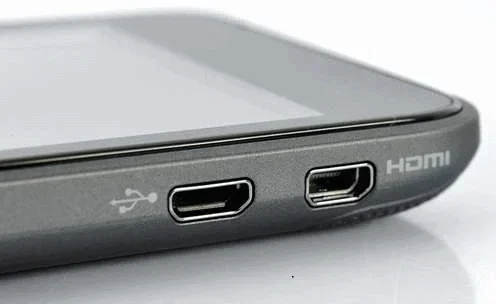
Every Tesla model comes with at least one USB port. These ports deliver power to charge your phone while you drive. Newer models like the Tesla Model 3 and Tesla Model Y feature USB-C ports, which are faster and more versatile. Older models such as the Model S and Model X may have USB-A ports, which still work great but might need an adapter for newer phones.
The USB ports in a Tesla are located in different spots depending on the model. You will typically find them in the center console, near the rear seats, or on the dashboard. This means you can charge your phone from almost anywhere in the cabin.
Wireless Charging Pads: A Modern Convenience
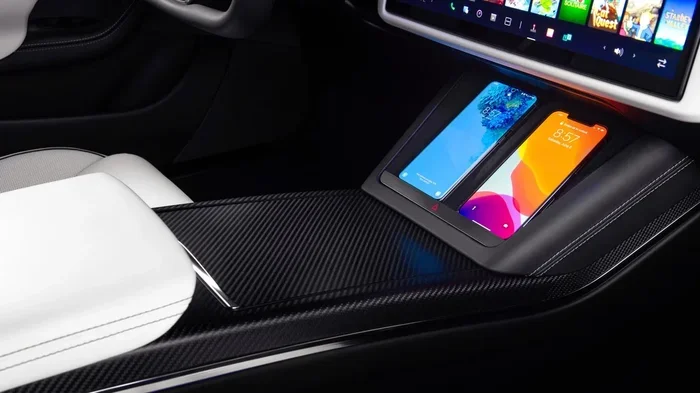
Tesla also offers a wireless charging pad in some models. This pad sits on the center console and charges your phone using magnetic resonance. You simply place your phone on the pad, and it starts charging. No cables, no fuss. This feature is available in newer Tesla vehicles and is a huge convenience for daily commuters.
The wireless charging pad supports Qi-enabled devices, which means most modern smartphones work with it. iPhones from the iPhone 8 onward and many Android phones are compatible. It is one of the coolest features Tesla offers for device charging.
12V Power Outlet: The Backup Option
Some Tesla models also include a 12V power outlet, similar to what you find in traditional cars. This outlet works with standard car chargers and adapters. It is a reliable backup option if the USB ports are occupied or not working. You can plug in a car charger or a USB adapter to power your phone through this outlet.
Charging Methods Compared: Which Is Best for You?
Not all charging methods are the same. Each option has its own advantages and limitations. Let us break them down so you can choose the best one for your needs.
| Charging Method | Speed | Convenience | Compatibility |
|---|---|---|---|
| USB Port (USB-C) | Fast | High | Most modern phones |
| USB Port (USB-A) | Moderate | High | Older phones, needs adapter for USB-C |
| Wireless Charging Pad | Moderate | Very High | Qi-enabled devices |
| 12V Outlet with Car Charger | Fast | Medium | Any phone with a car charger |
| Mobile Connector | Slow | Low | Universal, but not practical for driving |
For most people, the USB-C port is the best option. It is fast, reliable, and works with almost every modern smartphone. The wireless charging pad is the most convenient, especially if you hate dealing with cables. The 12V outlet is great as a backup when you need extra charging options.
Tesla Model by Model: Phone Charging Options
Different Tesla models have different charging setups. Here is a detailed look at what each model offers for phone charging.
Tesla Model 3
The Tesla Model 3 is one of the most popular electric vehicles on the road. It comes with USB-C ports in the front and rear of the center console. This means you can charge your phone quickly and easily, no matter where you sit. The Model 3 also supports wireless charging with an add-on pad that Tesla sells as an Tesla accessory.
Tesla Model S
The Tesla Model S offers USB-A ports in the front and rear. While these are not USB-C, they still charge phones effectively. You may need a USB-A to USB-C cable if your phone uses USB-C. The Model S also has a 12V outlet for additional charging flexibility.
Tesla Model X
The Tesla Model X is similar to the Model S in terms of charging options. It has USB-A ports and a 12V outlet. The rear seats also have USB ports, which is great for families. If you want wireless charging, you can install a Qi-compatible pad on the center console.
Tesla Model Y
The Tesla Model Y is the newest addition to the Tesla family and has the most modern charging setup. It features USB-C ports up front and in the rear. The Model Y also includes a wireless charging pad as a standard feature in some trim levels. This makes it the easiest Tesla to charge your phone in.
Tips for Fast and Safe Phone Charging in Your Tesla
Charging your phone in a Tesla is straightforward, but a few tips can make the experience even better. Here are practical suggestions to help you charge faster and safer.
Use High-Quality Cables
Not all cables are created equal. Cheap, uncertified cables can damage your phone or charge slowly. Always use certified USB-C cables that are rated for fast charging. Look for cables that are MFi-certified for iPhones or USB-IF certified for Android devices. A good cable makes a big difference in charging speed.
Close Unnecessary Apps
When you charge your phone while driving, close apps that drain battery in the background. Navigation apps, streaming services, and social media can use a lot of power. By closing them, your phone will charge faster and maintain a healthier battery level over time.
Keep Your Phone Cool
Phones can overheat when charging, especially in a warm Tesla cabin during summer. Heat slows down charging and can damage your battery over time. If your phone feels hot, take the phone case off or move it to a shaded spot. Some Tesla owners use a phone mount near the air vents to keep their device cool while charging.
Use a USB-C Adapter When Needed
If your Tesla has USB-A ports but your phone uses USB-C, get a USB-C adapter. These small adapters plug into the USB-A port and give you a USB-C charging option. They are inexpensive and very effective. Make sure to buy adapters from reputable brands to avoid power issues.
Monitor Your Tesla Battery Level
Charging your phone uses energy from the Tesla battery. On short trips, this is negligible. But on long road trips with multiple devices charging, it can add up. Keep an eye on your Tesla’s energy consumption using the Tesla app or the in-dash display. This helps you plan charging stops and manage your overall range.
Enable Battery Saver Mode on Your Phone
Most smartphones have a battery saver or low-power mode. Enable this when you are charging on the road. It reduces background activity and slows down battery drain from the phone itself. This means your phone gains more charge than it loses while connected to the Tesla’s power source.
Common Mistakes People Make When Charging Phones in a Tesla
Even though charging a phone in a Tesla is simple, some common mistakes can cause problems. Here are errors to avoid.
Using damaged cables: Frayed or broken cables can cause slow charging, overheating, or even electrical issues. Replace damaged cables immediately. A good cable is a small investment that protects both your phone and your car.
Charging while the car is off: If you turn off your Tesla, the USB ports may not provide power. Always make sure the car is on or in accessory mode when charging your phone while parked. This is a common oversight that frustrates many new Tesla owners.
Overloading the USB port: Do not plug multiple high-power devices into a single USB port. This can cause the port to overheat or stop working. Use a USB hub if you need to charge multiple devices at once, but choose one that is rated for the correct power output.
Ignoring software updates: Tesla regularly releases software updates that improve the charging system. Keep your car updated to ensure the best performance. Sometimes an update fixes charging speed issues or adds new features to the wireless charging pad.
Forgetting the phone case: Thick phone cases can interfere with wireless charging. If you use a wireless charging pad, remove the case or use a thin case that does not block the magnetic connection. This ensures consistent and efficient charging.
Expert Insights: How Tesla Engineers Think About Phone Charging
Tesla engineers design the charging system with simplicity and safety in mind. The USB ports in a Tesla are regulated to deliver a consistent and safe power output. This means your phone will not overcharge or receive too much power. The system is smart enough to adjust the power flow based on what is connected.
According to Tesla’s technical documentation, the USB ports in newer models can deliver up to 15 watts of power. This is enough to charge most phones at a reasonable speed while driving. The wireless charging pad delivers around 10 to 15 watts, which is standard for most Qi-compatible devices.
Tesla also designs the cabin wiring to minimize electrical interference. This means your phone call quality and GPS signal should not be affected by charging. It is a well-thought-out system that just works, which is very much in line with Tesla’s overall design philosophy.
How the Tesla App Helps Manage Charging
The Tesla app is a powerful tool for managing your vehicle and its features. While the app does not directly control phone charging, it helps you monitor your car’s battery level and energy usage. This is useful when you are planning long trips and need to know how much power is available for charging your devices.
You can also use the Tesla app to pre-condition the cabin, which can help keep your phone cool while charging. On hot days, turning on the climate control before you get in the car creates a comfortable environment for both you and your devices. It is a small tip, but it makes a real difference.
Quick Tips for Charging Your Phone in a Tesla
- Use USB-C cables for the fastest charging speeds.
- Place your phone on the wireless charging pad for a cable-free experience.
- Keep a USB-C adapter in your glove box for older USB-A ports.
- Close background apps to charge your phone faster.
- Remove thick phone cases before using the wireless charging pad.
- Check your Tesla software for updates that improve charging performance.
- Use certified cables and adapters to protect your devices.
Final Thoughts
Charging your phone with a Tesla while driving is one of the simplest and most convenient features of owning an electric vehicle. With USB-C ports, wireless charging pads, and 12V outlets, Tesla gives you multiple ways to keep your devices powered up on the road. No matter which Tesla model you drive, you have a reliable charging solution built right in.
The key is to use the right cables, keep your car updated, and follow the simple tips we shared in this guide. By doing so, you will never have to worry about a dead phone battery during your drive. Charge your phone with a Tesla confidently and enjoy every mile of your journey.
Take a few minutes today to check your charging setup. Make sure you have the right cables, a working adapter if needed, and a clean USB port. A little preparation goes a long way in keeping your devices powered and your trips stress-free. Happy driving!
Frequently Asked Questions
Can I charge my iPhone with a Tesla while driving?
Yes, you can charge your iPhone with a Tesla while driving. Tesla vehicles have USB ports that support iPhones. If your Tesla has USB-C ports, use a Lightning-to-USB-C cable for the fastest charging. Older Tesla models with USB-A ports work with a Lightning-to-USB-A cable as well.
Does charging my phone drain the Tesla battery?
Charging your phone uses a small amount of energy from the Tesla battery. The drain is minimal and usually does not affect your driving range in a noticeable way. However, if you charge multiple devices for long periods, it can add up slightly. On very long trips, it is worth keeping in mind.
Can I use a wireless charger with my Tesla?
Yes, Tesla offers a built-in wireless charging pad in some models. You can also add a third-party Qi-compatible wireless charger to the center console. Just make sure the charger is compatible with Tesla’s power output and does not block any controls or sensors.
Why is my phone charging slowly in my Tesla?
Slow charging can happen for several reasons. A damaged cable, a faulty USB port, or a phone case blocking the connection can all cause slow speeds. Try using a different cable, cleaning the USB port, or removing your phone case. Also, make sure your Tesla software is up to date.
Can I charge my phone and use it for navigation at the same time?
Absolutely. You can charge your phone and use it for navigation simultaneously in a Tesla. The USB ports provide enough power to charge the phone while running navigation apps. For the best experience, use a USB-C cable and close any unnecessary background apps to speed up charging.
Do all Tesla models have wireless charging?
Not all Tesla models come with wireless charging as a standard feature. Newer models like the Tesla Model Y and some trim levels of the Model 3 include a wireless charging pad. Older models and base trims may not have this feature. You can add an aftermarket wireless charger that fits the center console.