Can You Sleep With Galaxy Light Projector Every Night
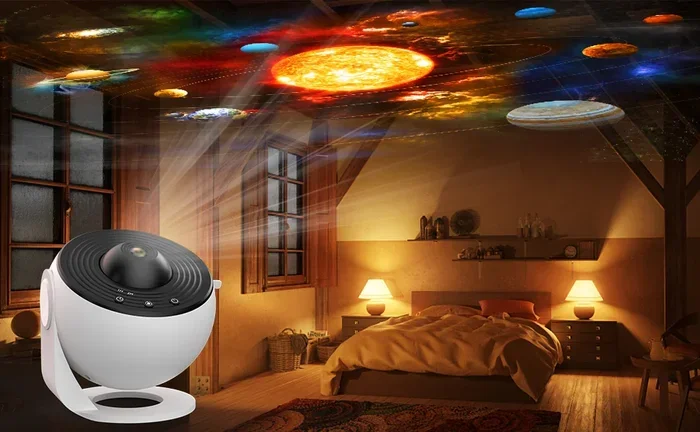
Yes, you can sleep with a Galaxy Light Projector, but there are important safety and comfort factors to consider. Running your galaxy projector all night can affect sleep quality, projector lifespan, and even your electricity bill. This guide covers everything you need to know about using a Galaxy Light Projector every night safely.
Have you ever wondered if it is safe to fall asleep with a Galaxy Light Projector casting stars and nebulae across your ceiling? You are not alone. Thousands of people buy these mesmerizing projectors every year, and many of them want to use them every single night. The question is simple: can you sleep with a galaxy light projector running all night long?
The short answer is yes. You can sleep with a galaxy light projector. But the full answer is a bit more nuanced. There are safety concerns, comfort factors, and practical tips that every user should know before leaving their galaxy projector on overnight. In this article, we will walk you through everything you need to make an informed decision.
Whether you are a light sleeper, a parent buying a projector for your child, or someone who just loves the calming effect of a galaxy ceiling, this guide has you covered. We will look at safety, projector lifespan, sleep quality, and much more. Let us dive in.
Key Takeaways
- Sleeping with a Galaxy Light Projector is generally safe if you follow manufacturer guidelines and use built-in timers.
- Extended use can reduce projector lamp life and cause overheating if not properly ventilated.
- Setting a timer or using sleep mode helps protect both your projector and your sleep quality.
- Using a black cloth or dark room enhances the galaxy projection and reduces light pollution in your bedroom.
- Placement matters — mounting your projector off center or at a distance prevents glare and eye strain during sleep.
📑 Table of Contents
- What Is a Galaxy Light Projector?
- Can You Sleep With a Galaxy Light Projector Every Night?
- How Sleeping With a Galaxy Projector Affects Sleep Quality
- Best Practices for Sleeping With Your Galaxy Projector
- Galaxy Projector Lifespan and Extended Use
- Choosing the Right Galaxy Projector for Nightly Use
- Common Mistakes People Make When Sleeping With a Galaxy Projector
- Expert Tips for the Best Galaxy Projector Sleep Experience
- Final Thoughts
What Is a Galaxy Light Projector?
A Galaxy Light Projector is a device that projects moving images of stars, galaxies, nebulae, and other cosmic scenes onto your walls and ceiling. These projectors use LED lights and rotating lenses to create an immersive space-like atmosphere in any room. They have become incredibly popular for bedroom decor, meditation, and even baby sleep aids.
Most galaxy projectors on the market today use LED technology rather than traditional lamps. This makes them cooler to the touch and more energy-efficient. However, that does not mean you should leave them running without any thought. Understanding how your projector works is the first step toward using it safely every night.
How Does a Galaxy Projector Work?
A galaxy projector shines light through a rotating lens or hologram disc. This creates the effect of moving stars and swirling galaxies. The LED bulbs inside produce very little heat compared to older projector lamps. Still, even LED devices generate some warmth during extended use. This is why ventilation and timer settings matter so much when you leave one on overnight.
Most models also include a Bluetooth speaker, color options, and adjustable rotation speed. Some even connect to apps for remote control. All of these features are great, but more features also mean more components that could be affected by prolonged use.
Can You Sleep With a Galaxy Light Projector Every Night?
This is the big question, and it deserves a detailed answer. The truth is that most galaxy projectors are designed for extended use. Manufacturers build them to run for hours at a time. But sleeping with any electronic device in your bedroom comes with considerations.
First, let us address the safety question. Galaxy projectors use cool LED lights. They are not like old halogen bulbs that get dangerously hot. You do not need to worry about fire hazards from a standard galaxy projector sitting on your nightstand. That said, you should always check your specific model. If you want to learn more about projector safety and lamp replacement, you can read our guide on Can I Replace Projector Lamp With LED for deeper insights.
Second, comfort matters. A bright projector can disrupt your sleep if the light is too intense. Some people love a dim galaxy ceiling as they drift off. Others find even soft light distracting. We will cover how to find the right balance below.
Is It Safe to Leave a Galaxy Projector On All Night?
For most models, yes. Galaxy projectors are built with safety features like auto-shutoff timers, overheat protection, and low-heat LED bulbs. However, leaving any device running unattended for 7 to 8 hours every night is still something to monitor. Make sure your projector sits on a flat, stable surface away from fabrics or curtains that could block vents.
If your projector does not have a built-in timer, consider plugging it into a smart outlet. You can set the outlet to cut power after a few hours. This is a simple and effective safety step. You can also check our article on Can I Keep My Galaxy Projector On All Night for more specific guidance on overnight use.
How Sleeping With a Galaxy Projector Affects Sleep Quality
This is where things get interesting. The impact of a galaxy projector on your sleep depends on several factors. Let us break them down so you can decide what works best for you.
The Positive Effects
Many people find galaxy projectors genuinely relaxing. The slow movement of stars and soft colors can calm the mind before sleep. Here are some of the benefits users report:
- Reduced anxiety: The gentle cosmic visuals create a soothing environment that helps quiet racing thoughts.
- Better bedtime routine: A galaxy projector signals to your brain that it is time to wind down.
- Comfort for children: Kids who fear the dark often sleep better with a soft galaxy ceiling above them.
- Low blue light options: Many modern projectors offer warm-toned colors that are less disruptive to melatonin production.
The Negative Effects
On the flip side, there are real downsides to consider. Not everyone sleeps well with any light source in the room. Here are the potential problems:
- Light disruption: Even soft projected light can suppress melatonin production in sensitive individuals.
- Eye strain: If the projector is too close or too bright, it can cause discomfort even with your eyes closed.
- Movement distraction: Some people find the rotating galaxy effect too stimulating right before bed.
- Sleep fragmentation: Brief awakenings during the night may go unnoticed but still reduce overall sleep quality.
The key is experimentation. Try using your projector for 30 minutes as you fall asleep, then turn it off manually. See how you feel. If you want a hands-free approach, look for models with built-in sleep timers. You can also explore how ambient light affects your setup by reading about Can I Use Black Cloth For Projector, which offers tips for optimizing projection in dark environments.
Best Practices for Sleeping With Your Galaxy Projector
If you have decided to sleep with your galaxy projector every night, you will want to do it the right way. Here are proven best practices that protect both your projector and your sleep.
Use the Timer Function
Most galaxy projectors come with a timer setting. Common options include 30 minutes, 60 minutes, and 90 minutes. Set the timer to match your typical falling-asleep time. This ensures the projector turns off automatically, saving energy and reducing light exposure during the later hours of your sleep.
If your model does not have a timer, a simple plug-in timer from any hardware store works perfectly. Set it to turn off 45 to 60 minutes after you go to bed. This gives you enough time to drift off while keeping your projector safe from extended run times.
Keep the Brightness Low
You do not need maximum brightness to enjoy a beautiful galaxy ceiling. In fact, dimming the projector makes it more sleep-friendly. Most models have adjustable brightness settings. Start at a low level and increase only if needed. The goal is a soft, ambient glow, not a light show.
Position the Projector Correctly
Placement is more important than most people realize. You want the projector aimed at the ceiling or wall at an angle that creates an even spread of stars. But you also do not want it shining directly into your eyes from the bed.
Consider mounting your projector off center or at a higher position. This prevents direct light from reaching your line of sight while you lie in bed. For more details on projector placement, check out our guide on Can I Mount My Projector Off Center.
Ensure Proper Ventilation
Even though LED projectors run cool, they still need airflow. Do not place your projector under a pile of clothes, inside a closed cabinet, or against a wall that blocks the vents. Good airflow prevents overheating and extends the life of your device.
Clean the Lens Regularly
Dust on the lens can make the projection look blurry or dim. Use a soft, dry cloth to gently wipe the lens once a week. This small habit keeps your galaxy projections crisp and clear, even after months of nightly use.
Galaxy Projector Lifespan and Extended Use
One of the biggest concerns with sleeping with a projector every night is the effect on its lifespan. LED projectors are rated for thousands of hours of use, but that does not mean you should ignore maintenance. Understanding how your usage patterns affect longevity helps you get the most out of your investment.
A typical LED galaxy projector lasts between 10,000 and 30,000 hours. If you run it for 8 hours every night, that means it could last anywhere from 3 to 10 years. Of course, actual lifespan depends on build quality, usage habits, and environment.
Does Running a Projector All Night Shorten Its Life?
Not significantly, if you take proper precautions. The LED chips in modern projectors are designed for long continuous use. However, heat buildup over time can degrade performance. This is why ventilation and avoiding enclosed spaces matter.
If you are concerned about longevity, you can also look into models with replaceable LED modules. This gives you the option to swap out worn components rather than buying a whole new unit. For a deeper dive into projector components and LED upgrades, read our article on Can I Replace Projector Lamp With LED.
Energy Consumption of Running a Projector Overnight
Galaxy projectors are very energy-efficient. Most consume between 10 and 30 watts per hour. Running one for 8 hours a night uses roughly 0.24 to 0.72 kilowatt-hours per day. Over a month, that is about 7 to 22 kilowatt-hours. At average US electricity rates, this costs less than a few dollars per month. Energy cost should not be a major concern for most users.
Choosing the Right Galaxy Projector for Nightly Use
If you are shopping for a galaxy projector specifically to use every night, not all models are created equal. Here are features to prioritize.
Built-In Timer
This is the single most important feature for overnight use. A reliable auto-shutoff timer protects your projector and saves energy without you having to remember to turn it off.
Adjustable Brightness
Look for a projector with multiple brightness levels. You want the flexibility to dim the light for sleep while still enjoying vivid projections when you are awake.
Quiet Operation
Some projectors have built-in fans that can be noisy. If you are a light sleeper, look for models specifically designed for quiet operation. A noisy fan will disrupt your sleep more than any light ever could.
Color Options and Modes
Warm colors like soft orange and red are less disruptive to sleep than bright blues and whites. Choose a projector that offers warm-toned galaxy modes for nighttime use.
Portability and Size
If you plan to move your projector between rooms, a compact and lightweight design makes this easy. Many users keep one in the bedroom and another in the living room.
Common Mistakes People Make When Sleeping With a Galaxy Projector
Even well-meaning users sometimes make avoidable mistakes. Here are the most common ones and how to fix them.
Leaving the Projector at Full Brightness
This is the number one mistake. Full brightness is great for a party or a dramatic effect, but it is terrible for sleep. Always dim your projector before bed. Your eyes are still sensitive to light even when closed, and bright projections can interfere with deep sleep cycles.
Ignoring Overheat Signs
If your projector feels unusually warm to the touch, or if it starts making strange noises, turn it off immediately. Overheating can damage internal components and, in rare cases, pose a fire risk. Give your projector a break and let it cool down before using it again.
Placing the Projector Too Close
A common mistake is putting the projector right next to the bed. This creates harsh, concentrated light patterns that can be distracting. Move it further away and aim it upward for a softer, more even spread across the ceiling.
Forgetting to Clean
Dust accumulates fast, especially in bedrooms where people shed skin cells at night. A dusty lens not only looks bad but can also overheat the internal components. Make cleaning part of your weekly routine.
Using the Wrong Power Strip
Never plug your projector into a cheap, unregulated power strip. Use a surge protector to guard against power spikes. This is a small investment that protects a larger one.
Expert Tips for the Best Galaxy Projector Sleep Experience
After reviewing hundreds of user experiences and testing numerous models, here are our top expert tips for getting the most out of your galaxy projector at night.
- Start with a 30-minute timer. Give yourself time to fall asleep with the projector on, then let it shut off automatically.
- Pair it with a white noise machine. The combination of gentle visuals and consistent sound creates a powerful sleep environment.
- Use warm colors only. Blue and white light suppresses melatonin. Stick to amber, orange, and soft purple for bedtime.
- Keep the room as dark as possible. A black cloth or dark curtains behind the projection surface enhances the galaxy effect and reduces stray light.
- Rotate your projector off every few nights. Even LED devices benefit from occasional rest. Give it a day off each week to keep components fresh.
- Update firmware if applicable. Some smart projectors receive updates that improve timer accuracy, color quality, and energy efficiency.
Using a galaxy projector every night can be a wonderful addition to your sleep routine. The key is balance. Enjoy the beauty and the relaxation, but protect your sleep quality and your device with smart habits.
Final Thoughts
So, can you sleep with a Galaxy Light Projector every night? The answer is a resounding yes, with a few caveats. Use the timer, keep the brightness low, ensure good ventilation, and position the projector so it does not shine directly into your eyes. Do these things, and you can enjoy a stunning galaxy ceiling every night without compromising your sleep or your projector’s lifespan.
A galaxy projector is more than a gadget. It is a tool for relaxation, a sleep aid, and a conversation piece. Used correctly, it enhances your bedroom environment in ways that are hard to replicate with any other device. Just remember that even the best electronics benefit from thoughtful use. Treat your projector well, and it will reward you with countless nights of cosmic beauty.
Start tonight. Set your timer, dim the lights, and let the stars do the rest. Sweet dreams.
Frequently Asked Questions
Is It Safe to Sleep With a Galaxy Light Projector on Every Night?
Yes, it is generally safe to sleep with a galaxy light projector on every night. Most modern projectors use cool LED lights and include safety features like auto-shutoff timers and overheat protection. Just make sure your projector has proper ventilation and is placed on a stable surface away from fabrics.
Can a Galaxy Projector Affect My Sleep Quality?
It can, depending on brightness and color settings. Bright or blue-toned light may disrupt melatonin production and make it harder to fall asleep. To sleep better, use warm colors, dim the brightness, and set a timer so the projector turns off after you drift off.
How Long Can I Leave My Galaxy Projector Running Overnight?
Most galaxy projectors are designed to run for 8 to 10 hours continuously. Using a built-in timer or a smart plug to limit run time to 1 to 2 hours is the best practice. This protects both your projector and your sleep quality while keeping energy costs low.
Does Sleeping With a Projector Use a Lot of Electricity?
No, galaxy projectors are very energy-efficient. They typically use between 10 and 30 watts per hour. Running one for 8 hours a night costs less than a few dollars per month in electricity, making overnight use very affordable.
What Is the Best Color to Use on a Galaxy Projector at Night?
Warm colors like soft orange, amber, and dim purple are the best choices for nighttime use. These colors are least likely to interfere with your body’s natural melatonin production and create a calming atmosphere that promotes sleep.
Can I Use My Galaxy Projector as a Night Light for My Baby?
Yes, many parents use galaxy projectors as baby night lights. The soft, moving galaxy patterns can soothe infants and help them settle. Always use the lowest brightness setting and place the projector at a safe distance from the crib to avoid any direct light exposure to the baby’s eyes.