Difference Between A Tv Splitter Coupler For Beginners
A tv splitter coupler splits one signal into multiple outputs, while a coupler joins two cables together. Understanding this difference saves money and prevents signal loss in your home entertainment setup.
Have you ever wanted to watch the same TV show on two screens at once? Or maybe you needed a longer cable to reach your TV from the cable box. Either way, you have probably heard the terms “TV splitter” and “TV coupler.” But what exactly is the difference between a tv splitter coupler?
Many people use these two words interchangeably. They are not the same thing though. Each device has a very different job. One splits a signal into multiple paths. The other just extends a single cable run. This guide breaks it all down in plain English.
A tv splitter coupler is a small but important piece of gear. Whether you are setting up a home theater or just trying to share a cable connection, knowing which one you need makes a huge difference. Let us dive into the details.
Key Takeaways
- A TV splitter divides one input into multiple outputs so you can watch the same content on several screens.
- A coupler simply connects two cables end to end to extend the length of a single signal path.
- Signal loss increases with each split, so choose a powered splitter for long cable runs.
- HDMI splitters and coaxial splitters serve different purposes depending on your TV setup.
- Match your splitter type to your cable type for the best picture and sound quality.
- A coupler does not amplify or divide signals — it just bridges two cables together.
📑 Table of Contents
What Is A TV Splitter?
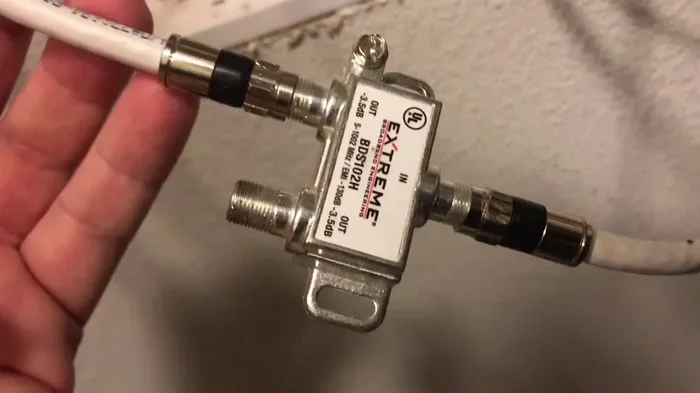
A TV splitter takes one input signal and divides it into two or more outputs. Think of it like a fork in a road. One signal goes in, and it splits into multiple paths. Each path then feeds a separate screen or device.
People use splitters most often when they want to watch the same content in different rooms. For example, you might have a cable box in the living room. A splitter lets you send that same signal to the bedroom TV too.
Splitters come in different types. The most common ones are HDMI splitters and coaxial splitters. Each type works with a specific kind of cable. Choosing the right one depends on your setup.
How Does A TV Splitter Work?
A passive splitter just divides the signal evenly. It does not need power. A powered or active splitter, on the other hand, uses electricity to boost the signal after splitting. This is important when you run cables over long distances.
Every time a signal splits, it loses a little strength. This is called signal loss. A passive splitter with two outputs will cut the signal strength roughly in half. A powered splitter adds amplification to fix this problem.
Here are the main types of TV splitters you will encounter:
- HDMI Splitter: Splits high-definition video and audio signals. Great for modern TVs and streaming devices.
- Coaxial Splitter: Works with older cable TV connections. Often used for antenna or cable TV setups.
- RCA Splitter: Handles older composite or component video connections.
- VGA Splitter: Splits analog video signals for older computer monitors or displays.
When Should You Use A TV Splitter?
You need a splitter when one source must feed multiple displays. Common use cases include:
- Watching cable TV in two rooms from one box
- Sharing a gaming console across multiple TVs
- Setting up a digital signage display in a store
- Running a home theater with multiple screens
Keep in mind that cheap splitters can cause problems. Signal degradation is a real concern. If you notice a fuzzy picture or no sound, your splitter may be the culprit. Spending a little more on a quality HDMI splitter can save you a lot of frustration.
What Is A TV Coupler?
A TV coupler does something much simpler. It joins two cables together to make one longer cable. Think of it as a bridge between two cable ends. It does not split anything. It just extends the path.
Couplers are handy when your cable is too short. Maybe your couch is far from the wall outlet. Or your TV mount is higher than your cable box allows. A coupler solves this problem without buying a whole new cable.
Unlike splitters, couplers do not reduce signal strength in any meaningful way. The signal passes straight through. You are simply connecting two pieces of cable end to end.
Types Of TV Couplers
Couplers come in the same connector types as the cables they join. Here are the most common ones:
- HDMI Coupler: Joins two HDMI cables together. Ideal for extending connections to a wall-mounted TV.
- Coaxial Coupler: Connects two coaxial cables. Common in older cable TV installations.
- USB Coupler: Extends USB connections. Useful for devices that need a longer cable reach.
- RCA Coupler: Joins RCA audio or video cables. Often used in legacy AV setups.
If you have ever wondered whether you can extend an HDMI cable using a coupler, the answer is yes. Just make sure the coupler matches your cable type. An HDMI coupler works with HDMI cables, and a coaxial coupler works with coaxial cables. Mixing them up will not work.
Key Differences Between A Splitter And A Coupler
This is where things get clear. A tv splitter coupler serves two very different purposes. Let us compare them side by side.
| Feature | TV Splitter | TV Coupler |
|---|---|---|
| Main Function | Divides one signal into multiple outputs | Joins two cables into one longer cable |
| Signal Strength | Reduces signal with each split | No meaningful signal loss |
| Power Needed | Sometimes (active splitters) | No |
| Number of Outputs | Two or more | Two inputs, one output |
| Common Use | Sharing content across multiple screens | Extending cable length |
| Price Range | 5 to 50 dollars | 3 to 15 dollars |
The table above shows the core differences clearly. A splitter multiplies outputs. A coupler extends reach. They are not interchangeable.
One common mistake people make is buying a splitter when they actually need a coupler. If your cable is too short, a splitter will not help. You need a coupler to bridge the gap. On the flip side, if you want to watch the same show on two TVs, a coupler will not do the job. You need a splitter.
Does A Coupler Affect Picture Quality?
A good coupler should not affect your picture or sound quality at all. The signal passes through without being divided or weakened. However, a cheap or poorly made coupler can introduce connection issues. Loose fit, bad shielding, or corrosion can all cause problems.
To get the best results, buy couplers from reputable brands. Look for gold-plated connectors. These resist corrosion and provide a snug fit. A solid HDMI coupler from a trusted brand will last for years without any issues.
Does A Splitter Reduce Signal Quality?
Yes, a splitter reduces signal strength. Every split takes a toll. A two-way splitter cuts the signal roughly in half. A four-way splitter divides it four ways. This is why long cable runs with splitters often need a powered or active model.
If you notice pixelation, flickering, or no signal at all, the splitter may be to blame. Upgrading to an active splitter with built-in amplification can solve this problem. It boosts the signal after it splits, giving you a clean picture on every connected screen.
Some people also ask whether they can use a coupler to extend an HDMI cable and then add a splitter at the end. Yes, this works. You can chain a coupler and a splitter together. Just be aware that each device in the chain adds a small amount of potential signal loss. Keep your cable runs as short as possible for the best results.
How To Choose The Right Device For Your Setup
Picking the right device depends on what you are trying to do. Here is a simple way to think about it.
Do you want to watch the same content on more than one TV? Get a splitter. Do you need a longer cable to reach your TV? Get a coupler. It really is that simple.
But there are a few more things to consider. Let us walk through them.
Consider Your Cable Type
First, identify what type of cable you are using. Most modern TVs use HDMI. Older setups might use coaxial, RCA, or VGA cables. Your splitter or coupler must match the cable type.
For example, you cannot use a coaxial splitter with an HDMI cable. The connectors and signal types are different. Always double-check before you buy. A quick look at the ports on your TV and devices will tell you exactly what you need.
Check The Number Of Outputs You Need
How many screens do you want to connect? A two-way splitter works for two TVs. A four-way splitter handles four. But remember, more outputs mean more signal loss. If you need many outputs, consider a powered splitter.
If you are not sure, start with a two-way splitter. You can always add more later. Buying a four-way splitter when you only need two wastes money and reduces signal quality unnecessarily.
Think About Cable Length
Longer cables mean more signal loss. This is true for both splitters and couplers. If you need to run a cable more than 15 feet, consider using a powered splitter or a higher-quality cable.
For couplers, keep the total combined cable length in mind. Two short cables joined by a coupler work fine. But if you are chaining three or four couplers together, you may start to see signal degradation. Keep it simple and direct whenever possible.
If you are dealing with longer cable runs, you might also want to check whether you can get HDMI to USB for certain setups, or learn about connecting a monitor via USB C or HDMI for alternative display options.
Budget Matters
Splitters and couplers are generally affordable. You can find a basic two-way HDMI splitter for under 15 dollars. A simple HDMI coupler costs even less. But quality varies a lot between brands.
Spend a little more on a well-reviewed product. A cheap splitter might seem like a good deal, but it can cause headaches. Picture issues, audio dropouts, and compatibility problems are common with low-quality models. A reliable tv splitter coupler from a trusted brand pays for itself in peace of mind.
Common Mistakes People Make With Splitters And Couplers
Even with the best intentions, people make mistakes. Here are the most common ones and how to avoid them.
- Buying the wrong type: Confusing a splitter with a coupler is the number one mistake. Remember, a splitter divides, a coupler extends.
- Using a passive splitter for long runs: Passive splitters work fine for short distances. For runs over 15 feet, use an active splitter with amplification.
- Daisy-chaining too many devices: Connecting a coupler to a splitter to another coupler creates too much signal loss. Keep your setup as simple as possible.
- Ignoring signal loss: Every split costs you signal strength. If you notice a bad picture, the splitter may be the problem.
- Mixing cable types: A coaxial coupler will not work with an HDMI cable. Always match the connector type to your cables.
Avoiding these mistakes will save you time and money. It will also keep your home theater setup running smoothly.
Expert Tips For Getting The Best Results
Here are some pro tips that make a real difference in your setup.
- Use high-quality cables. Cheap cables cause more problems than cheap splitters or couplers. Invest in well-shielded cables with gold-plated connectors.
- Test your setup before mounting. Set everything up on a table first. Check the picture and sound on every screen. Fix any issues before you drill holes or mount TVs.
- Label your cables. When you have multiple cables running to different rooms, labels save a lot of confusion. Use colored tags or tape to mark each cable.
- Keep firmware updated. Some smart TVs and streaming devices need firmware updates to work properly with splitters. Check for updates if you notice compatibility issues.
- Consider a matrix splitter. A matrix splitter lets you route any input to any output. It is more flexible than a basic splitter, but it costs more.
These tips come from real-world experience. They apply whether you are setting up a simple bedroom TV or a complex whole-home entertainment system.
One final thought: if you are running into issues with your current setup, it might be worth checking whether your cables can handle the bandwidth. For example, older coaxial cables may not support HD signals well. You can learn more about this by reading about getting HD through a coax cable. Also, if you are working with a receiver setup, you might want to check whether you can connect your TV to your receiver using both HDMI and component cables for more flexibility.
Frequently Asked Questions
Can I use a TV splitter to connect two different sources to one screen?
No, a splitter divides one source into multiple outputs. If you want to connect two different sources to one TV, you need an HDMI switch instead. A switch lets you choose between sources, while a splitter sends the same source everywhere.
Do I need a powered splitter for my home theater?
It depends on your cable length. For runs under 15 feet, a passive splitter usually works fine. For longer runs, a powered splitter with amplification will give you a much cleaner picture and sound.
Can I chain multiple couplers together to make a really long cable?
You can, but it is not recommended. Each coupler adds a small amount of potential signal loss. For the best results, buy one long cable instead of chaining couplers together. If you must extend, limit it to one or two couplers maximum.
Will a TV splitter reduce the resolution of my picture?
A good splitter should not reduce resolution. However, a cheap or low-quality splitter can cause signal degradation that affects picture quality. Always buy from a reputable brand and check reviews before purchasing.
What is the difference between a splitter and a switch?
A splitter takes one input and sends it to multiple outputs. A switch takes multiple inputs and lets you choose one to send to a single output. They do opposite things. A splitter shares content, while a switch lets you pick content.
Can I use a coupler with any type of TV cable?
You need to match the coupler type to your cable type. An HDMI coupler works with HDMI cables. A coaxial coupler works with coaxial cables. Using the wrong type will not work and could damage your equipment. Always check the connector type before buying.
Final Thoughts
The difference between a tv splitter coupler is simple once you see it clearly. A splitter divides one signal into many. A coupler joins two cables into one longer path. They serve completely different purposes, and using the right one for the job makes all the difference.
Next time you are shopping for TV accessories, you will know exactly what you need. Whether you are setting up a second TV in the bedroom or extending a cable behind your wall mount, this knowledge will guide you right.
Take a moment to assess your setup. Count your screens. Measure your cable runs. Then pick the right device. A small investment in the right splitter or coupler can transform your viewing experience. You will enjoy clearer pictures, better sound, and fewer headaches. That is a win for everyone.
Remember, the world of TV connectivity does not have to be confusing. With the right information, you can make smart choices. And now you have exactly what you need to do just that.