Do Bluetooth Earphones Work With Any Phone Or Not
Bluetooth earphones can work with most phones, but compatibility depends on Bluetooth versions, profiles, and brand restrictions. Not all earphones pair seamlessly with every device, and some phones have specific requirements that limit your choices. This guide breaks down everything you need to know about Bluetooth earphone compatibility so you can make a confident purchase.
Do Bluetooth Earphones Work With Any Phone Or Not
Let’s get one thing straight. The short answer is yes, Bluetooth earphones work with most phones. But the full answer is a bit more complicated than that. You might run into compatibility issues, connection drops, or audio glitches if you don’t know what to look for.
Bluetooth earphone compatibility isn’t always a given. Different phones use different Bluetooth versions. Different earphones support different codecs. And some brands just don’t play nice with others. That’s exactly why this guide exists.
By the end of this article, you’ll know exactly what to check before buying a pair of wireless earbuds. You’ll understand why some connections fail. And you’ll have the confidence to pair any Bluetooth earphones with your phone without the guesswork.
Key Takeaways
- Most Bluetooth earphones work with most phones: Standard Bluetooth protocols ensure broad compatibility across devices.
- Check the Bluetooth version: Newer versions offer better range, audio quality, and lower power consumption.
- Some brands lock their earbuds: Apple AirPods and certain others work best with their own ecosystem.
- Bluetooth profiles matter: A2DP and HFP are the two key profiles for audio and calls.
- Pairing issues are usually fixable: Simple steps like resetting or updating software solve most problems.
- USB-C and Lightning matter too: Wired connections may be needed if Bluetooth fails or isn’t supported.
📑 Table of Contents
- How Bluetooth Earphones Connect to Phones
- Do Bluetooth Earphones Work With Every Phone Brand?
- Common Bluetooth Earphone Compatibility Issues
- What to Check Before Buying Bluetooth Earphones
- Can You Make Non-Bluetooth Devices Work With Bluetooth Earphones?
- Quick Tips for Better Bluetooth Earphone Performance
- Expert Insights on Bluetooth Earphone Compatibility
- Conclusion
How Bluetooth Earphones Connect to Phones
Bluetooth is a wireless technology that lets devices talk to each other over short distances. When you pair Bluetooth earphones with your phone, they create a tiny personal network. This network sends audio from your phone to your ears without any wires.
The process is simple on the surface. You put your earphones in pairing mode. You go to your phone’s Bluetooth settings. You tap connect. But behind the scenes, a lot is happening. Your phone and earphones negotiate the connection. They agree on a Bluetooth version. They select an audio codec. They establish a stable link.
Bluetooth Versions and Why They Matter
Not all Bluetooth connections are created equal. The version of Bluetooth your phone and earphones support makes a big difference. Here’s a quick look at what each version brings to the table.
- Bluetooth 4.0: Basic connectivity. Works fine for calls and standard audio.
- Bluetooth 4.2: Slightly faster. Better security. Common in older phones.
- Bluetooth 5.0: Double the speed. Four times the range. Better battery life.
- Bluetooth 5.2: Introduced LE Audio. Better multi-device support. Improved codecs.
- Bluetooth 5.3: The latest. Enhanced connection stability. Lower power use.
If your phone runs Bluetooth 5.0 or newer, you’re in great shape. Most modern wireless earbuds also support these versions. But if you have an older phone, you might notice weaker range or lower audio quality. Bluetooth connectivity improves with every new version, so upgrading your phone or earphones can make a real difference.
Bluetooth Profiles: The Secret Sauce
Here’s something most people don’t know. Bluetooth earphones don’t just connect. They use specific profiles to handle different tasks. Two profiles are especially important.
A2DP (Advanced Audio Distribution Profile) handles high-quality audio streaming. This is what lets you listen to music, podcasts, and videos. HFP (Hands-Free Profile) handles calls. It manages your microphone and voice audio.
Both profiles need to be supported by your phone and earphones. If one is missing, you might get audio but no call support. Or you might get calls but no music. This is a common reason why Bluetooth earphones seem incompatible with certain phones.
Do Bluetooth Earphones Work With Every Phone Brand?
The short answer is mostly yes. But there are important exceptions. Different phone brands handle Bluetooth audio differently. Some have extra restrictions. Some offer better integration.
Android Phones and Bluetooth Earphones
Android phones are generally the most flexible. They support a wide range of Bluetooth earphones from every brand. Samsung, Google, OnePlus, Xiaomi — they all play well with most wireless earbuds.
Android phones also support more Bluetooth codecs. Codecs are like languages for audio. The more codecs your phone supports, the better your audio quality can be. Popular codecs include:
- SBC: The default. Works everywhere but isn’t the best.
- AAC: Great for Apple devices and many Android phones.
- aptX: High quality. Common on Android.
- LDAC: Sony’s codec. Offers near-lossless quality.
- LC3: The new standard from Bluetooth 5.2. Great for low latency.
If you want the best audio streaming experience on Android, look for earphones that support aptX or LDAC. Your phone needs to support them too. This is one area where Bluetooth earphone compatibility really varies.
iPhone and Bluetooth Earphones
iPhones work well with most Bluetooth earphones. But Apple has its own ecosystem. AirPods connect seamlessly with iPhones. They switch between devices. They handle calls and Siri with ease. Third-party wireless earbuds also work with iPhones, but you might miss out on some features.
For example, iPhone users might notice that some Android-focused earbuds don’t support AAC as well as they should. And features like automatic ear detection or in-ear sensing might not work perfectly. Still, basic Bluetooth connectivity works fine for calls and music on any iPhone.
If you’re wondering whether other earbuds work well with iPhone, the answer is yes for basic use. But for the full experience, sticking with the Apple ecosystem has its perks.
Samsung and Other Phone Brands
Samsung phones are very Bluetooth-friendly. They support all major codecs and work with virtually any Bluetooth earphones. Other brands like OnePlus, Xiaomi, and Huawei also offer excellent Bluetooth audio support.
Some brands add their own software layers for Bluetooth management. Samsung’s Galaxy Buds work best with Samsung phones, but they still connect to other Android devices. The same goes for Samsung TV Bluetooth headphones — they work well within the Samsung ecosystem but also connect to other devices.
Common Bluetooth Earphone Compatibility Issues
Even when Bluetooth earphones should work with your phone, things sometimes go wrong. Here are the most common issues and why they happen.
Pairing Failures
Sometimes your earphones just won’t connect. This is frustrating but usually fixable. Common causes include:
- The earphones aren’t in pairing mode.
- Your phone’s Bluetooth is turned off.
- The earphones are connected to another device.
- Software needs updating on one or both devices.
- The earphones need a reset.
Most pairing issues clear up after a simple restart. Turn off Bluetooth on your phone. Turn off your earphones. Wait 30 seconds. Turn everything back on. Try pairing again. This fixes the problem about 80% of the time.
Audio Dropouts and Lag
If your audio keeps cutting out or there’s a delay, the issue is usually Bluetooth range or interference. Bluetooth works best within about 30 feet. Walls, furniture, and other electronics can weaken the signal.
Microwaves, Wi-Fi routers, and even USB 3.0 cables can interfere with Bluetooth connectivity. If you notice dropouts, try moving closer to your phone. Or move away from other wireless devices.
One Earbud Connects, the Other Doesn’t
This is a common complaint with wireless earbuds. Often it’s a simple fix. Put both earbuds back in the case. Wait a few seconds. Take them out together. They should pair simultaneously. If one still won’t connect, check your earphone manufacturer’s guide for a reset procedure.
Low Audio Quality
If your music sounds compressed or tinny, your phone might be using the SBC codec instead of a better one. Check your phone’s Bluetooth settings. Some Android phones let you choose your preferred codec. Switching from SBC to aptX or AAC can dramatically improve sound quality.
What to Check Before Buying Bluetooth Earphones
Not all Bluetooth earphones are created equal. Before you spend your money, check these things to make sure you get a pair that works with your phone.
Check Your Phone’s Bluetooth Version
Go to your phone’s settings. Look for the Bluetooth section. You should see the version number. If your phone runs Bluetooth 5.0 or newer, you’re set for most wireless earbuds on the market.
If your phone is older, don’t panic. Most modern earphones are backward compatible. You just might not get the best range or audio quality. Think of it like driving a car on a slower road — it still works, just not as fast.
Check the Bluetooth Codecs
This matters more than most people realize. If you care about sound quality, look for earphones that support codecs beyond SBC. AAC is a safe bet for iPhone users. aptX or aptX HD is great for Android users.
Some premium earphones support LDAC or LHDC. These offer the highest quality wireless audio. But both your phone and earphones need to support the same codec for it to work.
Check for Multipoint Connection
Multipoint is a feature that lets your Bluetooth earphones connect to two devices at once. You can listen to music on your phone and take a call on your laptop without reconnecting. This feature is becoming more common but isn’t universal.
If you switch between devices often, multipoint is a game-changer. Look for it when shopping for wireless earbuds. Brands like Jabra, Sony, and Samsung offer this on many models.
Consider Your Use Case
Think about how you’ll use your earphones. For calls, you need a good microphone and HFP support. For workouts, you want sweat resistance and a secure fit. For travel, battery life and noise cancellation matter most.
Matching your earphones to your needs ensures you get the most out of your Bluetooth earphone investment. Don’t just buy the flashiest pair. Buy the pair that fits your life.
Can You Make Non-Bluetooth Devices Work With Bluetooth Earphones?
What if your phone doesn’t have Bluetooth? Or what if your old stereo doesn’t support wireless audio? You’re not out of luck. There are ways to add Bluetooth connectivity to almost any device.
Bluetooth Adapters and Dongles
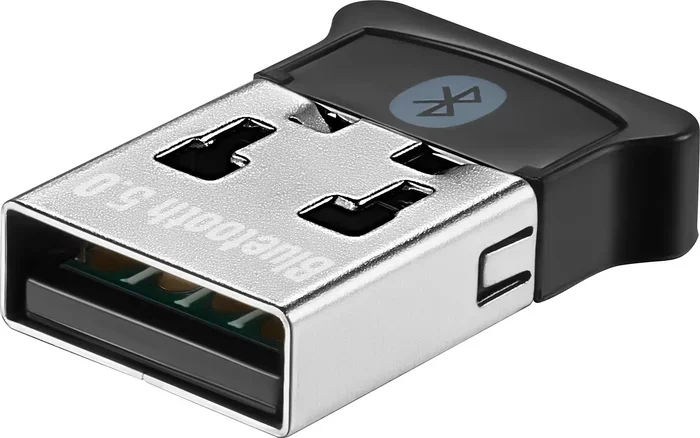
A Bluetooth adapter is a small device that plugs into your phone or audio source. It adds Bluetooth capability to devices that don’t have it built in. These adapters are affordable and work with most Bluetooth earphones.
You can also use a USB Bluetooth dongle with phones that support USB OTG. This is especially useful for older phones or tablets that lack Bluetooth. Just plug in the dongle, pair your earphones, and you’re good to go.
Bluetooth Transmitters
A Bluetooth transmitter takes audio from a non-Bluetooth source and sends it wirelessly to your earphones. This works great with old stereos, TVs, and car radios. Some transmitters even work with airplane entertainment systems.
If you want to use Bluetooth earphones with a device that wasn’t built for wireless audio, a transmitter is your best bet. They’re easy to set up and don’t require any technical skills.
Quick Tips for Better Bluetooth Earphone Performance
Want your wireless earbuds to work their best? Follow these simple tips.
- Keep your earphones charged. Low battery can cause connection issues and poor audio quality.
- Update your phone’s software. Updates often include Bluetooth improvements and bug fixes.
- Keep devices close. Stay within 30 feet for the best connection.
- Avoid interference. Move away from Wi-Fi routers and microwaves if you notice dropouts.
- Clean your earphones. Earwax and dust can block sensors and affect connectivity.
- Forget and re-pair. If something feels off, remove the device from your phone’s Bluetooth list and pair fresh.
- Check for codec support. Make sure both your phone and earphones support the same high-quality codec.
These tips apply to any Bluetooth earphones and any phone. They’re simple but effective. Most connection problems go away with just a few of these steps.
Expert Insights on Bluetooth Earphone Compatibility
Bluetooth technology has come a long way. But compatibility isn’t always perfect. Industry experts point to a few ongoing challenges with Bluetooth earphone connectivity.
Codec fragmentation is a big one. Not all phones support all codecs. Not all earphones support all codecs. This means your audio quality can vary depending on the combination of devices you use. The industry is moving toward universal standards, but we’re not there yet.
Ecosystem lock-in is another issue. Apple, Samsung, and other brands push their own earbuds because they offer features that work best within their ecosystem. This doesn’t mean you can’t use other brands. But you might lose some convenience features.
Finally, Bluetooth range limitations remain a reality. Even with Bluetooth 5.3, walls and obstacles reduce range. For most people, this isn’t a problem. But if you need to move around freely while on calls, consider a Bluetooth transmitter or a phone with a stronger antenna.
Conclusion
So, do Bluetooth earphones work with any phone? The answer is a qualified yes. Most Bluetooth earphones will connect to most phones without issues. Standard Bluetooth protocols ensure broad compatibility across brands and devices.
But for the best experience, you need to pay attention to a few details. Check the Bluetooth version. Look for codec support. Consider your use case. And if your phone doesn’t have Bluetooth, use an adapter or transmitter.
Bluetooth earphone compatibility isn’t perfect. But it’s good enough for almost everyone. With the right pair of wireless earbuds and a little know-how, you can enjoy wireless audio on any phone. The days of tangled cords are over. Just make sure your gear plays nice together, and you’ll be listening wirelessly in no time.
Frequently Asked Questions
Can I use any Bluetooth earphones with my iPhone?
Yes, most Bluetooth earphones work with iPhones. Apple’s AirPods offer the smoothest experience, but third-party earbuds from brands like Sony, Jabra, and Samsung also connect and work well for calls and music streaming.
Why won’t my Bluetooth earphones connect to my phone?
This usually happens because the earphones aren’t in pairing mode, Bluetooth is turned off, or the devices are connected to another source. Try restarting both devices, forgetting the earphones from your phone’s Bluetooth list, and pairing again.
Do Bluetooth earphones work with Android and iPhone equally well?
Mostly yes. Basic functions like calls and music work on both platforms. However, some features like seamless device switching and codec support may work better on one platform than the other. iPhones tend to favor AAC, while Android phones often support aptX.
What Bluetooth version do I need for good audio quality?
Bluetooth 5.0 or newer gives you the best experience. It offers better range, faster data transfer, and support for modern codecs. Even older versions work fine for basic calls and music, but you may notice lower quality or shorter range.
Can I connect Bluetooth earphones to a phone without Bluetooth?
Not directly. But you can use a Bluetooth transmitter or USB Bluetooth dongle to add wireless capability. These small adapters plug into your audio source and let you connect any Bluetooth earphones wirelessly.
Do expensive Bluetooth earphones work better with all phones?
Price doesn’t always equal better compatibility. Most wireless earbuds regardless of price use the same core Bluetooth standards. Expensive models usually offer better sound quality, noise cancellation, and more codec support, but basic connectivity works the same across price ranges.
=== META TITLE ===
Do Bluetooth Earphones Work With Any Phone Or Not?
=== URL SLUG ===
do-bluetooth-earphones-work-with-any-phone
=== SEO TITLE ===
Do Bluetooth Earphones Work With Any Phone Or Not?