Can You Put A Projector On A Shelf Setup Made Easy For You
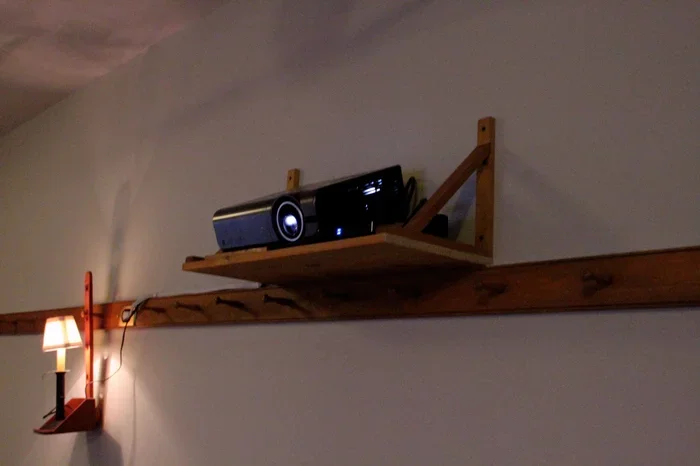
Yes, you can put a projector on a shelf — and it is one of the easiest ways to set up a home theater. A shelf mount keeps your projector stable, hidden, and at the right height for a clear picture. You just need to check the throw distance, ventilation, and weight limits to make it work perfectly.
You love movies. You love big screens. And you have a shelf that seems like the perfect spot for your projector. But wait — can you actually put a projector on a shelf? The short answer is yes. The longer answer is that it depends on a few key factors like shelf depth, throw distance, and airflow.
Setting up a projector on a shelf is one of the most popular ways to build a home theater without drilling holes in your walls. Whether you are in a dorm room, a cozy living room, or a bedroom setup, a shelf mount can work beautifully. This guide walks you through everything you need to know to make it happen the right way.
We will cover shelf height, projector placement tips, cable routing, and common mistakes to avoid. By the end, you will feel confident about your projector shelf setup. Let us get into it.
Key Takeaways
- A shelf is a great spot for your projector if you have enough depth and clearance.
- Throw distance matters most — measure before you mount anything on the shelf.
- Ventilation is critical — projectors need airflow to avoid overheating.
- Cable management keeps things clean and prevents tripping hazards.
- Weight capacity of the shelf must match your projector’s size.
- Black cloth behind the projector can reduce light bounce and improve contrast.
📑 Table of Contents
Why Put A Projector On A Shelf?
A shelf mount is one of the simplest projector setups you can do. It does not require ceiling tiles, special brackets, or a professional installer. Here are some reasons why a shelf works so well for many people.
It Keeps Things Simple
A shelf gives you a flat, stable surface. Your projector sits right on it, pointed at the screen or wall. No drilling, no messy wires running across the ceiling. You can set it up in under an hour if you plan it out.
It Hides The Equipment
Nobody wants to look at a bulky projector sitting in the middle of the room. A shelf lets you tuck the projector behind a decorative item or inside a cabinet. This keeps your living space clean and focused on the movie.
It Is Budget-Friendly
Ceiling mounts can cost anywhere from $50 to $200 or more. A simple shelf costs much less. You might already have one in your room. This makes the projector on a shelf idea one of the most affordable home theater upgrades you can make.
Can Any Projector Go On A Shelf?
Not every projector is the same. Some work great on a shelf, while others need more space or a different angle. Here is what to consider before you place your projector on a shelf.
Throw Distance And Shelf Depth
The throw distance is how far the projector needs to be from the screen to display a clear image. A short throw projector can create a big picture from just a few feet away. A long throw projector needs more distance. If your shelf is too shallow, the image might not reach the whole screen.
Measure your shelf depth first. Then check your projector’s throw ratio. Multiply the throw ratio by the image width to find the minimum distance needed. If your shelf is deep enough, you are good to go.
Projector Size And Weight
A small portable projector is easy to place on any shelf. A large home theater projector might be too heavy or too big. Check the weight of your projector and make sure your shelf can handle it. A sturdy wooden shelf works best for heavier units.
Ventilation Needs
Projectors generate heat. They need airflow to stay cool and last a long time. A closed cabinet shelf might trap heat and cause problems. Make sure your shelf has open sides or enough space around the projector for air to circulate. Never block the vents on the projector with a wall or bookshelf.
How To Set Up A Projector On A Shelf
Setting up a projector on a shelf is straightforward. Follow these steps to get the best picture quality and a clean look.
Step 1: Choose The Right Shelf
Look for a shelf that is deep enough for your projector and strong enough to hold its weight. A floating shelf works great because it saves floor space. Make sure the shelf is at the right height. You do not want the projector pointing up at a steep angle, or the image will look distorted.
Quick Tip: Eye-level placement is ideal. The projector lens should be roughly at the same height as the center of your screen. This keeps the image sharp and avoids keystone distortion.
Step 2: Measure The Throw Distance
Before you finalize the shelf position, measure the throw distance. Use a tape measure from the shelf to the wall or screen. Compare this with the projector’s recommended distance for your desired screen size. Adjust the shelf position until the image fits perfectly.
Step 3: Manage Your Cables
Cables can make or break a shelf setup. Loose wires look messy and can be a safety hazard. Use cable ties or a cable management box to keep things neat. Run HDMI cables along the wall or behind the shelf. If your projector supports wireless connection, this step becomes even easier.
You can also connect your phone or laptop to the projector without a tangled mess of cables. For example, you can easily connect my phone to projector with USB cable for a clean, simple setup.
Step 4: Test The Image
Turn on the projector and check the image quality. Look for sharpness, color accuracy, and brightness. If the image looks blurry, adjust the focus ring. If it looks tilted, move the shelf or use keystone correction. Take your time to get it just right.
Step 5: Add A Screen Or Use A Wall
You can project onto a white wall or use a dedicated projector screen. A screen gives better contrast and color. A white wall works fine for casual movie nights. If you want to reduce light bounce, consider using black cloth for projector behind the lens area to improve picture quality.
Best Shelves For Projector Setup
Not all shelves are created equal. Some work better for projectors than others. Here are a few shelf options to consider.
Floating Wall Shelves
These are the most popular choice for projector mounts. They mount flush against the wall and save floor space. Look for shelves that are at least 12 to 18 inches deep to accommodate most projectors.
Bookshelf Or Cabinet Shelves
If you already have a bookshelf, you can place your projector on one of the shelves. Just make sure the shelf is open on the sides for airflow. A closed cabinet might block ventilation and cause the projector to overheat.
TV Stand Shelves
Many TV stands have a shelf at the back or on top. This can work for smaller projectors. Make sure the stand is sturdy and does not wobble. A wobbly stand can shake the projector and blur the image.
Custom Built Shelves
If you want a perfect fit, build a custom shelf. You can design it with the exact depth, height, and cable routing you need. This is a great option for a dedicated home theater room.
Common Mistakes To Avoid
Even a simple projector shelf setup can go wrong if you skip a few important steps. Here are the most common mistakes people make.
Ignoring Ventilation
This is the number one mistake. Projectors need air to cool down. If you stuff the projector into a tight, enclosed shelf, it will overheat. The lamp life will drop, and the image quality will suffer. Always leave space around the projector for airflow.
Wrong Shelf Height
If the shelf is too low or too high, the image will not line up with the screen. You might end up with a crooked picture or a shadow on part of the screen. Measure carefully before you drill or place the shelf.
Not Checking Throw Distance
A projector that is too close to the screen will show a small, blurry image. One that is too far will cast light beyond the screen. Always check the throw distance before you commit to a shelf position.
Forgetting About Ambient Light
A shelf setup in a bright room can wash out the projector image. Keep the shelf away from direct light sources like windows or bright lamps. If you cannot control the light, consider using a projector screen with a higher gain rating.
Can You Leave A Projector On A Shelf All Night?
Some people like to leave their projector running overnight. But is it safe? Most modern projectors have built-in safety features that shut them off if they overheat. However, leaving it on for extended periods is not ideal.
If you want to keep your projector running all night, make sure the shelf has good ventilation. You can also check if your model supports continuous use mode. For more details on this topic, you can read about whether it is safe to keep your galaxy projector on all night and what precautions to take.
As a general rule, turn the projector off when you are not using it. This extends the lamp life and keeps your projector running smoothly for years.
Projector On Shelf Versus Ceiling Mount
You might wonder whether a shelf setup or a ceiling mount is better. Both have their pros and cons. Here is a quick comparison.
| Feature | Shelf Mount | Ceiling Mount |
|---|---|---|
| Cost | Low | Medium to High |
| Installation | Easy, no drilling needed | Requires drilling |
| Space | Takes up shelf space | Saves floor and shelf space |
| Ventilation | Good if shelf is open | Can be limited |
| Image Quality | Great if placed correctly | Excellent, no obstructions |
| Portability | Easy to move | Fixed in place |
A shelf mount is perfect for renters or anyone who wants a quick, no-hassle setup. A ceiling mount is better for a permanent home theater. Choose based on your needs and budget.
If you are also wondering about using a projector as a TV replacement, check out our guide on can I use a projector instead of a TV for more tips and ideas.
Final Thoughts
Putting a projector on a shelf is a simple, affordable, and effective way to enjoy big-screen entertainment at home. As long as you pick the right shelf, measure the throw distance, and keep the projector well-ventilated, you will have a fantastic setup in no time.
Remember to manage your cables, test the image quality, and avoid common mistakes like blocking the vents. A little planning goes a long way. Your projector shelf setup can look clean and professional without costing a fortune.
Start with these tips, experiment with placement, and enjoy your movies like never before. A great projector setup on a shelf can turn any room into your personal cinema.
Frequently Asked Questions
Can I put any projector on a shelf?
Most projectors can go on a shelf, but you need to check the throw distance, shelf depth, and weight capacity. A short throw projector works best on shallow shelves, while a long throw projector needs more depth. Make sure the shelf is sturdy enough to hold the projector safely.
How high should the shelf be for a projector?
The shelf should be at or near eye level when you are seated. This keeps the projector lens aligned with the center of the screen and reduces keystone distortion. Measure your seating position and the screen height to find the perfect shelf placement.
Does a projector on a shelf need special ventilation?
Yes, projectors generate heat and need airflow to stay cool. Avoid placing the projector in a closed cabinet or tight space. An open shelf with space on all sides works best for ventilation and projector longevity.
Can I use a bookshelf as a projector shelf?
Absolutely. A bookshelf can work well as long as the shelf is deep enough and allows for airflow. Just make sure the projector does not block any vents and that the shelf is strong enough to handle the weight. For more ideas on projector placement, you can also explore how to use a projector instead of a TV in different room setups.
What is the best throw distance for a shelf projector setup?
The throw distance depends on your projector model and the screen size you want. Check your projector’s manual or website for the throw ratio. Multiply that ratio by your desired screen width to find the correct distance from the shelf to the screen.
How do I hide cables on a projector shelf setup?
Use cable ties, cable raceways, or a cable management box to keep wires neat. You can run HDMI cables along the back of the shelf and behind the wall for a clean look. Wireless projectors make cable management even easier and reduce clutter on your shelf.