Do Old Thermostats Have C Wire
Old thermostats often lack a C wire, which is the constant power source needed for many modern smart thermostats. Without a C wire, your thermostat may lose power or fail to connect to Wi-Fi. This guide walks you through how to check for a C wire, what happens if you don’t have one, and simple solutions to keep your system running smoothly.
This is a comprehensive guide about Do Old Thermostats Have C Wire.
Key Takeaways
- Not all old thermostats have a C wire: Many older systems were designed without one since they didn’t need constant power.
- The C wire provides continuous electricity: It keeps your thermostat powered even when the heating or cooling system is off.
- You can check for a C wire yourself: Simply remove your old thermostat and look at the wires in the wall plate.
- Missing C wire doesn’t mean you’re stuck: There are several workarounds, including power stealing adapters and new wiring.
- Smart thermostats need a C wire for best performance: Features like Wi-Fi and touchscreen displays require a steady power supply.
- A professional can add a C wire if needed: An HVAC technician can run a new wire fairly quickly and affordably.
[FEATURED_IMAGE_PLACEHOLDER]
Do Old Thermostats Have C Wire?
If you are thinking about upgrading to a smart thermostat, one of the first things you need to check is whether your old thermostat has a C wire. The C wire, also known as the common wire, is a crucial part of your heating and cooling setup. It provides the constant power that many modern thermostats need to work properly.
Here is the short answer. Many older thermostats do not have a C wire. Back when these systems were installed, they didn’t need one. The thermostat drew its power directly from the heating and cooling system itself each time it kicked on. That worked fine for basic models. But today’s smart thermostats need a steady flow of electricity to keep their screens lit, stay connected to Wi-Fi, and run advanced features.
Don’t worry if this sounds confusing. By the end of this article, you will know exactly how to check for a C wire, what to do if you don’t have one, and which options work best for your home. Let us get into it.
What Is a C Wire and Why Does It Matter?
The C wire is short for the common wire. It acts as a continuous power path between your HVAC system and your thermostat. Think of it like a power cord that keeps your thermostat charged at all times. Without it, your thermostat depends on bursts of power every time your heating or cooling system turns on.
How the C Wire Works
In a typical setup, your HVAC system has a transformer that steps down the voltage to a level safe for your thermostat. The C wire carries that low-voltage power back to the thermostat around the clock. This means your thermostat is always ready to go, even when the system is not actively heating or cooling your home.
Here are the key benefits of having a C wire:
- Constant power supply: Your thermostat never loses power or settings.
- Wi-Fi connectivity: Smart thermostats stay online and responsive.
- Touchscreen functionality: Screens stay bright and responsive.
- Battery longevity: Thermostats with batteries last much longer with a C wire.
- Advanced features: Sensors, scheduling, and remote control all work reliably.
What Happens Without a C Wire?
If your old thermostat does not have a C wire, you might notice some frustrating issues. The screen may go blank every now and then. Wi-Fi connections might drop frequently. Some thermostats will simply not turn on at all. Battery-powered thermostats can help, but you will need to replace or recharge batteries regularly.
Older systems were built for simple mechanical thermostats. Those basic units did not need constant power. They used the tiny amount of electricity from the HVAC system each time the furnace or air conditioner ran. That was enough to switch the system on and off. But modern smart thermostats demand much more.
How to Check if Your Old Thermostat Has a C Wire
Checking for a C wire is easier than you might think. You do not need to be an electrician. With a few simple steps, you can look at the wires yourself and figure out what you are working with.
Step 1: Turn Off Power to Your HVAC System
Before you touch anything, safety comes first. Go to your breaker box and switch off the power to your heating and cooling system. This prevents any electrical accidents while you are working. If you are not comfortable doing this, skip ahead to the next section and call a professional.
Step 2: Remove Your Old Thermostat
Carefully pull your old thermostat off the wall plate. Most models simply pop off or unscrew. Once it is removed, you will see the wires that were connected to it. Do not let the wires fall back into the wall. Use a piece of tape or a pencil to keep them in place.
Step 3: Look for a C Wire
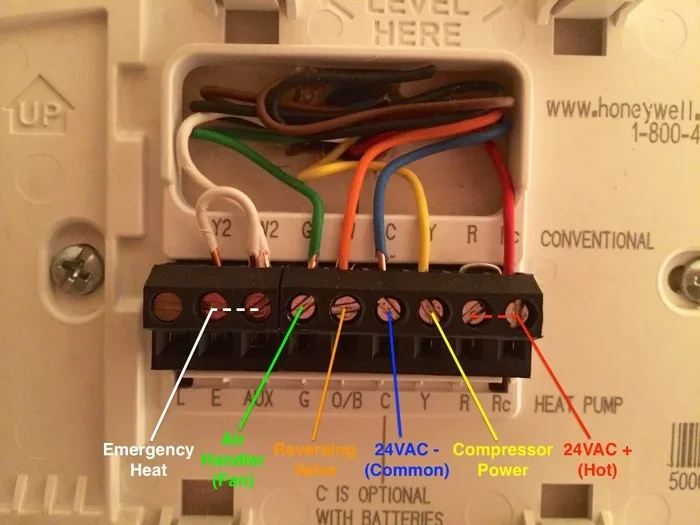
Now look at the wires. Each wire will have a letter label on the end or on the cable itself. The C wire is usually labeled with the letter C. It is often blue, but color is not always reliable. The label matters more than the color.
If you see a wire labeled C, you have a C wire. If you do not see one, your system does not have a C wire. It is that simple.
What If You See a G, W, Y, or R Wire?
These are common thermostat wires, but they are not the C wire. Here is what each one does:
- G: Controls the fan.
- W: Controls the heating system.
- Y: Controls the cooling system.
- R: Carries the 24-volt power from the transformer.
Having these wires is normal. It just means you do not have a dedicated C wire for constant power.
Why Older Thermostats Often Lack a C Wire
Understanding why older systems skip the C wire helps you make better decisions about upgrades. When central heating and cooling became common in homes, the technology was simpler. Thermostats were basic mechanical devices with no screens, no Wi-Fi, and no smart features.
These old thermostats used very little power. They got that power directly from the HVAC system each time it ran. A simple bimetallic strip or mercury switch would activate the system. No constant power was needed. So electricians skipped the C wire to save time and money during installation.
Over the decades, thermostat technology evolved rapidly. Digital thermostats came first, then programmable models, and now smart thermostats. Each generation needed more power than the last. But many homes still have the old wiring setup from decades ago.
If your home was built before the 2000s, there is a good chance the thermostat wiring does not include a C wire. This is especially true for older HVAC systems that were never updated. Newer homes are more likely to have a C wire already in place, since builders started including them as standard.
What to Do If Your Old Thermostat Does Not Have a C Wire
Finding that your old thermostat lacks a C wire can feel disappointing, especially if you want a smart thermostat. But there are several solutions. You do not have to give up on upgrading your system.
Option 1: Use a Power Stealing Thermostat
Some smart thermostats are designed to work without a C wire. These models use a technique called power stealing. They draw small amounts of power from the heating and cooling wires each time the system cycles on. Over time, this accumulated power keeps the thermostat running.
Brands like Nest and Ecobee offer models that can work without a C wire in certain situations. However, there are some downsides to keep in mind:
- Power stealing may not work with all HVAC systems.
- Some systems experience short cycling or flickering.
- Battery backup is still recommended in some cases.
- Performance may be less reliable than with a C wire.
If you go this route, make sure to check compatibility carefully before buying. Most thermostat brands have online tools to help you confirm whether the model will work with your system.
Option 2: Add a C Wire to Your System
The most reliable solution is to add a C wire. This means running a new wire from your HVAC system to your thermostat location. It sounds intimidating, but it is a straightforward job for a qualified technician.
Here is what the process typically looks like:
- The technician assesses your current wiring and wall space.
- They run a new blue wire (the standard C wire color) from the HVAC control board to the thermostat location.
- They connect the wire to both the system and the thermostat base.
- They test the setup to make sure everything works properly.
The cost of adding a C wire varies. It typically ranges from $100 to $300 depending on the complexity of the job and your location. If your walls have easy access, such as unfinished basements or attic spaces, the cost tends to be lower.
Option 3: Use a C Wire Adapter or Extender
Another option is to use a C wire adapter. These small devices plug into your existing thermostat wiring and provide the missing C wire connection. They are sometimes called C wire adapters or C wire extenders.
These adapters work by creating a common power path using the existing wires in your system. They are compact and easy to install. However, they may not be compatible with every HVAC setup. Check the specifications carefully before purchasing one.
Option 4: Choose a Battery-Operated Thermostat
If adding a wire is not an option, consider a thermostat that runs on batteries. Some models use standard batteries that last for months. Others are rechargeable. This removes the need for a C wire entirely.
The trade-off is that you need to keep up with battery replacements or recharging. It is a small inconvenience, but it does add maintenance to your routine.
Smart Thermostats and C Wire Compatibility
Smart thermostats have become hugely popular in recent years. They offer remote control through phone apps, learning capabilities, energy savings, and home automation integration. But most of these features require a steady power source. That is where the C wire comes in.
Here is a quick look at how popular smart thermostat brands handle the C wire situation:
| Brand | C Wire Required? | Workaround Available? | Notes |
|---|---|---|---|
| Nest Learning Thermostat | Recommended | Yes, power stealing | Works without C wire in most cases |
| Ecobee SmartThermostat | Recommended | Yes, included power adapter | Comes with a power extender kit |
| Honeywell Home T9 | Recommended | Yes, battery backup | Can run on batteries for short periods |
| Emerson Sensi | Recommended | Limited | Check compatibility before buying |
As you can see, most major brands offer some kind of workaround. But having a C wire always gives you the best experience. If you are planning a long-term upgrade, adding a C wire is the smartest investment you can make.
Common Mistakes People Make When Dealing with Thermostat Wiring
DIY thermostat projects can go wrong quickly if you are not careful. Here are some common mistakes to avoid:
- Forgetting to turn off the power: Always switch off the breaker before touching any wires. This protects you from electrical shock and prevents damage to your HVAC system.
- Mixing up wire labels: Every wire has a specific job. Connecting the wrong wire to the wrong terminal can cause your system to malfunction. Take a photo before you disconnect anything.
- Assuming wire colors are universal: Blue is usually the C wire, but that is not always the case. Some systems use different colors. Always check the label, not the color.
- Forcing wires into terminals: If a wire does not fit easily, do not force it. You may damage the wire or the terminal. Make sure the connection is secure but gentle.
- Ignoring compatibility warnings: Not every thermostat works with every HVAC system. Check the compatibility list before you buy.
If you are ever unsure about something, it is perfectly fine to call a professional. A quick visit from an HVAC technician can save you hours of frustration and potentially expensive mistakes.
When to Call a Professional for Thermostat Wiring Help
There are times when calling an expert makes the most sense. If you are uncomfortable working with electrical wiring, that is a perfectly valid reason to get help. You should also call a professional if:
- Your HVAC system has unusual wiring that does not match standard setups.
- You need to add a C wire but are not sure how to run new wiring through walls.
- Your thermostat keeps losing power even after you install it.
- You are planning a full HVAC upgrade at the same time.
- You want to make sure your system is safe and up to code.
A qualified technician can also check your overall HVAC system while they are at it. They can spot potential issues before they become expensive problems. That is an added benefit worth considering.
Final Thoughts: Do Old Thermostats Have C Wire?
The answer really depends on the age and type of your system. Many old thermostats do not have a C wire because they simply did not need one. But if you want to upgrade to a smart thermostat and enjoy all the modern features, a C wire makes a big difference.
The good news is that you have options. You can check your wiring yourself in minutes. If you do not have a C wire, you can choose a power-stealing model, add a new wire, use an adapter, or go with a battery-powered thermostat. Each option has its pros and cons, and the best choice depends on your home, your budget, and your comfort level with DIY projects.
Taking the time to understand your thermostat wiring pays off. You will make smarter purchasing decisions, avoid installation headaches, and enjoy a more comfortable home. Whether you stick with your old thermostat or upgrade to a new smart model, knowing about the C wire puts you one step ahead.
So go ahead and check your wiring today. You might be surprised at what you find. And if you are ready to upgrade, you will know exactly what you need to make it work.
Do Old Thermostats Have C Wire?
Many do not, but checking is quick and easy. If you find a C wire, you are all set for a smart thermostat upgrade. If you do not, there are several reliable workarounds available.
Can I Install a Smart Thermostat Without a C Wire?
Yes, in many cases. Several smart thermostat brands offer models that work without a C wire using power stealing or battery backup. Check compatibility with your HVAC system before purchasing.
How Much Does It Cost to Add a C Wire?
Adding a C wire typically costs between $100 and $300. The price depends on the complexity of the installation and whether your walls have easy access for running new wiring.
What Color Is the C Wire?
The C wire is usually blue, but color is not a reliable indicator. Always check the wire label to confirm it is the C wire.
Can I Use the G Wire as a C Wire?
No. The G wire controls the fan and serving as a C wire can cause your fan to run continuously or damage your system. Always use the proper C wire connection.
Do All Smart Thermostats Need a C Wire?
Most smart thermostats work best with a C wire, but some models are designed to function without one. Check the product specifications and compatibility guide before buying.
Is It Safe to Remove and Reinstall My Old Thermostat Myself?
Yes, as long as you turn off the power to your HVAC system first. Take a photo of the wiring before disconnecting anything, and label each wire carefully before reinstalling.
Frequently Asked Questions
What is Do Old Thermostats Have C Wire?
Do Old Thermostats Have C Wire is an important topic with many practical applications.