Can You Use Any Screen For Ultra Short Throw Projector
Not every screen works with an ultra short throw projector. You need the right projector screen material and screen gain to get the best image. Using the wrong setup can cause hot spots, color distortion, and blurry visuals. This guide covers everything you need to pick the perfect ultra short throw projector screen for your space.
Ultra short throw projectors have changed the way we watch movies, play games, and set up home theaters. But here is the question many people ask: can you use any screen for ultra short throw projector? The short answer is no. The longer answer is that you need to understand a few key things about screen materials, gain, and placement to get the best results.
When you invest in a short throw projector setup, you want every part of the equation to work together. The projector is only half the battle. The screen you choose plays a huge role in how your images look. A wrong screen can turn a crisp, vibrant picture into a washed-out mess.
In this guide, we will walk through everything you need to know about projector screen types, what works best with ultra short throw models, and how to avoid common mistakes. Whether you are a movie lover or a gamer, this article will help you make the right choice.
Key Takeaways
- Ultra short throw projectors need specific screens: Not all screens deliver good results with these projectors.
- ALR screens are the top choice: Ambient Light Rejecting screens boost contrast and reduce glare.
- Screen material matters a lot: The texture and gain directly affect image sharpness and brightness.
- Placement and throw distance count: Even the best screen fails if the projector is positioned wrong.
- DIY options exist: You can use black cloth or paint, but they come with trade-offs.
- Size and aspect ratio should match your content: Picking the right dimensions improves your viewing experience.
📑 Table of Contents
- What Is an Ultra Short Throw Projector?
- Why You Cannot Use Just Any Screen
- Best Screen Types for Ultra Short Throw Projectors
- Key Factors to Consider When Choosing a Screen
- Common Mistakes People Make
- Expert Tips for the Best Setup
- Comparison Table: Screen Types for Ultra Short Throw Projectors
- Final Thoughts
What Is an Ultra Short Throw Projector?
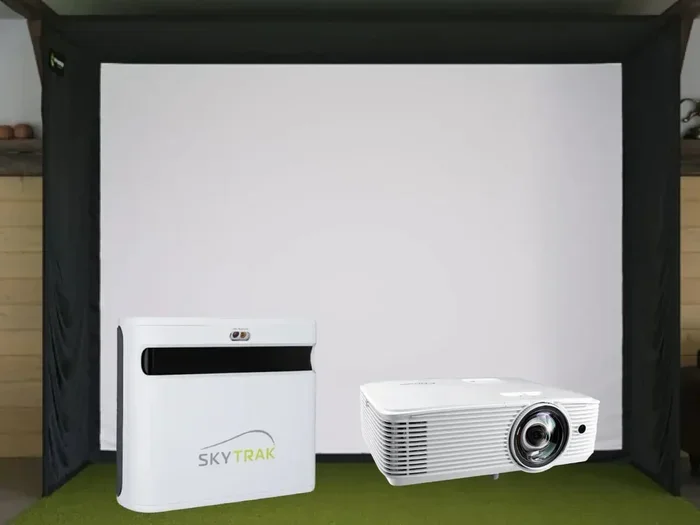
An ultra short throw projector sits very close to the screen. Most models project a large image from just a few inches away. This is different from a standard projector, which needs several feet of distance. The throw ratio is the key number here. It tells you how far the projector needs to be from the screen to produce a given image size.
Because these projectors sit so close, they face unique challenges. Light hits the screen at a steep angle. This can cause glare, hot spots, and color shifts. That is why the screen material you choose matters even more than with a standard projector.
Why Throw Ratio Matters
The throw ratio determines the relationship between the projector and the screen. For ultra short throw models, this ratio is usually between 0.2 and 0.4. This means a projector placed 12 inches from the screen can produce a 100-inch image. The steep angle of projection means light bounces off the screen differently. Standard screens are not always built to handle this.
Why You Cannot Use Just Any Screen
Using a regular screen with an ultra short throw projector often leads to problems. The image may look uneven, too bright in some spots, or dim in others. Here is why the projector screen type you choose makes such a big difference.
The Problem with Standard Screens
Most standard projector screens are designed for front projection at a distance. They scatter light evenly across the surface. But when a projector sits inches away, the light hits the screen at a very steep angle. This creates a hotspot in the center of the image. The edges can look dim and washed out.
Standard screens also do not handle ambient light well. If you are watching in a room with windows or overhead lights, the image can look pale and lifeless. This is the main reason why ambient light rejecting screens have become so popular for ultra short throw setups.
Hot Spots and Color Shifts
Hot spots are bright patches in the center of the projected image. They happen because the projector sends a concentrated beam of light straight at the screen. Without the right screen texture to diffuse that light, the center of the image looks much brighter than the edges. Color shifts happen when the screen material reflects certain wavelengths of light differently. This can make whites look blue or skin tones look orange.
Best Screen Types for Ultra Short Throw Projectors
Not all projector screen types are created equal. Some work beautifully with ultra short throw models, while others fall short. Let us look at the best options available.
ALR Screens (Ambient Light Rejecting)
ALR screens are the gold standard for ultra short throw setups. These screens are designed to reflect light back toward the viewer while blocking ambient light from above and the sides. The result is a sharp, high-contrast image even in bright rooms.
ALR screens use a special surface texture that directs light in a controlled way. They come in both fixed frame and retractable styles. Most ALR screens have a gain rating between 0.8 and 1.3. A higher gain means a brighter image, but it also narrows the viewing angle. You need to sit in the sweet spot for the best results.
White Screens with High Gain
White screens are a simpler option. They work well in dark rooms where ambient light is not a problem. A high-gain white screen can boost brightness significantly. However, they still struggle with hot spots when used with ultra short throw projectors. The steep angle of projection often creates uneven brightness across the image.
Gray Screens
Gray screens absorb some of the light from the projector. This can improve contrast in rooms with some ambient light. They also help reduce the appearance of hot spots. However, gray screens can make the image look darker overall. They work best with very bright ultra short throw models.
DIY Screen Options
Some people wonder if they can use a DIY approach. You can paint a wall with specialized projector paint or hang black cloth for projector use. Black cloth can help reduce glare, but it does not match the performance of a purpose-built ALR screen. If you want to try a DIY option, make sure the surface is perfectly smooth and wrinkle-free. Any texture in the material will show up in the projected image.
Key Factors to Consider When Choosing a Screen
Picking the right screen involves more than just picking a brand. Several factors determine how well a screen works with your ultra short throw projector.
Screen Gain
Screen gain measures how much light the screen reflects back to the viewer. A gain of 1.0 means the screen reflects light exactly as a standard white surface would. Higher gain screens reflect more light back, making the image brighter. But they also narrow the viewing angle. Lower gain screens spread light more evenly, but the image may look dimmer.
For ultra short throw projectors, a gain between 0.9 and 1.2 is usually ideal. This range balances brightness and viewing angle well.
Screen Size and Aspect Ratio
The size of your screen should match your projector’s capabilities and your room size. Most ultra short throw projectors work best with screens between 80 and 120 inches. The aspect ratio should match your content. 16:9 is standard for movies and TV shows. 16:10 works well for productivity and gaming.
Screen Material and Texture
The texture of the screen surface affects how light scatters. Smooth surfaces give a sharper image but are more prone to showing imperfections. Matte surfaces diffuse light more evenly but can reduce sharpness. The best projector screen material for ultra short throw models has a micro-textured surface that controls light direction without sacrificing detail.
Room Lighting and Placement
Where you place the projector and screen matters a lot. Ultra short throw projectors sit on a low table or shelf right in front of the screen. Make sure nothing blocks the light path. Also consider the projector screen placement in relation to windows and light sources. Even with an ALR screen, controlling ambient light improves the image significantly.
Viewing Distance and Angle
Because ultra short throw projectors sit so close, the viewing angle is different from traditional setups. You may need to sit lower or at a different angle than you are used to. Some ALR screens are designed with a specific viewing cone. Make sure the screen you choose matches your seating arrangement.
Common Mistakes People Make
Avoiding mistakes can save you money and frustration. Here are the most common errors people make when setting up an ultra short throw projector.
Using the Wrong Screen Material
The biggest mistake is using a standard white sheet or a basic screen designed for distance projection. These do not handle the steep projection angle of ultra short throw models. The result is an uneven, washed-out image that does not do justice to your projector.
Ignoring the Throw Distance
Every projector has a specific throw distance range. If you place the projector too close or too far, the image will not focus properly. Always check the manufacturer’s recommendations before buying a screen or setting up your projector.
Skipping the Screen Altogether
Some people project directly onto a white wall. While this can work in a pinch, it is not ideal. A wall does not have the same texture or gain as a proper screen. The image will look less vibrant and less sharp. If you want the best quality, invest in a proper ultra short throw projector screen.
Not Considering the Projector’s Brightness
The brightness of your projector and the screen gain should match. A very bright projector on a high-gain screen can be too intense in a dark room. A dim projector on a low-gain screen will look pale in a bright room. Always pair your projector’s brightness level with the right screen.
Expert Tips for the Best Setup
Getting the most out of your ultra short throw projector takes a little planning. Here are some tips from experienced home theater enthusiasts.
First, always test your setup in the actual room where you will be watching. Every room has different lighting conditions. What works in a dark basement may not work in a living room with windows.
Second, make sure the projector is level and centered on the screen. Even a slight tilt can cause keystone distortion. If you need to mount my projector off center, look for models with good keystone correction and lens shift features.
Third, keep the projector lens clean. Dust and fingerprints can reduce image quality significantly. Use a soft microfiber cloth to clean the lens regularly.
Fourth, consider the projector lamp life. If your model uses a traditional lamp, you may want to replace projector lamp with LED for longer-lasting, more consistent brightness. LED light sources also produce less heat and last much longer.
Fifth, if you are connecting devices like a Roku or streaming stick, make sure the connection is stable. For those wondering about using a streaming device with a projector, you can use a Roku with a projector for easy access to all your favorite apps and content.
Finally, do not forget about sound. A great image means nothing if the audio is poor. Consider pairing your projector with a soundbar or external speakers for a complete experience.
Comparison Table: Screen Types for Ultra Short Throw Projectors
| Screen Type | Best For | Gain Range | Ambient Light Handling | Price Range |
|---|---|---|---|---|
| ALR Screen | Bright rooms, premium setups | 0.8 – 1.3 | Excellent | $$$ – $$$$ |
| White High-Gain Screen | Dark rooms, budget setups | 1.0 – 1.5 | Poor | $ – $$ |
| Gray Screen | Mixed lighting, contrast focus | 0.5 – 0.8 | Moderate | $$ – $$$ |
| DIY Black Cloth | Temporary setups, tight budgets | 0.3 – 0.5 | Poor | $ |
| Projector Paint | Permanent wall setups | 0.6 – 1.0 | Moderate | $$ |
As you can see from the table, ALR screens offer the best overall performance for ultra short throw projectors, especially in rooms with any ambient light. They are an investment, but the image quality improvement is significant.
If you are also considering whether to use a projector as your primary display instead of a TV, keep in mind that projectors and TVs serve different purposes. Each has its strengths depending on your room size, lighting, and viewing habits.
Final Thoughts
The answer to can you use any screen for ultra short throw projector is a clear no. The right screen makes all the difference in image quality, brightness, and overall viewing experience. An ALR screen is the best choice for most setups, especially in rooms with any ambient light. Pay attention to screen gain, material, size, and placement to get the most from your projector.
Take the time to research and choose wisely. A great screen paired with a quality ultra short throw projector can transform any room into an immersive entertainment space. Whether you are watching movies, streaming shows, or playing games, the right setup delivers a cinematic experience right in your living room.
Remember, every detail matters. From the screen material to the projector placement, small decisions add up to a big difference in your final picture. Invest in quality equipment, follow the tips in this guide, and enjoy a stunning viewing experience every time.
Frequently Asked Questions
Can I use a white wall instead of a projector screen with an ultra short throw projector?
You can, but the results will not be as good. A white wall lacks the proper texture and gain of a dedicated screen. The image will likely look less vibrant and may have uneven brightness. A proper screen gives you sharper details and better color accuracy.
What is the best screen size for an ultra short throw projector?
Most ultra short throw projectors work best with screens between 80 and 120 inches. The ideal size depends on your room dimensions and seating distance. Measure your space before purchasing a screen to ensure the best fit.
Do I need a special screen for a short throw projector?
Yes, you need a screen designed for short throw or ultra short throw use. Standard screens create hot spots and uneven brightness with these projectors. ALR screens are the most popular choice because they handle the steep projection angle and ambient light well.
Can I use black cloth as a projector screen?
Black cloth can work in a pinch, but it is not ideal for ultra short throw projectors. It absorbs too much light and produces a dim image. If you want to experiment, check out whether black cloth for projector setups can work in your specific room conditions.
How does screen gain affect my projector image?
Screen gain controls how much light is reflected back to the viewer. Higher gain makes the image brighter but narrows the viewing angle. Lower gain spreads light more evenly but makes the image dimmer. For ultra short throw projectors, aim for a gain between 0.9 and 1.2.
Can I use a projector instead of a TV for everyday viewing?
Yes, many people use projectors as their main TV replacement. Ultra short throw projectors are especially convenient because they sit close to the screen and do not need a lot of space. Just make sure you pick the right screen and control the room lighting for the best experience.
=== CONCLUSION ===
Choosing the right screen for your ultra short throw projector is one of the most important decisions you will make. The wrong screen can ruin even the best projector image. The right screen brings out the full potential of your equipment and delivers a cinematic experience at home.
Focus on ALR screens for the best results, pay attention to gain and material, and always consider your room’s lighting conditions. Avoid the common mistakes we covered, and follow the expert tips for a setup that looks amazing every time. With the right screen and a little planning, your ultra short throw projector will deliver pictures that impress everyone who watches them.