Can I Connect A Bluetooth Speaker To My Car And How
Yes, you can connect a Bluetooth speaker to your car and enjoy wireless music on the road. This guide walks you through every method, from simple pairing to using adapters, so you can upgrade your car audio without wires. Whether you have a newer vehicle or an older model, connecting a Bluetooth speaker to your car is simple, affordable, and instantly improves your driving soundtrack.
You are driving down the highway. Your favorite song comes on. But instead of enjoying it through your car speakers, you hear static and crackle. Sound familiar? If you have ever wished your car had better audio, you are not alone. The good news is that connecting a Bluetooth speaker to your car is one of the easiest upgrades you can make. It costs little, takes minutes, and instantly transforms your driving experience.
Whether you drive a new sedan or a classic truck, there is a way to get wireless audio working in your vehicle. In this guide, we will walk you through every method step by step. You will learn how to pair devices, which speakers work best, and how to troubleshoot common problems. By the end, you will know exactly how to connect a Bluetooth speaker to your car and start enjoying music the way it was meant to be heard.
Key Takeaways
- Easy Connectivity: Most Bluetooth speakers can pair with your car in minutes using simple steps.
- Multiple Methods: You can connect via direct pairing, an FM transmitter, or a Bluetooth adapter depending on your car.
- Affordable Upgrade: A Bluetooth speaker is a budget-friendly way to add wireless audio to any vehicle.
- Better Sound Quality: The right speaker can dramatically improve your car’s music experience.
- Works with Older Cars: Even older vehicles without built-in Bluetooth can benefit from a Bluetooth speaker or receiver.
- Common Issues Are Fixable: Pairing problems, weak signals, and audio lag all have simple solutions.
📑 Table of Contents
- What Is a Bluetooth Speaker and Why Use One in Your Car?
- How to Connect a Bluetooth Speaker to Your Car
- Best Bluetooth Speakers for Cars
- Bluetooth Speaker vs. Car Stereo: Which Is Better?
- Common Problems and How to Fix Them
- Tips for Getting the Best Sound from Your Bluetooth Speaker in the Car
- Can I Connect Multiple Bluetooth Speakers to My Car?
- Is It Safe to Use a Bluetooth Speaker While Driving?
- Frequently Asked Questions
- Conclusion
What Is a Bluetooth Speaker and Why Use One in Your Car?
A Bluetooth speaker is a portable device that receives audio signals wirelessly. It uses Bluetooth technology to connect to your phone, tablet, or laptop. Once paired, it plays music, podcasts, and calls without any cables. Most Bluetooth speakers are small, rechargeable, and surprisingly powerful for their size.
Using a Bluetooth speaker in your car has several clear advantages:
- Wireless freedom: No more tangled cords or aux cables lying around your car.
- Portability: You can move the speaker between your car, home, and backyard.
- Easy setup: Most speakers pair in under a minute with no technical skills needed.
- Cost savings: A Bluetooth speaker costs far less than replacing your entire car stereo.
- Better sound: Many portable speakers offer richer, louder audio than factory car speakers.
If your car does not have built-in Bluetooth, a Bluetooth speaker for car use becomes an even more valuable tool. It fills the gap and gives you modern wireless audio without any permanent changes to your vehicle.
How to Connect a Bluetooth Speaker to Your Car
The process depends on your car’s audio setup. Below, we cover the most common methods. Each one is simple and works with most vehicles.
Method 1: Direct Bluetooth Pairing
This method works if your car has a Bluetooth-enabled stereo system. Many cars made after 2015 come with this feature built in. Here is how to do it:
- Turn on your car’s Bluetooth: Go to your car’s settings menu and enable Bluetooth.
- Put your speaker in pairing mode: Press and hold the Bluetooth button on your speaker until the light flashes.
- Search for devices on your car stereo: Your car should detect the speaker in its list of available devices.
- Select the speaker: Tap on the speaker name to pair it.
- Start playing music: Once connected, play music from your phone and it will stream through the speaker.
This is the simplest method. It requires no extra equipment and delivers clean wireless audio directly through your car’s sound system.
Method 2: Using an FM Transmitter with Bluetooth
If your car does not have Bluetooth, an FM transmitter is a great workaround. This small device plugs into your car’s cigarette lighter or USB port. It broadcasts audio over an FM frequency that your car radio can pick up.
Here is how it works:
- Plug the FM transmitter into your car’s power source.
- Set your car radio to an empty FM frequency, like 88.1 or 107.9.
- Pair your phone with the FM transmitter using Bluetooth.
- Play music on your phone. The transmitter sends it to your car radio.
Some FM transmitters also include a built-in speaker or a USB charging port. This makes them even more useful for daily driving. Look for a model that supports Bluetooth 5.0 for the best connection quality and range.
Method 3: Using a Bluetooth Audio Receiver
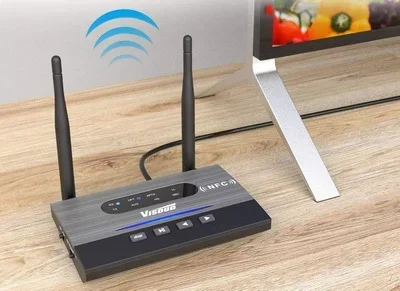
A Bluetooth audio receiver is a small adapter that connects to your car’s aux input. It receives Bluetooth signals from your phone and sends them through your car’s existing speakers. This is one of the most reliable methods for older cars.
Steps to set this up:
- Plug the Bluetooth receiver into your car’s aux port.
- Turn on the receiver and put it in pairing mode.
- On your phone, go to Bluetooth settings and find the receiver.
- Tap to connect.
- Play music and enjoy wireless audio through your car speakers.
This method gives you the cleanest sound because it uses your car’s own speakers. It also avoids the interference that can happen with FM transmitters.
Method 4: Using a Portable Bluetooth Speaker Directly
You can also simply place a portable Bluetooth speaker inside your car and pair it with your phone. This is the most straightforward approach. It works with any car, regardless of age or audio features.
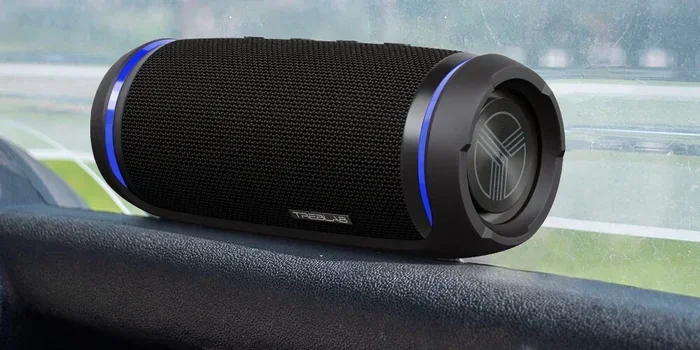
Just place the speaker on your dashboard or passenger seat, pair it with your phone, and start playing. The speaker fills the car with sound. This method is perfect for short trips, road trips, or when you want a quick audio upgrade without any installation.
Best Bluetooth Speakers for Cars
Not all Bluetooth speakers are created equal. Some are designed for portability, while others focus on sound quality and battery life. Here are some top choices for car use:
| Speaker | Battery Life | Sound Quality | Best For |
|---|---|---|---|
| JBL Flip 6 | 12 hours | Excellent | All-around car use |
| Ultimate Ears Boom 3 | 15 hours | Great | Loud, immersive sound |
| Anker Soundcore Motion+ | 12 hours | Very Good | Clear mids and highs |
| Sony SRS-XB23 | 12 hours | Great | Bass-heavy music lovers |
| Tribit StormBox Micro 2 | 8 hours | Good | Budget-friendly option |
When choosing a Bluetooth speaker for your car, consider these factors:
- Battery life: Longer battery means fewer charges during road trips.
- Durability: Look for water-resistant and shockproof models since cars get hot and dusty.
- Sound volume: A louder speaker fills the car better, especially with windows up.
- Size: Compact speakers fit easily on dashboards or in cup holders.
- Battery type: Rechargeable lithium-ion batteries are standard and reliable.
For most drivers, a mid-range speaker like the JBL Flip 6 or Anker Motion+ strikes the perfect balance between price, sound, and battery life. These are popular choices among car enthusiasts who want a reliable wireless car speaker setup.
Bluetooth Speaker vs. Car Stereo: Which Is Better?
Many people wonder whether they should invest in a Bluetooth car stereo or just use a portable speaker. Both options have their merits. Here is a quick comparison:
| Feature | Bluetooth Speaker | Bluetooth Car Stereo |
|---|---|---|
| Cost | $30-$150 | $100-$400 |
| Installation | None needed | Requires professional or DIY install |
| Sound Quality | Good to excellent | Excellent, integrated with car system |
| Portability | Highly portable | Stays in the car |
| Battery | Built-in rechargeable | Uses car electrical system |
| Extra Features | Limited | GPS, touchscreen, phone integration |
If you want a quick, no-hassle upgrade, a Bluetooth speaker is the way to go. If you want a permanent, integrated solution with more features, a Bluetooth car stereo makes more sense. Many drivers actually use both. They keep a portable speaker for casual drives and invest in a car stereo for daily commuting.
One thing to keep in mind: a Bluetooth audio receiver for car is a middle-ground option. It gives you wireless connectivity without replacing your entire stereo. It is a smart choice for drivers who want better sound without a big investment.
Common Problems and How to Fix Them
Even though connecting a Bluetooth speaker to your car is straightforward, you may run into a few hiccups along the way. Here are the most common issues and their solutions.
Speaker Keeps Disconnecting
If your Bluetooth speaker keeps cutting out, the connection may be unstable. Try these fixes:
- Move your phone closer to the speaker.
- Make sure nothing is blocking the signal between devices.
- Turn Bluetooth off and back on both devices.
- Forget the device on both sides and re-pair from scratch.
- Check for interference from other Bluetooth devices in the car.
Poor Sound Quality
Muffled or distorted audio can ruin your listening experience. Common causes include:
- Low battery: A low battery on the speaker reduces sound quality. Charge it fully before driving.
- Distance: Bluetooth works best within 30 feet. Keep your phone close to the speaker.
- Volume too high: Pushing the speaker to maximum volume causes distortion. Keep it at 70-80% for best results.
- Equalizer settings: Adjust the EQ on your phone to boost mids and highs for clearer sound.
Speaker Won’t Pair
If your speaker will not connect, try this troubleshooting checklist:
- Make sure the speaker is in pairing mode. The flashing light usually indicates this.
- Check that Bluetooth is enabled on your phone.
- Restart both the speaker and your phone.
- Delete old pairings from both devices.
- Try pairing with a different device to rule out a hardware issue.
Most pairing problems are temporary and easy to fix. A simple restart of both devices solves the issue more often than not.
Audio Delay or Lag
Some Bluetooth car speakers have a slight delay between the audio and video. This is normal with wireless connections. To reduce lag:
- Use a speaker with Bluetooth 5.0 or higher for faster data transfer.
- Keep your phone in airplane mode to reduce network interference.
- Close background apps on your phone that may be using bandwidth.
Tips for Getting the Best Sound from Your Bluetooth Speaker in the Car
Once you have your wireless car speaker connected, a few simple tips can make a big difference in sound quality.
Placement Matters
Where you put your speaker inside the car affects the sound. Avoid placing it on the seat where fabric absorbs sound. Instead, put it on the dashboard or center console for the best audio projection. If your speaker has a passive radiator, make sure it has space to breathe and is not pressed against a surface.
Use High-Quality Audio Files
Bluetooth streaming compresses audio to some degree. To get the best results, use high-bitrate files or streaming services that offer lossless quality. Apps like Tidal, Apple Music, and Spotify Premium all support higher-quality streaming that sounds noticeably better over Bluetooth.
Keep Your Speaker Charged
A fully charged speaker performs much better than a low-battery one. Make it a habit to charge your speaker after every use. Most portable Bluetooth speakers last 8 to 15 hours on a single charge, which is more than enough for daily commutes and weekend road trips.
Clean Your Speaker Regularly
Dust and crumbs can build up inside your speaker, especially in a car environment. Use a soft, dry cloth to wipe down the exterior and clear any dust from the speaker grille. Clean connections also help maintain consistent audio quality over time.
Experiment with Equalizer Settings
Every car and speaker combination sounds a little different. Spend a few minutes adjusting the equalizer on your phone to find the best sound profile for your car. Boosting the bass slightly can help fill the cabin, while boosting the mids brings out vocals and instruments more clearly.
Can I Connect Multiple Bluetooth Speakers to My Car?
Yes, you can connect more than one Bluetooth speaker to your car in some cases. Some speakers support stereo pairing, where two speakers work together to create a wider soundstage. This is great for larger vehicles like SUVs and trucks where a single speaker may not fill the cabin.
To set up stereo pairing:
- Buy two matching Bluetooth speakers from the same brand.
- Put both speakers in pairing mode.
- Use your phone’s Bluetooth settings to connect to both speakers simultaneously.
- Select the stereo or dual-speaker mode if your phone or app supports it.
Keep in mind that not all speakers support this feature. Check the product manual or manufacturer’s website before buying. Stereo pairing works best with speakers designed for it, such as the JBL Charge series or the Ultimate Ears Hyperboom.
Is It Safe to Use a Bluetooth Speaker While Driving?
Using a Bluetooth speaker for music while driving is generally safe. However, there are a few things to keep in mind. First, make sure the speaker does not block your view of the road or interfere with your mirrors. Second, keep the volume at a reasonable level so you can still hear traffic sounds and emergency vehicles. Third, avoid placing the speaker where it could become a projectile in a sudden stop or accident.
For hands-free calling, a Bluetooth speaker with a built-in microphone works well. Many portable speakers include this feature, allowing you to take calls wirelessly without holding your phone. This is a convenient and legal way to stay connected while driving in most states.
Frequently Asked Questions
Can I connect any Bluetooth speaker to my car?
Yes, most Bluetooth speakers can connect to any car with a Bluetooth-enabled stereo, an aux input, or an FM transmitter. Even older cars without built-in Bluetooth can use a Bluetooth speaker with an FM transmitter or audio receiver. The key is finding the right connection method for your vehicle.
Do I need special equipment to connect a Bluetooth speaker to my car?
It depends on your car. Newer cars with built-in Bluetooth need no extra equipment. Older cars may need an FM transmitter or a Bluetooth audio receiver. A portable Bluetooth speaker can also work on its own without any additional accessories. The right choice depends on your car model and budget.
Will a Bluetooth speaker drain my car battery?
A Bluetooth speaker has its own rechargeable battery and does not draw power from your car battery. However, if you use an FM transmitter or Bluetooth receiver that plugs into your car, it will use a small amount of electrical power. This is negligible and will not drain your battery during normal use.
What is the best Bluetooth speaker for car use?
The best speaker depends on your needs. The JBL Flip 6 offers excellent all-around sound and battery life. The Ultimate Ears Boom 3 is great for louder, more immersive audio. For budget-conscious buyers, the Tribit StormBox Micro 2 delivers solid performance at a low price. Choose based on your sound preferences and how you plan to use it.
Can I use a Bluetooth speaker for GPS navigation audio in my car?
Yes, you can. Once your Bluetooth speaker is paired with your phone, all audio from your phone plays through the speaker. This includes GPS navigation apps like Google Maps and Waze. The turn-by-turn directions will come through the speaker clearly, making it easy to follow your route while driving.
How far can my Bluetooth speaker be from my phone in the car?
Bluetooth typically works up to 30 feet in open space. Inside a car, the signal passes through the cabin easily, so you can place the speaker a few feet from your phone without any issues. Walls, metal surfaces, and other electronics can reduce the range slightly, but this rarely causes problems in a vehicle.
Conclusion
Connecting a Bluetooth speaker to your car is one of the simplest and most rewarding upgrades you can make. Whether you use direct pairing, an FM transmitter, a Bluetooth receiver, or just set a portable speaker on your dashboard, the result is the same: better sound, more freedom, and a more enjoyable drive. The methods covered in this guide work with almost any car and budget. You do not need to be tech-savvy or spend hundreds of dollars. A single Bluetooth speaker can transform your daily commute, road trips, and even short errands into a much better experience.
Now that you know how to connect a Bluetooth speaker to your car, it is time to take action. Pick a method that fits your vehicle, choose a speaker you love, and start enjoying wireless audio on the road. The upgrade is quick, the results are immediate, and you will wonder how you ever drove without it.