Do You Really Need A Special Screen For Laser Projector
A laser projector delivers stunning brightness and color, but your screen choice still matters a lot. You do not always need a special screen, but picking the right one can make your image sharper, brighter, and more vibrant. This guide walks you through everything you need to know about laser projector screens and whether the investment is worth it.
You just bought a laser projector, and you are ready to turn your living room into a home theater. But then a question hits you. Do you really need a special screen for laser projector setups, or can you just hang a white sheet and call it a day?
The short answer is: it depends. A lot depends on your room, your lighting, and what kind of image quality you expect. A laser projector is powerful, but even the best projector cannot perform magic on a bad screen. In this guide, we break down everything you need to know about choosing the right screen for your laser projector.
Whether you are a movie lover, a gamer, or someone who wants to impress friends with movie nights, this article covers it all. We will look at screen types, materials, common mistakes, and expert tips. By the end, you will know exactly what screen works best for your setup.
Key Takeaways
- Not all laser projectors require a special screen: a plain white wall can work in low-light rooms.
- ALR (Ambient Light Rejecting) screens are the best choice for rooms with windows or overhead lighting.
- Screen material and gain directly impact brightness, contrast, and color accuracy.
- Portable and fixed-frame screens each have unique benefits depending on your setup.
- Matching screen size to projector throw distance ensures the best image quality.
- Budget options exist that still deliver great results with a laser projector.
📑 Table of Contents
- What Is a Laser Projector and Why Does Your Screen Matter?
- Types of Projector Screens You Can Use
- Do You Really Need a Special Screen for Laser Projector?
- How to Choose the Right Screen for Your Laser Projector
- Common Mistakes People Make with Laser Projector Screens
- Expert Tips for Getting the Best Image from Your Laser Projector
- Conclusion
What Is a Laser Projector and Why Does Your Screen Matter?
A laser projector uses laser light sources instead of traditional lamps. This gives you brighter images, better color accuracy, and a longer lifespan. Unlike lamp-based projectors, laser models maintain their brightness over time. That is a huge advantage.
But here is the thing many people overlook. The screen you use plays a big role in how the final image looks. A projector sends light onto a surface, and that surface determines how much light bounces back to your eyes. A poor screen can wash out colors and reduce contrast, even on the best laser projector.
Think of it like this. A laser projector is a high-end speaker. The screen is the room acoustics. If the room does not sound right, even the best speaker will not shine. The same idea applies to your projector and screen combo.
How Laser Projectors Differ from Lamp Projectors
Laser projectors are different from traditional lamp projectors in a few key ways. First, they are brighter. Many laser models output 3,000 lumens or more. Second, they have better color gamut. This means they can display a wider range of colors. Third, they last longer. A laser light source can run for 20,000 hours or more before dimming.
Because laser projectors are so bright, they can work on screens that lamp projectors cannot. You can use a screen with lower gain and still get a bright image. This gives you more flexibility in your screen choice. But that does not mean any screen will do.
Types of Projector Screens You Can Use
Not all projector screens are created equal. There are several types, and each one works better in certain situations. Let us walk through the most common options you will find on the market.
White Screens
A plain white screen is the simplest option. It works well in dark rooms where there is very little ambient light. The screen reflects all the light from the projector evenly, giving you a natural-looking image. If you are setting up a home theater in a basement or a room with blackout curtains, a white screen is a solid choice.
White screens are also affordable. You can find a basic white screen for under $50. That makes them a great starting point if you are not sure whether you need something fancier.
Gray Screens
Gray screens absorb some ambient light while still reflecting the projector light. This helps improve contrast in rooms that are not completely dark. If your living room has windows or LED lights, a gray screen can make a noticeable difference.
Gray screens work especially well with laser projectors because the laser light is powerful enough to overcome the slight light absorption of the gray material. You get deeper blacks and better shadow detail compared to a white screen in the same room.
ALR (Ambient Light Rejecting) Screens
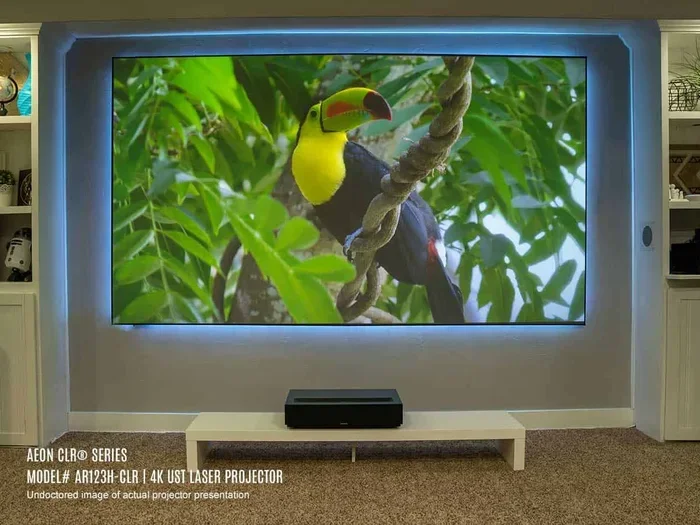
ALR screens are the premium option. They are designed to reject ambient light from above and the sides while reflecting the projector light directly back to the viewer. This means you get a bright, vibrant image even in a room with windows or overhead lights.
If you want the best image quality from your laser projector, an ALR screen is the way to go. These screens are more expensive, but the difference in image quality is significant. They are especially popular for living room setups where you cannot control the lighting.
Portable Screens
Portable screens are lightweight and easy to set up. They usually come with a stand or a carrying case. They are great for outdoor movie nights or for people who move their projector around the house.
Most portable screens work well with laser projectors. However, they may not offer the same image quality as a fixed-frame screen. The material is usually thinner, and the surface may not be as perfectly smooth. That said, for casual viewing, a portable screen gets the job done.
Fixed-Frame Screens
A fixed-frame screen is mounted to the wall or ceiling and stays in place permanently. These screens offer the smoothest surface and the best image quality. They are the top choice for dedicated home theaters.
Fixed-frame screens come in many materials, including white, gray, and ALR. They also come in different sizes. If you want a true cinema experience at home, a fixed-frame screen paired with a laser projector is hard to beat.
Do You Really Need a Special Screen for Laser Projector?
This is the big question. And the honest answer is: not always, but it helps a lot. Let us break this down by room type and lighting situation so you can decide what is right for you.
When a Basic Screen or Wall Works Fine
If you have a dedicated home theater room with blackout curtains and no windows, a basic white screen or even a white wall will work just fine. The laser projector is bright enough to produce a great image on a simple surface. In this scenario, you do not need to spend extra money on a special screen.
Many people use a plain white wall and are happy with the results. If you are on a tight budget, this is a perfectly valid option. Just make sure the wall is smooth and clean. Any bumps or textures will show up on the projected image.
When You Need a Special Screen
If your projector room has any ambient light, a special screen becomes much more important. A standard white screen will look washed out in a bright room. An ALR screen or a gray screen can save the day here.
Similarly, if you want the best possible image quality for movies or gaming, investing in a high-quality screen is worth it. The laser projector can produce an incredible image, but only if the screen can handle that light properly. Think of the screen as the final piece of the puzzle.
For those who already own a projector and are looking to upgrade, you might want to check out whether you need software for your Blue Yeti mic to improve your audio setup alongside your new screen and projector combo.
Quick Comparison: White Wall vs. Special Screen
| Feature | White Wall | Special Screen (ALR/Gray) |
|---|---|---|
| Cost | Free or very low | $50 to $500+ |
| Image Brightness | Good in dark rooms | Excellent in any room |
| Color Accuracy | Average | Very good to excellent |
| Contrast | Lower in ambient light | Much higher |
| Setup Ease | Very easy | Moderate |
| Durability | Depends on wall | Built to last |
As you can see, a special screen offers clear advantages. But it is not strictly necessary for everyone. Your room setup and budget will guide your decision.
How to Choose the Right Screen for Your Laser Projector
Now that you know your options, let us talk about how to pick the right screen. There are a few key factors to consider before you buy.
Consider Your Room Lighting
This is the most important factor. Ask yourself: how much light enters the room during the day? If the answer is a lot, go with an ALR screen or a gray screen. If the room is dark or you can control the lighting, a white screen will work perfectly.
If you are setting up in a room with windows, you might also want to look into whether you can boost your Wi-Fi signal outside to ensure seamless streaming during your outdoor projector sessions.
Match Screen Size to Projector Throw Distance
Every projector has a throw ratio that tells you how far it needs to be from the screen to produce a certain image size. Check your laser projector manual for this information. If you place the projector too close or too far, the image will not look right.
A good rule of thumb is to measure your room first. Decide how large you want the image, then position the projector accordingly. Most laser projectors can handle screen sizes from 80 inches to 150 inches or more.
Look at Screen Gain
Screen gain measures how much light the screen reflects back to the viewer. A higher gain means a brighter image. Most white screens have a gain of 1.0. Gray screens usually range from 0.8 to 1.3. ALR screens can have gains of 1.3 or higher.
Higher gain is not always better. A very high gain screen can create a narrow viewing angle. This means the image looks best when you sit directly in front of it. If you have a wide seating area, a lower gain screen with a wider viewing angle might be a better choice.
Choose the Right Material
Screen material affects image quality in several ways. Some materials are designed for high brightness. Others focus on color accuracy. Here are a few popular options:
- Matte white vinyl: Affordable and versatile. Works well in dark rooms.
- Woven fiberglass: Durable and wrinkle-free. Great for fixed installations.
- ALR fabric: Best for rooms with ambient light. More expensive but worth it.
- Acoustic transparent fabric: Allows sound to pass through. Ideal for speaker setups behind the screen.
If you are looking for a quick and affordable way to test different materials, a black cloth for projector use can be a surprisingly effective option for certain setups, especially in dark environments.
Think About Portability vs. Permanence
Do you want a screen that stays in one place, or do you want something you can roll up and take with you? Portable screens are convenient but usually offer lower image quality. Fixed-frame screens give you the best picture but require a permanent setup.
If you are deciding between a projector and a TV for your main entertainment setup, consider checking out whether you can use a projector instead of a TV for a more immersive experience.
Quick Tips for Choosing Your Screen
- Measure your room before buying any screen.
- Read your projector manual for recommended screen size and throw distance.
- Test the screen in your actual room if possible.
- Do not skimp on material quality if image matters to you.
- Consider how many people will be watching and from what angles.
Common Mistakes People Make with Laser Projector Screens
Even experienced projector users make mistakes when choosing or setting up a screen. Here are the most common ones and how to avoid them.
Using the Wrong Screen Material
This is the number one mistake. People often buy a screen without thinking about the material. A shiny screen might look cool in a store, but it could create hot spots or glare in your room. Always choose a material that matches your room lighting and projector type.
Ignoring the Viewing Angle
Some screens have a very narrow sweet spot. If you sit off to the side, the image gets dim and distorted. This is especially true for high-gain ALR screens. Make sure the screen you choose has a viewing angle that works for your seating arrangement.
Wrong Screen Size
Too big or too small, and the image suffers. A screen that is too large for your projector will look dim and blurry. A screen that is too small will not take full advantage of your projector’s capabilities.
Skipping Screen Flatness
A wrinkled or curved screen ruins the image. Even small wrinkles create shadows and distortion. Fixed-frame screens stay flat by design. Portable screens may need extra care to stay smooth.
Not Considering the Aspect Ratio
Most movies are filmed in a 16:9 or 21:9 aspect ratio. If your screen does not match, you will get black bars on the sides or top and bottom. Make sure your screen aspect ratio matches your content.
Expert Tips for Getting the Best Image from Your Laser Projector
You have your laser projector and your new screen. Now what? Here are some expert tips to get the most out of your setup.
Calibrate Your Projector Settings
Most laser projectors come with preset modes like Standard, Cinema, and Dynamic. The Cinema mode usually gives the most accurate colors. Take a few minutes to tweak the brightness, contrast, and color temperature settings. Small adjustments can make a big difference.
Position the Projector Correctly
Place the projector at the right distance and height. Most laser projectors support keystone correction and lens shift, which helps with positioning. But for the best image quality, try to set the projector so the lens is centered on the screen.
Control the Room Lighting
Even with the best screen, too much light will hurt your image. Use blackout curtains or dimmable lights. If you cannot control the light, an ALR screen is your best friend.
Keep the Screen Clean
Dust and fingerprints on the screen reduce image quality. Use a soft microfiber cloth to clean the screen gently. Never use harsh chemicals or abrasive cleaners.
Upgrade Your Content Source
A laser projector is only as good as the content you feed it. Use a high-quality streaming device or media player. If you are using a Roku with your projector, make sure the connection is stable and the device is compatible.
Pair Your Projector with Good Audio
Projector speakers are usually weak. Consider adding a soundbar, external speakers, or a home theater system. Great image quality paired with poor audio will hold back your experience.
Conclusion
So, do you need a special screen for a laser projector? The answer is not a simple yes or no. If you have a dark room and a tight budget, a white wall or basic white screen will work. But if you want the best image quality and you have ambient light in your room, a special screen like an ALR or gray screen makes a real difference.
A laser projector is a fantastic investment. It gives you bright, colorful, and long-lasting images. Pairing it with the right screen unlocks its full potential. Take the time to evaluate your room, consider your options, and choose a screen that fits your needs and budget.
With the right setup, you can enjoy a true cinema experience right in your living room. And that is something worth investing in.
Frequently Asked Questions
Can I use a white wall instead of a projector screen with a laser projector?
Yes, you can. A smooth, clean white wall works well in dark rooms. The image will not look as sharp or vibrant as it would on a dedicated screen, but it is a perfectly fine option for casual viewing or on a tight budget.
What is the best screen material for a laser projector?
It depends on your room. For dark rooms, a matte white screen works great. For rooms with ambient light, an ALR screen is the best choice. Gray screens are a good middle-ground option that improves contrast without the premium price of ALR.
How big should my projector screen be?
Screen size depends on your throw distance and room size. Most laser projectors work best with screens between 80 and 120 inches. Check your projector manual for the recommended screen size based on how far the projector sits from the wall or screen.
Is an ALR screen worth the extra cost?
Yes, if you have a room with windows or overhead lights. ALR screens reject ambient light and deliver a much brighter, more vibrant image. The cost is higher, but the improvement in image quality is noticeable and worth it for most users.
Can I use a portable screen with a laser projector?
Absolutely. Portable screens work fine with laser projectors for casual viewing and outdoor use. They may not match the image quality of a fixed-frame screen, but they are convenient and easy to set up.
Do I need a special mount for my projector screen?
Not necessarily. Most projector screens come with their own mounting hardware. Fixed-frame screens usually mount to the wall. Portable screens use a stand. Just make sure the mount is secure and the screen is level for the best image.