How Accurate Are Bluetooth Weight Scales in Real Life
Bluetooth weight scales offer convenient wireless tracking, but their accuracy depends on several factors like calibration, surface type, and body composition. Most quality Bluetooth scales deliver readings within 0.2 to 0.5 pounds of a traditional scale, making them reliable for everyday use. Understanding how these devices work and what impacts their precision helps you get the best results from your smart weighing experience.
Have you ever stepped on a Bluetooth weight scale and wondered if the number it shows is really correct? You are not alone. Millions of people use these smart scales every day to track their weight, body fat, and fitness progress. But the big question remains: how accurate are they really?
The truth is that Bluetooth weight scales have come a long way in recent years. Today’s smart scales use advanced technology to give you readings that are surprisingly close to traditional scales. However, they are not perfect. Several factors can throw off their measurements, and knowing what those factors are can make a huge difference in your results.
In this guide, we will break down everything you need to know about Bluetooth scale accuracy. We will look at how these scales work, what affects their readings, and how you can get the most accurate measurements every time. Whether you are tracking your weight loss journey or just curious about your body composition, this article has you covered.
Key Takeaways
- Bluetooth weight scales are generally accurate: Most reputable brands deliver readings within 0.2 to 0.5 pounds of medical-grade scales.
- Several factors affect accuracy: Surface type, foot placement, hydration levels, and calibration all play a role.
- They measure more than just weight: Many Bluetooth scales also estimate body fat, muscle mass, bone density, and water percentage.
- App connectivity matters: Your Bluetooth scale needs a stable connection to sync data properly with fitness apps.
- Calibration is essential: Regular calibration keeps your Bluetooth scale reading accurately over time.
- They are worth buying for fitness tracking: Bluetooth scales make it easy to monitor progress and stay motivated on your health journey.
📑 Table of Contents
What Are Bluetooth Weight Scales?
A Bluetooth weight scale is a digital scale that connects wirelessly to your phone, tablet, or computer. Instead of just showing a number on a screen, these scales send your data to an app where you can track trends over time. Many of them measure more than just weight. They estimate body fat percentage, muscle mass, bone density, and even water weight.
The technology inside these scales is called Bioelectrical Impedance Analysis or BIA for short. Here is how it works in simple terms. When you step on the scale, it sends a tiny, harmless electrical current through your body. Different tissues in your body conduct electricity at different speeds. The scale uses this data to estimate your body composition. All of this happens in seconds, and the results appear on your phone through a Bluetooth connection.
How Do Bluetooth Weight Scales Connect to Devices?
Most Bluetooth scales use Bluetooth 4.0 or higher to connect to your devices. Once paired, the scale automatically sends your weight and body composition data to the companion app. You do not need to do anything except step on the scale and wait a few seconds. The app then stores your data and creates charts so you can see your progress over days, weeks, and months.
If you use a PC or laptop to track your fitness data, you might need to set up Bluetooth connectivity first. Some users ask, “Can I download Bluetooth on my PC?” The answer is yes, most modern computers support Bluetooth built in. If yours does not, you can add a Bluetooth adapter. Just make sure your Bluetooth driver is up to date for smooth connections. Without a stable connection, your scale might not sync data properly, which can lead to missing readings or inaccurate records.
How Do Bluetooth Weight Scales Measure Accuracy?
Accuracy in a Bluetooth weight scale means how close the reading is to your actual weight. Most quality smart scales are tested against certified medical scales before they go to market. The best Bluetooth scales on the market today claim to be accurate within 0.2 to 0.5 pounds for weight measurement. That is pretty impressive for a device that costs under $100.
But here is where it gets tricky. Weight measurement is only one part of the equation. The body composition features like body fat percentage and muscle mass are estimates. They are not as precise as the weight reading. BIA technology has limits, and those limits affect how accurate the body composition numbers really are.
Weight Accuracy vs Body Composition Accuracy
It is important to understand the difference between weight accuracy and body composition accuracy. Your Bluetooth weight scale will likely give you a very close weight reading every time. But the body fat percentage it shows might be off by 2 to 5 percent. That is a big range. So while the weight number is reliable, the other measurements should be treated as estimates rather than exact numbers.
Several studies have looked at how well smart scales measure body fat. The results show that BIA scales tend to underestimate or overestimate body fat depending on a person’s body type. People with higher body fat percentages often get lower readings than they should. Lean individuals sometimes get higher readings. This does not mean the scale is broken. It just means the technology has limitations.
Factors That Affect Bluetooth Scale Accuracy
Many things can change the accuracy of your Bluetooth weight scale readings. Some of these factors are easy to control, and others are not. Let us look at the biggest ones.
Surface Type and Placement
Where you place your scale matters a lot. A Bluetooth scale works best on a hard, flat surface like tile or hardwood flooring. If you put it on carpet, the scale might sink in slightly, which can throw off the reading. The same goes for uneven surfaces. Always place your scale on a level, firm floor for the best results.
Here are some quick tips for proper placement:
- Place the scale on a hard, flat surface
- Avoid carpets and rugs
- Keep the scale away from walls and furniture
- Make sure the floor is level and stable
- Do not move the scale around between weigh-ins
Foot Placement and Body Position
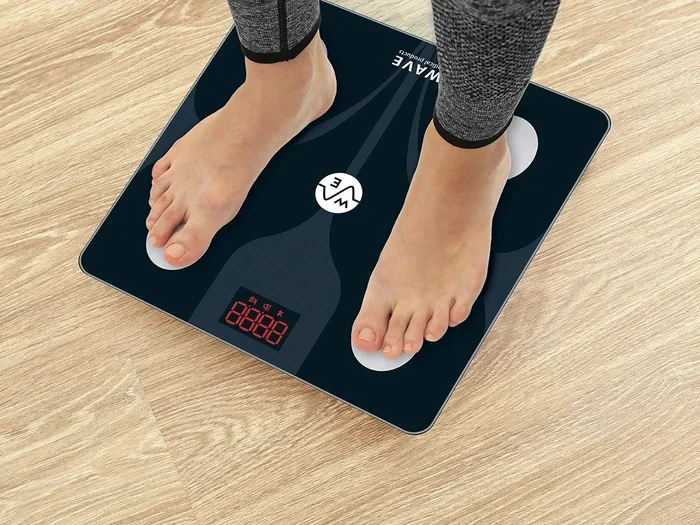
How you stand on the scale also affects accuracy. Make sure your feet are clean and dry. Dirty or sweaty feet can interfere with the electrical current that the scale uses for body composition analysis. Stand straight with your weight distributed evenly on both feet. Do not lean on the wall or hold onto anything while weighing yourself.
Hydration Levels
Your body water content changes the electrical impedance that the scale measures. If you are dehydrated, your body fat reading might be higher than normal. If you are very hydrated, it might be lower. This is why many experts recommend weighing yourself at the same time each day, preferably in the morning after using the bathroom and before eating or drinking.
Calibration and Maintenance
Like any measuring device, a Bluetooth weight scale needs regular calibration to stay accurate. Over time, the sensors inside the scale can drift, which means the readings might slowly become less precise. Most quality scales have an auto-calibration feature that kicks in every time you turn them on. But if your scale has been dropped or damaged, you might need to recalibrate it manually.
Some users wonder if they can fix Bluetooth issues by removing and reinstalling the software. For example, you might ask, “Can I uninstall Bluetooth?” on your device. While you can turn off Bluetooth settings, completely uninstalling Bluetooth drivers on your computer can cause connectivity problems with your scale. It is better to troubleshoot connection issues by updating drivers or restarting your device rather than removing Bluetooth entirely.
User Profile Settings
Most Bluetooth scale apps let you create a user profile with your age, height, gender, and activity level. The scale uses this information to calculate body composition. If your profile is incorrect, the readings will be off too. Always make sure your profile details are accurate and up to date in the app.
Bluetooth Weight Scales vs Traditional Scales
So how do Bluetooth weight scales compare to old-fashioned analog or digital scales? Let us break it down.
Weight Measurement Comparison
For measuring weight alone, a good Bluetooth scale is just as accurate as a traditional digital scale. Both types use load cells to measure your weight, and both can be calibrated for precision. The main difference is that a Bluetooth scale sends your data to an app automatically, while a traditional scale just shows the number on a screen.
Body Composition Features
This is where Bluetooth scales pull ahead. A traditional scale only tells you your weight. A Bluetooth scale can estimate your body fat, muscle mass, bone density, and more. However, as we mentioned earlier, these extra measurements are estimates and not as precise as the weight reading. If you need highly accurate body composition data, you would need to visit a clinic that uses DEXA scans or hydrostatic weighing.
Practical Comparison Table
| Feature | Bluetooth Weight Scale | Traditional Scale |
|---|---|---|
| Weight Accuracy | Within 0.2-0.5 lbs | Within 0.1-0.5 lbs |
| Body Composition | Yes (estimated) | No |
| Data Tracking | Automatic via app | Manual or none |
| Connectivity | Bluetooth to phone/PC | None |
| Price Range | $30-$150 | $10-$50 |
| Setup Required | App pairing required | None |
As you can see, Bluetooth scales offer much more functionality than traditional scales. The trade-off is that they need a stable Bluetooth connection and a compatible app to work properly. If your phone or computer does not support Bluetooth well, you might run into syncing issues. This is why some people prefer to use a simple digital scale for weight tracking and rely on other methods for body composition.
How to Get the Most Accurate Readings From Your Bluetooth Scale
Getting the best accuracy from your Bluetooth weight scale is easier than you might think. Follow these simple steps and you will see more consistent and reliable readings.
1. Weigh Yourself at the Same Time Every Day
Your weight fluctuates throughout the day. It can go up or down by several pounds depending on when you eat, drink, and exercise. The best time to weigh yourself is in the morning, right after waking up and using the bathroom. At that point, your body is in its most stable state.
2. Use the Same Scale Every Time
Different scales can give slightly different readings. If you switch between scales, your data will be inconsistent. Pick one scale and stick with it. This way, you are comparing apples to apples when you look at your progress over time.
3. Keep the Scale on a Hard Floor
We touched on this earlier, but it is worth repeating. Hard, flat surfaces give the most accurate readings. Carpet and soft surfaces absorb some of your weight and can throw off the measurement. If you only have carpet in your home, consider placing a flat board under the scale.
4. Update Your App and Firmware
Scale manufacturers regularly release firmware updates that improve accuracy and fix bugs. Make sure your scale’s firmware and companion app are always up to date. Also, keep your phone’s Bluetooth drivers current. If you are on Windows 10, you can check if you need a new driver by searching for “Can I download a Bluetooth driver for Windows 10?” and following the official instructions.
5. Create Accurate User Profiles
Take the time to set up your profile correctly in the app. Enter your correct age, height, gender, and activity level. The more accurate your profile, the better the scale can estimate your body composition.
6. Don’t Rely on a Single Reading
One reading means very little. Look at trends over weeks and months instead. A single high or low reading can be caused by many factors, including water retention, food intake, and time of day. The real story is in the long-term trend.
Are Bluetooth Weight Scales Worth Buying?
The short answer is yes, for most people. If you are trying to lose weight, build muscle, or just stay mindful of your health, a Bluetooth weight scale is a great tool. The ability to track your progress automatically and see trends over time is incredibly motivating. You do not have to write anything down or manually enter your weight into a spreadsheet.
That said, you should not treat the body composition numbers as gospel. They are estimates, not medical diagnoses. If you need precise body fat or muscle mass measurements for medical reasons, talk to your doctor about clinical-grade testing options.
For everyday fitness tracking, Bluetooth scales are convenient, affordable, and surprisingly accurate. Just remember to use them correctly, keep them calibrated, and focus on trends rather than single readings. With the right expectations and a little consistency, a Bluetooth scale can be a valuable part of your health and fitness routine.
One thing to keep in mind is that Bluetooth technology is not perfect. Sometimes devices have trouble connecting. If you are having issues, make sure Bluetooth is turned on and your scale is in pairing mode. You can also check whether Bluetooth is working properly on your device. For Apple Watch users, you might wonder if Bluetooth works independently. The answer is that Bluetooth does work on Apple Watch without an iPhone nearby, but you need to have the Watch set up and paired beforehand.
Conclusion
Bluetooth weight scales are accurate enough for everyday use, especially when it comes to weight measurement. Most quality scales give readings that are within a half-pound of a traditional scale. The body composition features are useful for tracking trends, but they should not be treated as exact medical measurements.
To get the best results, use your scale consistently, place it on a hard flat surface, weigh yourself at the same time each day, and keep your app and firmware updated. Follow these simple tips and your Bluetooth scale will serve you well for years to come. The convenience of automatic tracking and wireless syncing makes these scales a worthwhile investment for anyone serious about their fitness journey.
Remember that no scale is perfect, and small day-to-day fluctuations are completely normal. Focus on the big picture, stay consistent, and let the data guide you toward your health goals. A Bluetooth weight scale is a tool, and like any tool, it works best when you use it correctly and with realistic expectations.
Frequently Asked Questions
How accurate are Bluetooth weight scales for measuring weight?
Most quality Bluetooth weight scales are accurate within 0.2 to 0.5 pounds for weight measurement. This is comparable to traditional digital scales. However, the body composition readings like body fat percentage are estimates and can vary by 2 to 5 percent from clinical measurements.
Can I use a Bluetooth weight scale without a smartphone?
Most Bluetooth scales need a smartphone or tablet to sync and store data. However, some scales have built-in displays that show your weight without a phone. The smart features like trend tracking and body composition analysis require the companion app to work properly.
Why does my Bluetooth weight scale give different readings each time?
Several factors cause variations in readings. These include hydration levels, time of day, what you ate recently, foot placement, and surface type. Weighing yourself at the same time each day on a hard flat surface will reduce these variations significantly.
Are Bluetooth weight scales accurate for body fat measurement?
Bluetooth scales estimate body fat using Bioelectrical Impedance Analysis, which is not as precise as clinical methods like DEXA scans. The body fat readings are useful for tracking trends over time but should not be treated as exact measurements. They are best used as a general guide rather than a medical diagnosis.
How often should I calibrate my Bluetooth weight scale?
Most Bluetooth scales auto-calibrate every time you turn them on. However, if you notice inconsistent readings, you may need to recalibrate manually. Check your scale’s user manual for specific calibration instructions. As a general rule, recalibrate after moving the scale to a new location or if it has been dropped.
Do Bluetooth weight scales work with Apple Watch?
Yes, many Bluetooth weight scales work with Apple Watch through their companion apps. The scale data syncs to your iPhone and can be shared with your Apple Watch for easy access. Just make sure your devices are properly paired and your Bluetooth connection is stable for seamless data transfer.