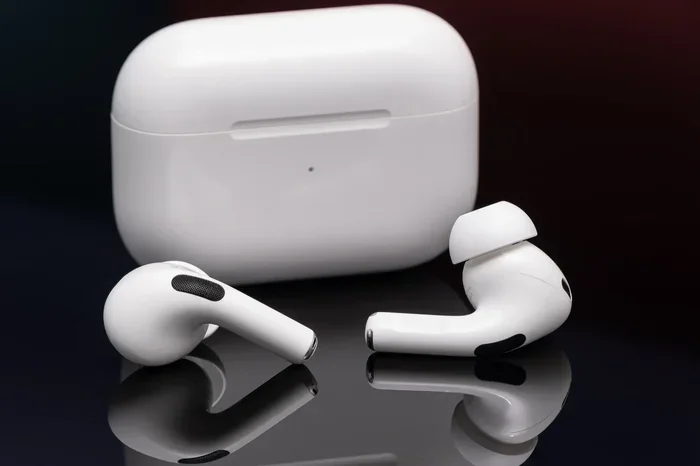
Do iPhone Earphones Work With Bluetooth Connectivity
Yes, iPhone earphones can work with Bluetooth, but it depends on the model. Wired Lightning earphones need a Bluetooth adapter, while wireless AirPods connect natively. This guide covers everything you need to know about iPhone earphones and Bluetooth connectivity, from pairing steps to troubleshooting tips.
So you have a pair of iPhone earphones and you want to go wireless. Maybe your wired earphones are getting tangled in your pocket again. Or maybe you just want the freedom to move around without being tied to your phone. Whatever the reason, the big question is simple: do iPhone earphones work with Bluetooth?
The short answer is yes, but with some important caveats. iPhone earphones and Bluetooth compatibility depend entirely on the type of earphones you have. If you own wireless AirPods or Bluetooth earphones, the process is smooth and straightforward. But if you have traditional wired earphones that came with your iPhone, you need an extra step to make them wireless.
In this guide, we will walk through everything you need to know. We will cover how Bluetooth works with iPhone earphones, which models are compatible, how to pair them, and what to do when things go wrong. By the end, you will have a clear picture of your options and know exactly what to do next.
Key Takeaways
- Wired iPhone earphones cannot connect to Bluetooth directly: You need a Bluetooth adapter or transmitter to make them wireless.
- Apple AirPods and wireless earphones pair easily: They connect natively to iPhone through Bluetooth without extra accessories.
- Bluetooth 5.0 offers better range and audio quality: Newer Bluetooth versions reduce lag and improve the listening experience.
- You can use iPhone earphones with non-Apple devices too: A Bluetooth transmitter lets you connect to TVs, cars, and other gadgets.
- Common connection issues are usually easy to fix: Resetting Bluetooth settings or updating your iPhone often solves the problem.
- Audio latency can be an issue with wired adapters: Look for adapters with low-latency chipsets for a better experience.
📑 Table of Contents
How Bluetooth Connectivity Works With iPhone Earphones
Understanding Bluetooth Technology
Bluetooth is a wireless technology that lets devices communicate over short distances. It uses radio waves to send and receive data. When you connect iPhone earphones to Bluetooth, your phone sends an audio signal through the air to the earphones. No cables needed.
Bluetooth has been around for a long time. The technology has improved a lot over the years. Bluetooth 5.0, which most modern iPhones support, offers faster data transfer and better range. This means better audio quality and fewer dropouts during playback.
Here is how Bluetooth works in simple terms:
- Your iPhone sends an audio signal using radio waves.
- The Bluetooth earphone receives the signal through its built-in antenna.
- The earphone converts the signal into sound.
- You hear your music, podcast, or call.
The whole process happens in milliseconds. Most people do not notice any delay at all. But Bluetooth latency can sometimes be a problem, especially with cheaper adapters or older Bluetooth versions. We will talk more about that later.
Wired vs Wireless iPhone Earphones
It helps to understand the difference between wired and wireless earphones. Wired iPhone earphones plug directly into the Lightning port or the 3.5mm headphone jack (on older models). They get power and audio through the cable. Wireless earphones like AirPods use Bluetooth to receive audio and charge through a case.
Here is a quick comparison:
- Wired earphones: Reliable, no charging needed, but limited by cable length.
- Wireless earphones: Freedom of movement, but need regular charging.
- Bluetooth adapters: Let wired earphones go wireless, but add bulk and may cause slight audio delay.
If you want to know more about how other earbuds work with iPhone, check out our guide on do other earbuds work well with iPhone. It covers a lot of the same compatibility questions.
Which iPhone Earphones Support Bluetooth
Apple AirPods and Bluetooth
Apple AirPods are the most popular wireless earphones for iPhone users. They connect to iPhone through Bluetooth pairing automatically. You just open the case near your iPhone, and a prompt appears on screen. Tap “Connect” and you are done.
AirPods work with all iPhones that support Bluetooth. This includes iPhone 5s and newer models. They also work with iPad, Apple Watch, and Mac. The Apple H1 or H2 chip inside AirPods handles the Bluetooth connection efficiently. This means low latency, stable connection, and good battery life.
Here are some key features of AirPods with Bluetooth:
- Automatic switching between Apple devices.
- Siri voice activation hands-free.
- Up to 30 hours of total battery life with the charging case.
- Seamless Bluetooth pairing with iPhone.
- Adaptive EQ for customized sound.
Third-Party Wireless Earphones
You are not limited to AirPods. Many third-party brands make Bluetooth earphones that work great with iPhone. Brands like Jabra, Sony, Samsung, and Beats all offer wireless options. These earphones use standard Bluetooth protocols, so they connect to any device that supports Bluetooth.
When shopping for third-party earphones, look for these features:
- Bluetooth 5.0 or higher for better range and stability.
- Low latency codecs for gaming and video watching.
- IP rating for sweat and water resistance.
- Quick charge capability for fast top-ups.
- Multi-device pairing if you switch between phone and laptop.
How to Pair iPhone Earphones With Bluetooth
Step-by-Step Pairing Guide
Pairing wireless earphones with your iPhone is simple. Follow these steps and you will be listening in minutes:
- Turn on your Bluetooth earphones and put them in pairing mode. Most earphones have a button or slider for this. Check the manual if you are not sure.
- Open the Settings app on your iPhone.
- Tap “Bluetooth.” Make sure the toggle is turned on.
- Wait for your earphones to appear in the list of available devices.
- Tap on the name of your earphones.
- Wait for the connection to complete. You will see “Connected” next to the device name.
- Start playing audio and enjoy.
That is it. The whole process takes less than a minute. Once paired, your earphones will automatically connect whenever Bluetooth is turned on and the earphones are nearby.
If you want to use your Bluetooth headphones to talk on the phone, the process is the same. The audio routing handles calls automatically once the devices are paired.
Using a Bluetooth Adapter for Wired Earphones
If you have wired iPhone earphones and want to make them wireless, you need a Bluetooth adapter. These small devices plug into the earphone jack or Lightning port and transmit audio over Bluetooth to your earphones.
Here is how to set one up:
- Plug the Bluetooth adapter into your wired earphones.
- Turn on the adapter and put it in pairing mode.
- Go to iPhone Settings > Bluetooth.
- Find the adapter in the device list and tap to connect.
- Play audio and test the connection.
Bluetooth adapters are affordable and easy to use. They come in different shapes and sizes. Some are tiny and clip onto your shirt. Others look like small dongles that plug directly into the earphone jack. Choose one that fits your needs and budget.
Bluetooth Audio Quality and Performance
Does Bluetooth Affect Sound Quality?
This is one of the most common questions people ask. The honest answer is: it depends. Bluetooth audio quality has improved a lot over the years, but there are still some limitations compared to wired connections.
Here is what affects Bluetooth sound quality:
- Bluetooth version: Bluetooth 5.0 and newer offer better audio codecs and less compression loss.
- Audio codec: Codecs like AAC, aptX, and LDAC determine how much audio data is transmitted. AAC is the standard for iPhone.
- Distance: The farther you are from your phone, the weaker the signal and the lower the quality.
- Interference: Wi-Fi, microwaves, and other Bluetooth devices can cause interference.
For most people, the difference between Bluetooth and wired audio is barely noticeable in everyday use. You will enjoy great sound quality for music, podcasts, and calls. Only audiophiles who demand the absolute best might notice a difference.
Latency and Delay Issues
Bluetooth latency is the delay between the audio being sent and the audio being played. On wireless earphones, this delay is usually too small to notice. But on Bluetooth adapters for wired earphones, the delay can be more noticeable.
You might notice latency when:
- Watching videos where the lip movement does not match the audio.
- Playing games where sound effects are slightly off.
- Recording video where the audio is out of sync.
To reduce latency, look for adapters that support low-latency Bluetooth codecs. Some adapters use specialized chips that minimize delay. Also, keep your iPhone close to the adapter for a stronger signal.
Using iPhone Earphones With Non-Apple Devices
Connecting to TVs, Cars, and Other Gadgets
One of the great things about Bluetooth is that it works across different devices. You are not stuck using your iPhone earphones only with iPhone. You can connect them to a TV, car stereo, laptop, or tablet.
Want to listen to your TV privately? You can use Bluetooth headphones with your TV by connecting them to your TV’s Bluetooth settings. The same goes for car stereos. If your car does not have Bluetooth built in, you can use a Bluetooth transmitter for car to add wireless capability.
Here are some popular non-Apple uses for iPhone earphones:
- TV watching: Connect wireless earphones to a smart TV for private listening.
- Car audio: Use a Bluetooth car adapter to stream music to your speakers.
- Laptop: Pair earphones with a Windows or Chromebook laptop for calls and media.
- Gaming consoles: Some consoles support Bluetooth audio for a wireless experience.
Bluetooth Adapters and Transmitters
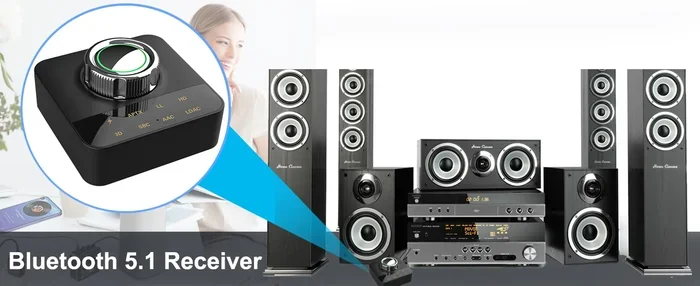
If your device does not have Bluetooth built in, a Bluetooth transmitter is your best friend. These small devices plug into a 3.5mm audio jack or USB port and broadcast audio over Bluetooth to your earphones.
Popular uses include:
- Making old stereos wireless.
- Adding Bluetooth to a car radio without built-in Bluetooth.
- Connecting earphones to a desktop computer without Bluetooth.
- Streaming audio from a gaming console to wireless earphones.
Bluetooth adapters and transmitters are cheap and effective. You can find reliable ones for under $20. They make any device with a 3.5mm jack or USB port Bluetooth-ready.
Common Problems and How to Fix Them
iPhone Earphones Not Connecting via Bluetooth
Sometimes Bluetooth earphones will not connect to iPhone. This can be frustrating, but it is usually easy to fix. Here are the most common causes and solutions:
- Bluetooth is turned off: Make sure Bluetooth is enabled in Settings.
- Earphones are not in pairing mode: Check that your earphones are ready to be discovered.
- Too far away: Move closer to your iPhone. Bluetooth range is typically about 30 feet.
- Interference from other devices: Turn off nearby Bluetooth devices and try again.
- Software glitch: Restart your iPhone and try pairing again.
- Outdated software: Update your iPhone to the latest iOS version.
If none of these work, try resetting your Bluetooth settings. Go to Settings > General > Transfer or Reset iPhone > Reset > Reset Network Settings. This clears all Bluetooth pairings and lets you start fresh.
Battery and Range Limitations
Bluetooth earphones run on batteries. Battery life varies by model and usage. Most wireless earphones last between 4 and 8 hours on a single charge. The charging case extends this to 24-30 hours total.
Bluetooth range is typically about 30 feet (10 meters) in open space. Walls, furniture, and other obstacles can reduce the range. If you walk too far from your iPhone, the audio may cut out or drop.
To get the best battery life and range:
- Keep your earphones charged.
- Stay within 30 feet of your iPhone.
- Avoid placing your phone behind thick walls or far away in another room.
- Turn off Bluetooth when you are not using it to save battery.
Final Thoughts
Do iPhone earphones work with Bluetooth? Yes, they absolutely do. Whether you have wireless AirPods or wired earphones with a Bluetooth adapter, the technology works well and continues to improve. Bluetooth connectivity gives you the freedom to move around, listen wirelessly, and connect to a wide range of devices.
The key is to understand your options. Wireless earphones offer the most convenience. Wired earphones with a Bluetooth adapter are a great budget-friendly alternative. And Bluetooth adapters and transmitters open up a world of possibilities for non-Apple devices too.
Take some time to explore what works best for you. Try different setups, test the audio quality, and find the combination that fits your lifestyle. Bluetooth technology has made listening to audio more flexible and enjoyable than ever before.
Frequently Asked Questions
Can I use any Bluetooth earphones with my iPhone?
Yes, most Bluetooth earphones work with iPhone. iPhone supports standard Bluetooth profiles like A2DP for audio streaming and HFP for calls. Whether you buy AirPods, Jabra, Sony, or any other brand, they will connect to your iPhone as long as they support Bluetooth.
Do wired iPhone earphones work with Bluetooth without an adapter?
No, wired earphones cannot connect to Bluetooth on their own. They need a physical cable to receive audio. To make wired earphones wireless, you must use a Bluetooth adapter or transmitter. These devices plug into the earphone jack or Lightning port and send audio over Bluetooth.
Why does my Bluetooth audio sound worse than wired?
Bluetooth audio is compressed before transmission, which can slightly reduce quality. However, with Bluetooth 5.0 and modern codecs like AAC, the difference is very small for most listeners. If you notice poor quality, check that your devices support the same codec and stay within range.
Can I connect my iPhone earphones to a non-Apple device via Bluetooth?
Absolutely. Bluetooth is a universal standard. Your iPhone earphones will connect to Android phones, Windows laptops, smart TVs, and car stereos. Just put the earphones in pairing mode and select them from the Bluetooth settings on the other device.
What is the best Bluetooth adapter for wired iPhone earphones?
Look for adapters that support Bluetooth 5.0 and have a low-latency chipset. Popular options include the 1Mii B06 adapter and the TaoTronics Bluetooth 5.0 transmitter. These offer good range, stable connections, and minimal audio delay.
How far can Bluetooth earphones be from my iPhone?
Bluetooth range is typically about 30 feet (10 meters) in open space. Walls, furniture, and other obstacles can reduce this distance. Bluetooth 5.0 offers better range than older versions, sometimes reaching up to 80 feet in ideal conditions.