How Can I Split A Direct TV Signal For Two Receivers
Splitting your Direct TV signal for two receivers lets you watch different channels in separate rooms without paying for extra subscriptions. You can use a coaxial cable splitter, an HDMI splitter, or a DirecTV Genie system to distribute your satellite signal. This guide covers every method, including setup steps, equipment you need, and common mistakes to avoid.
Key Takeaways
- Coaxial splitters are the most common way to divide a DirecTV signal between two receivers at home.
- Signal loss is real, so you may need a powered splitter or amplifier to maintain quality.
- The DirecTV Genie system offers the easiest multi-receiver setup without extra hardware.
- HDMI and component cables connect your TV to the receiver, and you can use both at the same time if needed.
- Avoid cheap splitters that degrade your HD signal and cause pixelation or channel dropouts.
- SWM technology simplifies wiring and makes splitting your Direct TV signal much easier.
📑 Table of Contents
- How Can I Split A Direct TV Signal For Two Receivers
- Understanding How Direct TV Signal Splitting Works
- Equipment You Need To Split A Direct TV Signal
- Step-By-Step Setup For Splitting Your Direct TV Signal
- Common Problems And How To Fix Them
- The DirecTV Genie: The Easiest Way To Split Your Signal
- Tips To Keep Your Split Signal Strong And Reliable
- Can You Use An HDMI Splitter Instead Of A Coaxial Splitter
- Final Thoughts On Splitting A Direct TV Signal
How Can I Split A Direct TV Signal For Two Receivers
Have you ever wanted to watch a game in the living room while someone else watches a movie in the bedroom? Splitting a Direct TV signal for two receivers makes this possible. You do not need to pay for two separate satellite subscriptions either. With the right equipment and a little patience, you can set up a dual receiver system that keeps everyone happy.
This guide walks you through every method available. Whether you use a simple coaxial splitter or a full DirecTV Genie setup, you will find clear steps here. We also cover common mistakes, equipment choices, and tips to keep your signal strong across both TVs.
Before you start, grab your receiver remote and a notepad. You will want to jot down your current setup. Knowing what you already have makes the whole process much smoother. Let us dive in.
Understanding How Direct TV Signal Splitting Works
A DirecTV satellite dish picks up signals from space. Those signals travel down the coaxial cable to your receiver. The receiver decodes the signal and sends picture and sound to your TV. When you split the signal, you are essentially copying that path so two receivers can work at the same time.
The key concept here is signal distribution. Think of it like a garden hose. If you split the flow into two streams, each stream gets less water. The same idea applies to your TV signal. A weaker signal means pixelation, buffering, or lost channels. This is why choosing the right splitter matters so much.
What Is A DirecTV Signal Splitter
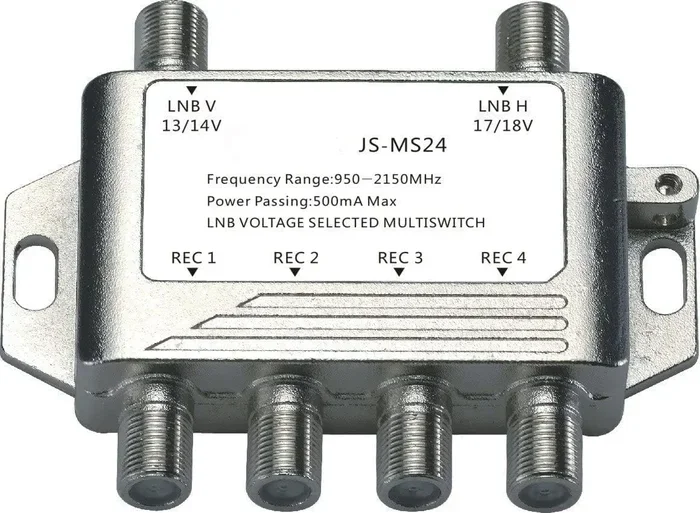
A signal splitter is a small device that takes one input and divides it into two or more outputs. For DirecTV, you typically use a coaxial splitter or an HDMI splitter. The coaxial splitter works with the cable that runs from your dish to the receiver. The HDMI splitter works after the receiver and sends the same picture to two TVs.
Not all splitters are the same. A cheap splitter can ruin your HD picture. A good splitter preserves signal quality and keeps your channels crisp. We will talk more about choosing the right one below.
Types Of DirecTV Signal Splitters
There are three main types of splitters you will encounter. Each has its own use case and benefits.
- Coaxial Splitters: These split the cable signal before it reaches the receiver. They are the most common choice for two-receiver setups.
- HDMI Splitters: These split the signal after the receiver. You use them when both TVs are in the same room or close together.
- Powered Splitters: These include a built-in amplifier. They boost the signal after splitting, which helps prevent signal loss over long cable runs.
For most homes, a coaxial splitter is the best starting point. It is simple to install and does not require extra power. If you experience signal issues, a powered splitter is your next best option.
Equipment You Need To Split A Direct TV Signal
Setting up two receivers does not require a lot of gear. Here is a simple list of what you will need. Most of this equipment is affordable and easy to find online or at any electronics store.
- Coaxial cable splitter (2-way or 3-way): This divides the signal from your dish. A 2-way splitter works for two receivers. A 3-way splitter gives you room to add a third later.
- Coaxial cables: You need enough cable to run from the splitter to each receiver. Measure the distances first.
- Two DirecTV receivers: You can use standard receivers or DVR models. Both work with a split signal setup.
- HDMI cables: These connect each receiver to its TV. You need one HDMI cable per receiver-TV pair.
- Optional: Powered amplifier: If your cable runs are long, an amplifier keeps the signal strong.
Before buying anything, check what you already have. Many people already own extra HDMI cables and coaxial cables from past setups. Reusing cables saves money and reduces waste.
Do You Need A Powered Splitter
This depends on your setup. If both receivers are close to the dish and the cable runs are short, a regular passive splitter works fine. If your cables run through walls, attics, or across long distances, a powered splitter helps maintain signal quality.
Watch for signs of weak signal. If your picture breaks up or channels refuse to load, your signal is too weak. A powered splitter or amplifier fixes this problem quickly. You can also check your signal strength in the receiver menu under Settings and then System Setup.
Step-By-Step Setup For Splitting Your Direct TV Signal
Now for the fun part. Setting up a two-receiver system is easier than most people think. Follow these steps carefully and you will be watching two different channels in two different rooms in no time.
Step 1: Turn Off All Equipment
Start by powering down your DirecTV receiver and TV. Unplug the coaxial cable from the dish that connects to your current receiver. This prevents any signal interference while you work. Safety first always.
Step 2: Connect The Coaxial Splitter
Take your coaxial splitter and connect the single cable from the dish to the input port on the splitter. Then connect two coaxial cables from the output ports of the splitter to each receiver. Make sure each connection is tight and secure. Loose connections are the number one cause of signal problems.
Tip: Label each cable at both ends with tape or a marker. This makes troubleshooting much easier later if something goes wrong.
Step 3: Connect Each Receiver To A TV
Run an HDMI cable from each receiver to its respective TV. Plug the cable into the HDMI port on the receiver and the matching port on the TV. If your TV has multiple HDMI ports, note which port you use for each receiver. You will need this info when switching inputs.
If you want to use both HDMI and component cables at the same time, you can do that too. Just make sure your TV supports dual input types. You can learn more about connecting your TV to your receiver using both HDMI and component cables at the same time here.
Step 4: Power On And Initialize
Turn on your dish, both receivers, and both TVs. Use the remote for each receiver to run the channel scan. Each receiver will search for available channels independently. This process usually takes about five minutes per receiver.
If one receiver finds channels and the other does not, check your coaxial connections. A loose cable is the most common culprit. Also make sure your splitter is rated for the frequency range that DirecTV uses.
Step 5: Test Both Setups
Change the channel on one receiver and verify the other receiver is unaffected. Each receiver should work independently. You should be able to watch different channels on each TV without any interference or lag.
This is the moment everything comes together. Grab some snacks, pick a show, and enjoy your new multi-room setup.
Common Problems And How To Fix Them
Even with the best setup, you might run into issues. Do not worry. Most problems have simple solutions. Here are the most common issues people face when splitting a DirecTV signal and how to fix them.
Signal Loss Or Pixelation
Pixelation happens when the signal is too weak. The picture breaks into blocks or lines. This usually means your splitter is dividing the signal too much. A 2-way splitter loses about 3.5 dB of signal. A 3-way splitter loses even more.
The fix is simple. Use a powered splitter or add a signal amplifier to your setup. You can also shorten your cable runs. Shorter cables mean less signal loss. If you are dealing with long cable runs, check if you can get HD through your coax cable to confirm your cable quality is sufficient.
One Receiver Works But The Other Does Not
This is a very common issue. Usually, it means one of the coaxial connections is loose or damaged. Disconnect and reconnect both ends of the cable for the non-working receiver. If that does not work, try swapping the cables to see if the problem follows the cable or the receiver.
Another cause is an incorrect splitter. Make sure your splitter is rated for satellite frequencies. Regular TV splitters do not work well with DirecTV signals because the frequency range is different.
Channels Do Not Match On Both Receivers
Each DirecTV receiver stores its own channel list. If one receiver shows different channels than the other, run a fresh channel scan on the problematic receiver. Go to Settings, then System Setup, then Channel Settings, and select Scan For Channels.
Also check that both receivers are on the same account and have the same subscription level. Different subscription tiers can limit the channels available on each receiver.
The DirecTV Genie: The Easiest Way To Split Your Signal
If you want the simplest multi-receiver experience, the DirecTV Genie system is the way to go. The Genie is a central hub that serves up to five receivers in your home. It eliminates the need for a traditional signal splitter in most cases.
With the Genie, you get one main receiver and smaller client receivers for each TV. The client receivers do not need their own dish or splitter. They connect to the Genie through your home’s existing coaxial wiring. This makes installation much easier and keeps your signal strong across every TV.
How The Genie System Works
The Genie receives all the satellite signals and distributes them to each client receiver. Think of it as a smart hub. Each client receiver acts like a mini-receiver that talks to the Genie. You can watch different channels on every TV, record shows on any receiver, and access all your content from one central place.
The Genie also supports Whole-Home DVR. This means you can record a show in one room and watch it in another. It is a huge convenience for families with different viewing schedules.
Do You Need A Genie To Split Your Signal
No. You can split your signal without a Genie using a standard splitter. The Genie simply makes the process easier and gives you more features. If you already have multiple standard receivers, a splitter is the most cost-effective option. If you are starting fresh or upgrading, the Genie is worth considering.
Also consider that older DirecTV systems may not support the latest SWM (Single Wire Multiswitch) technology. SWM makes splitting much easier because it allows you to run one cable to multiple receivers instead of needing separate cables for each receiver. If your system is older, you may want to upgrade your dish and LNB to take advantage of SWM.
One thing to keep in mind is that you can use a projector instead of a TV for one of your viewing areas. Projectors work great with DirecTV receivers and create a cinematic experience. Learn more about using a projector instead of a TV here.
Tips To Keep Your Split Signal Strong And Reliable
Once your system is running, you want to keep it that way. Signal quality can degrade over time due to cable wear, weather, or loose connections. Follow these tips to keep both receivers working perfectly.
Use High-Quality Coaxial Cables
Cheap coaxial cables have thinner shielding and higher signal loss. Invest in quality cables with double shielding and gold-plated connectors. RG6 cables are the standard for DirecTV setups. They handle the frequency range well and minimize signal loss over distance.
Check Connections Regularly
Every few months, check all your cable connections. Look for any signs of corrosion, bending, or wear. Tighten any loose fittings. A loose connection is the fastest way to lose your signal or experience intermittent picture problems.
Keep Cables Away From Power Sources
Running coaxial cables parallel to power cords can cause interference. This interference shows up as static or ghosting on your screen. Keep your TV cables and power cables at least six inches apart. If they must cross, make sure they cross at a 90-degree angle to minimize interference.
Update Your Receiver Software
DirecTV occasionally releases software updates for its receivers. These updates can improve signal processing and fix bugs. Keep your receivers connected to the internet so they can download updates automatically. You can also manually check for updates in the Settings menu.
Consider A Signal Meter
If you frequently deal with signal issues, a satellite signal meter is a handy tool. It connects to your coaxial cable and shows you the signal strength in real time. This makes it easy to pinpoint loose connections or cable problems without guessing. You can also find out how to get HD through your coax cable to verify your signal path is optimized.
Use A Surge Protector
Lightning strikes and power surges can damage your receivers and dish equipment. Plug your entire setup into a quality surge protector. This is a small investment that can save you hundreds of dollars in replacement costs.
Can You Use An HDMI Splitter Instead Of A Coaxial Splitter
Yes, you can use an HDMI splitter, but it works differently. An HDMI splitter takes the video output from one receiver and sends the same picture to two TVs. This means both TVs show the same channel at the same time. It does not let you watch different channels on each TV.
An HDMI splitter is useful when you want to mirror content to a second TV in the same room. For example, you might want to watch a cooking show in the kitchen while the living room TV shows something else. In that case, you would need two separate receivers anyway.
For true multi-room viewing with different channels, a coaxial splitter or a Genie system is the better choice. The HDMI splitter is a supplemental tool, not a replacement for proper signal splitting at the receiver level.
You can also connect your phone to an HDMI TV for casting content. This is a different use case but worth knowing about if you like sharing content from your phone on a big screen. You can learn more about connecting your phone to an HDMI TV here.
Final Thoughts On Splitting A Direct TV Signal
Splitting a Direct TV signal for two receivers is a practical and affordable way to enjoy satellite TV in multiple rooms. Whether you choose a simple coaxial splitter or invest in a DirecTV Genie system, the key is to use quality equipment and secure all connections properly.
Start with a passive coaxial splitter if your setup is simple and your cable runs are short. Move to a powered splitter or Genie system if you need more reliability or have longer cable runs. Always test both receivers after setup and run a channel scan on each one.
Keep your cables in good condition, check connections periodically, and protect your equipment with a surge protector. These small habits go a long way in keeping your multi-room DirecTV setup running smoothly for years.
With the right approach, you and everyone in your household can enjoy your favorite shows, games, and movies on separate TVs without any hassle. Happy watching.
Frequently Asked Questions
Can I Split My Direct TV Signal Without Buying Extra Equipment?
Yes, if you already have a DirecTV Genie system. The Genie acts as a central hub and distributes the signal to multiple client receivers without needing a traditional splitter. If you do not have a Genie, you will need at least a coaxial splitter and extra cables to set up two receivers.
Will Splitting My Signal Reduce The Picture Quality?
A basic passive splitter can cause some signal loss, which may reduce picture quality slightly. Using a high-quality splitter or a powered splitter with an amplifier minimizes this loss. For most setups, the picture quality remains excellent even after splitting.
How Many Receivers Can I Split A Direct TV Signal To?
It depends on your equipment. A standard 2-way splitter works for two receivers. A 3-way or 4-way splitter supports more receivers. However, each split reduces signal strength. For more than two receivers, a powered splitter or the DirecTV Genie system is recommended.
Do I Need A Second DirecTV Subscription For The Second Receiver?
No. You can use multiple receivers on the same DirecTV account. Each receiver accesses the same channel lineup and DVR library. However, you may need to add a receiver fee to your plan depending on your current subscription level.
What Is The Difference Between SWM And A Standard Splitter?
SWM stands for Single Wire Multiswitch. It allows you to run one coaxial cable to multiple receivers instead of needing separate cables for each receiver. A standard splitter divides the signal but does not consolidate the wiring. SWM systems are cleaner and easier to install in homes with existing wiring.
Can I Use A Regular TV Splitter For DirecTV?
No. Regular TV splitters are not designed for the frequency range that DirecTV uses. Using a regular splitter can cause poor signal quality, missing channels, or no signal at all. Always use a splitter specifically rated for satellite TV frequencies, such as those designed for DirecTV and DISH networks.