How Do Bluetooth Trail Cameras Work and Why They Are Great
Bluetooth trail cameras use wireless technology to connect to your phone or tablet, letting you view and download photos instantly. These wireless game cameras combine motion detection, infrared night vision, and cellular-free connectivity in one compact device. Whether you are monitoring wildlife or securing your property, a Bluetooth trail camera eliminates the hassle of retrieving SD cards.
Have you ever wondered how those small cameras in the woods capture photos of deer and other wildlife without anyone there to press the button? The answer lies in Bluetooth trail cameras. These clever devices combine motion detection, wireless technology, and smart photography to give you a window into the wild. In this guide, we will break down exactly how they work and why they have become so popular among hunters, nature lovers, and homeowners alike.
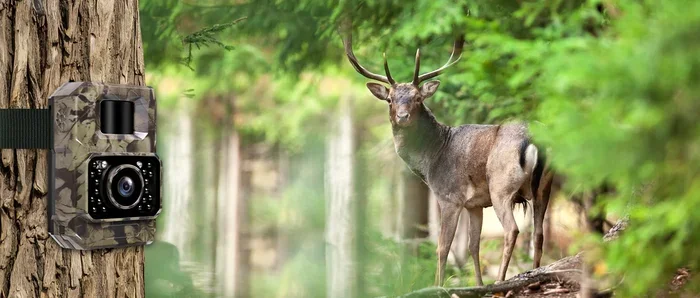
A Bluetooth trail camera is a portable camera that uses Bluetooth wireless technology to send photos and videos to your smartphone or tablet. Unlike traditional trail cameras that require you to physically retrieve an SD card, Bluetooth models let you check your shots from a distance. This makes wildlife monitoring, hunting preparation, and property surveillance much more convenient. You do not need Wi-Fi or a cell signal either, which is a huge advantage in remote areas.
In this article, we will cover everything from the basic technology inside these cameras to practical tips for getting the best results. By the end, you will understand why so many people are switching to wireless trail cameras for their outdoor needs.
Key Takeaways
- Wireless Convenience: Bluetooth trail cameras send photos directly to your phone without needing Wi-Fi or cell service.
- Easy Setup: Most models pair with a mobile app in minutes, making them beginner-friendly.
- Motion Sensor Technology: PIR sensors detect heat and movement, triggering the camera to snap photos or record video.
- Night Vision Capability: Infrared flash captures clear images in complete darkness without spooking animals.
- Battery Efficiency: Bluetooth trail cameras are designed to run on batteries for weeks or even months.
- No Subscription Required: Unlike cellular models, Bluetooth cameras work without monthly fees.
- Versatile Use: Great for hunting, wildlife watching, property security, and backyard fun.
📑 Table of Contents
- What Is a Bluetooth Trail Camera?
- How Bluetooth Trail Cameras Connect
- Key Features That Make Bluetooth Trail Cameras Stand Out
- How to Set Up Your Bluetooth Trail Camera
- Bluetooth Trail Cameras vs. Cellular Trail Cameras
- Common Uses for Bluetooth Trail Cameras
- Tips for Getting the Best Results
- Final Thoughts
What Is a Bluetooth Trail Camera?
A Bluetooth trail camera is a type of game camera that uses Bluetooth connectivity to link with your mobile device. Think of it like pairing your Bluetooth headphones with a PS4 — the camera and your phone establish a short-range wireless connection. This lets you browse photos, change settings, and even receive notifications when motion is detected.
These cameras are also called wireless trail cameras or wireless game cameras. They come in different shapes and sizes, but they all share one goal: to capture images of wildlife or activity and deliver them to you without wires or physical retrieval. Most models store photos on a built-in SD card as a backup, even though the Bluetooth transfer is the primary method.
How Is It Different From a Regular Trail Camera?
A standard trail camera takes photos or videos and saves them to an SD card. You must walk to the camera, remove the card, and insert it into a computer or phone to see your images. A Bluetooth trail camera cuts out that middle step. You can pull up photos right on your phone from dozens of feet away. Some models also include Wi-Fi or cellular features, but pure Bluetooth cameras rely only on the short-range wireless signal.
What About the Bluetooth Range?
Bluetooth has a limited range, usually between 30 and 100 feet depending on the model and obstacles like trees or hills. This is similar to how Bluetooth connectivity works on devices like the Apple Watch, which can function without an iPhone nearby within a certain range. For trail camera use, this range is perfect because you are typically within a reasonable distance when checking your camera.
How Bluetooth Trail Cameras Connect
The connection process between a Bluetooth trail camera and your phone is simple and straightforward. Let us walk through the steps so you know exactly what to expect.
Step 1: Download the Companion App
Every Bluetooth trail camera comes with a dedicated mobile app. You can download it from the Apple App Store or Google Play Store. The app acts as the bridge between your phone and the camera. Popular brands like Browning, Stealth Cam, and Bushnell each have their own app with slightly different features.
Step 2: Power On and Pair
Turn on your trail camera and enable Bluetooth in the settings. Open the app on your phone and select the option to add a new device. The app will scan for the camera and display it on screen. Tap to pair, and within seconds, the connection is established.
Step 3: Browse and Transfer Photos
Once paired, you can view thumbnails of all photos stored on the camera’s SD card. You can select individual images or batch download entire folders. Some apps even let you adjust camera settings, change the trigger speed, or switch between photo and video mode right from your phone.
Does Bluetooth Replace the SD Card?
Not entirely. Most Bluetooth trail cameras still use an SD card for storage. The Bluetooth connection simply gives you wireless access to those files. Think of the SD card as the camera’s memory and Bluetooth as the delivery method. Having both means you always have a backup if something goes wrong with the wireless transfer.
Key Features That Make Bluetooth Trail Cameras Stand Out
What makes these cameras so appealing? Let us look at the features that set them apart from other options on the market.
Motion Detection and PIR Sensors
Every Bluetooth trail camera uses a passive infrared or PIR sensor. This sensor detects heat changes in its field of view. When an animal or person walks past, the temperature difference triggers the camera to take a photo or start recording video. The speed at which the camera reacts is called the trigger speed, and faster is always better for capturing clear shots of moving animals.
Infrared Night Vision
Most wildlife cameras come with infrared flash for night photography. The camera emits a low-glow or no-glow infrared light that is invisible to the human eye and most animals. This means you get clear nighttime images without spooking the wildlife. The PIR sensor works just as well in the dark because it detects heat, not light.
Photo Resolution and Video Quality
Bluetooth trail cameras today offer impressive image quality. Many models shoot photos at 20 megapixels or higher and record video in 1080p or even 4K resolution. Higher resolution means sharper images and more detail, which is especially useful for identifying individual animals or reading license plates for security purposes.
Battery Life
Battery life is a critical factor for any trail camera. Because Bluetooth trail cameras do not need a constant Wi-Fi or cell connection, they conserve power. Most models run on AA or D batteries and can last anywhere from a few weeks to several months depending on usage and the number of photos taken. Some models also support solar panel attachments for extended power in the field.
No Subscription Fees
One of the biggest advantages of Bluetooth trail cameras is that they do not require a monthly subscription. Cellular trail cameras need a data plan to send photos to the cloud, which adds ongoing costs. With a Bluetooth model, you get free wireless access to your photos. There is no monthly fee, no data limit, and no contract to worry about.
How to Set Up Your Bluetooth Trail Camera
Setting up a Bluetooth trail camera is easier than most people think. Here is a simple walkthrough to get you started.
- Choose the Right Spot: Find a location with good wildlife activity. Look for trails, feeding areas, or water sources. Mount the camera 3 to 4 feet off the ground, facing north or east to avoid sun glare.
- Insert Batteries and SD Card: Fresh batteries and a properly formatted SD card are essential. Most cameras accept standard SD cards up to 32GB or 64GB.
- Power On and Enable Bluetooth: Turn on the camera and go to the Bluetooth settings in the menu. Make sure the Bluetooth indicator light is flashing, which means it is ready to pair.
- Open the App and Connect: Launch the companion app on your phone, enable Bluetooth, and follow the on-screen prompts to pair with the camera.
- Test the Camera: Walk in front of the camera to trigger a test shot. Check your phone to confirm the photo arrives. Adjust the sensitivity or trigger speed if needed.
Quick Tips for the Best Setup
- Use tree straps instead of screws to avoid damaging the tree and allow easy repositioning.
- Clear branches or leaves from in front of the lens to prevent false triggers.
- Set the camera to a low-glow or no-glow infrared mode to avoid alerting animals at night.
- Check your phone battery before heading out, since you will use it to view and transfer photos.
Bluetooth Trail Cameras vs. Cellular Trail Cameras
When shopping for a trail camera, you will likely come across both Bluetooth and cellular models. Understanding the differences helps you choose the right one for your needs.
| Feature | Bluetooth Trail Camera | Cellular Trail Camera |
|---|---|---|
| Connectivity | Short-range Bluetooth to phone | Cellular network (4G/LTE) |
| Range | 30 to 100 feet | Anywhere with cell service |
| Photo Transfer | Direct to phone via app | To cloud or email via cellular data |
| Subscription Required | No | Yes, monthly data plan |
| Wi-Fi Needed | No | No, but needs cell towers |
| Best For | Local monitoring, hunting stands | Remote property, real-time alerts |
| Cost | Lower upfront cost | Higher upfront and ongoing cost |
A Bluetooth trail camera is ideal if you visit your camera site regularly and want quick, free access to your photos. A cellular camera is better if you need real-time alerts or cannot physically visit the camera often. Some advanced models offer both Bluetooth and cellular connectivity, giving you the best of both worlds.
Common Uses for Bluetooth Trail Cameras
These cameras are incredibly versatile. Here are some of the most popular ways people use them.
Hunting and Wildlife Monitoring
Hunters use Bluetooth trail cameras to scout animal activity before and during hunting season. By reviewing photos on your phone, you can identify travel corridors, feeding spots, and buck patterns. This information helps you make better decisions about stand placement and timing.
Property Security
You can place a Bluetooth trail camera near your driveway, cabin, or outbuildings to monitor for trespassers or wildlife damage. The motion sensor triggers the camera whenever something moves, giving you a clear picture of who or what is on your property.
Backyard Wildlife Watching
Nature enthusiasts love setting up trail cameras in their backyard to capture visits from deer, foxes, raccoons, and birds. It is a fun and educational way to observe local wildlife without disturbing their natural behavior.
Research and Education
Scientists, students, and educators use Bluetooth trail cameras to study animal behavior and habitat use. The wireless transfer makes it easy to collect data over time without disturbing the study area.
Tips for Getting the Best Results
Getting great photos from your Bluetooth trail camera is all about placement, settings, and maintenance. Here are some expert tips to help you succeed.
Optimize Your Camera Settings
Start with a medium sensitivity setting to reduce false triggers from wind-blown leaves or small animals. Adjust the trigger speed to the fastest setting your camera offers. Set the photo mode to burst or video if you want to capture action sequences. For nighttime shots, use no-glow infrared to keep the flash invisible.
Maintain Your Camera Regularly
Check your camera every one to two weeks. Clean the lens with a soft cloth to remove dust and spider webs. Replace batteries when the indicator shows low power. Format the SD card periodically to keep the camera running smoothly and prevent memory errors.
Avoid Common Mistakes
One of the biggest mistakes is pointing the camera directly at the sun during the day, which causes overexposed images. Another is placing the camera too low or too high, which misses the target zone. Always test your camera after setup and review the first few photos to make sure everything is working correctly.
Keep Your Phone Updated
Make sure your phone’s Bluetooth is turned on and updated to the latest operating system. If you have trouble pairing, try turning Bluetooth off and back on, or restart the app. Keeping your phone’s Bluetooth drivers current ensures a smooth and stable connection with your trail camera.
Final Thoughts
Bluetooth trail cameras are a fantastic tool for anyone who wants to monitor wildlife, scout hunting locations, or keep an eye on their property without the hassle of physical retrieval. They combine motion sensor technology, infrared night vision, and wireless photo transfer into a single easy-to-use device. With no subscription fees and simple setup, they offer excellent value for hunters, nature enthusiasts, and homeowners alike.
Whether you are a seasoned hunter or a curious nature lover, a Bluetooth trail camera opens up a whole new way to experience the outdoors. You get real-time access to photos, the freedom to check your camera from a distance, and the peace of mind that comes with knowing you have eyes on your property around the clock. Give one a try, and you will wonder how you ever managed without it.
Frequently Asked Questions
Do Bluetooth trail cameras need Wi-Fi or cell service to work?
No. Bluetooth trail cameras connect directly to your phone using Bluetooth wireless technology. They do not need Wi-Fi or a cellular signal. This makes them perfect for remote areas where cell service is weak or unavailable. The camera stores photos on an SD card and sends them to your phone within Bluetooth range.
How far can a Bluetooth trail camera send photos to my phone?
The Bluetooth range is typically between 30 and 100 feet, depending on the model and obstacles like trees or terrain. This is similar to how Bluetooth connectivity works with other devices like wireless speakers or headphones. For best results, stay within range when checking your camera.
Can I use a Bluetooth trail camera for home security?
Yes, absolutely. Bluetooth trail cameras work great for monitoring driveways, cabins, and outbuildings. The motion sensor detects movement and sends photos to your phone so you can review activity in real time. Since they do not require a subscription, they are a cost-effective security solution.
How long do the batteries last in a Bluetooth trail camera?
Battery life varies by model and usage, but most Bluetooth trail cameras last between 4 and 8 months on a set of AA or D batteries. Cameras with lower trigger frequency and photo-only mode tend to last longer. Some models support solar panels for indefinite power in the field.
Do Bluetooth trail cameras record video or just photos?
Most Bluetooth trail cameras can do both. You can switch between photo mode and video mode in the camera settings or through the companion app. Video quality ranges from 720p to 4K depending on the model. Keep in mind that video uses more battery and storage space than photos.
Are Bluetooth trail cameras hard to set up?
Not at all. Most models come with a simple step-by-step setup process. You download the app, insert batteries and an SD card, turn on Bluetooth, and pair with your phone. The entire setup usually takes less than 10 minutes. If you have ever paired Bluetooth headphones with a console, you already have the basic skills needed.