Does Bluetooth Work On Apple Watch Without iPhone
Does Bluetooth Work On Apple Watch Without iPhone? Yes, it absolutely can. Your Apple Watch can connect to the internet and use many features on its own, even when your phone is not nearby. This guide breaks down exactly how Bluetooth works on Apple Watch without iPhone, what you can do, and what limitations you might face.
Have you ever wondered if your Apple Watch can do its thing without your iPhone nearby? Maybe you left your phone at home and still want to track your run. Or perhaps you just want to know what your watch can do on its own. The answer might surprise you. Does Bluetooth work on Apple Watch without iPhone? The short answer is yes. But the full story is much more interesting than that.
Your Apple Watch is more capable than most people realize. It can connect to the internet, stream music, send messages, and track your health all by itself. This happens through a combination of Bluetooth, Wi-Fi, and sometimes cellular service. In this article, we will walk through everything you need to know about Apple Watch Bluetooth without iPhone. You will learn how it works, what features stay available, and how to get the most out of your watch when your phone is not around.
Key Takeaways
- Apple Watch can work independently: Bluetooth and Wi-Fi allow your watch to stay connected even without your iPhone nearby.
- Cellular models offer full freedom: With a cellular plan, your Apple Watch can make calls, send texts, and stream data anywhere.
- GPS-only models have some limits: They can still connect to Wi-Fi and Bluetooth but need your phone for cellular tasks.
- Bluetooth range matters: The typical range is about 30 feet, but Wi-Fi can extend your watch’s connectivity much further.
- Troubleshooting is simple: Most Bluetooth issues can be fixed with basic steps like restarting or re-pairing.
- Many features work standalone: Music, fitness tracking, Apple Pay, and Emergency SOS all function without your phone.
- Family Setup is a game changer: Kids and family members can use an Apple Watch without needing their own iPhone.
📑 Table of Contents
- What Is Bluetooth on Apple Watch?
- Can You Use Apple Watch Without iPhone?
- How Bluetooth Connectivity Works Without iPhone
- Features You Can Use Without iPhone
- Troubleshooting Bluetooth Issues
- Tips for Better Bluetooth Performance
- Common Mistakes to Avoid
- Expert Insights on Apple Watch Standalone Use
- Final Thoughts
What Is Bluetooth on Apple Watch?
Bluetooth is a wireless technology that lets devices talk to each other over short distances. Your Apple Watch uses Bluetooth to communicate with your iPhone when they are close together. This connection handles things like notifications, syncing data, and controlling your phone from your wrist. But Bluetooth is not just a link to your phone. It is also a tool your watch uses on its own.
How Bluetooth Low Energy Powers Your Watch
Apple Watch uses something called Bluetooth Low Energy, or BLE. This is a smart version of Bluetooth that uses very little power. It lets your watch stay connected for hours without draining the battery fast. BLE is perfect for small devices like smartwatches. It sends small bursts of data quickly and then goes quiet to save energy. This is why your watch can track your heart rate and steps all day without needing a recharge every few hours.
Bluetooth vs Wi-Fi on Apple Watch
While Bluetooth handles short-range connections, Wi-Fi gives your Apple Watch a much wider reach. When your watch connects to a known Wi-Fi network, it can access the internet even if your iPhone is nowhere in sight. Think of Bluetooth as a short rope and Wi-Fi as a long bridge. Both help your watch stay connected, but they serve different purposes. Together, they make Apple Watch standalone mode possible.
Can You Use Apple Watch Without iPhone?
The big question everyone asks is whether an Apple Watch truly works without an iPhone. The answer depends on a few things. Your watch model matters a lot. Your setup matters too. And the features you want to use play a role as well. Let us break this down clearly.
GPS-Only Models vs Cellular Models
There are two main types of Apple Watch. The GPS-only model connects to your iPhone and uses your phone’s data connection. The cellular model has its own built-in modem. This means it can connect to a mobile network all by itself. With a cellular Apple Watch, you can make calls, send texts, and use apps without your phone anywhere near you. A GPS-only watch can still do a lot on its own, but it needs Wi-Fi for internet access when your phone is not around.
What Stays Available Without iPhone?
When your Apple Watch is away from your iPhone, many features still work great. You can track workouts, check the time, use Apple Pay, and listen to music stored on your watch. You can also receive calls if your watch has cellular. Notifications can still appear if they were synced before you left your phone behind. Fitness tracking continues to work without any interruption. Your watch does not need your phone to count your steps or monitor your heart rate.
What Stops Working Without iPhone?
Some features do need your iPhone to be nearby or set up ahead of time. Installing new apps usually requires your phone. Updating WatchOS often needs a connection to your iPhone. Setting up a new watch always requires an iPhone at first. Also, if your watch is GPS-only and not connected to Wi-Fi, it cannot access the internet for things like weather updates or sending messages through apps.
How Bluetooth Connectivity Works Without iPhone
Understanding how Bluetooth connection works on your Apple Watch without iPhone helps you use it better. When your watch is away from your phone, it does not just sit idle. It stays active and looks for other ways to connect.
The Pairing Process
When you first set up your Apple Watch, it pairs with your iPhone using Bluetooth. This pairing creates a trusted connection between the two devices. After pairing, your watch remembers your iPhone and can reconnect automatically when they are near each other. But here is the key part. That pairing also sets up your watch to work independently. It stores your settings, apps, and data right on the watch itself. So even when Bluetooth is not connected to your phone, your watch still has everything it needs to function.
Bluetooth Range and Real-World Performance
Bluetooth on Apple Watch typically works within about 30 feet. That is roughly 10 meters. In real life, walls and obstacles can shorten this range. If you are in another room, your Bluetooth connection to your iPhone might drop. But this is actually fine. Your watch does not need a constant Bluetooth link to your phone to keep working. It switches to Wi-Fi or cellular when Bluetooth is out of range. This seamless switch is one of the best things about Apple Watch design.
Reconnecting After Losing Connection
When your Apple Watch loses its Bluetooth connection to your iPhone, it does not panic. It simply switches to another available network. If Wi-Fi is nearby, it connects to Wi-Fi. If cellular is available, it uses cellular. Once your iPhone comes back into Bluetooth range, the watch reconnects automatically. This whole process happens in the background. You do not need to do anything. This is why Apple Watch Bluetooth without iPhone feels so smooth and natural.
Features You Can Use Without iPhone
Now let us talk about what you can actually do with your Apple Watch when your iPhone is not around. This is where things get really useful. Your watch is not just a phone accessory. It is a powerful standalone device.
Fitness and Health Tracking
This is one of the biggest strengths of Apple Watch. All your workout tracking works without your phone. You can start a run, track your pace, monitor your heart rate, and measure your calories burned. Apple Watch uses built-in sensors for all of this. Your GPS module tracks your route. Your heart rate sensor keeps monitoring your health. None of this needs your iPhone. After your workout, the data stays on your watch until you are ready to sync it back to your phone.
Music and Podcasts
You can store music and podcasts directly on your Apple Watch. With about 8GB of storage, there is plenty of room for your favorite playlists. When you go for a walk or workout without your phone, you can still listen to music through Bluetooth headphones connected to your watch. Apple Music subscribers can even stream music over Wi-Fi or cellular. This means your workout soundtrack never has to stop just because your phone is not with you.
Apple Pay and Contactless Payments
Apple Pay works great without your iPhone. You can tap your watch to pay at checkout counters, vending machines, and transit gates. Your payment cards are stored securely on your watch. You do not need your phone or even an internet connection to make a payment. This is one of the most convenient standalone features. It works anywhere contactless payments are accepted. Just double-click the side button and hold your watch near the reader.
Emergency SOS and Safety Features
Safety is a huge reason to love Apple Watch on its own. The Emergency SOS feature can call for help even without your phone nearby. If you have a cellular watch, it can dial emergency services directly. It can also send your location to your emergency contacts. The fall detection feature works independently too. If you take a hard fall and do not respond, your watch can automatically call for help. These features work because they rely on your watch’s own connections, not your phone.
Messaging and Communication
If your Apple Watch has cellular or is connected to Wi-Fi, you can send and receive messages without your iPhone. You can use the Messages app to reply to texts with voice dictation, scribbles, or emojis. You can also use popular apps like WhatsApp or Telegram if they are installed on your watch. Phone calls work the same way. With cellular, you can make and receive calls directly from your wrist. Your friends and family do not even need to know you left your phone at home.
Troubleshooting Bluetooth Issues
Sometimes things do not work perfectly. If your Apple Watch Bluetooth connection is acting up, do not worry. Most problems have simple fixes. Here are the most common issues and how to solve them.
Watch Not Connecting to Wi-Fi Without iPhone
If your watch cannot connect to Wi-Fi when your phone is not around, try these steps. First, make sure Wi-Fi is turned on in your watch settings. Go to Settings, then Wi-Fi, and select your network. If it still does not connect, restart your watch by holding the side button and sliding to power off. Wait a few seconds, then turn it back on. This fixes most temporary connection glitches.
Bluetooth Keeps Dropping
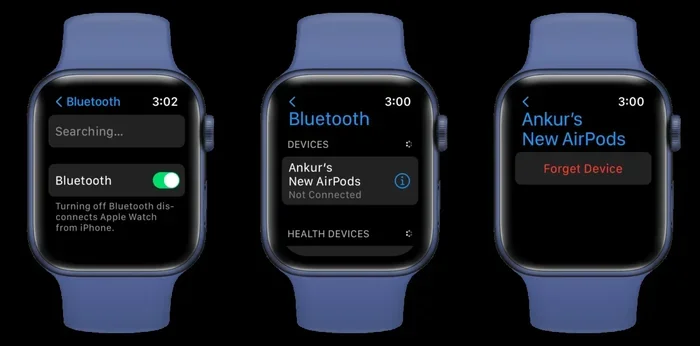
If your watch keeps losing its Bluetooth connection, the distance might be the issue. Stay within 30 feet of your iPhone for the best results. Also, check that Bluetooth is turned on in both devices. Sometimes simply toggling Bluetooth off and back on fixes the problem. On your iPhone, go to Settings, then Bluetooth, and turn it off for a few seconds before turning it back on. On your watch, go to Settings, then Bluetooth, and do the same.
Watch Not Syncing Data
If your watch is not syncing data back to your phone, make sure both devices are on the same Wi-Fi network. Also check that your iPhone has a stable internet connection. Sometimes the Watch app on your iPhone needs to be reopened for syncing to resume. Force close the app and open it again. If the problem persists, try restarting both devices. A fresh start often fixes stubborn syncing issues.
Resetting Bluetooth Connection
If nothing else works, you can reset the Bluetooth connection between your watch and phone. On your iPhone, go to the Watch app, tap All Watches at the top, and tap your watch name. Choose Unpair Apple Watch. Then pair it again as if it were new. This fixes deep connection issues. Just know that you will need to set up your watch again. Make sure your watch is backed up first so you do not lose any data.
Tips for Better Bluetooth Performance
Want to get the most out of your Apple Watch Bluetooth experience? A few simple tips can make a big difference. These are easy habits that keep everything running smoothly.
- Keep your watch software updated. Apple releases updates that fix Bluetooth bugs and improve performance. Go to Settings, then General, then Software Update on your watch.
- Restart your devices regularly. A quick restart clears out temporary glitches. Turn your watch and iPhone off and back on once a week.
- Stay within Bluetooth range. Keep your iPhone within about 30 feet when you want a direct Bluetooth connection. Walls and floors can weaken the signal.
- Use Wi-Fi when Bluetooth is not enough. If your watch needs internet but your phone is far away, connect to a known Wi-Fi network instead.
- Turn off Bluetooth when not needed. If you are not syncing or using connected features, turning off Bluetooth saves battery. Your watch will still work fine on its own.
- Keep your iPhone nearby for initial setup. Always set up new features or install new apps with your iPhone close by. This ensures everything syncs properly before you go standalone.
Common Mistakes to Avoid
Even experienced Apple Watch users make mistakes that hurt their Bluetooth experience. Here are a few to watch out for.
- Ignoring software updates. Old software can cause Bluetooth problems. Always keep your watch and iPhone updated to the latest version.
- Forgetting to reconnect Wi-Fi. When you leave home without your phone, make sure your watch is already connected to Wi-Fi. It cannot connect to new networks easily without your phone.
- Assuming all features work offline. Some features truly need your phone or an internet connection. Do not expect to send emails or use weather apps without a connection.
- Not charging your watch enough. Bluetooth, Wi-Fi, and cellular all drain battery faster. Make sure your watch has enough charge before you leave your phone behind.
- Overlooking the Watch app settings. The Watch app on your iPhone controls what syncs and when. Check your settings regularly to make sure your watch is set up for standalone use.
Expert Insights on Apple Watch Standalone Use
Many people think Apple Watch is just a companion device. It is not. Apple designed the watch to be a powerful standalone tool. The combination of Bluetooth, Wi-Fi, and optional cellular gives your watch multiple ways to stay connected. Even without your iPhone, your watch can do amazing things. Fitness tracking, payments, emergency calls, and music playback all work independently. The key is setting up your watch properly before you leave your phone behind. Make sure your Wi-Fi networks are saved and your apps are ready to go.
Apple continues to improve standalone features with every WatchOS update. Recent updates have made it even easier to use your watch without your phone. New apps work better offline. Messaging has become more independent. And the overall experience feels more like a real smartwatch and less like a phone accessory. If you have been hesitant to leave your iPhone at home, give your Apple Watch a chance to prove itself.
Final Thoughts
So, does Bluetooth work on Apple Watch without iPhone? Absolutely. Your watch is built to stay connected and keep working even when your phone is not around. Bluetooth gives it short-range wireless access. Wi-Fi extends its reach. And cellular models give it full independence. Together, these connections make your Apple Watch a powerful standalone device that can handle fitness, communication, payments, and safety all on its own.
The next time you head out without your iPhone, do not worry. Your Apple Watch has you covered. Just make sure it is updated, connected to Wi-Fi if needed, and fully charged. You will be surprised at how much you can do from your wrist. Embrace the freedom of Apple Watch Bluetooth without iPhone and enjoy the experience of a truly independent smartwatch.
Frequently Asked Questions
Can I use Apple Watch without iPhone nearby?
Yes, you can. Your Apple Watch can connect to Wi-Fi or cellular networks on its own. This lets you use many features like fitness tracking, Apple Pay, and messaging even when your phone is not around. GPS-only models need Wi-Fi for internet access, while cellular models work fully independent.
How far can Apple Watch Bluetooth reach without iPhone?
Bluetooth on Apple Watch works within about 30 feet under normal conditions. However, your watch can still stay connected to the internet through Wi-Fi or cellular when you are farther away from your phone. The Bluetooth connection is mainly for syncing with your iPhone when they are close.
Do I need a cellular plan for Apple Watch to work without iPhone?
No, a cellular plan is not required. A GPS-only Apple Watch can still work standalone using Wi-Fi for internet access. You can track workouts, use Apple Pay, and play stored music without cellular. A cellular plan just adds the ability to make calls and use data anywhere with mobile network coverage.
Can I install apps on Apple Watch without iPhone?
No, installing new apps requires your iPhone. You need to use the Watch app on your iPhone to browse, download, and install apps on your watch. However, apps already installed on your watch will continue to work without your iPhone nearby.
Does Apple Watch sync data without iPhone?
Your watch stores all health and fitness data locally. It syncs this data to your iPhone when they reconnect via Bluetooth or Wi-Fi. You do not need your phone present for the watch to track and save your workout data. The sync happens automatically when both devices are back in range.
Can I make phone calls on Apple Watch without iPhone?
Yes, if your Apple Watch has a cellular plan, you can make and receive phone calls without your iPhone. You can also make Wi-Fi calls if your carrier supports it and your watch is connected to Wi-Fi. GPS-only models cannot make calls without a nearby iPhone or Wi-Fi calling setup.
=== CONCLUSION ===
Does Bluetooth work on Apple Watch without iPhone? Yes, and your watch can do so much more than you might think. Bluetooth gives your watch a direct link to your phone when they are close. But Wi-Fi and cellular let your watch go far beyond that range. You get fitness tracking, payments, messaging, music, and emergency features all working on their own. Understanding how Apple Watch Bluetooth without iPhone works helps you use your watch to its full potential. Set up your watch properly, keep it updated, and enjoy the freedom of a smartwatch that truly stands on its own.