Can Alexa Alert You To Smoke Alarm And Keep You Safe
Yes, Alexa can alert you to smoke alarms when set up correctly. By linking your smoke detector to your smart home ecosystem, you can receive instant voice alerts and notifications throughout your house. This guide covers setup steps, compatible devices, and expert tips to make your home smarter and safer.
Imagine you are sleeping peacefully at night. Suddenly, a smoke alarm goes off in the kitchen. But you are in the bedroom, down the hall. What if Alexa could tell you exactly what is happening? The good news is that Alexa can alert you to smoke alarms and help keep your household safe. This is not science fiction anymore. Smart home technology has made it possible to turn your voice assistant into a reliable safety partner. In this article, we will walk you through everything you need to know. We will cover setup steps, compatible devices, and smart features that make your home smarter and safer.
Fire safety is something every homeowner takes seriously. A working smoke detector is the first line of defense. But traditional alarms only sound locally. They do not send you a push notification when you are at work or on vacation. That is where Alexa smoke detector integration comes in. By connecting your alarms to Alexa, you get voice alerts, smart notifications, and even automated responses. Let us dive into how this all works and what you can do to protect your family better.
Key Takeaways
- Alexa Works With Smart Smoke Detectors: You can connect compatible smart smoke alarms to Alexa for real-time alerts and voice notifications.
- Alexa Guard Adds Extra Protection: This built-in feature listens for smoke alarm sounds and sends you a notification even when you are away from home.
- Setting Up Is Simple: With the Alexa app and a few smart devices, you can create a reliable fire alert system in under 30 minutes.
- Not All Smoke Alarms Are Compatible: You need smart smoke detectors or a bridge device to link traditional alarms to Alexa.
- Alexa Routines Boost Safety: You can automate responses like turning on lights or sending phone alerts when smoke is detected.
- Alexa Does Not Replace Smoke Detectors: It is a supplement to your existing fire safety system, not a standalone replacement.
📑 Table of Contents
How Alexa Works With Smoke Alarms
Understanding how Alexa smoke alarm integration works is the first step. Alexa itself does not have a built-in smoke sensor. It cannot detect smoke on its own. Instead, Alexa acts as a central hub. It receives signals from compatible smart smoke detectors and then alerts you through voice commands, phone notifications, and smart home routines. Think of Alexa as the messenger. Your smart smoke detector is the sensor. Together, they form a powerful home security system that keeps you informed no matter where you are.
The Role of Smart Smoke Detectors
To make Alexa alert you to smoke alarm events, you need a smart smoke detector. These devices connect to your Wi-Fi network and communicate with the Alexa cloud. When smoke is detected, the detector sends a signal to Alexa. Alexa then speaks the alert out loud through any Echo device in your home. It also sends a push notification to your phone. Some detectors even trigger Alexa routines, which can turn on lights, unlock doors, or call a family member automatically.
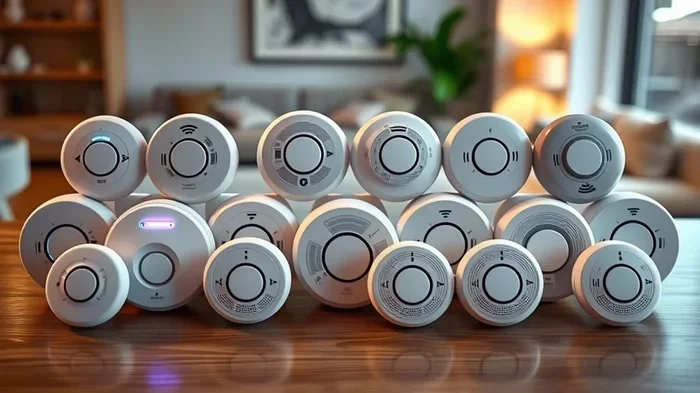
Popular smart smoke detectors include the Nest Protect, the First Alert Onelink Safe & Sound, and the Kidde Wi-Fi enabled models. Each of these works with Alexa in its own way. Some connect directly through Wi-Fi. Others use a bridge device or a smart home hub. We will look at compatibility in more detail later in this article.
Setting Up Alexa Smoke Alarm Alerts
Setting up Alexa smoke alarm notifications is easier than most people think. You do not need to be a tech expert. With the Alexa app on your phone, you can link your smart detector in just a few minutes. Here is a simple step-by-step guide to get you started.
- Open the Alexa app on your phone or tablet.
- Tap Devices at the bottom of the screen.
- Select the plus icon and choose Add Device.
- Pick your smoke detector brand from the list of supported devices.
- Follow the on-screen instructions to connect the detector to your Wi-Fi network.
- Enable the relevant skill in the Alexa Skills section if required.
- Test the connection by triggering a test alarm and confirming you receive a notification.
Once connected, you can customize how alerts work. Go to the Devices tab, select your smoke detector, and adjust notification preferences. You can choose to receive alerts on your phone, hear voice announcements on your Echo speakers, or both. This flexibility is what makes Alexa fire detection setup so powerful and user-friendly.
Quick Tips for a Smooth Setup
- Make sure your Wi-Fi signal is strong near the smoke detector location.
- Place your Echo device in a central area so alerts reach every room.
- Name your smoke detector clearly in the Alexa app for easy identification.
- Test your setup at least once a month to ensure everything works.
- Keep your Alexa app updated to the latest version for the best compatibility.
Alexa Guard And Its Fire Safety Features
Alexa Guard is one of the most useful built-in features for home automation safety. When you arm Alexa Guard, your Echo devices listen for specific sounds. These include the sound of a smoke alarm or a carbon monoxide detector. Even if you are not at home, Alexa Guard can pick up these sounds and send you an alert on your phone.
How Alexa Guard Listens For Danger
Here is how it works in practice. You leave for work in the morning. You say, “Alexa, I’m leaving.” Alexa Guard activates. It puts your Echo devices into a listening mode. They are not recording conversations. They are only scanning for specific alarm sounds. If Alexa hears a smoke alarm going off, it sends you a notification immediately. The alert includes a clip of the sound so you can verify what happened.
This feature is incredibly valuable for fire prevention. Even when you are miles away from home, you know if something is wrong. You can call a neighbor, contact emergency services, or check your smart security cameras. Alexa Guard turns your smart speakers into a passive monitoring system that works around the clock.
To enable Alexa Guard, open the Alexa app, go to Settings, and select Guard. Choose Home or Away mode. You can also set up custom routines that trigger when Guard detects an alarm. For example, you could set a routine that sends an SMS to a family member or flashes your smart lights red.
Compatible Smoke Alarms And Smart Devices
Not every smoke alarm works with Alexa. You need a device that supports smoke alarm compatibility with Amazon’s ecosystem. Here is a look at some of the best options available right now.
| Device | Connection Type | Alexa Compatible | Key Feature |
|---|---|---|---|
| Google Nest Protect | Wi-Fi | Yes | Voice alerts and self-testing |
| First Alert Onelink Safe & Sound | Wi-Fi | Yes | Built-in Alexa speaker |
| Kidde Wi-Fi Smoke Detector | Wi-Fi | Yes | Affordable and reliable |
| Roost Smart Battery | Wi-Fi (battery) | Yes | Retrofits any standard alarm |
| Amazon Echo with Built-in Detector | Wi-Fi | Yes | Full Alexa integration |
The Roost Smart Battery is a standout option for many homeowners. It replaces the battery inside your existing smoke detector. Once connected to Wi-Fi, it sends alerts to Alexa and your phone. This is a great choice if you do not want to replace your entire smoke alarm system. It is a simple upgrade that adds smart alerts to your current setup.
When shopping for a smoke detector compatibility check, always look for the “Works with Alexa” badge on the product packaging. This ensures a seamless setup experience. You can also check Amazon’s official list of compatible devices on their website for the most up-to-date options.
Alexa Routines For Enhanced Fire Safety
One of the best things about Alexa is its ability to automate tasks. With Alexa routines, you can create custom responses to smoke alarm events. This takes your smart home safety setup to the next level. Instead of just hearing a beep, you can trigger a full-house response that wakes everyone up and guides them to safety.
Example Routine: Smoke Detected
Here is a practical example of a routine you can set up. When your smart smoke detector senses smoke, Alexa can:
- Announce “Smoke detected in the kitchen” on every Echo speaker in the house.
- Turn on all smart lights to full brightness to help you see in the dark.
- Send a push notification to your phone with a detailed alert.
- Unlock your smart door locks so escape routes are clear.
- Call a preset emergency contact through the Alexa app.
To create this routine, open the Alexa app, go to Routines, and tap the plus icon. Set the trigger to your smoke detector. Then add the actions you want Alexa to perform. You can get as creative as you want. The key is to make the response fast, clear, and helpful in an emergency situation.
Using Alexa Skills For Fire Safety
Alexa skills are like apps for your Echo device. There are several skills designed specifically for fire safety and household safety. For example, the American Red Cross has a First Aid skill that provides guidance on what to do during a fire. You can also find skills that test your smoke detector or remind you to replace batteries on a schedule. These small additions can make a big difference in your overall home security system.
Common Mistakes And How To Avoid Them
Even with the best setup, there are common pitfalls that can reduce the effectiveness of your Alexa smoke alarm notification system. Here are some mistakes to watch out for and how to fix them.
- Weak Wi-Fi Signal: If your smoke detector has a weak connection, alerts may be delayed or fail entirely. Place your router close to the detector or use a Wi-Fi extender.
- Ignoring Test Alerts: Many people set up their system and never test it. Make it a monthly habit to trigger a test alarm and confirm Alexa responds correctly.
- Using Only One Echo Device: If you only have one Echo in the house, alerts may not reach every room. Spread Echo devices throughout your home for full coverage.
- Forgetting to Update Firmware: Both your smoke detector and Alexa app receive updates. Keep them current to ensure the best performance and security.
- Relying on Alexa Alone: Alexa is a supplement, not a replacement for traditional smoke detectors. Always keep battery-powered or hardwired detectors in place as your primary safety equipment.
Expert Insights On Smart Home Fire Safety
Fire safety experts agree that smart technology adds a valuable layer of protection. According to the National Fire Protection Association, working smoke detectors reduce the risk of dying in a home fire by 55 percent. Adding Alexa smart alerts on top of that can make the difference between a minor incident and a major disaster. The key is to use technology as a tool, not a crutch. Combine smart alerts with regular detector maintenance, fire escape plans, and family safety drills for the best results.
Experts also recommend placing smoke detectors in every bedroom, outside each sleeping area, and on every floor of your home. When these detectors are connected to Alexa, you create a comprehensive emergency alert system that keeps everyone informed and safe. The combination of smart technology and traditional safety practices is the gold standard for modern fire detection.
Can Alexa Replace Traditional Smoke Detectors
This is a question many people ask. The short answer is no. Alexa cannot replace a smoke detector. Alexa does not have the hardware to detect smoke particles in the air. It relies on connected smart detectors to do the sensing work. What Alexa does provide is the communication layer. It takes the data from your smart detector and delivers it to you in a clear, immediate, and actionable way.
Think of it this way. A traditional smoke detector is the eyes and ears. Alexa is the voice that tells you what those eyes and ears have found. Both are important. You need both for a complete home automation safety setup. Always maintain your traditional detectors alongside your smart setup. Replace batteries regularly, test monthly, and replace units every 10 years as recommended by manufacturers.
The Future Of Alexa And Fire Safety
The world of smart home devices is evolving fast. Amazon continues to expand its compatibility list and improve Alexa Guard features. In the near future, we may see even deeper integration between voice assistants and fire safety equipment. Imagine Alexa not only alerting you to smoke but also analyzing air quality, detecting carbon monoxide levels, and coordinating with your home security system in real time. The possibilities are exciting and they point toward a future where our homes are not just connected but genuinely protective.
For now, the current Alexa smoke detector integration options are already impressive. They offer real value, real convenience, and most importantly, real peace of mind. Whether you are a tech enthusiast or someone just starting to explore smart home devices, adding Alexa to your fire safety plan is a smart move.
Final Thoughts
Can Alexa alert you to smoke alarms? Absolutely. With the right smart detector, a solid setup, and a few automated routines, Alexa becomes a powerful ally in your fire safety plan. It gives you voice alerts, smart notifications, and the ability to respond quickly even when you are away from home. The combination of Alexa Guard, Alexa routines, and compatible smoke detectors creates a layered safety system that every modern home can benefit from.
Take the time to set up your system properly. Test it regularly. And remember that technology works best when combined with good old-fashioned safety habits. Keep your detectors maintained, have a fire escape plan, and make sure everyone in your household knows what to do when an alarm sounds. With Alexa as part of your safety toolkit, you are taking a meaningful step toward protecting what matters most. Your family. Your home. Your peace of mind.
Frequently Asked Questions
Can Alexa detect smoke on its own without a smart detector?
No, Alexa cannot detect smoke by itself. It does not have a built-in smoke sensor. You need a compatible smart smoke detector connected to your Wi-Fi network. Alexa then receives the alert from the detector and notifies you through voice commands and phone notifications.
Does Alexa work with all smoke alarm brands?
No, not all smoke alarms work with Alexa. You need a detector that specifically supports Alexa integration. Look for the “Works with Alexa” label when purchasing. Popular compatible brands include Nest, First Alert, Kidde, and Roost. Always check the manufacturer’s compatibility list before buying.
How do I set up Alexa to alert me about my smoke alarm?
Open the Alexa app, go to Devices, tap the plus icon, and select Add Device. Choose your smoke detector brand and follow the setup prompts. Make sure the detector is connected to your Wi-Fi and enable any required Alexa skills. Test the connection by triggering a test alarm and confirming you receive a notification on your phone or Echo speaker.
What is Alexa Guard and how does it help with fire safety?
Alexa Guard is a built-in feature that listens for smoke alarm or carbon monoxide detector sounds when you are away from home. When activated, it sends you a notification with a sound clip if it detects an alarm. This allows you to take action quickly even when you are not at home, adding an extra layer of protection to your fire safety plan.
Can Alexa call emergency services if smoke is detected?
Alexa cannot directly call 911 or emergency services on its own. However, you can set up Alexa routines that call a family member or contact emergency services through a third-party service. Some smart home security systems integrate with Alexa and can automatically dispatch emergency responders. Always have a separate emergency plan in place.
What should I do if my Alexa smoke alert fails to work?
First, check your Wi-Fi connection and make sure the smoke detector is online. Restart both the detector and your Echo device. Update the Alexa app and the detector firmware to the latest versions. If the issue persists, remove the device from the Alexa app and set it up again. You can also contact the detector manufacturer’s support team for troubleshooting help.