Can All Projectors Be Mounted Upside Down With Ease
Not every projector can be mounted upside down easily. While many modern devices support inverted projection, specific models and ventilation designs can create big problems. You must check your projector placement and ceiling mount options before drilling holes. This guide reveals which units work and which do not, so you can enjoy your home theater setup with confidence.
Setting up a home theater is exciting. You want the best image quality projector experience possible. One big question comes up early: can all projectors be mounted upside down? The short answer is no. But the full answer is much more interesting. Many factors decide if your unit can hang from the ceiling.
The idea of hanging your AV equipment from the ceiling is very appealing. It creates a clean, modern look. It also keeps the projector placement out of the way. But the question remains: can all projectors be mounted upside down? The truth is, it depends entirely on your specific model and room setup.
Mounting your AV equipment on the ceiling looks sleek. It frees up floor space and keeps your view clear. However, not every device handles this setup well. Some projectors overheat when flipped. Others show terrible image distortion. Before you buy a mounting bracket, you need to know the rules. This guide walks you through everything you need to know about projector placement and inverted projection. We want you to succeed with your projector installation. We will help you avoid costly mistakes.
Key Takeaways
- Point 1: Not all projectors support inverted projection, so always check the manual first.
- Point 2: Ceiling mounting saves space and creates a more immersive home theater setup.
- Point 3: Ventilation is a major concern when a projector is flipped upside down.
- Point 4: Keystone correction and lens shift help fix image distortion during upside-down mounting.
- Point 5: Short throw and ultra short throw projectors have unique mounting challenges.
- Point 6: Using the right mounting bracket ensures safety and perfect image alignment.
📑 Table of Contents
- Understanding How Projectors Handle Inverted Projection
- Types of Projectors and Their Mounting Capabilities
- When Upside-Down Mounting Fails or Causes Issues
- Step-by-Step Guide to Mounting Your Projector Upside Down
- Quick Tips and Common Mistakes for Projector Setup
- Expert Insights on Long-Term Projector Placement
- Conclusion
Understanding How Projectors Handle Inverted Projection
To answer the question of can all projectors be mounted upside down, you must understand how these machines work. Light shines through a lens. It creates an image on your wall. By default, most projectors flip the image right side up. When you turn the device upside down, the image orientation flips too.
The Optical Mechanics Behind Flipping an Image
The way a projector creates an image is fascinating. A bright light shines inside the machine. This light passes through a tiny image chip. The lens then magnifies that chip onto your wall. When the projector is right side up, the light travels up. The image hits the screen perfectly.
When you flip the projector upside down, the light travels down. The physical image on the lens is now reversed. This is where inverted projection saves the day. The software inside the projector flips the digital image. It matches the physical flip. The result is a right-side-up picture on your projection screen. Without this software feature, you would see an upside-down movie. That is why can all projectors be mounted upside down is not a simple yes or no.
Standard vs. Ceiling Mount Setup
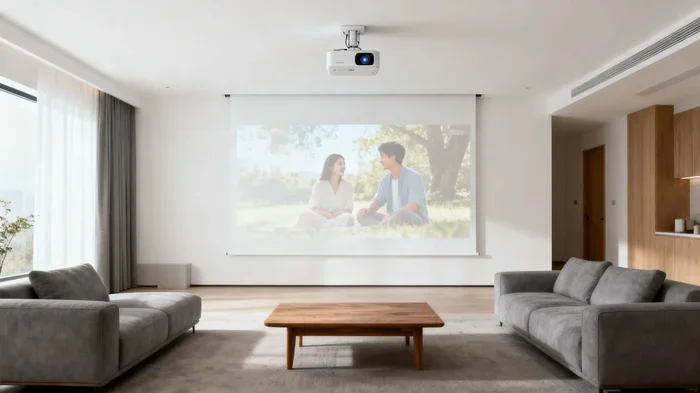
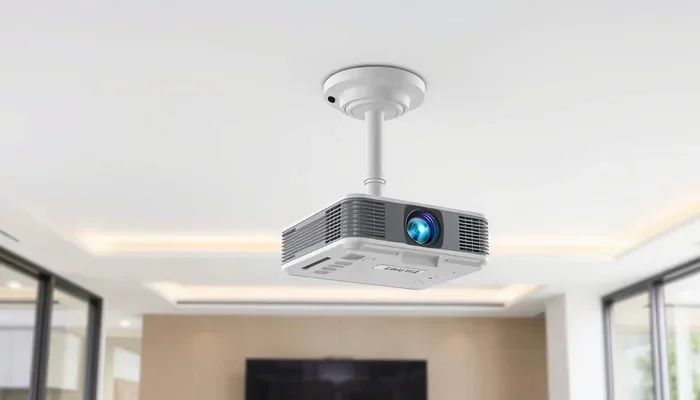
A standard setup places the projector on a table. The lens points forward. The image shines onto a wall or projection screen. A ceiling mount projector setup changes this completely. The device hangs from the ceiling. The lens points straight down. This changes the throw distance and the angle of the light.
Table placement is easy. You just plug it in. Ceiling mounting requires planning. You need to measure the throw distance carefully. The projector must be far enough from the screen. If it is too close, the image is tiny. If it is too far, the image is blurry. Always check your projector specifications before buying a mounting bracket. The throw distance determines how big your picture will be.
Types of Projectors and Their Mounting Capabilities
Not all projectors are built the same way. Some easily handle an upside-down position. Others simply cannot. Let us look at the different types of AV equipment available today. Knowing the type helps you decide if can all projectors be mounted upside down applies to you.
DLP and LCD Projectors
DLP projectors use tiny mirrors. LCD projectors use liquid crystals. Both create great pictures. Most have the image flip feature built-in. You just press a button in the menu. But the hardware is different from the software.
Think about the shape of the projector. When it sits on a table, the bottom vents pull in cool air. The top vents push hot air out. Gravity helps this process. When you flip the projector upside down, the hot air stays at the top. The top is now facing the ceiling. The hot air gets trapped. This is a serious problem for AV equipment longevity. Always check the vent locations before you decide on projector placement.
Laser Projectors and LED Models
Laser and LED projectors are becoming very popular. They are bright and last a long time. Many of these models support ceiling mounting with ease. They often have better cooling systems than traditional bulb models.
Still, you must read the manual. Some laser units have sensitive optics on the bottom. Flipping them blocks the intake vents. This can cause the machine to shut down. Always verify the projector installation guidelines. A ceiling mount projector should have airflow in all directions. Check the ventilation projector design before you buy.
Lamp vs LED and Laser Light Sources
Old projectors used bright lamps. These lamps get very hot. Newer models use LED or laser light sources. They run much cooler. If you have an older lamp model, upside-down mounting is risky. The heat buildup can melt internal parts. LED and laser models handle inverted projection much better. They have ventilation projector designs that work in any position.
When Upside-Down Mounting Fails or Causes Issues
Sometimes the answer to can all projectors be mounted upside down is a firm no. Why does this happen? Several factors can make ceiling mounting a bad idea. You must know these risks before you drill a hole in your ceiling.
Ventilation and Overheating Risks
Projectors generate a lot of heat. They need constant airflow to stay cool. When a projector sits on a table, air flows around it freely. When you flip it upside down, the hot air rises. It gets trapped against the ceiling or the projector’s own body.
This trapped heat causes the internal temperature to spike. The projector might turn off automatically. This is a safety feature. It protects the device from melting. If your projector does not have side or rear vents, do not mount it upside down. Good ventilation projector design is essential for long-term use. You want your AV equipment to last for years.
Heat is the enemy of electronics. A projector overheating will shut itself down. This is a safety mechanism. It prevents a fire. If your projector keeps turning off during a movie, check the vents. Dust and hair block the airflow. You must clean the filters regularly. This is true for any setup. But it is even more important for a ceiling mount projector.
When the projector hangs upside down, dust from the ceiling falls into the vents. This dust clogs the filters fast. You should clean the filters every few weeks. This keeps the airflow strong. Strong airflow means cool electronics. Cool electronics mean a long life for your AV equipment. Do not ignore this simple maintenance task.
Keystone Distortion and Image Quality Loss
When a projector is not perfectly straight, the image looks like a trapezoid. This is called keystone distortion. You can fix this with keystone correction. But this feature has limits.
Heavy keystone correction reduces image quality projector performance. It makes the picture look pixelated. It removes fine details. If your projector placement is slightly off, the image suffers. For the best home theater setup, try to mount the projector perfectly centered. This avoids the need for heavy digital corrections. You want the sharpest picture possible on your projection screen.
Step-by-Step Guide to Mounting Your Projector Upside Down
If your device supports it, mounting it on the ceiling is rewarding. Follow these steps for a perfect projector installation. You will enjoy a clean, professional look in your room.
Choosing the Right Ceiling Mount Bracket
First, you need a strong mounting bracket. Not all brackets are the same. Look for one that fits your specific model. Check the VESA mount pattern on the back of your projector. This pattern is a set of screw holes.
The bracket should allow you to adjust the angle. You need to point the lens right at the screen. Some brackets offer projector lens shift features. This lets you move the image up or down without moving the whole projector. This is very helpful for perfect projector placement. A good bracket makes the projector ceiling mount process much easier.
- Measure the distance from the ceiling to the screen.
- Choose a bracket that fits your VESA holes.
- Ensure the bracket allows for tilt adjustments.
- Check that the bracket supports the weight of your projector.
- Install the bracket into a ceiling joist for safety.
Dealing with Cable Management
When you mount a projector upside down, cables hang down from the ceiling. This can look messy. It can also be a safety hazard. You need a plan for your cables before you start the projector installation.
Use cable ties to bundle the wires. Run the cables through the ceiling if possible. This hides them completely. If you cannot run them inside, use a cable cover. These are flat strips that stick to the wall. They hide the wires and protect them from damage. Good cable management makes your home theater setup look professional.
Also, make sure the cables are long enough. You do not want to stretch them. Stretching cables can break the connections. Measure the distance from the ceiling to the projection screen first. Add a few extra feet just in case. It is always better to have too much cable than too little.
Adjusting Projector Settings for Inverted Projection
Once the bracket is on the ceiling, you must change the settings. Every projector menu has an inverted projection option. This is sometimes called ceiling mount mode.
Turn this feature on before you turn the projector upside down. If you do not, the image will be upside down on the screen. You will have to flip it in the menu while looking at a reversed picture. It is much easier to set it up first. This simple step saves a lot of frustration during your projector installation.
Also, turn off any keystone correction if possible. Use the physical lens shift instead. This keeps the image quality projector at its highest level. Digital corrections always degrade the picture slightly. You paid for a great image quality projector, so use it properly.
Quick Tips and Common Mistakes for Projector Setup
Setting up a ceiling mount projector can be tricky. Many people make simple mistakes. Here is how to avoid them and get the best picture.
Quick Tips for Perfect Alignment
- Use a laser level: This ensures your bracket is perfectly straight. A crooked bracket makes the image trapezoid-shaped.
- Check the throw ratio: Make sure the projector is far enough from the screen. A short throw projector needs less space.
- Test before drilling: Hold the projector in place first. Check the image size on the wall before you commit.
- Label your cables: Ceiling wiring can get messy. Keep things organized so you know which cable goes where.
- Consider a short throw projector: These need less distance from the projection screen. Great for small rooms.
- Mind the image orientation: Always set the menu to inverted before powering on the device.
- Use a projector lens shift: This adjusts the picture without moving the whole projector. It keeps the image sharp.
Common Mistakes to Avoid
The biggest mistake is ignoring the manual. The manual tells you if the unit supports inverted projection. Another mistake is blocking the vents. Do not mount the projector right next to a wall. Air needs room to flow. Finally, do not forget to factor in the throw distance for an ultra short throw projector. These models sit very close to the screen and cannot always be mounted upside down. Their lenses are designed for a specific angle.
Also, never use a cheap bracket. A strong mounting bracket holds the weight securely. A falling projector can be very dangerous. Protect your AV equipment investment by spending a little extra on quality hardware. Your safety matters more than saving a few dollars.
Expert Insights on Long-Term Projector Placement
Experts in AV equipment always stress one thing: airflow is king. A projector overheating issue can ruin your movie nights. If you mount your device upside down, clean the filters often. Dust falls into the vents from the ceiling. This dust blocks the airflow and causes overheating.
Also, think about the home theater setup acoustics. Some projectors have loud fans. When the projector is above your head, the fan noise might distract you. Choose a model with quiet cooling. This makes your home theater setup much more enjoyable. You want to hear the dialogue, not the fan.
Another expert tip is to watch the ambient light. The image quality projector you choose must fight the room light. A ceiling mount projector is often higher than a table setup. This changes how light hits the screen. You might need a brighter model to compensate. Test the picture in your actual room before you finalize the projector placement.
Finally, consider the image orientation carefully. You want the screen to look perfect. Take your time with the projector placement. A little extra planning now saves you headaches later. The goal is a seamless home theater setup that looks like a commercial cinema. When you get it right, watching movies is pure magic.
Conclusion
So, can all projectors be mounted upside down? The answer depends on your specific model. Many modern devices support inverted projection with ease. But ventilation and image quality projector concerns mean you must check first. Always read the manual and choose the right mounting bracket.
A proper ceiling mount projector setup looks amazing. It saves space and creates a true cinema feel. Just remember to plan your throw distance and manage your airflow. With the right steps, your home theater setup will be a huge success. Enjoy your movies and happy watching!
Frequently Asked Questions
Can I mount any projector upside down?
No, not every projector supports inverted projection. You must check the manual first. Some models lack the software feature to flip the image correctly.
What happens if I mount a projector upside down without the setting?
The image on your screen will be upside down. This makes watching movies very difficult. Always enable the inverted projection mode before you flip the device.
Why does my projector overheat when mounted on the ceiling?
Hot air rises and gets trapped against the ceiling. This blocks the ventilation projector needs to cool down. Always ensure your AV equipment has enough airflow.
Is a short throw projector good for ceiling mounting?
Yes, but they have strict placement rules. The throw distance is very short. Check if the manufacturer allows upside-down mounting for that specific model.
How do I fix keystone distortion after mounting?
You can use the keystone correction setting in the menu. However, this reduces the image quality projector fans protect. It is better to adjust the physical mounting bracket angle instead.
What is the best mounting bracket for a ceiling?
Look for a bracket that matches your VESA pattern. It should also allow for tilt and swivel adjustments. A sturdy bracket keeps your ceiling mount projector safe and secure.