Are Doorbell Cameras Always Recording to Keep You Safe
Doorbell cameras do not always record. Most smart doorbells use motion detection or event-triggered recording to save storage and battery life. Understanding how your doorbell camera records helps you balance home security with personal privacy. This guide covers recording modes, privacy settings, and tips to get the most from your device.
Key Takeaways
- Doorbell cameras are not always on: Most record only when motion is detected or when you press the doorbell button.
- Recording modes vary by brand: Continuous, event-triggered, and manual modes offer different levels of coverage.
- Privacy settings give you control: You can adjust sensitivity, set privacy zones, and manage cloud storage preferences.
- Storage options matter: Cloud and local storage each have pros and cons for saving your video footage.
- Technology connects many fields: The computing power behind doorbell cameras is part of a broader tech evolution, similar to how computers are used in medicine to improve safety and monitoring.
- Legal considerations exist: Recording laws vary by location, so knowing your rights is essential.
- Regular maintenance helps: Keeping your device updated ensures reliable recording and better home security.
📑 Table of Contents
- How Doorbell Cameras Work
- Are Doorbell Cameras Always Recording?
- Different Recording Modes Explained
- Privacy Concerns and How to Manage Them
- Benefits of Doorbell Camera Recording
- How to Choose the Right Doorbell Camera
- Common Mistakes People Make with Doorbell Cameras
- Expert Tips for Better Doorbell Camera Security
- The Future of Doorbell Camera Technology
- Key Takeaways
How Doorbell Cameras Work
Doorbell cameras have changed the way we think about home security. These smart devices sit right at your front door. They let you see who is there without opening the door. Many people install them for peace of mind. But how do they actually work?
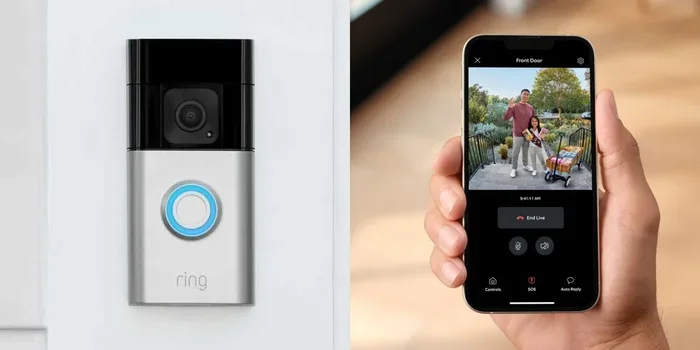
At their core, doorbell cameras combine a camera, a motion sensor, and a speaker. When someone approaches your door, the motion sensor wakes up the camera. It starts recording a short video clip. Some models also offer two-way audio. This means you can talk to the person at your door from anywhere.
The technology behind these devices has come a long way. Early models had low resolution and limited range. Today’s doorbell cameras offer high definition video. Many include night vision too. The computing power inside these small devices is impressive. In fact, the same kind of technology that drives modern computing has found its way into home security. Just as technology is used in fields like healthcare, where computers are used in medicine to monitor patients and improve outcomes, the same digital advances power your doorbell camera.
Most doorbell cameras connect to your home Wi-Fi network. They send video to the cloud or to a local storage device. This connection is what makes them so convenient. You can check your camera from your phone while at work or on vacation.
Are Doorbell Cameras Always Recording?
This is the question most homeowners ask. The short answer is no. Doorbell cameras are not always recording. Most of the time, they stay in a standby mode. They wait for a trigger before they start capturing video.
But why don’t they record all the time? There are a few good reasons. First, continuous recording uses a lot of storage space. Second, it drains the battery faster. Third, it raises privacy concerns. No one wants a camera watching every second of their day.
Instead, most doorbell cameras use smart detection. They only record when something happens. This is called event-triggered recording. It saves storage and battery life. It also makes it easier to find important footage later.
That said, some models do offer continuous recording. These are usually wired cameras with a constant power source. They can record 24 hours a day. But even then, most people set them to record only when motion is detected.
What Triggers a Doorbell Camera to Record?
Several things can wake up your doorbell camera and start recording:
- Motion detection: The camera senses movement within its field of view.
- Doorbell press: Someone rings your doorbell, and the camera starts recording.
- Sound detection: Some models respond to loud noises like breaking glass.
- Manual activation: You can start recording from your phone app anytime.
- Scheduled recording: You can set times when the camera is more sensitive.
Each trigger type serves a different purpose. Motion detection is the most common. It catches visitors before they even ring the bell. Doorbell press recording ensures you capture the full interaction. Sound detection adds an extra layer of security.
Different Recording Modes Explained
Not all recording modes are the same. Different doorbell cameras offer different options. Understanding these modes helps you choose the right setup for your home.
Event-Triggered Recording
This is the default mode for most smart doorbells. The camera stays off until it detects motion or a doorbell press. Then it records a short clip, usually between five and thirty seconds. Some cameras record longer if the motion continues.
Event-triggered recording is great for saving storage. It also saves battery life on wireless models. Most homeowners find this mode works well for everyday use.
Continuous Recording
Continuous recording means the camera never stops. It captures video 24 hours a day, seven days a week. This mode is common with wired doorbell cameras. They have a constant power source, so battery life is not an issue.
Continuous recording gives you the most complete picture. You can review footage from any time of day. But it requires a lot of storage space. You may need a larger SD card or a cloud storage plan.
Manual Recording
With manual recording, you decide when to start and stop. You can open your app and tap the record button. This mode is useful when you are expecting a delivery. Or when you want to check on something specific.
Manual recording gives you the most control. But it also requires you to be active. If you forget to start recording, you might miss something important.
Comparison of Recording Modes
| Recording Mode | When It Records | Storage Used | Battery Impact | Best For |
|---|---|---|---|---|
| Event-Triggered | Motion or doorbell press | Low | Low | Everyday home security |
| Continuous | All the time | High | None (wired only) | Complete coverage |
| Manual | When you start it | Low to Medium | Low | Targeted monitoring |
Each mode has its place. Most people use event-triggered recording as their primary mode. It offers the best balance of coverage and efficiency.
Privacy Concerns and How to Manage Them
Privacy is a big deal when it comes to doorbell cameras. After all, your camera faces the street. It may capture neighbors, pedestrians, and passing cars. This raises important questions about surveillance and personal rights.
Most doorbell camera makers understand these concerns. They build privacy settings into their devices. You can adjust these settings to control what your camera records and who can see it.
Privacy Settings You Should Know About
- Privacy zones: You can block out certain areas from recording. For example, you might block your neighbor’s window.
- Motion sensitivity: Lower the sensitivity so the camera ignores small movements like swaying trees.
- Time-based privacy: Set the camera to stop recording during certain hours.
- Cloud storage controls: Decide who can access your stored video footage.
- Indicator lights: Make sure your camera has a light that shows when it is recording.
Taking the time to set up these privacy features makes a big difference. You get the security you need without feeling like you are being watched all the time.
Legal Considerations for Recording
Recording laws vary from place to place. In most areas, you can record video on your own property. But audio recording is different. Many states and countries require two-party consent for audio recording.
This means you may need to tell visitors that they are being recorded. Check your local laws before installing a doorbell camera. Understanding the rules helps you stay on the right side of the law.
Some neighborhoods also have rules about security cameras. Homeowner associations may have guidelines. Always check with your HOA before mounting a doorbell camera.
Benefits of Doorbell Camera Recording
Even though doorbell cameras do not record all the time, they still offer huge benefits. Let us look at why so many homeowners choose to install them.
Deterring Package Thieves
Package theft is a growing problem. Doorbell cameras help stop thieves in their tracks. When a porch pirate sees a camera, they are less likely to steal your packages. Even if they do, the video footage can help police find them.
Monitoring Children and Pets
Doorbell cameras let you see who comes to your door. This is great for watching young children. You can make sure they do not open the door to strangers. You can also check on pets that go near the front door.
Verifying Visitors
Not sure who is at the door? Check your phone. You can see the visitor before you open the door. This is especially helpful after dark. Night vision doorbell cameras make this easy.
Providing Evidence
If something happens at your door, the recorded video can serve as evidence. Police can use the footage to investigate. Insurance companies may also want to see the video. This makes doorbell cameras a valuable tool for home security.
How to Choose the Right Doorbell Camera
Not all doorbell cameras are created equal. Choosing the right one depends on your needs and budget. Here are some factors to consider.
Wireless vs. Wired
Wireless doorbell cameras are easy to install. They run on batteries or solar power. Wired cameras connect to your existing doorbell wiring. They offer continuous power and often better video quality.
If you want continuous recording, a wired model is a better choice. If you want easy installation, go wireless. Both types can provide excellent home security.
Cloud vs. Local Storage
Cloud storage keeps your videos on remote servers. It is convenient and accessible from anywhere. But it usually requires a monthly subscription. Local storage saves videos to an SD card or a base station. It is often cheaper in the long run.
Some cameras offer both options. This gives you flexibility. You can choose the storage method that works best for you.
Video Quality and Night Vision
Look for a camera with at least 1080p resolution. This gives you clear, detailed video. If you want even better quality, consider 2K or 4K models. Night vision is also important. You want your camera to work well after dark too.
Two-Way Audio
Two-way audio lets you speak to visitors through the camera. This is a handy feature. You can talk to delivery drivers. You can tell solicitors to leave flyers. It adds a layer of convenience to your home security setup.
Smart Home Integration
Many doorbell cameras work with smart home systems. You can connect them to Amazon Alexa, Google Home, or Apple HomeKit. This lets you automate your home security. For example, you can set up routines that turn on lights when motion is detected.
The technology behind these integrations is part of the broader smart home ecosystem. It connects devices in ways that make daily life easier and safer. Much like how technology advances in fields such as medicine, where computers are used in medicine to create smarter monitoring tools, smart home devices continue to evolve and improve.
Common Mistakes People Make with Doorbell Cameras
Avoiding common mistakes helps you get the most from your doorbell camera. Here are a few things to watch out for.
- Ignoring firmware updates: Updates fix bugs and improve security. Always keep your device up to date.
- Placing the camera too high: If the camera is too high, it may miss faces. Mount it at a comfortable height.
- Not adjusting motion sensitivity: Default settings may cause too many false alerts. Fine-tune the sensitivity to your environment.
- Forgetting to check storage: Make sure you have enough storage space. Full storage means missed recordings.
- Neglecting privacy settings: Take a few minutes to set up privacy zones and access controls.
- Choosing the wrong power source: Make sure your camera has a reliable power source for consistent recording.
Small mistakes can lead to big problems. Taking the time to set up your camera properly pays off in the long run.
Expert Tips for Better Doorbell Camera Security
Want to get the most out of your doorbell camera? Follow these expert tips.
- Test your camera regularly. Press the doorbell and check the video. Make sure the footage is clear and the motion detection works.
- Set up activity zones. Most cameras let you choose specific areas to monitor. Focus on your driveway and front porch.
- Use a strong password. Protect your camera from hacking. Use a unique, complex password for your account.
- Enable two-factor authentication. This adds an extra layer of security to your camera app.
- Check your Wi-Fi signal. A weak signal means poor video quality. Consider a Wi-Fi extender if needed.
- Review footage weekly. Make it a habit to check your camera history. This helps you spot anything unusual.
These simple steps make a big difference. They help ensure your doorbell camera works when you need it most.
The Future of Doorbell Camera Technology
Doorbell cameras are getting smarter every year. New features are constantly being added. Here are some trends to watch for.
Artificial intelligence is playing a bigger role. AI can distinguish between people, animals, and packages. This reduces false alerts. Some cameras now use facial recognition to identify familiar faces. This means you can get alerts for strangers only.
Battery life is also improving. Solar-powered doorbell cameras are becoming more popular. They never need a battery change. Wired cameras are getting better video quality too. 4K resolution is becoming more affordable.
Integration with other smart home devices is another exciting trend. Doorbell cameras are working with smart locks, lights, and alarms. This creates a seamless home security system. All these devices communicate with each other to keep you safe.
As technology continues to evolve, so will the capabilities of these devices. The same spirit of innovation that drives progress in many fields, from computers in medicine to everyday consumer tech, ensures that home security will keep getting better.
Key Takeaways
- Doorbell cameras are not always recording: Most use motion detection or event triggers to save storage and battery.
- Multiple recording modes exist: Choose between event-triggered, continuous, and manual recording based on your needs.
- Privacy settings give you control: Adjust sensitivity, set zones, and manage access to protect your privacy.
- Legal rules apply: Know your local laws about video and audio recording before installing a camera.
- Regular maintenance is key: Keep your device updated and review settings periodically for best performance.
- Technology is always improving: AI, better batteries, and smarter integrations are making doorbell cameras more effective every year.
Frequently Asked Questions
Do doorbell cameras record 24 hours a day?
Most doorbell cameras do not record 24 hours a day. They use motion detection or event-triggered recording. Only wired models with continuous recording mode capture video all day long. Even then, most homeowners set them to record only when motion is detected.
Can I check my doorbell camera recordings from anywhere?
Yes, you can check your recordings from anywhere with an internet connection. Most doorbell cameras send video to the cloud. You can access it through the manufacturer’s app on your phone or computer. Just make sure you have a strong Wi-Fi connection at home.
How long do doorbell cameras store video footage?
Storage length depends on your plan and settings. Free plans usually store clips for 24 to 72 hours. Paid cloud plans can store footage for 30 days or longer. Local storage on an SD card depends on the card size and how much video you record.
Is it legal to record with a doorbell camera?
Video recording on your own property is generally legal in most places. However, audio recording laws are stricter. Many areas require consent from all parties being recorded. Always check your local laws to make sure you are following the rules.
What happens if my doorbell camera runs out of storage?
When storage is full, most cameras overwrite the oldest footage. This means you may lose older recordings. To avoid this, upgrade your storage plan or use a larger SD card. Regularly reviewing and saving important clips also helps.
Can I turn off my doorbell camera’s recording feature?
Yes, most doorbell cameras let you turn off recording. You can do this through the app settings. Some cameras also have a physical privacy shutter or button. This gives you full control over when your camera is active.
=== CONCLUSION ===
So, are doorbell cameras always recording? The answer is no. Most doorbell cameras use smart detection to record only when something happens. This approach saves storage, preserves battery life, and respects your privacy. At the same time, it still gives you powerful home security when you need it most.
Understanding your camera’s recording modes and privacy settings puts you in control. You can customize how and when your doorbell camera works. This knowledge helps you get the best value from your device.
Doorbell cameras are a smart addition to any home. They deter theft, help you monitor visitors, and provide valuable evidence if something goes wrong. With the right setup and regular maintenance, your doorbell camera will keep you and your family safe for years to come.
Take the time to explore your camera’s features today. A few small adjustments can make a big difference in your home security and peace of mind.