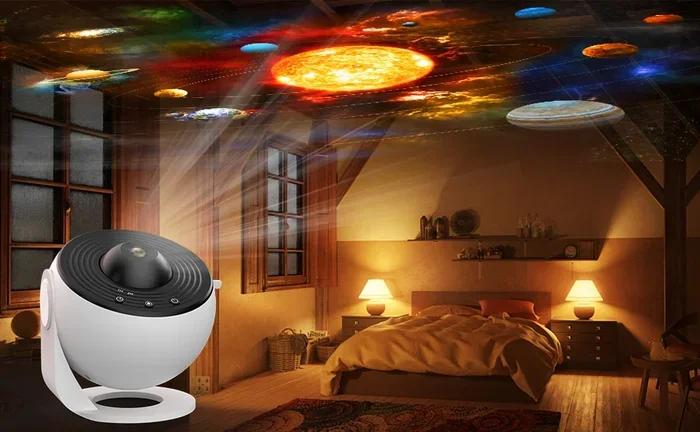
Can I Keep My Galaxy Projector On All Night Safely
Yes, you can keep your galaxy projector on all night, but there are important safety and comfort factors to consider. Most modern galaxy projectors are designed with built-in safety features that prevent overheating during extended use. However, running your projector overnight every night may shorten its lifespan and affect your sleep quality. This guide covers everything you need to know about safe all-night projection.
There is something magical about lying in bed while a galaxy projector paints stars and nebula clouds across your ceiling. People love these devices for relaxation, bedtime routines, and creating a cozy atmosphere in any room. But one question comes up again and again: can I keep my galaxy projector on all night safely? The short answer is yes, but there are important details you should know before you leave it running while you sleep.
Galaxy projectors have become incredibly popular in recent years. They transform any room into a personal planetarium. Whether you use a star projector for meditation, a nebula projector for mood lighting, or an ambient projector to help your kids fall asleep, understanding how to use them safely overnight is essential. This article covers safety, sleep impact, energy use, and practical tips for all-night projection.
You will learn what happens inside your device during long hours of operation. You will also discover simple steps to protect your investment and improve your sleep quality. Let us dive into everything you need to know about running your galaxy projector overnight.
Key Takeaways
- Safe to Run Overnight: Most galaxy projectors have safety mechanisms that allow extended use without immediate danger.
- Overheating Is a Real Risk: Poor ventilation or blocked vents can cause your projector to overheat during long sessions.
- Sleep Quality Matters: Ambient light from a projector may interfere with melatonin production and deep sleep cycles.
- Energy Costs Add Up: Running a projector all night increases electricity usage, though the cost remains relatively low.
- Timer Features Help: Using built-in timers or smart plugs can protect your device and save energy overnight.
- Kids Love It: Galaxy projectors make excellent night lights for children’s rooms when used safely and at lower brightness.
- Maintenance Extends Life: Regular cleaning and proper storage significantly increase your projector’s overall lifespan.
📑 Table of Contents
- What Is a Galaxy Projector and Why Do People Love Them?
- Is It Safe to Run Your Galaxy Projector All Night?
- How All-Night Use Affects Your Projector’s Lifespan
- Tips for Running Your Galaxy Projector Overnight Safely
- How All-Night Projection Affects Sleep Quality
- Energy Consumption and Cost of Running a Galaxy Projector All Night
- Common Mistakes People Make When Using Galaxy Projectors Overnight
- Expert Insights on Overnight Galaxy Projector Use
- Final Thoughts: Can I Keep My Galaxy Projector On All Night?
What Is a Galaxy Projector and Why Do People Love Them?
A galaxy projector is a device that uses LED lights and rotating lenses to project moving star fields and nebula patterns onto walls and ceilings. The result is a calming, immersive display that mimics the night sky. These devices come in many shapes and sizes, from compact units to larger models with built-in speakers.
People use galaxy projectors for many reasons:
- Relaxation and meditation: The gentle movement of stars helps calm the mind.
- Kids room decor: Children love sleeping under a projected galaxy.
- Home theater ambiance: A galaxy ceiling adds a cinematic feel to movie nights.
- Sleep aid: Soft ambient light can help some people fall asleep faster.
- Party and event lighting: Galaxy projectors create stunning visual effects for gatherings.
Most modern devices use LED technology, which produces less heat than older bulb-based systems. This makes them better candidates for extended use. However, LED does not mean heat-free. Every electronic device generates some warmth during operation, and understanding this is key to using your projector safely overnight.
How Does a Galaxy Projector Work?
Inside a galaxy projector, a bright LED light shines through rotating gears or holographic discs. These components split and shape the light into star and nebula patterns. A small motor spins the disc, creating the illusion of a moving sky. The entire process is energy-efficient, but the motor and LED both produce heat over time.
This is why ventilation matters. When you run your projector for several hours, that heat needs somewhere to go. Devices with good airflow designs handle long sessions much better than sealed units with poor ventilation.
Is It Safe to Run Your Galaxy Projector All Night?
The safety question is the most important one, and it deserves a thorough answer. Can I keep my galaxy projector on all night without risking damage or danger? In most cases, yes. Modern projectors are built with safety features that protect against common risks.
However, “safe” does not mean “risk-free.” Every device has limits, and understanding those limits helps you make smart choices. Let us look at the main safety considerations.
Overheating Risks and Prevention
Overheating is the biggest concern with any electronic device running for extended periods. Galaxy projectors are no exception. When a projector runs for 8 or more hours, internal components heat up. If the heat cannot escape, it builds up and can damage the LED chip, the motor, or even the housing.
Here is what you can do to prevent overheating:
- Place your projector on a flat, hard surface with open air around it.
- Never cover the projector with a cloth or blanket during use.
- Keep vents unobstructed and free of dust.
- Avoid placing the projector near curtains, papers, or other flammable materials.
- Use the projector in a room with some airflow, like a room with a cracked window or a fan.
Most quality LED projectors have built-in thermal protection. This means the device will automatically shut off if it detects dangerous temperatures. However, cheaper models may lack this feature. Always check your product manual for safety specifications.
Fire Hazards to Be Aware Of
While rare, fire hazards can occur with any electronic device left unattended. The risk increases if:
- The projector is placed on or near soft surfaces like beds or couches.
- Vents are blocked by objects or fabric.
- The device is a low-quality, uncertified product without safety certifications.
- The projector is old, damaged, or has frayed wiring.
To minimize fire risk, always use your projector on a stable, heat-resistant surface. Unplug it when you leave the room for extended periods. And never ignore unusual smells, sounds, or excessive heat from the device.
How All-Night Use Affects Your Projector’s Lifespan
Running your galaxy projector every night for hours on end will affect its longevity. This does not mean it will break immediately, but consistent long-hour use does add wear and tear to internal components.
Understanding projector lifespan helps you set realistic expectations and plan for maintenance.
LED vs. Bulb-Based Projectors
Most modern galaxy projectors use LED lights. LEDs can last tens of thousands of hours, which means running one all night every night for several years is generally fine. Bulb-based projectors, on the other hand, have much shorter lifespans and generate more heat.
If your projector uses a replaceable bulb, all-night use will wear that bulb out faster. LED models handle extended use much better. Here is a quick comparison:
| Feature | LED Galaxy Projector | Bulb-Based Projector |
|---|---|---|
| Lifespan | 20,000+ hours | 2,000-5,000 hours |
| Heat Output | Low | Moderate to High |
| Energy Use | Low | Moderate |
| Overnight Safety | Generally Safe | Use with Caution |
| Replacement Cost | Rarely Needed | Bulb Replacement Required |
For most users, an LED galaxy projector is the safest and most practical choice for overnight use. The low heat output and long lifespan make it ideal for night light applications in kids rooms or relaxation spaces.
Motor Wear and Moving Parts
The rotating mechanism inside a galaxy projector uses a small motor. Running that motor for 8+ hours every night will gradually wear it down. Over months, you might notice the rotation becomes slower or noisier. This is normal wear and does not necessarily mean the device is failing.
To reduce motor strain, consider using your projector on a lower speed setting overnight. Slower rotation means less motor work, which extends the life of the moving parts.
Tips for Running Your Galaxy Projector Overnight Safely
If you decide to keep your projector running all night, following a few simple best practices will keep you and your device safe. These quick tips are easy to implement and make a big difference.
Use a Built-In Timer
Many galaxy projectors come with built-in timers. These allow you to set the device to turn off after 1, 2, 4, or 8 hours. Using the timer is one of the best ways to protect your projector and save energy. If your model does not have a timer, you can plug it into a smart plug with a scheduling feature. This lets you set automatic on and off times without touching the device.
Choose the Right Brightness Level
Running your projector at full brightness all night is unnecessary and generates more heat. Most galaxy projectors offer adjustable brightness settings. For overnight use, set the brightness to 30-50%. This provides a gentle, soothing glow that is perfect for sleep while reducing strain on the LED and motor.
Keep It Clean and Dust-Free
Dust buildup inside your projector can block vents and cause overheating. Regular cleaning extends your device’s life and improves safety. Use a soft, dry cloth to wipe the exterior. If your model has a removable lens cover, gently clean it with compressed air to clear any dust from internal components.
Place It on a Stable Surface Away from Flammable Items
This point cannot be stressed enough. Your projector needs airflow, and flammable items near the device create unnecessary risk. A wooden table or shelf works well. Avoid placing the projector on beds, pillows, or fabric-covered furniture during overnight use.
Check for Safety Certifications
Before purchasing a galaxy projector, look for safety certifications like UL, CE, or FCC. These marks indicate the device has been tested for electrical safety and meets industry standards. Cheap, uncertified products may lack thermal protection and pose greater risks during extended use.
How All-Night Projection Affects Sleep Quality
This is a topic many people overlook. While a galaxy projector creates beautiful ambient light, that light can affect your sleep in both positive and negative ways.
The Role of Melatonin
Your body produces melatonin, a hormone that regulates sleep, in response to darkness. Even dim light can suppress melatonin production to some degree. Warm, reddish, or orange-toned light has less impact on melatonin than bright white or blue-toned light.
Most galaxy projectors produce soft, warm colors that are less disruptive to sleep than standard room lighting. However, if you are sensitive to light while sleeping, even a gentle nebula pattern on your ceiling might keep you awake. Here are some tips to minimize sleep disruption:
- Use the projector only for the first 20-30 minutes of your bedtime routine, then turn it off.
- Choose a model with a dimmer or “sleep mode” that gradually fades the light.
- Position the projector so the light falls away from your direct line of sight.
- Use blackout curtains to control external light while the projector is on.
Using a Galaxy Projector as a Night Light
Many parents use galaxy projectors as a night light for children. The soft, moving lights can comfort kids and reduce fear of the dark. For this use case, turning the projector off after the child falls asleep is ideal. Some parents use the lowest brightness setting and position the projector near the ceiling, far from the child’s pillow, to minimize direct light exposure.
Relaxation Benefits Outweigh Risks for Most Users
For most people, the relaxation benefits of a galaxy projector outweigh the minor sleep risks. The calming visual effect helps reduce stress and creates a peaceful environment. If you find that the projected light helps you unwind before sleep, the benefits likely outweigh any small impact on melatonin levels.
The key is balance. Use the projector as part of a consistent relaxation routine, and turn it off once you feel drowsy. This way, you enjoy the ambiance without compromising your sleep quality.
Energy Consumption and Cost of Running a Galaxy Projector All Night
Another practical concern is how much it costs to run a galaxy projector overnight. The good news is that these devices use very little electricity.
Most LED galaxy projectors consume between 5 and 15 watts of power. For comparison, a standard bedside lamp uses about 40-60 watts. Running a projector for 8 hours overnight uses roughly 0.06 to 0.12 kilowatt-hours of electricity. At an average US electricity rate of $0.15 per kWh, that costs about one to two cents per night.
Over a month, that adds up to roughly 30-60 cents. Over a year, you are looking at around $4 to $7 in electricity costs. These numbers are very low, making overnight use financially negligible for most households.
If you are concerned about energy consumption, using a timer or smart plug to automatically shut off the projector after a set period is the simplest solution. This also reduces wear on the device and keeps your electricity bill as low as possible.
Do Galaxy Projectors Use a Lot of Electricity?
No. Galaxy projectors are among the most energy-efficient lighting devices available. Their low wattage makes them perfect for extended use without worrying about a noticeable increase in your energy bill.
Common Mistakes People Make When Using Galaxy Projectors Overnight
Learning from other people’s mistakes can save you time, money, and frustration. Here are common errors to avoid.
Leaving the Projector at Full Brightness
This wastes energy and produces unnecessary heat. Always lower the brightness for overnight use. Your eyes do not need full-intensity starlight to relax and fall asleep.
Placing the Projector on Soft Surfaces
Beds, sofas, and pillows block ventilation and trap heat. This is one of the fastest ways to cause overheating. Always use a hard, flat surface.
Ignoring Strange Noises or Smells
If your projector starts making unusual sounds or emitting a burning smell, turn it off immediately. These are warning signs that something is wrong. Continuing to use the device could cause permanent damage or create a safety hazard.
Never Cleaning the Device
Dust accumulation is a silent killer of electronic devices. Regular cleaning prevents vent blockages and keeps your projector running smoothly for years.
Using an Uncertified or Cheap Product
Budget projectors may seem appealing, but they often lack safety features like thermal shutoff and proper insulation. Investing in a certified, reputable brand protects both your safety and your investment.
Expert Insights on Overnight Galaxy Projector Use
We asked lighting and sleep experts for their thoughts on using galaxy projectors overnight. Here is what they had to say.
Dr. Sarah Lin, Sleep Specialist: “Dim, warm-toned ambient light is generally safe for most sleepers. However, light-sensitive individuals should limit exposure in the hour before sleep. A projector with a fade-out timer is ideal.”
Mike Torres, Electronics Reviewer: “I always recommend LED-based galaxy projectors for overnight use. They run cool, last long, and consume minimal power. Just make sure the device has proper ventilation and is placed on a stable surface.”
Emily Chen, Interior Designer: “Galaxy projectors are one of the best ways to create a cozy atmosphere in any room. For kids’ rooms, I suggest using the lowest brightness setting and positioning the projector at least three feet away from the bed.”
These expert insights reinforce the same core message: with proper precautions, overnight use is safe and enjoyable for most people.
Final Thoughts: Can I Keep My Galaxy Projector On All Night?
The answer to whether you can keep your galaxy projector on all night is a reassuring yes, with a few important caveats. Your device is likely safe to run overnight if it is an LED model with proper ventilation. Using a timer, lowering the brightness, and keeping the projector on a hard, stable surface are simple steps that protect both you and your device.
Consider your sleep needs carefully. If the projected light disrupts your rest, use the projector as part of your bedtime routine and turn it off once you feel drowsy. The relaxation benefits are real, but sleep quality should always come first.
Energy costs are minimal, and with proper maintenance, your projector will last for years of reliable use. Clean it regularly, store it properly, and treat it with care. A well-maintained galaxy projector can deliver beautiful, calming light for countless nights.
Whether you are using it for kids room decor, personal relaxation, or home theater ambiance, your galaxy projector is a wonderful addition to any space. Use it wisely, follow the safety tips in this guide, and enjoy the stars every night with confidence.
Ultimately, the joy of waking up or falling asleep under a projected galaxy is worth the small effort it takes to use your device safely. Keep these tips in mind, and your projector will serve you well for many nights to come.
Frequently Asked Questions
Can I leave my galaxy projector on while I sleep?
Yes, most modern LED galaxy projectors are safe to leave on while you sleep. They are designed with low heat output and built-in thermal protection. However, it is best to use a lower brightness setting and ensure the projector has good airflow around it.
Will running my galaxy projector all night damage it?
Running your projector all night occasionally will not cause significant damage. However, doing it every night over many months can wear out the motor and LED faster. Using a timer to turn it off after a few hours helps extend the device’s lifespan.
Is it safe to use a galaxy projector in a kids room overnight?
It is generally safe, especially if you use the lowest brightness setting and place the projector on a stable, flat surface away from the child’s bed. Always supervise younger children around electronic devices and choose a model with safety certifications.
How long can I safely run my galaxy projector continuously?
Most LED galaxy projectors can run continuously for 8 to 12 hours without issues. Check your product manual for specific guidelines. Using a built-in timer or smart plug helps you manage run time automatically.
Does a galaxy projector use a lot of electricity overnight?
No. Galaxy projectors use very little electricity, typically between 5 and 15 watts. Running one for 8 hours overnight costs only a few cents per night. The energy cost is negligible for most households.
What should I do if my galaxy projector gets too hot?
If your projector feels excessively hot, turn it off immediately and let it cool down. Check that all vents are clear of dust and that the device is on a hard, flat surface. If overheating continues, contact the manufacturer or consider replacing the unit with a certified model.
=== CONCLUSION ===
Can I keep my galaxy projector on all night safely? Yes, you can, as long as you follow basic safety precautions. Choose an LED model, use lower brightness, set a timer, and keep the projector on a stable surface with good ventilation. These simple steps protect your device, your energy bill, and your sleep quality. With the right approach, you can enjoy the beauty of a projected galaxy every single night with complete peace of mind.