Can School Wi Fi See Your Screen And Track Everything
Can School Wi Fi See Your Screen is an essential topic that provides valuable insights.
Key Takeaways
- Understanding Can School Wi Fi See Your Screen: Provides essential knowledge
📑 Table of Contents
- Can School Wi-Fi See Your Screen And Track Everything?
- What Can Schools See on Your Phone vs. School Laptop?
- Can Schools See Your Browsing History After You Delete It?
- How To Protect Your Privacy on School Wi-Fi
- Common Mistakes Students Make About School Wi-Fi Privacy
- Expert Insights on School Network Privacy
- Key Takeaways
- Conclusion
Can School Wi-Fi See Your Screen And Track Everything?
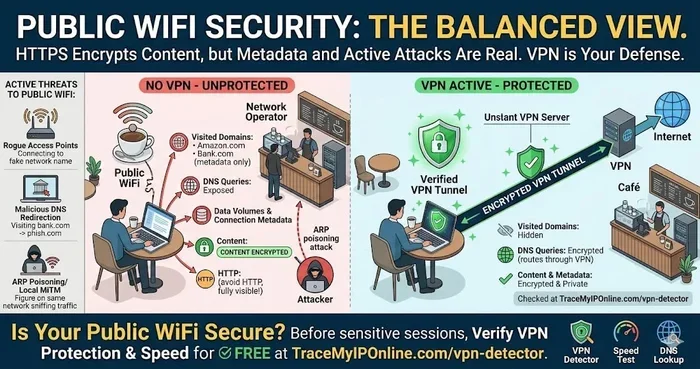
The short answer is yes, but with important limits. Your school can see a lot more than you probably think. But they cannot see everything either. Understanding the difference is key to staying safe online.
When you connect to any Wi-Fi network, your device sends and receives data. On a school network, the network administrator sits at the center of all that data flow. They control the routers, the servers, and the monitoring tools. This gives them a front-row seat to your online activity.
What Does Your School Network Actually Monitor?
Schools use different tools to watch network traffic. Some of these tools are built into the firewall or web filtering software. Others are standalone monitoring platforms. Here is what your school can typically track:
- Websites you visit — including the domain names, even if not the full URLs
- DNS requests — these reveal which sites your device tries to reach
- Connection times — when you go online and for how long
- Bandwidth usage — how much data you consume
- Device identifiers — your MAC address or device name
- Attempted blocked sites — any site that the filter caught you trying to reach
Now, here is the critical part. What your school cannot easily see depends heavily on encryption. When a website uses HTTPS, the content between you and that site is encrypted. This means your school can see you visited a site, but not what you did on it in detail.
How School Wi-Fi Tracking Works
Let us break down the technical side in simple terms. Every time your phone or laptop connects to a network, it makes a request. That request goes through the school’s proxy server before reaching the internet. The proxy server logs the request. This is how your school builds a record of your activity.
Some schools also use SSL inspection. This is a more advanced technique. It allows the network to decrypt and re-encrypt your traffic on the fly. If your school uses SSL inspection, they can potentially see more of what you are doing. However, this requires installing special certificates on your device, which many schools do on school-owned devices only.
Another method is packet sniffing. This involves capturing raw data packets as they travel across the network. It is a powerful tool, but it works best on unencrypted connections. For encrypted sites, packet sniffing shows less detail.
What Can Schools See on Your Phone vs. School Laptop?
This is where things get interesting. The answer depends on whose device you are using. Let us compare the two scenarios.
School-Issued Devices
Schools have much more control over devices they own. If you use a school Chromebook or a laptop provided by your school, the institution may have installed monitoring software. This software can go beyond just network-level tracking. It can record:
- Keystrokes — what you type on the keyboard
- Screen activity — screenshots or screen recordings
- Application usage — which apps you open and when
- File downloads — everything you save or upload
- Camera and microphone access — in some cases, schools can activate these remotely
Many schools use device management platforms like Google Admin Console or Microsoft Intune. These tools give administrators deep visibility into how devices are used. Even at home, a school-issued device may still report activity back to the school network.
Personal Devices on School Wi-Fi
When you use your own phone or personal laptop on school Wi-Fi, the school’s access is more limited. They can still monitor your network traffic at the router level. But they generally cannot install software on your personal device. This means they can see which domains you visit, but not the specific pages or actions you take on encrypted sites.
However, there is a catch. If a school requires you to install a security profile or VPN certificate to access the network, they may gain deeper access. Always read the terms before connecting your personal device to school Wi-Fi.
| Feature | School Device | Personal Device |
|---|---|---|
| Network traffic visible | Yes | Yes |
| Browsing history visible | Yes | Partially |
| Screen monitoring | Possible | No |
| Keystroke logging | Possible | No |
| App usage tracking | Yes | No |
| Full URL tracking | Yes | No (HTTPS sites) |
Can Schools See Your Browsing History After You Delete It?
Many students think clearing their browsing history makes them invisible. Unfortunately, that is not how it works on a school network. Your browsing history on your device is only one piece of the puzzle. The school’s network logs keep a separate record.
When you visit a website, your device asks a DNS server for the site’s address. The school controls this DNS server. So even if you delete your history, the DNS log still shows the request. The school can see that your device tried to reach a specific domain at a specific time.
Here is a quick example. You visit YouTube at 2:15 PM. You then clear your browser history. But the school’s DNS log still shows a request to youtube.com from your device at 2:15 PM. The record does not disappear just because you cleared it on your end.
Does Incognito Mode Help?
Some students rely on incognito mode to stay private. Incognito mode only prevents your browser from saving local history, cookies, and site data. It does not hide your activity from the network. The school’s firewall and monitoring tools still see every request your device makes.
Think of it this way. Incognito mode is like whispering a secret in your room. Nobody in your house remembers what you said. But if someone is listening through the walls, they still heard it. Incognito mode does not encrypt your traffic or hide it from the network.
How To Protect Your Privacy on School Wi-Fi
If you want more privacy on a school network, you have options. Some are simple. Others require a bit more effort. Here are the most effective methods.
Use a VPN
A VPN is the most powerful tool for protecting your privacy. It creates an encrypted tunnel between your device and a remote server. The school can see that you are connected to a VPN, but they cannot see what you are doing inside that tunnel. Your network traffic is fully encrypted and hidden from their monitoring tools.
However, many schools block known VPN websites and apps. You may need to find a VPN that uses obfuscation techniques to bypass these blocks. Always check your school’s acceptable use policy before using a VPN, as it may violate school rules.
Stick to HTTPS Websites
Look for the padlock icon in your browser. This means the site uses HTTPS encryption. On HTTPS sites, your school can see the domain you visited, but not the specific pages or content. This is a basic but important layer of protection.
Avoid School Networks for Sensitive Activity
The simplest advice is to avoid doing sensitive things on school Wi-Fi. If you need to access personal accounts or private information, use your mobile data instead. Your cellular network is much harder for the school to monitor.
Read the Acceptable Use Policy
Every school has an acceptable use policy that outlines what is and is not allowed on their network. Reading this document gives you a clear picture of what the school monitors and what the consequences are for misuse. It is your best resource for understanding your rights and limits.
Quick Tips for Staying Safe
- Never log into personal accounts on a school device
- Use your phone’s mobile data for private browsing
- Avoid downloading anything on school Wi-Fi
- Log out of accounts when you are done
- Be aware that school-owned devices may have monitoring software installed
- Do not assume incognito mode makes you invisible
- Read the school’s network policy before connecting
Common Mistakes Students Make About School Wi-Fi Privacy
There are several mistakes students make when it comes to school network monitoring. Avoiding these can save you a lot of trouble.
Mistake 1: Thinking VPNs make you completely invisible. A VPN hides your traffic content, but your school can still see that you are using a VPN. If your school blocks VPNs, you could face consequences.
Mistake 2: Assuming personal devices are fully private. Even on your own phone, the school network can log your DNS requests and connection times. You are not as hidden as you might think.
Mistake 3: Ignoring the acceptable use policy. Many students never read this document. But it contains important details about what the school monitors and what is allowed. Ignorance of the policy is not an excuse.
Mistake 4: Using school Wi-Fi for illegal activity. This should go without saying, but some students test the limits. School networks are monitored closely, and any illegal activity will be reported. The consequences can be severe.
Mistake 5: Trusting public Wi-Fi thinking it is safer. Some students switch to mobile data but then connect to public Wi-Fi at cafes or libraries. Public networks have their own risks and are often less secure than school networks.
Expert Insights on School Network Privacy
Cybersecurity professionals agree that school networks are designed for safety, not privacy. Most schools implement monitoring to protect students from harmful content and to comply with federal regulations like CIPA (Children’s Internet Protection Act). These rules require schools to filter internet content and monitor student activity online.
However, the line between safety and surveillance can feel blurry. Some privacy advocates argue that extensive monitoring teaches students that constant surveillance is normal. This is a valid concern, especially as students grow up in a digital world.
The best approach is awareness. When you understand what your school can see, you can make informed choices about your behavior online. You do not need to panic, but you should be thoughtful about what you do on a school network.
Key takeaway: Your school has significant tools to monitor your activity on their network. But you also have options to protect your privacy. The goal is not to hide from your school. It is to understand the situation and act responsibly.
Key Takeaways
- School Wi-Fi can see your browsing activity: The network administrator can track which domains you visit, when you visit them, and how much data you use.
- School devices have deeper monitoring: School-issued laptops and Chromebooks may include screen monitoring, keystroke logging, and app tracking software.
- Personal devices are more limited: On your own phone, the school can see network traffic but not the specific content of encrypted HTTPS sites.
- Incognito mode does not hide you from school Wi-Fi: It only prevents local browser history from being saved. The network still sees everything.
- DNS logs persist even after you delete history: The school’s DNS server records every request, regardless of what you do on your device.
- A VPN is the best privacy tool: It encrypts your traffic and hides your activity from the school network, though schools may block VPNs.
- Always check the acceptable use policy: Knowing the rules helps you stay within bounds and avoid unintended consequences.
Conclusion
So, can school Wi-Fi see your screen and track everything? The answer is nuanced. Your school can monitor a significant amount of your online activity. They can see which websites you visit, how long you spend on them, and how much data you use. On school-issued devices, the monitoring goes even deeper. They may be able to track your screen activity, keystrokes, and app usage.
But there are limits. Encrypted websites, personal devices, and proper use of privacy tools like VPNs can reduce what your school can see. The key is to understand the level of monitoring in place and to make smart choices about your online privacy.
Being a smart digital citizen means knowing your rights and your limits. You do not have to be paranoid, but you should be informed. The next time you connect to your school’s Wi-Fi network, you will know exactly what is happening behind the scenes. Stay safe, stay smart, and always think before you click.
Frequently Asked Questions
Can my school see what I search on Google?
Yes, your school can see that you visited Google and what search terms you typed, especially on school devices. The network logs your DNS requests, which reveal the domains you access. On encrypted Google searches, they can see the domain but not the full search query in some cases.
Can schools see your screen through Wi-Fi without installing anything?
On personal devices, schools generally cannot see your screen remotely without installing software. On school-issued devices, monitoring software may already be installed that allows screen capture or screen viewing. Network-level monitoring alone does not give schools direct screen access.
Does a VPN stop schools from seeing your browsing?
A VPN encrypts your traffic, which means the school cannot see what websites you visit or what you do on them. However, the school can still see that you are connected to a VPN server. If your school blocks VPNs, you may not be able to use one at all.
Can schools see deleted browsing history?
Yes, schools can see deleted browsing history through their network logs. When you delete history on your device, you only erase the local record. The school’s DNS logs and firewall logs still contain a record of your network requests and the domains you visited.
Is it illegal for schools to monitor student Wi-Fi activity?
No, it is generally not illegal. Schools are required by law in many countries to monitor online activity for student safety. Laws like CIPA in the United States mandate internet filtering and monitoring on school networks. However, schools must follow their own policies and cannot monitor in ways that violate privacy laws.
Can schools track your phone even when you are not on school Wi-Fi?
If you are using a school-issued device, monitoring software may still track activity even when you are not connected to school Wi-Fi. On personal devices, schools can only monitor activity when you are connected to their network. Your mobile data or home Wi-Fi is not visible to the school.