Can Someone See What You Search On Wifi On Your Iphone
Can someone see what you search on wifi on your Iphone? The short answer is yes, under certain conditions. Wifi network owners, internet service providers, and network admins can potentially track your browsing activity, search queries, and visited websites. However, using private browsing mode, a VPN, and https websites adds strong layers of protection. This guide explains exactly what others can see, how wifi tracking works on Iphone, and the steps you can take to keep your search history and online privacy safe.
Have you ever wondered, “Can someone see what you search on wifi on your Iphone?” It is a fair question. We all use wifi at home, at work, and in coffee shops. And every time we connect, our Iphone sends out tiny pieces of data. Some of that data can reveal what we are doing online.
The truth is, your wifi network can see more than you might think. But the good news is, there are simple ways to protect yourself. In this article, we will break down exactly how wifi tracking works on Iphone. We will look at what network owners can and cannot see. And we will share practical steps you can take right now to keep your search privacy safe.
Whether you are at home, at the office, or browsing at a cafe, understanding wifi privacy on your Iphone matters. Let us dive in and clear up the confusion.
Key Takeaways
- Wifi owners can see your browsing history: They can view which websites you visit, but not your full search queries if the site uses https encryption.
- Your Iphone shares data with the network: Every time you connect to wifi, your device sends DNS requests that reveal the domains you visit.
- Private browsing hides history locally: It prevents your Iphone from saving searches, but the wifi network can still see your activity.
- A VPN is the best defense: It encrypts all your traffic, making it nearly impossible for anyone on the same network to spy on your searches.
- https websites protect your content: Even on shared wifi, https sites keep your search terms and page content hidden from casual snoopers.
- Your Iphone stores local history: Without proper steps, anyone with physical access to your device can view your Safari browsing data.
- Simple settings boost your privacy: Turning off auto-join, clearing history, and using DNS-over-HTTPS are easy ways to stay safer on public wifi.
📑 Table of Contents
- How Does Wifi Tracking Work on Iphone
- What Can a Network Admin See on Iphone
- How to Protect Your Search Privacy on Iphone
- Private Browsing vs Regular Browsing on Iphone
- Common Myths About Wifi Search Tracking on Iphone
- When Should You Worry About Wifi Snooping
- Expert Insights on Iphone Wifi Privacy
- Key Takeaways
- Conclusion
How Does Wifi Tracking Work on Iphone
When your Iphone connects to a wifi network, it starts talking to the outside world. Every website you visit starts with a request. That request goes through the wifi router before it reaches the internet. The router logs that request. This is the basic idea behind wifi tracking.
But what exactly gets logged? Let us break it down.
DNS Requests Reveal Your Activity
Every time you type a URL or click a link, your Iphone sends a DNS request. DNS stands for Domain Name System. Think of it as the phone book of the internet. Your Iphone asks, “Where is www.example.com?” The router sees that question. So the network owner knows which domains you visited.
Here is the key detail. The router can see the domain name. But it usually cannot see the full search query if the site uses https. For example, the router might log that you visited google.com. But it likely cannot see that you searched for “best pizza near me.”
Iphone Safari and Search Data
Safari is the default browser on Iphone. When you search using Safari, your queries go through your search engine. Google, Bing, or DuckDuckGo all process those requests. The wifi router can see that a request went to a search engine. But again, https encryption hides the actual search terms from most casual snoopers.
However, if you use an older or poorly configured network, some data might leak. This is why understanding your network setup matters. A well-configured router with proper logging can capture a surprising amount of detail.
What About Icloud and Sync?
Your Iphone may sync browsing data through iCloud. If you use Safari across multiple Apple devices, your history can flow between them. This is not wifi tracking. It is Apple’s sync feature. But it means someone with access to your iCloud account could potentially see your search history on any linked device.
This is different from wifi snooping. But it is worth knowing. Your Iphone stores local browsing history too. Anyone who picks up your unlocked Iphone can open Safari and scroll through your past visits.
What Can a Network Admin See on Iphone
Now let us answer the big question. Can someone see what you search on wifi on your Iphone? The answer depends on who controls the network and what tools they use.
Home Wifi Router
If you are on your home network, the person who owns the router can check the logs. Most home routers keep basic logs. These logs show which domains were accessed and when. They do not usually show full search queries or page content.
But some advanced routers keep detailed logs. They can track every DNS request. They can even capture packet data if configured to do so. For the average home user, this level of detail is rare. But it is possible with the right equipment and knowledge.
Public Wifi Networks
Public wifi is a different story. When you connect to wifi at a hotel, airport, or cafe, you are sharing the network with strangers. The network operator has full access to the logs.
Many public networks use a captive portal. That is the page you see before you get online. It often asks you to agree to terms. Behind the scenes, the operator can monitor all unencrypted traffic. On public wifi, your searches and browsing are more exposed than at home.
Workplace or School Networks
If you use a work or school network, assume you are being monitored. These networks often use deep packet inspection tools. These tools can analyze traffic in real time. They can flag suspicious activity. And in some cases, they can decrypt and view the content of your traffic.
Network admins at work or school may also force you to install root certificates. This allows them to decrypt https traffic. If you see a warning about a certificate, it is a sign that your traffic is being inspected.
Internet Service Provider (ISP) Tracking
Your ISP also plays a role. Even if you use wifi, your Iphone sends traffic through your ISP. The ISP can see which domains you visit. In some regions, ISPs are allowed to sell this data. Using a VPN helps hide your activity from your ISP.
How to Protect Your Search Privacy on Iphone
Now that you know what others can see, let us look at how you can protect yourself. These steps are simple and effective.
Use a VPN on Your Iphone
A VPN, or Virtual Private Network, is the single best tool for wifi privacy. When you turn on a VPN, all your traffic gets encrypted. The wifi router only sees that you are connected to a VPN server. It cannot see which websites you visit or what you search for.
There are many good VPN apps for Iphone. Look for one with a no-logs policy and strong encryption. Some top choices include ExpressVPN, NordVPN, and Surfshark. A VPN works on both home and public wifi.
Turn on Private Browsing in Safari
Safari on Iphone has a private browsing mode. When you use it, Safari does not save your history, cookies, or search data on your device. This is great for local privacy.
But remember, private browsing does not hide your activity from the wifi network. The router can still see which domains you visited. Private browsing keeps your Iphone clean, not the network.
Use https Websites Whenever Possible
Https is the secure version of a website. It encrypts the data between your Iphone and the website. Most modern sites use https by default. Look for the padlock icon in Safari’s address bar.
When a site uses https, the wifi router cannot see your search queries or the content you view. It can only see that you visited the domain. This is a big privacy win.
Clear Your Safari History Regularly
Your Iphone stores a local copy of your browsing history. Clearing it regularly removes that record. Go to Settings, then Safari, then Clear History and Website Data.
This step is simple but effective. It prevents anyone who picks up your Iphone from seeing where you have been online. Make it a habit, especially if you share your device with family members.
Disable Auto-Join for Unknown Networks
Your Iphone automatically connects to known wifi networks. This is convenient. But it also means your Iphone might connect to a network you do not trust without you noticing.
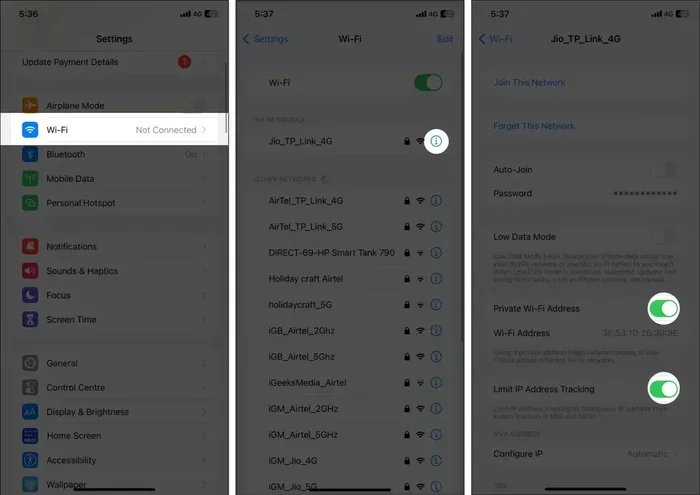
Go to Settings, then Wifi, and turn off Auto-Join for networks you do not use often. This gives you more control over when and where your Iphone connects. It is a small step that boosts your privacy.
Use DNS-over-HTTPS
DNS-over-HTTPS, or DoH, encrypts your DNS requests. This means your wifi router cannot see which domains you are looking up. Some browsers and VPN apps offer built-in DoH support.
You can also configure DoH on your Iphone through a configuration profile. It is an advanced step, but it adds a strong layer of protection against network-level snooping.
Private Browsing vs Regular Browsing on Iphone
Many people think private browsing makes them invisible online. That is not true. Let us clear up the difference between private browsing and regular browsing.
In regular browsing mode, Safari saves your history, cookies, and form data. This makes it easy to return to sites you visited. But it also means your Iphone keeps a detailed record of your activity.
In private browsing mode, Safari does not save any of that data. When you close the private tab, all traces are gone from your device. Your searches are not saved in your browsing history. Your cookies are deleted. And your autofill data is not stored.
But here is the part many people miss. Private browsing does not hide your activity from the wifi network. The router, the ISP, and any monitoring tool on the network can still see which domains you visited. Private browsing only protects your Iphone, not your network traffic.
If you want real privacy, combine private browsing with a VPN. That way, your Iphone stays clean locally, and your network traffic stays encrypted from prying eyes.
Common Myths About Wifi Search Tracking on Iphone
There are a lot of myths about wifi tracking. Let us bust some of the most common ones.
Myth 1: Incognito Mode Makes You Invisible
Incognito mode, or private browsing, only hides data on your device. It does not encrypt your traffic or hide it from the network. Anyone monitoring the wifi can still see your activity.
Myth 2: Deleting History Makes It Gone Forever
Deleting your browsing history removes the local record from your Iphone. But if a network admin or router has logged the traffic, that data may still exist on the network side. Deleting history on your device does not delete it from the router.
Myth 3: Only Public Wifi Is Risky
Public wifi is riskier than home wifi. But your home network is not immune. Anyone with access to your router admin panel can check the logs. And your ISP can still track your activity. Privacy is a spectrum, not a switch.
Myth 4: Iphone Protects You Automatically
Apple does a great job with security. But Iphone does not automatically hide your browsing from the wifi network. You need to take extra steps, like using a VPN, to protect your traffic from network-level monitoring.
When Should You Worry About Wifi Snooping
Not every situation requires panic. But some scenarios call for extra caution.
You should be most careful on public wifi. Coffee shops, airports, and hotels are prime spots for network monitoring. If you need to search for something private on public wifi, use a VPN first.
You should also be cautious on shared home networks. If you live with roommates or family members, someone could check the router logs. It is a good habit to use private browsing and a VPN, even at home.
Work and school networks are the most monitored. Assume that your employer or school can see your traffic. Avoid searching for sensitive topics on these networks. Use your mobile data instead if you need privacy.
If you notice strange activity on your Iphone, like unexpected data usage or new profiles installed, take action. Check your settings, run a security scan, and consider changing your passwords.
Expert Insights on Iphone Wifi Privacy
Cybersecurity experts agree on a few key points. First, no network is 100% safe. Even your home network can be compromised if your router has weak settings. Second, encryption is your best friend. Https and VPNs make it very hard for anyone to spy on your traffic.
Experts also recommend using a dedicated dns service. Services like Cloudflare (1.1.1.1) or Quad9 offer faster and more private DNS resolution. They do not log your queries the way your ISP might. This is a simple change that boosts your privacy without any extra cost.
Finally, keep your Iphone updated. Apple releases security patches regularly. These patches fix vulnerabilities that could be exploited on shared networks. Staying current is one of the easiest things you can do for your online safety.
Key Takeaways
- Wifi network owners can see your domain visits: They can track which websites you access through DNS logs, but https encryption hides your specific search queries and page content from casual snoopers.
- Your Iphone reveals data with every connection: Each time you join a wifi network, your device sends DNS requests that expose the domains you are interested in, even if the full search terms remain hidden.
- Private browsing mode protects only your device: It stops Safari from saving history locally, but it does not prevent the wifi network from seeing which domains you visited during your session.
- A VPN is the strongest privacy tool available: It encrypts all traffic between your Iphone and the VPN server, making it virtually impossible for anyone on the network to monitor your searches or browsing activity.
- https websites add a critical layer of protection: Secure connections ensure that even if someone intercepts your traffic, they cannot read your search terms or the content of the pages you visit.
- Your Iphone stores local browsing history: Without regular clearing and proper device security, anyone with physical access can view your Safari search history and visited sites.
- Simple habits make a big difference: Turning off auto-join, using a VPN on public wifi, clearing history often, and keeping your Iphone updated are all easy steps that significantly improve your search privacy.
Conclusion
So, can someone see what you search on wifi on your Iphone? The answer is yes, to some degree. Wifi network owners, admins, and even your ISP can see which domains you visit. They may be able to track your browsing patterns. But they usually cannot see your full search queries if you use https websites.
The good news is, you have real power to protect your privacy. Using a VPN, turning on private browsing, and sticking to https sites are all effective steps. Clearing your history regularly and being mindful of which networks you join adds even more protection.
Your online privacy matters. Taking a few simple precautions can keep your search activity safe from prying eyes. Start with one or two of the tips in this article. Build them into your daily routine. And browse with confidence, knowing you are taking control of your digital footprint.
Stay safe out there. Your Iphone is a powerful tool. And with the right settings, it can be a private one too.
Can Someone See What You Search On Wifi On Iphone If You Use Private Browsing?
Private browsing prevents your Iphone from saving your history locally. But it does not hide your activity from the wifi network. The network owner can still see which domains you visited. Use a VPN alongside private browsing for full protection.
Can the Owner of the Wifi See Your Safari Search History?
Yes, the wifi owner can see which websites you accessed through router logs. They can see the domain names and timestamps. However, if the site uses https, they cannot see the specific pages or search queries you viewed on that site.
Does a VPN Hide Your Searches from Wifi Owners?
Yes, a VPN encrypts all your traffic. The wifi owner can only see that you are connected to a VPN server. They cannot see which websites you visit or what you search for. This is the most effective way to protect your privacy on shared networks.
Can Your ISP See What You Search on Iphone Wifi?
Your ISP can see which domains you visit, even on wifi. They process the DNS requests that your Iphone sends. Using a VPN or DNS-over-HTTPS prevents your ISP from seeing your browsing activity and search queries.
How Can You Check If Your Iphone Is Safe on Public Wifi?
Check that Safari shows the padlock icon for https sites. Make sure you have a VPN running before you connect. Avoid logging into sensitive accounts on public wifi without a VPN. And turn off auto-join for networks you do not trust.
Should You Be Worried About Wifi Tracking on Your Iphone?
You should be aware of the risks, but not alarmed. Most casual wifi users cannot see your full search queries on https sites. But network admins, ISPs, and skilled snoopers can track your domain activity. Using a VPN and following the tips in this article greatly reduces those risks.
Frequently Asked Questions
What is Can Someone See What You Search On Wifi On Iphone?
Can Someone See What You Search On Wifi On Iphone is an important topic with many practical applications.